





FlexGunship
Members
-
Joined
-
Last visited
Everything posted by FlexGunship
-
Okay, that's clear apart from one item then. Thank you. IF: /mnt/disk1/myshare/document1.txt exists THEN /mnt/pool/myshare/document1.txt shouldn't, right? It implies the mover already moved the file. I ended up with a copy in disk1 and pool SOMEHOW. They were different revisions of the same file, but same name. I was able to manually resolve it (but, it invovled a lot of careful manual manipulation). I wonder if I stupidly did a manual rsync against /mnt/cache/ (/mnt/pool/) one time. This also (mostly) resolved my "always moving, but nothing moved" issue and my cache utilization is much lower now.
-
Interesting. During the SMB transfer operation, my assumption (naive) would be that it would comparing the file list against the one on the array - but maybe it's not? File info.dat exists on the array in share Documents (which uses cache). The same file, an unaltered second copy of info.dat, is moved to the unRAID share Documents via SMB transfer. Even though the share has info.dat, it may still move a second copy to the cache since the operation wouldn't generate a conflict? Then the mover can't move info.dat from cache to array because the operation would necessitate an overwrite? Okay. Thanks again. I was going to setup a cron job that uses rsync to do the samw.thijg, but I suspect it would see the file list of cache contents and not the file list of the array then. Last Q, can the "minimum free space" argument prevent a transfer? Or does it simply trigger the mover when exceeded? And if it's the second one, is there any harm in keeping the minimum free space arbitrarily high? 850GB on a 1TB cache to force the move operation frequently?
-
Thank you for the response. That's precisely what I have for the shares of interest... but mover looks at every single file and moves nothing. Presumably because they are new. I have a 1TB cache (2x 1TB nvme drives). During heavy traffic, my cache will fill up, and it will stay full for days. Invoking the mover gives me a string of "already exists on the array" and no reduction in cache utilization. The mover basically runs 24/7 and my cache stays 50%+ full. I have a folder that I copied from another system called "Backup" which is 130GB. I haven't touched it and its presence on the cache drive hasn't diminished in over 24hr. I've been running mover all day and it's just chilling there. Is there a way to change that behavior? artemis-diagnostics-20240906-1545.zip
-
I've tried searching under a few potential subjects, but I can't find what I'm looking for. I'd really like my cache to behave *purely* as temporary storage for transfers (at least for some shares). I'd like to be able to dump my backups from my network quickly (cache speed), but I have ZERO interest in keeping it on cache - I just love my 2.5Gbps transfers. I'm presently using the "Mover Tuning" plugin (which is good), but even then, I can only fudge the type of behavior I'd like and it barely works. There are a few shares (Documents, Photos, CAD Projects) where I like the behavior of keeping recent files in cache. So that's all good. I feel like what I want was always possible in the past (use cache, but prefer array - or whatever), and now it's gone. Can anyone help? Am I just being particularly low-IQ on this?
-
I understand perfectly. Thank you for the quick and clear reply.
-
Hi all, I've searched, but I'm not even sure how to look up my question. I have a legacy "Unraid Pro" key (8-drive array, 4 cache) and a more current "Unraid Unleashed" key (4-drive array, 2 cache). I just bought a new server chassis which supports 12 LFF drives and I'm going to combine everything. I've already consolidated all data on the "Unleashed" server. I'll start by preserving the "Unleashed" server and then add the drives from "Pro" Once done, I'd like to move my pro key over and keep the config, dockers, VMs, etc of the "Unleashed" server Can I do this by downloading the key and putting it in the /config folder?
-
Whelp - that was it. Thanks. I'll mark this solved. Solution: Cat8 cable versus (damaged?) Cat6 cable.
-
It's a cat6 I've used before. But I'll try another one. I had the same thought when I had the issue yesterday and I've already ordered some cat8 cables.
-
Long story short - I had some unfixable corruption of my btr file system (caused kernel panic under load; you can see my previous posts of the last couple of years) - I'm standing up a new server with xfs, moving everything over, and repurposing the old one. New server has 4x 10Gbe NIC but they are all auto-negotiating down to 100Mbps. I'm only expecting 1Gbps link-speed given the intervening hardware with a lower practical limit (~600Mbps) due to the temporary network topology. Firstly, is the X540-AT2 chipset supported in Unraid? Secondly, is there anything in my attached diagnostic file to suggest a correctable root cause? diagnostics-20240706-1241.zip
-
No overclocking. It's a stock i7-6700 (non-k) with a stock cooler on a stock Dell mobo. I haven't run memtest recently. But I HAVE run memtest since I had the issue. I have also removed each stick (running with 48GB at a time) and have noted a crash in every case. Also... I bought this processor, mobo, and RAM to address the crashing issue. I had the same issue on an i3-6100 previously with 32GB of different RAM on an HP motherboard. I also bought an LSI SAS card to try to solve this issue as the Dell mobo has a Marvel data controller which is notorious for not working in unRAID (I'm told). To be fair, I don't know for a *fact* that the failure mode is identical as the i3-6100 HP days, but the rate of failure and manifestation is the same.
-
syslog I guess I had it running since last year... so it was huge. I trimmed anything before 2/12 for the purpose of this upload. If you need more of the log... or need to me start it clean, please let me know.
-
Just updating that the syslog server is enabled, and I'm waiting for the next crash at this point.
-
Polite Bump I'm still having this issue about every 24 to 36 hours. No lost data, but I would really appreciate any other insights anyone has.
-
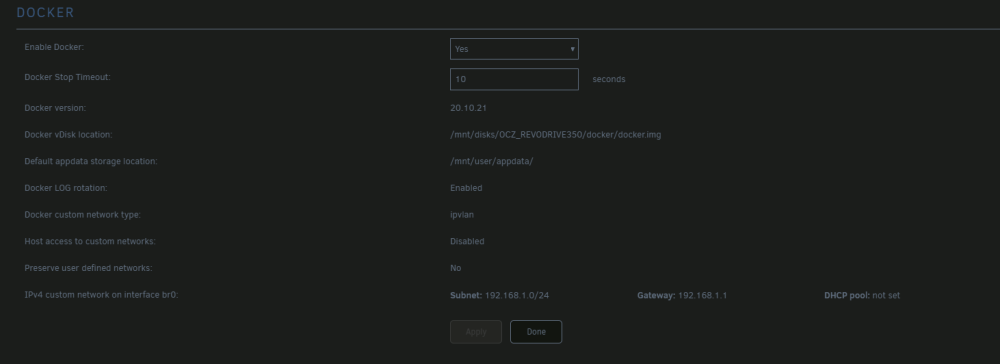
First question first - it seems to be an artifact of early PCIe SSDs. It's actually a single device on a single PCIe slot, but internally it has 4 devices mounted in raid. In my experience, unRAID recognizes a "head" device and 3 "others". If I mount one of the "others" I get 240GB and a single device - if I mount the "head" device, the internal firmware of the SSD kicks in and mount all devices as a single 1TB device. It kind of took a while to figure out how to make it work; I don't pretend to understand the internal machinations. EDIT: Anyway, it made cache pool thing tricky to manage when the array went down. So, I just nixed. No deeper meaning. If, for any reason, you believe this is contributing, I can pull it. Previously my docker.img was on the array. Likewise, I can also collocate the appdata folder if you think it could be related. But the problem, again, existed long before this recent move to the non-array device. I've recently switch to ipvlan - I didn't notice a change for better or for worse after the change. DOUBLE EDIT: Was it clear what the mode of failure was from the first syslog? It's not clear to me that there was evidence of failure in the diagnostics ZIP.
-
Lol... do you know how many times I'm mentally admonished someone for forgetting their diag.zip? My bad - apologies. athena-diagnostics-20230203-2333.zip
-
syslog.txt Hi all, I've been battling this problem for a couple of years now, I've never had a true resolution. Problem statement: If running Docker (with containers running, or not) eventually my system will hard lock on a page fault or (rarely) a kernel panic It doesn't seem to matter which containers I run, but ones which access the array more, or seem to use more computational power will speed up the failure I can only recover by physically powering off the server, rebooting, and letting the parity check run again - then I get another couple of days of use In the past, I've tried the following: Remake the flash drive (I've used a total of 4 so far) Blown away the docker image Put the docker image to a single disk Put the docker image to a disk that's not part of the array Enable or revoke privileged mode for every container Limit the memory of each container such that the total sum is less than half my physical memory (64GB) Swapped the mainboard and processor Putting all array disks on an LSI SAS controller Swapped memory Upgraded the power supply So, syslog is attached - hoping someone can help here. My next step is to pull one stick at a time of the 4 DIMMs in the system and assume one stick is bad. I don't have evidence of that, and I've already swapped it... but, evidence seems kind of RAMy. Thanks in advance. EDIT: I didn't immediately put this in the Docker support area because the last time I asked for help, someone pointed me towards a corrupted file system. It didn't resolve the issue, but that person was correct -- I don't know if the Docker thing is a symptom or the root cause.
-
Diagnostics was my first stop. I'll setup a syslog server. I think I need to stream that log to another machine on the network to debug this, right? Will it work if I do it to the flash and crashes during a write?
-
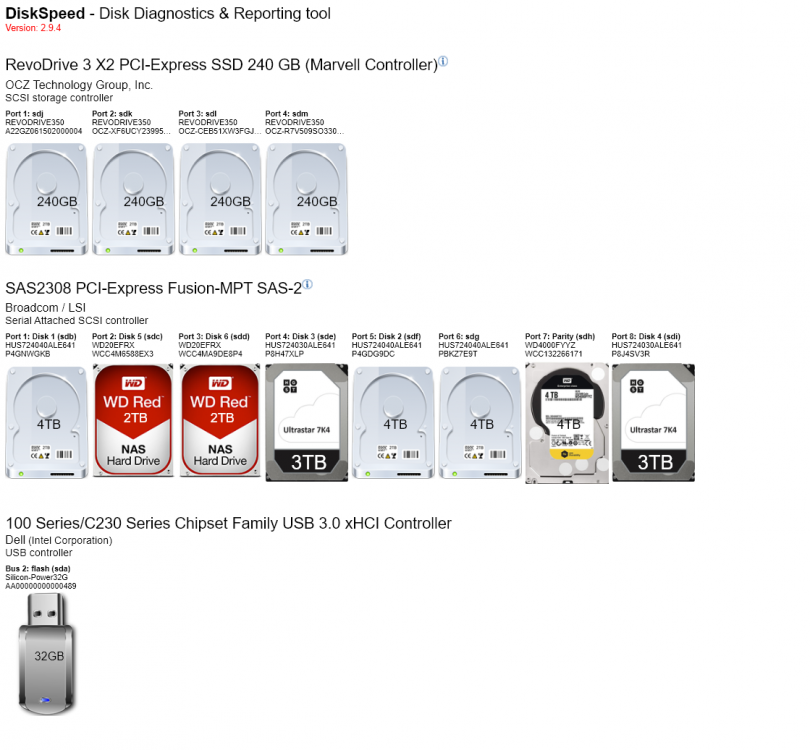
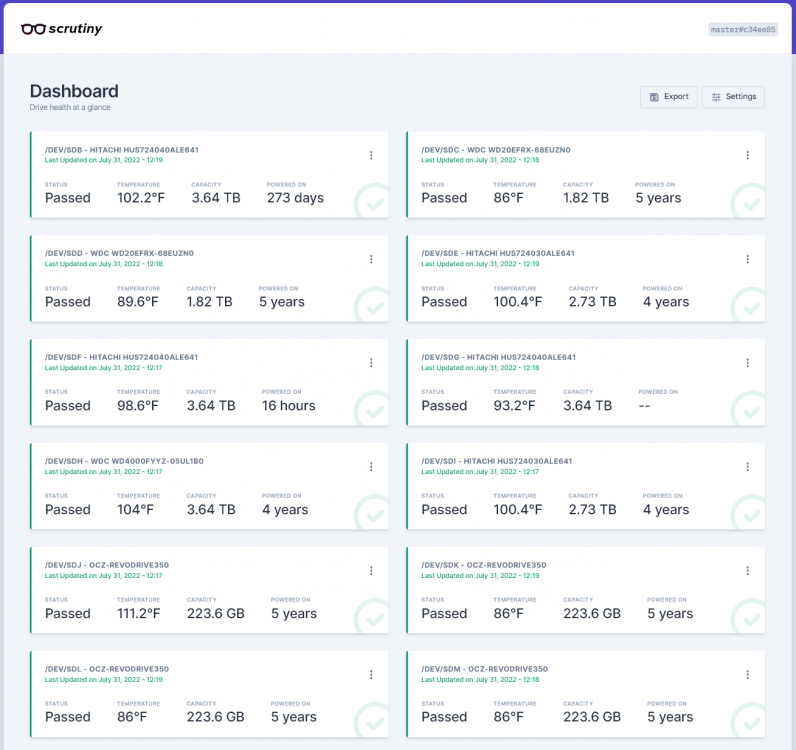
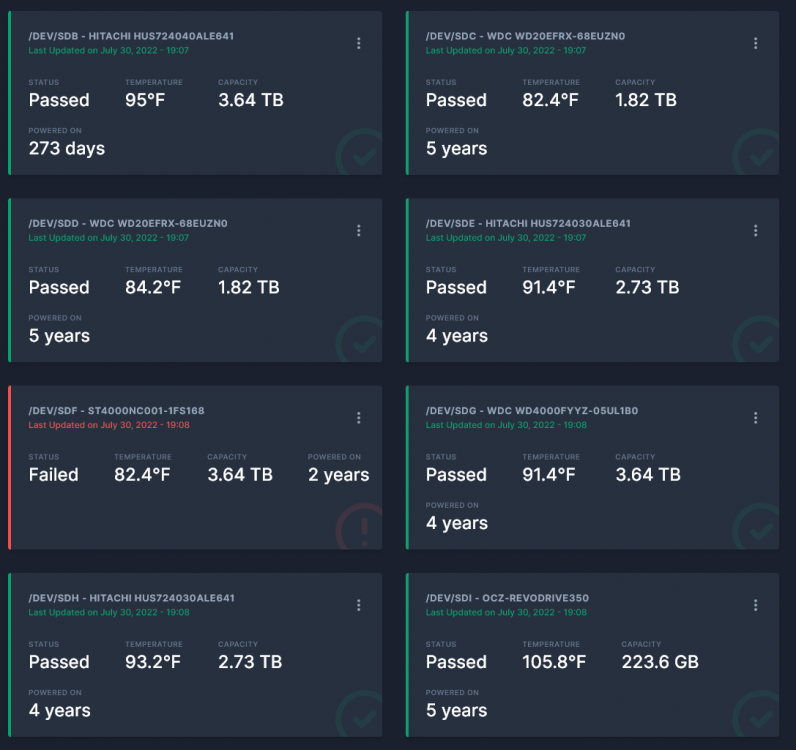
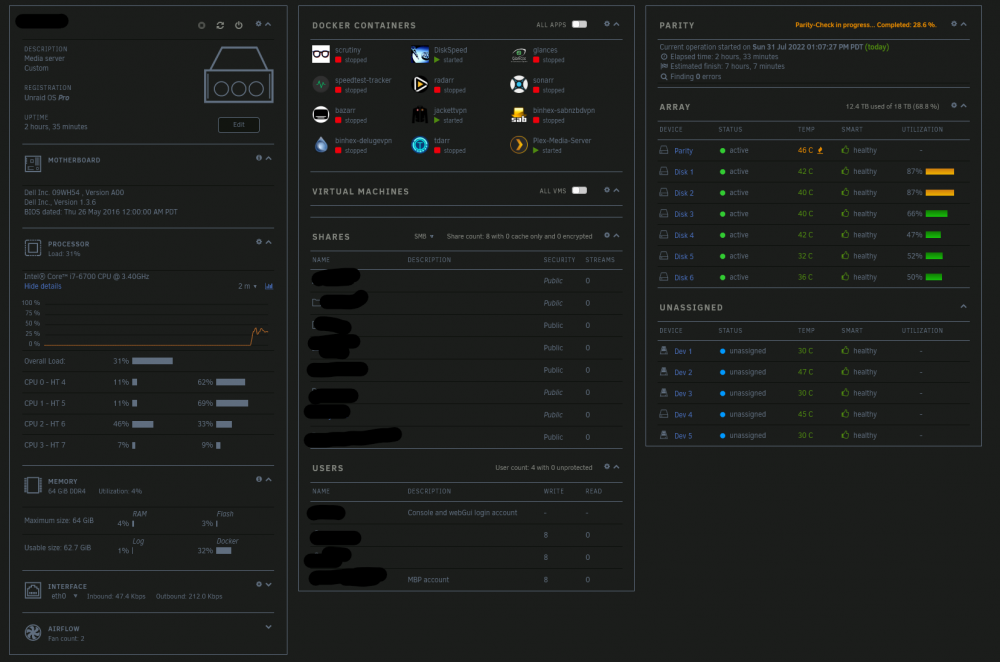
I've been using Unraid for ~5 years. I almost always have a smoking gun when I have an issue, but this time, I'm totally lost. Hardware specs at the end. Basically, after a few days, my system goes unresponsive. I can't connect to the webui, or via ssh... and after connecting a monitor, the monitor display goes blank (not, that there's simply nothing displayed, the output actually goes dead, and the monitor displays that its searching for a signal). I can reboot, go through a parity check, and then things are fine for another few days. Logs are useless since I can't get to them. I'm not sure if there's an improved logging plugin that will keep crash files through a power-cycle -- that's what I really need. I thought it might've been a flaky Seagate drive (showing command timeouts but after replacing and rebuilding -- same issue persists. Okay, system specs: Model: Custom M/B: Dell Inc. 09WH54 Version A00 - s/n: /84V2QD2/CN7220066A010Q/ BIOS: Dell Inc. Version 1.3.6. Dated: 05/26/2016 CPU: Intel® Core™ i7-6700 CPU @ 3.40GHz HVM: Enabled IOMMU: Enabled Cache: 256 KiB, 256 KiB, 1 MB, 8 MB Memory: 64 GiB DDR4 (max. installable capacity 64 GiB) Network: bond0: fault-tolerance (active-backup), mtu 1500 eth0: 1000 Mbps, full duplex, mtu 1500 Kernel: Linux 5.15.46-Unraid x86_64 OpenSSL: 1.1.1o Connected drives are in the attached screenshot. Primary disk controller is an LSI MPT SAS2. Only important note is that the 4 OCZ drives are actually a single PCIe-attached SSD. It presents as a single 1TB drive. It's an unassigned device that I only use for quick transfers (not a cache drive) and Plex transcoding. Unraid is basically agnostic to it. Any idea how I can further diagnose this?
-
Same. Reinstalled server. Reinstalled apps. Updated. Nothing is working.
-
I fresh install of the docker AFTER fixing the xfs filesystem error seems to have resolved things. Error messages gone. License working. Just an awful coincidence. Thanks to those who helped.
-
Okay, I resolved the license issue after fixing an xfs filesystem problem on one of the disks (miracle of miracles). You can see below that the license is now recognized. However, I still get the error message spam indicating an issue with file permissions: FileBot 4.9.2 (r8046) JDK8 JNA Native: 5.2.2 MediaInfo: 18.08.1 Tools: fpcalc/1.4.3 p7zip/16.02 unrar/5.61 Extended Attributes: OK Unicode Filesystem: OK Script Bundle: 2020-12-01 (r724) Groovy: 3.0.6 JRE: OpenJDK Runtime Environment 1.8.0_252 JVM: 64-bit OpenJDK 64-Bit Server VM CPU/MEM: 8 Core / 15 GB Max Memory / 57 MB Used Memory OS: Linux (amd64) HW: Linux 6b4207f600d8 4.19.107-Unraid #1 SMP Thu Mar 5 13:55:57 PST 2020 x86_64 GNU/Linux CPU/MEM: Intel(R) Core(TM) i7-6700 CPU @ 3.40GHz [MemTotal: 67 GB | MemFree: 64 GB | MemAvailable: 65 GB] STORAGE: btrfs [/] @ 314 GB | fuse.shfs [/watch] @ 7 TB | fuse.shfs [/config] @ 7 TB | fuse.shfs [/output] @ 7 TB | fuse.shfs [/storage] @ 7 TB DATA: /config Package: DOCKER License: FileBot License P22573292 (Valid-Until: 2022-02-05) (process:1019): dconf-CRITICAL **: 07:07:05.919: unable to create file '/tmp/run/user/app/dconf/user': Permission denied. dconf will not work properly. (process:1019): dconf-CRITICAL **: 07:07:05.920: unable to create file '/tmp/run/user/app/dconf/user': Permission denied. dconf will not work properly. (process:1019): dconf-CRITICAL **: 07:07:05.920: unable to create file '/tmp/run/user/app/dconf/user': Permission denied. dconf will not work properly. (process:1019): dconf-CRITICAL **: 07:07:05.920: unable to create file '/tmp/run/user/app/dconf/user': Permission denied. dconf will not work properly. (process:1019): dconf-CRITICAL **: 07:07:05.920: unable to create file '/tmp/run/user/app/dconf/user': Permission denied. dconf will not work properly. (process:1019): dconf-CRITICAL **: 07:07:05.920: unable to create file '/tmp/run/user/app/dconf/user': Permission denied. dconf will not work properly. (process:1019): dconf-CRITICAL **: 07:07:05.921: unable to create file '/tmp/run/user/app/dconf/user': Permission denied. dconf will not work properly. (process:1019): dconf-CRITICAL **: 07:07:05.921: unable to create file '/tmp/run/user/app/dconf/user': Permission denied. dconf will not work properly. (process:1019): dconf-CRITICAL **: 07:07:05.921: unable to create file '/tmp/run/user/app/dconf/user': Permission denied. dconf will not work properly. (process:1019): dconf-CRITICAL **: 07:07:05.921: unable to create file '/tmp/run/user/app/dconf/user': Permission denied. dconf will not work properly. Done ヾ(@⌒ー⌒@)ノ
-
I'm having a new problem with FileBot container after about a year. My license expired, and I had to purchase a new one. I deleted the old license file, added the new one and restarted. This coincided with some new files appearing in the watch folder. These are the messages I'm getting: The last line is spammed 8 - 10 times. I assumed a permissions issue.... so I chmod'd everything in appdata/FileBot to 777 to test, but there is no change in the symptoms. I've also reinstalled the docker with no change. Has anyone seen this issue arise when adding a new license file? I assume I've borked the ownership or premissions somehow. Thanks.
-
Hi, I'm having some issues after migrating from the "coppit" docker to the "jlesage" docker. 1) I tried parsing over the same renaming arguments, but it didn't work at first -- changed to default {plex} for further testing -- originals below Music/{n.$QUOTE_FIXER}/{album.$QUOTE_FIXER}/{media.TrackPosition.pad(2)} - {t.$QUOTE_FIXER} Movies/{n.colon(' - ')} ({y}) [{vf} {channels}]/{n.$QUOTE_FIXER} {vf} {af} TV Shows/{n} ({y}) [{vf} {channels}]/{episode.special ? 'Special' : 'Season '+s.pad(2)}/{n} - {episode.special ? 'S00E'+special.pad(2) : s00e00} - {t.${QUOTE_FIXER}.replaceAll(/[!?.]+$/).replacePart(', Part $1')}{'.'+lang} 2) I have working subtitles logins, etc 3) I bought a fresh license for Filebot The docker runs one iteration about 50% of the time, but invariably ends up throwing this in the log (and stops working): Full log is attached with a few batches of test files in the log. Has anyone else seen this issue? amc.log
-
Firstly, I'm going to make sure to respond to your requests, although I have an update on my situation. From amc.log - nothing new. Use excludes: /config/amc-exclude-list.txt (80875) Input: /input/Ylvis/Work It - Ylvis.mp3 Input: /input/Ylvis/Ylvis - Calle_ fu__ you!.mp3 Input: /input/Ylvis/Ylvis - Jan Egeland.mp3 Input: /input/Ylvis/Ylvis - Janym (?????).mp3 Input: /input/Ylvis/Ylvis - Jeg heter Finn.mp3 Input: /input/Ylvis/Ylvis - Kjempeform.mp3 Input: /input/Ylvis/Ylvis - La det på is.mp3 Input: /input/Ylvis/Ylvis - Massachusetts.mp3 Input: /input/Ylvis/Ylvis - Mr Saxobeat.mp3 Input: /input/Ylvis/Ylvis - Pressure.mp3 Input: /input/Ylvis/Ylvis - Sammen finner vi frem.mp3 Input: /input/Ylvis/Ylvis - Someone Like Me.mp3 Input: /input/Ylvis/Ylvis - Stonehenge.mp3 Input: /input/Ylvis/Ylvis - The Fox.mp3 Group: [music:ylvis] => [Work It - Ylvis.mp3, Ylvis - Calle_ fu__ you!.mp3, Ylvis - Jan Egeland.mp3, Ylvis - Janym (?????).mp3, Ylvis - Jeg heter Finn.mp3, Ylvis - Kjempeform.mp3, Ylvis - La det på is.mp3, Ylvis - Massachusetts.mp3, Ylvis - Mr Saxobeat.mp3, Ylvis - Pressure.mp3, Ylvis - Sammen finner vi frem.mp3, Ylvis - Someone Like Me.mp3, Ylvis - Stonehenge.mp3, Ylvis - The Fox.mp3] Rename music using ID3 Failed to process music file: /input/Ylvis/Work It - Ylvis.mp3 Failed to process music file: /input/Ylvis/Ylvis - Calle_ fu__ you!.mp3 Failed to process music file: /input/Ylvis/Ylvis - Jan Egeland.mp3 Failed to process music file: /input/Ylvis/Ylvis - Janym (?????).mp3 Failed to process music file: /input/Ylvis/Ylvis - Jeg heter Finn.mp3 Failed to process music file: /input/Ylvis/Ylvis - Kjempeform.mp3 Failed to process music file: /input/Ylvis/Ylvis - La det på is.mp3 Failed to process music file: /input/Ylvis/Ylvis - Massachusetts.mp3 Failed to process music file: /input/Ylvis/Ylvis - Mr Saxobeat.mp3 Failed to process music file: /input/Ylvis/Ylvis - Pressure.mp3 Failed to process music file: /input/Ylvis/Ylvis - Sammen finner vi frem.mp3 Failed to process music file: /input/Ylvis/Ylvis - Someone Like Me.mp3 Failed to process music file: /input/Ylvis/Ylvis - Stonehenge.mp3 Failed to process music file: /input/Ylvis/Ylvis - The Fox.mp3 CmdlineException: Failed to identify or process any files Finished without processing any files The output path is well defined for the docker. I used the unRAID GUI to reassign it as a precaution. root@Athena:~# docker exec -it FileBot ls /output Documents Google Drive Movies Photos TV Shows Downloads Installs Music Pictures Videos It looks like stopping the Docker service and restarting it resolved the issue; a restart of the container alone wasn't enough. I still get the same message in the webUI, but my files are being processed automatically again via the script. Turns out the Ylvis CD isn't in any databases (hard to imagine, right?). So, in the webUI i'm still seeing "AccessDeniedException /Music" when I attempt to manually move files. I suppose I can live with this. It's still tremendously powerful and useful. EDIT: Thanks again for your help. If you have any other ideas about the webUI, let me know.
-
@coppit, hey, different guy with a different problem. I've used this docker for quite a while to organize my monster music library. Did the update today, and broke the docker on my most recently ripped CD. Looked in the logs, noticed what you mentioned... fixed the version number... no problem! However, I now get (both with the script and with the web UI) a "Filed to process music file:" message for every file in the target input folder. I did a diff on the new filebot.sh and the old one and, apart from the version number that I already fixed, I noticed that the --output and --def ut_dir formats had changed, I fixed those arguments ("fixed"?) by changing them from "/output" to "$OUTPUT_DIR" and "/input" to "$INPUT_DIR" but I'm still not having any luck. Here's what my filebot.sh looks like: # Used to detect old versions of this script VERSION=4 # Download scripts and such. . /files/pre-run.sh # See http://www.filebot.net/forums/viewtopic.php?t=215 for details on amc #formerly --action copy change made 7/5/2017 SP filebot -script fn:amc -no-xattr --def minFileSize=0 minLengthMS=0 --output "$OUTPUT_DIR" --log-file /files/amc.log --action duplicate --conflict auto \ -non-strict --def ut_dir="$INPUT_DIR" ut_kind=multi music=y deleteAfterExtract=y clean=y \ excludeList=/config/amc-exclude-list.txt $SUBTITLE_OPTION \ movieFormat="$MOVIE_FORMAT" musicFormat="$MUSIC_FORMAT" seriesFormat="$SERIES_FORMAT" And here's what the output looks like: Input: /input/Ylvis/Work It - Ylvis.mp3 Input: /input/Ylvis/Ylvis - Calle_ fu__ you!.mp3 Input: /input/Ylvis/Ylvis - Jan Egeland.mp3 Input: /input/Ylvis/Ylvis - Janym (Жаным).mp3 Input: /input/Ylvis/Ylvis - Jeg heter Finn.mp3 Input: /input/Ylvis/Ylvis - Kjempeform.mp3 Input: /input/Ylvis/Ylvis - La det på is.mp3 Input: /input/Ylvis/Ylvis - Massachusetts.mp3 Input: /input/Ylvis/Ylvis - Mr Saxobeat.mp3 Input: /input/Ylvis/Ylvis - Pressure.mp3 Input: /input/Ylvis/Ylvis - Sammen finner vi frem.mp3 Input: /input/Ylvis/Ylvis - Someone Like Me.mp3 Input: /input/Ylvis/Ylvis - Stonehenge.mp3 Input: /input/Ylvis/Ylvis - The Fox.mp3 Group: [music:ylvis] => [Work It - Ylvis.mp3, Ylvis - Calle_ fu__ you!.mp3, Ylvis - Jan Egeland.mp3, Ylvis - Janym (Жаным).mp3, Ylvis - Jeg heter Finn.mp3, Ylvis - Kjempeform.mp3, Ylvis - La det på is.mp3, Ylvis - Massachusetts.mp3, Ylvis - Mr Saxobeat.mp3, Ylvis - Pressure.mp3, Ylvis - Sammen finner vi frem.mp3, Ylvis - Someone Like Me.mp3, Ylvis - Stonehenge.mp3, Ylvis - The Fox.mp3] Rename music using ID3 Failed to process music file: /input/Ylvis/Work It - Ylvis.mp3 Failed to process music file: /input/Ylvis/Ylvis - Calle_ fu__ you!.mp3 Failed to process music file: /input/Ylvis/Ylvis - Jan Egeland.mp3 Failed to process music file: /input/Ylvis/Ylvis - Janym (Жаным).mp3 Failed to process music file: /input/Ylvis/Ylvis - Jeg heter Finn.mp3 Failed to process music file: /input/Ylvis/Ylvis - Kjempeform.mp3 Failed to process music file: /input/Ylvis/Ylvis - La det på is.mp3 Failed to process music file: /input/Ylvis/Ylvis - Massachusetts.mp3 Failed to process music file: /input/Ylvis/Ylvis - Mr Saxobeat.mp3 Failed to process music file: /input/Ylvis/Ylvis - Pressure.mp3 Failed to process music file: /input/Ylvis/Ylvis - Sammen finner vi frem.mp3 Failed to process music file: /input/Ylvis/Ylvis - Someone Like Me.mp3 Failed to process music file: /input/Ylvis/Ylvis - Stonehenge.mp3 Failed to process music file: /input/Ylvis/Ylvis - The Fox.mp3 CmdlineException: Failed to identify or process any files Failure (°_°) Finished without processing any files As I mentioned, using the Web UI ) which I used to use for checking formatting) returns "Access Denied to /Music" or something similar. "AccessDeniedException /Music" Help would be much appreciated. And thanks for a great docker.


