





shaunsund
Members
-
Joined
-
Last visited
-
Lost my USB drive Sunday sometime. System still was running, Plex worked but the /boot dir was non-existent. The old drive won't show up as a USB device and due to some misconfigurations with my backup system and the Flash backup, I only had 3 month-old backup of my config/ dir. Making lemonade out of lemons, I decided to start from scratch (my config dir had become a mess of old plugins and other detritus ) and throwing caution to the wind I went with a fresh install of 6.12.0-rc3 on a new USB drive. Working on bringing back some Dockers and then VMs, but currently I seem to be having some odd issues: The Apps tab (limited to Safari I think) fails to load all the CSS at times and has misinformed page items (large app logos, wrong fonts, etc). I also get "Did not parse stylesheet at <server address>/plugins/community.applications/skins/Narrow/css.php?v=1678545693 because non CSS MIME types are note allowed in strict mode." and an "avatar FailedToLoad error' on the browser console. I get past this by toggling the "Disable content blockers" setting for the page - until it happens again. Haven't figured out why or what causes it again. I also have seen times where I'l be on a Settings page, for example, and the UI will refresh and take me to the Main page. Got some random times where I can't pull images and the UI is slow to load. I could ping my router from unraid but couldn't ping 1.1.1.1. Yet other devices could ping 1.1.1.1 so it wasn't a loss of my network service. Then, randomly, I can pull images and things work. I doubt I am the first to have issues like these, but haven't found a reason or solution here with Google. the -2108 is the diag from when I lost the drive. -1330 is today after getting some things working. fractal-diagnostics-20230416-2108.zip fractal-diagnostics-20230417-1330.zip
-
I've wiped my app data several times, removed the images and re-downloaed several times, and even rebooted!. Still does it. You ask about Nerd Tools... I'm not sure how that would affect a container, but I do have libffi, libsodium, python3, vim, unrar, iftop, iotop and tmux innstalled.
-
Yes. 6.11.5
-
Cleared the cached docker config, redownloaded from the App Store, deleted the appdata folder for this container and tried again, but still got a segmentation fault.
-
I did find a dump log from MegaSync. It seems to crash after gathering a file list from Mega. 56886e1e-a417-80e0-2834909c-50631d7e.dmp
-
It's unusable. The container restarts.
-
Megasync client segfaults and the container restarts. Basically can't sync.
-
I have suddenly started to get `Error for "xrdb -query" command: "/bin/bash: line 1: xrdb: command not found\n" It will happen everytime it syncs a file list from mega. I have redownloaded and configured the docker several times.
-
A few scripts that run hourly, daily or weekly. Only 2 that run at the start of the array. I have disabled them both and restarted. Still have that strange output.
-
Here ya go! fractal-diagnostics-20230211-2131.zip
-
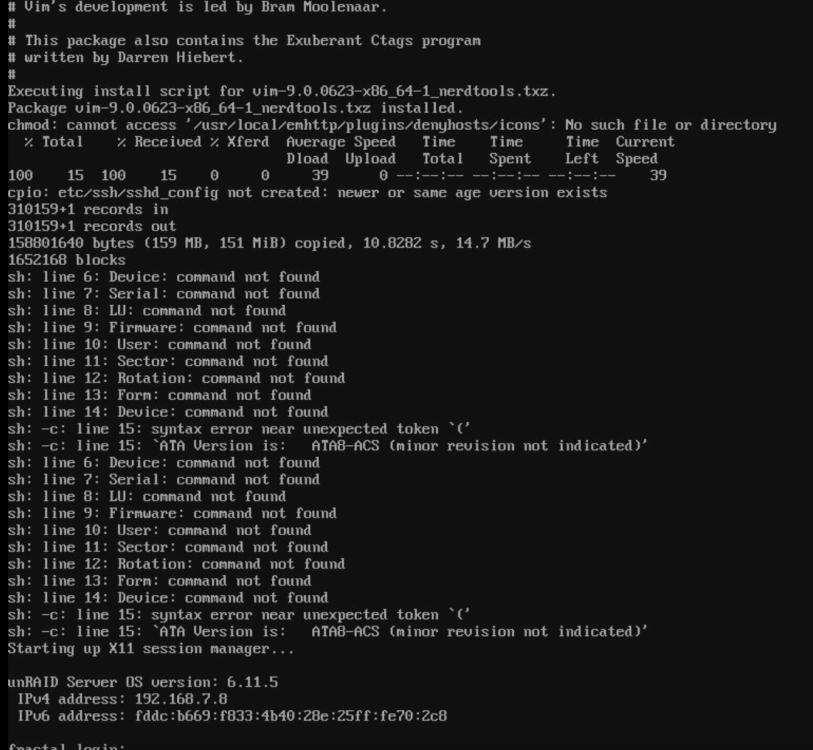
So I got an odd message coming up on my screen on every reboot lately: The lines starting with "sh:" are errors from what appears to be a disk report that somehow is running as a script upon a boot. I must have coped the output to a script or something dumb. Here's the odd thing; I can't find any file in /boot matching any of the terms. I've ran: find /boot -type f -exec grep -l "ATA8-ACS" {} \; find /boot -type f -exec grep -l "Firmware" {} \; The server is working fine. Other than this odd output every time it boots! find and grep seem to be failing me. Can anyone think of where to look or what to do? Thanks in advance.
-
I'll add my thoughts on the extended tests: I found the search for duplicate files handy - sometimes in the past a Move operation would do weird things. Would be nice to verify my FS.
-
I see your points. Still don't know why it did it.
-
well if a drive disappeared then the calculation for disk free would change -- although I would expect that to cause a warning before disk usage. I did check while writing the first post, every disk's utilization warning and critical are equal to the global. Also, even if they were different, why did they alarm for 2 disks and report ok for 6 disks a minute later? Like JorgeB mentioned it seems to be "an elusive issue and difficult to replicate"
-
Wow! I should go buy a lottery ticket.

