





clowncracker
Members
-
Joined
-
Last visited
Everything posted by clowncracker
-
I'm on version 6.9.2, so it isn't a bug with a new version. Additionally, Squid's docker patch app isn't available in the app store (presumably because I am on an older version of unraid).
-
Looking at the docker container, it says the latest version is not available. The repository is vaultwarden/server. Also looking at the logs I tend to see this recurring entry: [2023-03-27 07:53:12.811][_][WARN] Responding with registered (not_found) 404 catcher. [2023-03-27 07:53:13.081][_][WARN] Response was `None`.

-
I believe the sever crashes when the CPU gets near 100% utilization. If memtest didn't give me any errors, do you think that means it's the motherboard?
-
Ever since I installed the Coral Accelerator Module Drivers plugin and the m.2 Google Coral, my entire server has been crashing constantly. I went ahead and removed the Google Coral and uninstalled the plugin, but it keeps happening still. Is there any reason why this would be happening? Is there anything lingering from the plugin install that I can remove?
-
Is there nothing in the system log or diagnostics that might help determine the cause? @JorgeB any chance you can look at the latest diagnostic and system log I attached? Nothing has changed in my config and this point and I have no idea how to diagnose this issue.
-
All of the VMs and Dockers stop working, I think it just crashes but the computer doesn't turn off. Not ECC RAM. Considering it's been working for about 8 hours at this point in safe mode with no Dockers/VMs running, I'm fairly certain the hardware error was a false flag. This all started when I installed the m.2 Google coral and installed the driver plugin, so I think the driver plugin messed something up. Even after I uninstalled the plugin and removed the Google coral, the issue persisted.
-
Another update, I've had it running in safe mode with all VMs and Dockers disabled for 7 hours with no crashes yet.
-
Just crashed again during a parity check, after being online for about 3 hours and 45 minutes. I needed to manually restart my server to get it to be responsive again. I have a notification popup that says Parity check finished (0 errors) with a duration of over 19 hours, even though the server was online for less than four hours. I'd like to note that fix common problems (and the syslog) no longer indicate that this is a hardware issue. I've attached the syslog.
-
Memtest has completed four passes with no issues. The weird thing is that it isn't an instant crash. The server is fine for 3ish hours and then the UI just stops working. I cannot access it from the webpage and I have manually restart the computer.
-
I initially installed a m.2 Google Coral and the Coral Accelerator Module Driver plugin, but my server started crashing. Assuming that this was the issue, I removed the Google Coral and uninstalled the plugin. Now my server is still crashing and I have no idea why, I'm hoping someone could look at the diagnostics and let me know. Fix common problems states that there is a hardware issue: Your server has detected hardware errors. You should install mcelog via the NerdPack plugin, post your diagnostics and ask for assistance on the Unraid forums (which is what I did).
-
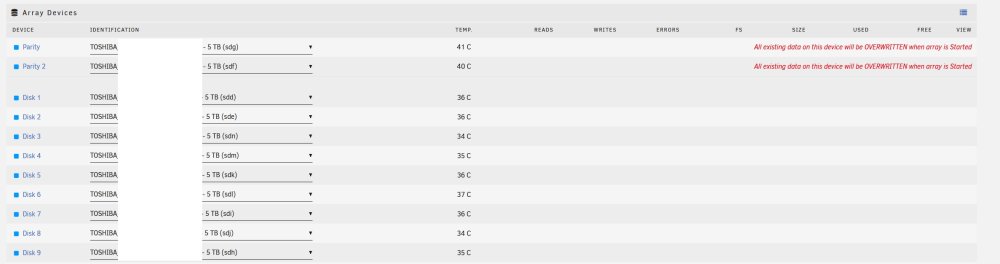
I just copied over the entire USB backup onto the new USB drive. I can clearly see that in the config folder that it haves the drives labeled, so it's weird they aren't showing up correctly on the array.
-
It did not know the correct disk assignments. I have a more recent backup stored on the array (obviously I know that's not a great place for it), so I was hoping to start the array and then grab the most recent backup and copy it over to the boot drive again.
-
My USB drive died this morning and I already set up a new drive with a new registration key. I know which drives were mounted to which location, but I see this before I start the array and I want to make sure I'm not losing any data. I was able to copy the config file over from an old USB backup (it's about a month old, but the content should be the same). I won't lose any data in the array if the devices are mounted to the same location, right?
-
That resolved the issue. I find it weird that you cannot backup the systemlog, seems like a useful thing to keep backed up. I'm more concerned about appdata, so at least backups are working again. Thanks!
-
I just tried that and it did not work. I've attached updated logs. Ideally any solution would still include USB backups, since I do not like the cloud-based solution provided by Unraid post 6.9. backup v2.log
-
This isn't working for me since I updated to the forked version. Here is the error log: backup.log
-
Whenever I try to VNC into a VM, I get the Failed to connect to server message. Not even sure how to troubleshoot this. What can I do?
-
I appreciate all your help with this @trurl
-
@trurl attached are the updated diagnostics. Parity check finished with 0 errors.
-
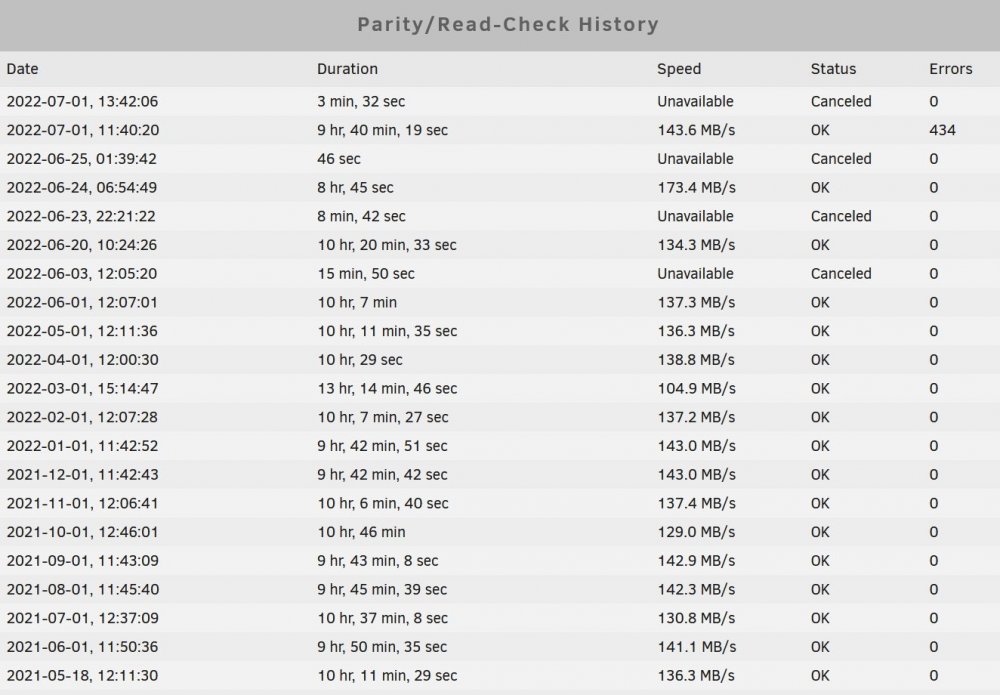
Correct. The 6/24 parity check was after the unclean shutdown on 6/23. There were no parity issues at that point. The 6/25 parity check was started on accident, meant to hit the mover button. The other check on 7/1 (after the 434 errors) was me thinking about starting another parity check after the issues came up but deciding to wait for more info on the forum before I proceeded.
-
I changed my scheduled checks to be non-correcting. I had one unclean shutdown on 6/23.
-
It was a scheduled check, here is the full history. Unrelated, but I fixed the cron for that plugin so that error should stop popping up.
-
I just installed the Dynamix File Integrity plugin. If I do a build & export now, there is nothing to check against right? Is there anything I can do at this point? Is the syslog file not helpful for determining the problem?I have the syslog file that can be reviewed. Disk 9 (which is my newest drive) has 572 UDMA CRC errors, not sure if that is the root cause of the issue. Do I have any recourse at this point? Any sort of data validation I can do to look for potentially corrupted data?




