





russdyer77
Members
-
Joined
-
Last visited
Everything posted by russdyer77
-
great thanks.
-
Is it abnormal for a docker.img file to be 100+gb? Mine is 107gb and I'm seeing some posts where the limit should be 20gb or so? Should I start over? I started using the AppData Backup plugin - assuming I could just stop the Docker service, rename docker.img, start service, use previous apps to reinstall dockers? I had the "docker" folder with the docker.img under the "system" share - do others create a "docker" only share to limit the size of the docker vdisk? Am I better off switching to directory mode instead of using a docker.img? Thanks, Russ
-
ok great, thank you for the info.
-
phew...nvm, I figured it out - luckily I didn't wipe the old cache drive. it seems the move operation must have been incomplete - I was able to rename the old docker.img and libvirt.img and copy them into place and now they are both working! Thanks, Russ
-
I had an issue with one of my drives in a cache pool so I: closed down docker & VM Moved all from cache to array Removed and erased the existing cache pool (it kept failing when replacing with other drives) Created a new cache pool with two new drives, did a move operation from array back to cache for system, domains, app data Even though the files are in the same place both docker and VM manager show no data? Did I screw up by removing the existing pool (even though it's named the exact same)? Can I fix this? Thanks, Russ
-
Thanks, I'll try that.
-
I purchased some recertified drives online and this is the second time this drive has failed (Disk2)- attaching diags. Can somebody look to see if the drive is just dead or if maybe it's the bay it's installed in? I have running in a used SuperMicro server backplane. Thanks, Russ unruss-diagnostics-20250521-2313.zip
-
The only solution I didn't try fixed it - it seems the immich REALLY wants to run on port 8080 and not be redirected to another port. I changed my other conflicting container to use a different port than 8080 and gave Immich 8080 and it worked, very strange.
-
Are others having issues just getting the WebUI to load? I have another container on 8080 so changed the WebUI port to 8079 (or anything else) and it won't load. When looking at the log, everything looks good. text error warn system array login Connection to localhost (127.0.0.1) 2283 port [tcp/*] succeeded! [Nest] 686 - 04/16/2025, 4:12:25 PM LOG [Api:RouterExplorer] Mapped {/api/tags/:id/assets, PUT} route [Nest] 686 - 04/16/2025, 4:12:25 PM LOG [Api:RouterExplorer] Mapped {/api/tags/:id/assets, DELETE} route [Nest] 686 - 04/16/2025, 4:12:25 PM LOG [Api:RoutesResolver] TimelineController {/api/timeline}: [Nest] 686 - 04/16/2025, 4:12:25 PM LOG [Api:RouterExplorer] Mapped {/api/timeline/buckets, GET} route [Nest] 686 - 04/16/2025, 4:12:25 PM LOG [Api:RouterExplorer] Mapped {/api/timeline/bucket, GET} route [Nest] 686 - 04/16/2025, 4:12:25 PM LOG [Api:RoutesResolver] TrashController {/api/trash}: [Nest] 686 - 04/16/2025, 4:12:25 PM LOG [Api:RouterExplorer] Mapped {/api/trash/empty, POST} route [Nest] 686 - 04/16/2025, 4:12:25 PM LOG [Api:RouterExplorer] Mapped {/api/trash/restore, POST} route [Nest] 686 - 04/16/2025, 4:12:25 PM LOG [Api:RouterExplorer] Mapped {/api/trash/restore/assets, POST} route [Nest] 686 - 04/16/2025, 4:12:25 PM LOG [Api:RoutesResolver] UserAdminController {/api/admin/users}: [Nest] 686 - 04/16/2025, 4:12:25 PM LOG [Api:RouterExplorer] Mapped {/api/admin/users, GET} route [Nest] 686 - 04/16/2025, 4:12:25 PM LOG [Api:RouterExplorer] Mapped {/api/admin/users, POST} route [Nest] 686 - 04/16/2025, 4:12:25 PM LOG [Api:RouterExplorer] Mapped {/api/admin/users/:id, GET} route [Nest] 686 - 04/16/2025, 4:12:25 PM LOG [Api:RouterExplorer] Mapped {/api/admin/users/:id, PUT} route [Nest] 686 - 04/16/2025, 4:12:25 PM LOG [Api:RouterExplorer] Mapped {/api/admin/users/:id, DELETE} route [Nest] 686 - 04/16/2025, 4:12:25 PM LOG [Api:RouterExplorer] Mapped {/api/admin/users/:id/preferences, GET} route [Nest] 686 - 04/16/2025, 4:12:25 PM LOG [Api:RouterExplorer] Mapped {/api/admin/users/:id/preferences, PUT} route [Nest] 686 - 04/16/2025, 4:12:25 PM LOG [Api:RouterExplorer] Mapped {/api/admin/users/:id/restore, POST} route [Nest] 686 - 04/16/2025, 4:12:25 PM LOG [Api:RoutesResolver] UserController {/api/users}: [Nest] 686 - 04/16/2025, 4:12:25 PM LOG [Api:RouterExplorer] Mapped {/api/users, GET} route [Nest] 686 - 04/16/2025, 4:12:25 PM LOG [Api:RouterExplorer] Mapped {/api/users/me, GET} route [Nest] 686 - 04/16/2025, 4:12:25 PM LOG [Api:RouterExplorer] Mapped {/api/users/me, PUT} route [Nest] 686 - 04/16/2025, 4:12:25 PM LOG [Api:RouterExplorer] Mapped {/api/users/me/preferences, GET} route [Nest] 686 - 04/16/2025, 4:12:25 PM LOG [Api:RouterExplorer] Mapped {/api/users/me/preferences, PUT} route [Nest] 686 - 04/16/2025, 4:12:25 PM LOG [Api:RouterExplorer] Mapped {/api/users/me/license, GET} route [Nest] 686 - 04/16/2025, 4:12:25 PM LOG [Api:RouterExplorer] Mapped {/api/users/me/license, PUT} route [Nest] 686 - 04/16/2025, 4:12:25 PM LOG [Api:RouterExplorer] Mapped {/api/users/me/license, DELETE} route [Nest] 686 - 04/16/2025, 4:12:25 PM LOG [Api:RouterExplorer] Mapped {/api/users/:id, GET} route [Nest] 686 - 04/16/2025, 4:12:25 PM LOG [Api:RouterExplorer] Mapped {/api/users/profile-image, POST} route [Nest] 686 - 04/16/2025, 4:12:25 PM LOG [Api:RouterExplorer] Mapped {/api/users/profile-image, DELETE} route [Nest] 686 - 04/16/2025, 4:12:25 PM LOG [Api:RouterExplorer] Mapped {/api/users/:id/profile-image, GET} route [Nest] 686 - 04/16/2025, 4:12:25 PM LOG [Api:RoutesResolver] ViewController {/api/view}: [Nest] 686 - 04/16/2025, 4:12:25 PM LOG [Api:RouterExplorer] Mapped {/api/view/folder/unique-paths, GET} route [Nest] 686 - 04/16/2025, 4:12:25 PM LOG [Api:RouterExplorer] Mapped {/api/view/folder, GET} route [Nest] 686 - 04/16/2025, 4:12:25 PM LOG [Api:NestApplication] Nest application successfully started [Nest] 686 - 04/16/2025, 4:12:25 PM LOG [Api:Bootstrap] Immich Server is listening on http://127.0.0.1:2283 [v1.131.3] [production] [ig-init] done. Detected CPU Cores: 32 Starting microservices worker [04/16/25 16:12:27] INFO Starting gunicorn 23.0.0 [04/16/25 16:12:27] INFO Listening at: http://0.0.0.0:3003 (744) [04/16/25 16:12:27] INFO Using worker: immich_ml.config.CustomUvicornWorker [04/16/25 16:12:27] INFO Booting worker with pid: 746 [Nest] 706 - 04/16/2025, 4:12:28 PM LOG [Microservices:EventRepository] Initialized websocket server [Nest] 706 - 04/16/2025, 4:12:29 PM LOG [Microservices:DatabaseRepository] Running migrations, this may take a while [Nest] 706 - 04/16/2025, 4:12:29 PM LOG [Microservices:MetadataService] Bootstrapping metadata service [Nest] 706 - 04/16/2025, 4:12:29 PM LOG [Microservices:MetadataService] Initializing metadata service [Nest] 706 - 04/16/2025, 4:12:29 PM LOG [Microservices:MapRepository] Initializing metadata repository [Nest] 706 - 04/16/2025, 4:12:29 PM LOG [Microservices:MetadataService] Initialized local reverse geocoder [Nest] 706 - 04/16/2025, 4:12:29 PM LOG [Microservices:ServerService] Feature Flags: { "smartSearch": true, "facialRecognition": true, "duplicateDetection": true, "map": true, "reverseGeocoding": true, "importFaces": false, "sidecar": true, "search": true, "trash": true, "oauth": false, "oauthAutoLaunch": false, "passwordLogin": true, "configFile": false, "email": false } [Nest] 706 - 04/16/2025, 4:12:29 PM LOG [Microservices:StorageService] Verifying system mount folder checks, current state: {"mountChecks":{"thumbs":true,"upload":true,"backups":true,"library":true,"profile":true,"encoded-video":true}} [Nest] 706 - 04/16/2025, 4:12:29 PM LOG [Microservices:StorageService] Successfully verified system mount folder checks [Nest] 706 - 04/16/2025, 4:12:29 PM LOG [Microservices:SystemConfigService] LogLevel=log (set via system config) [Nest] 706 - 04/16/2025, 4:12:29 PM LOG [Microservices:NestFactory] Starting Nest application... [Nest] 706 - 04/16/2025, 4:12:29 PM LOG [Microservices:InstanceLoader] BullModule dependencies initialized [Nest] 706 - 04/16/2025, 4:12:29 PM LOG [Microservices:InstanceLoader] ClsModule dependencies initialized [Nest] 706 - 04/16/2025, 4:12:29 PM LOG [Microservices:InstanceLoader] ClsCommonModule dependencies initialized [Nest] 706 - 04/16/2025, 4:12:29 PM LOG [Microservices:InstanceLoader] OpenTelemetryModule dependencies initialized [Nest] 706 - 04/16/2025, 4:12:29 PM LOG [Microservices:InstanceLoader] KyselyModule dependencies initialized [Nest] 706 - 04/16/2025, 4:12:29 PM LOG [Microservices:InstanceLoader] KyselyCoreModule dependencies initialized [Nest] 706 - 04/16/2025, 4:12:29 PM LOG [Microservices:InstanceLoader] DiscoveryModule dependencies initialized [Nest] 706 - 04/16/2025, 4:12:29 PM LOG [Microservices:InstanceLoader] OpenTelemetryCoreModule dependencies initialized [Nest] 706 - 04/16/2025, 4:12:29 PM LOG [Microservices:InstanceLoader] ClsRootModule dependencies initialized [Nest] 706 - 04/16/2025, 4:12:29 PM LOG [Microservices:InstanceLoader] BullModule dependencies initialized [Nest] 706 - 04/16/2025, 4:12:29 PM LOG [Microservices:InstanceLoader] BullModule dependencies initialized [Nest] 706 - 04/16/2025, 4:12:29 PM LOG [Microservices:InstanceLoader] MicroservicesModule dependencies initialized [Nest] 706 - 04/16/2025, 4:12:29 PM LOG [Microservices:NestApplication] Nest application successfully started [Nest] 706 - 04/16/2025, 4:12:29 PM LOG [Microservices:Bootstrap] Immich Microservices is running [v1.131.3] [production] [04/16/25 16:12:32] INFO Started server process [746] [04/16/25 16:12:32] INFO Waiting for application startup. [04/16/25 16:12:32] INFO Created in-memory cache with unloading after 300s of inactivity. [04/16/25 16:12:32] INFO Initialized request thread pool with 32 threads. [04/16/25 16:12:32] INFO Application startup complete. I followed the SpaceInvader guide on YT but it's a little outdated, so the latest container has some new entries: SERVER_HOST: 0.0.0.0 SERVER_PORT: 2283 Leaving those as is loads the container, but I can just never get into the WebUI. According to SpaceInvader, he says the "PostgreSQL_Immich" container should have the same version number as the docker compose file, but the docker compose file is v14 0.20, yet SpaceInvader's own container is pg16-v0.3.0. Wouldn't I get Immich log file errors if the SQL version was wrong?
-
Thanks all, sorry for the delay in response - actually now running around 150 MB/s and has under 3 hours to go. Diags attached. Drives are now all in a newly built disk shelf using an old SuperMicro server (SM JBOD board and SAS cables from backplane back to main PC to LSI SAS9211 card) so maybe more latency there but didn't think there would be over direct to the LSI card. unruss-diagnostics-20250410-1703.zip
-
I had a 8TB parity drive in place, upgraded to a EXOS X20 20TB drive. Stopped array, assigned 20TB in place, started array - currently running around 30 MB/s, estimating 5 days to complete. This drive should run around 250+ MB/s - think something is going on? Should I have formatted the drive before replacing the parity drive? It's fluctuating between 7-30 days to complete: Any help is appreciated. -Russ

-
nvm, I'm dumb - my cache drive got unplugged. phew
-
I hope I'm not freaking out too soon - I stopped array, added an additional drive, preclear of new drive went fine, added drive to array, started array as normal. AppData and VM folders are now gone. Please help troubleshoot or find out what I did wrong?
-
Thanks for the help - got database errors during upgrade process (following pinned thread for manually updating), so I'm just going to start over. I didn't know manual upgrades needed to be done, i was just updating the docker container.
-
A few years ago I followed SpaceInvaderOne vids on setting up Nextcloud. Now getting this error when firing up Nextcloud now: This version of Nextcloud is not compatible with > PHP 7.4. You are currently running 8.0.25. Docker repository is = linuxserver/nextcloud When loading up updater.phar, I'm still on version 20.0.14 and that's the latest available to download. The latest Nextcloud should be 24 or 25? Current version is 20.0.14. Update to Nextcloud 20.0.14 available. (channel: "stable") Following file will be downloaded automatically: https://download.nextcloud.com/server/releases/nextcloud-20.0.14.zip Open changelog ↗ Steps that will be executed: [✔] Check for expected files [✔] Check for write permissions [✔] Create backup [✔] Downloading [✔] Verify integrity [✔] Extracting [✔] Enable maintenance mode [✔] Replace entry points [✔] Delete old files [✔] Move new files in place [✔] Done Continue update? [y/N] Ideas on how to fix this (upgrade) without scrapping the entire Nextcloud install and reinstalling with latest docker? I saw SpaceInvaderOne has a new guide using Swag instead of letsencrypt, so wondering if I should just start over. Thanks, Russ
-
I recently moved to another ISP and DuckDNS/LetsEncrypt not appearing to resolve addresses now. My thought was I should be able to refresh my IP through DuckDNS and restart the containers to fix, but that's not working. Originally setup reverse proxy through SpaceInvaders guide here: Do I need to somehow rebuild a certificate?
-
I set the above for my 2nd vDisk and it was working great yesterday - I needed to restart the Win10 VM and it doesn't show. Going into Device Manager and it wants me to re-initialize/format the disk? I've tried several ways of setting this vDisk up ("/dev/sdi1" or /mnt/disks/partitionlabel") and this keeps happening Any ideas would be appreciated.

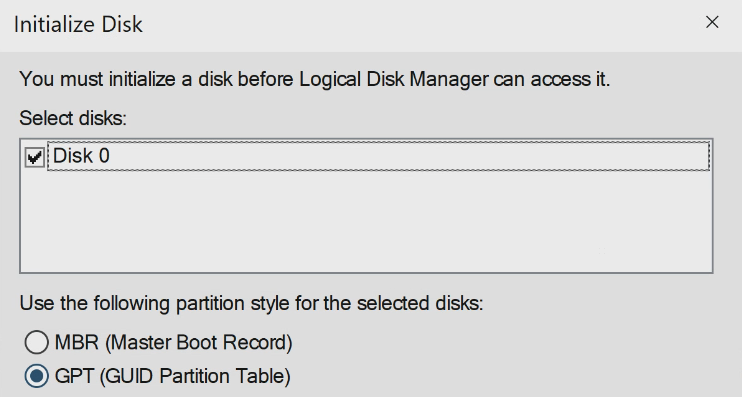
-
Is there a VM power setting in unRaid - or are you referring to sleep settings in the Windows VM? I already stated that sleep settings are set to never in the Windows VM
-
followed guide as suggested and VM wouldn't come up - backed out changes. Not sure why this didn't work.
-
500gb cache - set VM to 120gb - still showing 237gb free diagnostics-20210715-1753.zip
-
Recently spun up a Win10 VM, all sleep/hibernation is turned off in Windows. Noticed a few times over the past couple days that the VM is showing as paused in GUI (and I can't wake up with mouse/keyboard) and I need to choose "resume" from VM section. Windows itself isn't going to sleep (as I notice processes never stop running) but the VM is. Any help would be appreciated.
-
I seem to be having a problem with the "created date" tags - they don't seem to be working properly. For the "PAPERLESS_FILENAME_FORMAT" field I'm using: {correspondent} - {title} - {created_year}-{created_month}-{created_day} For a file name of "Bank - Invoice - 2021-01-15" (and have also tried 2021-1-15). The created date field is still bringing over the actual creation date coded from the date that the document was scanned, instead of the date that I'm using as the creation date. Any help would be appreciated. -Russ
-
I followed the instructions at the top of this post and Paperless was working for about a week - now, all of sudden the "paperless-consumer" template stopped working. Now the "consumer" template will stop running after about 30 seconds. Looking at the logs, this warning shows a few times, I'm wondering if this is what is causing it to halt? pyocr.error.TesseractError: (-11, b'Tesseract Open Source OCR Engine v4.0.0 with Leptonica\nDetected 116 diacritics\ncontains_unichar_id(unichar_id):Error:Assert failed:in file ../../src/ccutil/unicharset.h, line 502\n') Full log is: Mapping UID and GID for paperless:paperless to 99:1000 Operations to perform: Apply all migrations: admin, auth, contenttypes, documents, reminders, sessions Running migrations: No migrations to apply. Starting document consumer at /consume with inotify Parsers available: RasterisedDocumentParser Consuming /consume/2020-01-27-20-45-10.pdf ** Processing: /tmp/paperless/paperless-pg3qi59k/convert.png 500x647 pixels, 3x16 bits/pixel, RGB Input IDAT size = 418512 bytes Input file size = 418713 bytes Trying: zc = 9 zm = 9 zs = 0 f = 0 IDAT size = 233906 zc = 9 zm = 8 zs = 0 f = 0 IDAT size = 233890 Selecting parameters: zc = 9 zm = 8 zs = 0 f = 0 IDAT size = 233890 Output file: /tmp/paperless/paperless-pg3qi59k/optipng.png Output IDAT size = 233890 bytes (184622 bytes decrease) Output file size = 233947 bytes (184766 bytes = 44.13% decrease) Processing sheet #1: /tmp/paperless/paperless-pg3qi59k/convert-0000.pnm -> /tmp/paperless/paperless-pg3qi59k/convert-0000.unpaper.pnm Processing sheet #1: /tmp/paperless/paperless-pg3qi59k/convert-0001.pnm -> /tmp/paperless/paperless-pg3qi59k/convert-0001.unpaper.pnm [pgm_pipe @ 0x555930bc4f80] Stream #0: not enough frames to estimate rate; consider increasing probesize [pgm_pipe @ 0x559b9f1f0f80] Stream #0: not enough frames to estimate rate; consider increasing probesize [image2 @ 0x559b9f1f2600] Using AVStream.codec to pass codec parameters to muxers is deprecated, use AVStream.codecpar instead. [image2 @ 0x559b9f1f2600] Encoder did not produce proper pts, making some up. out of deviation range - NO ROTATING [image2 @ 0x555930bc6600] Using AVStream.codec to pass codec parameters to muxers is deprecated, use AVStream.codecpar instead. [image2 @ 0x555930bc6600] Encoder did not produce proper pts, making some up. OCRing the document Parsing for eng multiprocessing.pool.RemoteTraceback: """ Traceback (most recent call last): File "/usr/lib/python3.7/multiprocessing/pool.py", line 121, in worker result = (True, func(*args, **kwds)) File "/usr/lib/python3.7/multiprocessing/pool.py", line 44, in mapstar return list(map(*args)) File "/usr/src/paperless/src/paperless_tesseract/parsers.py", line 277, in image_to_string return ocr.image_to_string(f, lang=lang) File "/usr/lib/python3.7/site-packages/pyocr/tesseract.py", line 373, in image_to_string raise TesseractError(status, errors) pyocr.error.TesseractError: (-11, b'Tesseract Open Source OCR Engine v4.0.0 with Leptonica\nDetected 116 diacritics\ncontains_unichar_id(unichar_id):Error:Assert failed:in file ../../src/ccutil/unicharset.h, line 502\n') """ The above exception was the direct cause of the following exception: Traceback (most recent call last): File "/usr/src/paperless/src/manage.py", line 11, in <module> execute_from_command_line(sys.argv) File "/usr/lib/python3.7/site-packages/django/core/management/__init__.py", line 371, in execute_from_command_line utility.execute() File "/usr/lib/python3.7/site-packages/django/core/management/__init__.py", line 365, in execute self.fetch_command(subcommand).run_from_argv(self.argv) File "/usr/lib/python3.7/site-packages/django/core/management/base.py", line 288, in run_from_argv self.execute(*args, **cmd_options) File "/usr/lib/python3.7/site-packages/django/core/management/base.py", line 335, in execute output = self.handle(*args, **options) File "/usr/src/paperless/src/documents/management/commands/document_consumer.py", line 97, in handle self.loop_inotify(mail_delta) File "/usr/src/paperless/src/documents/management/commands/document_consumer.py", line 130, in loop_inotify self.loop_step(mail_delta) File "/usr/src/paperless/src/documents/management/commands/document_consumer.py", line 122, in loop_step self.file_consumer.consume_new_files() File "/usr/src/paperless/src/documents/consumer.py", line 117, in consume_new_files if not self.try_consume_file(file): File "/usr/lib/python3.7/contextlib.py", line 74, in inner return func(*args, **kwds) File "/usr/src/paperless/src/documents/consumer.py", line 158, in try_consume_file date = parsed_document.get_date() File "/usr/src/paperless/src/documents/parsers.py", line 127, in get_date text = self.get_text() File "/usr/src/paperless/src/paperless_tesseract/parsers.py", line 110, in get_text self._text = self._get_ocr(images) File "/usr/src/paperless/src/paperless_tesseract/parsers.py", line 170, in _get_ocr raw_text = self._ocr([imgs[middle]], self.DEFAULT_OCR_LANGUAGE) File "/usr/src/paperless/src/paperless_tesseract/parsers.py", line 222, in _ocr r = pool.map(image_to_string, itertools.product(imgs, [lang])) File "/usr/lib/python3.7/multiprocessing/pool.py", line 268, in map return self._map_async(func, iterable, mapstar, chunksize).get() File "/usr/lib/python3.7/multiprocessing/pool.py", line 657, in get raise self._value pyocr.error.TesseractError: (-11, b'Tesseract Open Source OCR Engine v4.0.0 with Leptonica\nDetected 116 diacritics\ncontains_unichar_id(unichar_id):Error:Assert failed:in file ../../src/ccutil/unicharset.h, line 502\n')
-
Getting the SAB error: socket.error: [Errno 104] Connection reset by peer Using Mylar & Sab, getting the following error when trying to use post-processing script: Loading config from /config/scripts/autoProcessComics.cfg File "/config/scripts/ComicRN.py", line 22, in <module> sys.exit(autoProcessComics.processIssue(sys.argv[1], sys.argv[3], sys.argv[7], comicrn_version=comicrn_version)) File "/config/scripts/autoProcessComics.py", line 90, in processIssue result = urlObj.readlines() File "/usr/lib/python2.7/socket.py", line 519, in readlines line = self.readline() File "/usr/lib/python2.7/socket.py", line 434, in readline data = recv(1) socket.error: [Errno 104] Connection reset by peer Previously, I was getting an error: /usr/bin/env: ‘python’: No such file or directory But fixed in prior comments to change from #!/usr/bin/env python to #!/user/bin/env python2 in the ComicRN.py file Thanks, Russ
-
Ok, I noticed that typing "which python" says python is located in /usr/bin, so I'm assuming the script is correct when it starts with the line #!/usr/bin/env python. But when I try to run the script file in SAB, the error is Yet the Sab log file doesn't show any errors:

