





stevep94
Members
-
Joined
-
Last visited
Everything posted by stevep94
-
Thanks for the tip - I had no idea! (told you I was new to this!) Anyway, I've created a new user share called "Home-Media" - put a test folder called "unRAID" in the share with just a few screenshots and at first it was still not showing any media until I changed the "SCAN_ON_BOOT" value to "yes" - does this need to be left permanently on yes? My issue with this is that the media I intend to put in the share has hundreds (if not thousands) of photos and videos - won't it take an age to scan all these if I need to restart the docker/app? (or can I leave it as "no" and somehow trigger the scan manually??) While I'm at it, should I be making sure that the folders within the share also don't have any spaces or is it just the main share that this applies to? I've left all of the other settings as they were as follows - I trust these are all OK??
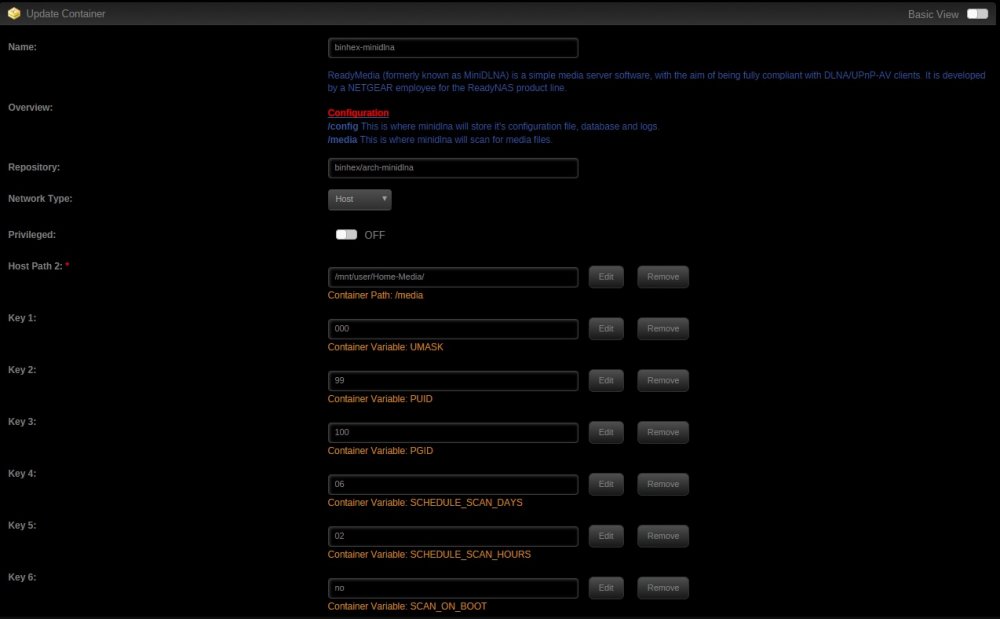
-
Sorry if this is a noob query but I'm very new using unRAID and I'm only just learning the basics of Dockers and containers etc! What I'm essentially after is a fairly simple DLNA server running alongside Plex solely for viewing my home media (family photos and videos) - predominantly via the media player built into my PS4! I've created a user share called "Home Media" - when I set the docker up I mapped the path to mnt/user/Home Media - now while the PS4 sees the media server, it isn't seeing any content!?!? It was working for a short time but the folder structure wasn't showing correctly and so I deleted it and started again and now there is no content at all! Thanks for any help.... (and sorry again if this is a bit basic - as I say, I'm VERY new with using unRAID!)
-
Will do! Thanks!
-
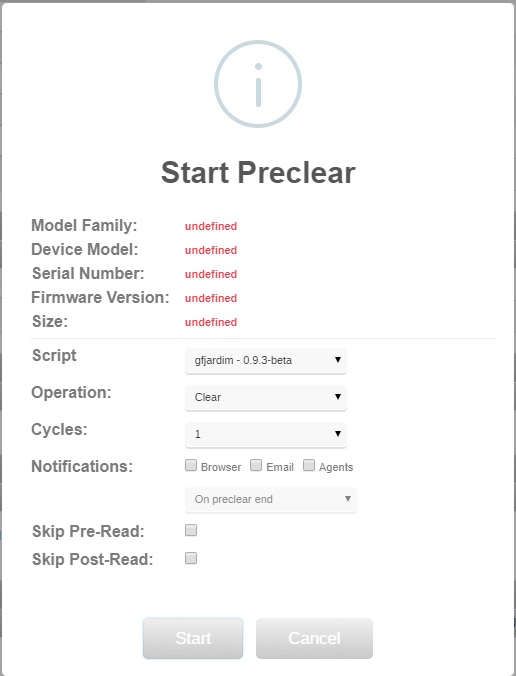
I've updated mine (assume I don't need a reboot or anything??) and it doesn't seem to have made any difference - my 2TB drive still shows up in my unassigned devices list in my "Main" tab (although there is no illumination on the far left near where it says "sdc" - is it supposed to? And if I click on the Preclear icon I still get the following Also, if I click on Tools>Preclear Disk nothing shows up: Am I doing something wrong or should this show a bit more information? (I don't want to start the Preclear process without being sure I've set everything up correctly!) Thanks...


-
I've literally just done a fresh install of Preclear - would this still need updating? (and if so, how would I do this??)
-
I've just bought a new 2TB drive that I want to set up on my unRAID server - when I come to use Preclear it's telling me that the model famil, device model, serial number, firmware version and size are all "undefined" - is this normal?? Also, for a brand new drive, which operation should I be running? (Clear, verify all the disk, verify MBR only, erase all the disk or erase and clear the disk) And lastly, should I be skipping the pre or post read?? Thanks for any help with this - VERY new unRAID user here!!!


