




.png.b2ecc25a2ab69eeef101165f65c9a537.png)

DieFalse
Members
-
Joined
-
Last visited
Everything posted by DieFalse
-
Hi Tucubanito07, The npm-01 that had the corrupt PEM would need its "conf" file deleted from the app data. You can copy the conf to another folder and review it to recreate that proxy host. When you delete that conf, NGINXProxyManager will load all but that host that is corrupted. (which sometimes can be more than one) you would then re-add that proxy host. Example: npm-01 = jimmy.domain.com Delete conf (/etc/letsencrypt/renewal/npm-1.conf) Load NPM Review hosts for missing one or review the conf file for the missing host info and re-add. However, if its multiple, then you will have to delete the others in the log with the same error of nginx: [emerg] cannot load certificate "/etc/letsencrypt/live/npm-1/fullchain.pem": PEM_read_bio_X509_AUX() failed (SSL: error:0909006C:PEM routines:get_name:no start line:Expecting: TRUSTED CERTIFICATE) Alternatively you can go to each PEM (certificate folder) and check the fullchainX.PEM (x being whatever number it is in the dir) for validity. https://ma.ttias.be/nginx-ssl-certificate-errors-pem_read_bio_x509_aux-pem_read_bio_x509-ssl_ctx_use_privatekey_file/ openssl x509 -text -noout -in /etc/letsencrypt/live/npm-1/fullchain.pem
-
You're welcome. It appears somehow your fullchain.pem became corrupted (likely blanked out). Rebuilding would fix this.
-
As I have said, I have mine configured and working. One thing I am thinking you may have an issue with /plex/ goes to a ".plex.direct" url by translation. Do you have DNS Rebinding allowed for "plex.direct"? If not, ONLY IP:32400/plex will work. If so, then domain.com/plex/ will work.
-
Check certs 6,7,12,13,20 as those are erroring. Are those files there? I suspect not. In which case, you will have to delete those hosts and recreate or manually force those to regenerate.
-
/mnt/cache/appdata/NginxProxyManager/letsencrypt/archive/npm-20
-
Can you check the archive folder for the originals please?
-
Have you checked the "/etc/letsencrypt/live/npm-20/" or any of the //etc/letsencrypt/live locations to see if the fullchain.pem is there? It seems the symlinking is broken for them. Example: drwxrwxrwx 1 nobody users 94 Dec 9 17:01 ./ drwx------ 1 nobody users 138 Dec 11 16:39 ../ -rw-rw-rw- 1 nobody users 692 Jul 30 14:01 README lrwxrwxrwx 1 nobody users 29 Dec 9 17:01 cert.pem -> ../../archive/npm-1/cert3.pem lrwxrwxrwx 1 nobody users 30 Dec 9 17:01 chain.pem -> ../../archive/npm-1/chain3.pem lrwxrwxrwx 1 nobody users 34 Dec 9 17:01 fullchain.pem -> ../../archive/npm-1/fullchain3.pem lrwxrwxrwx 1 nobody users 32 Dec 9 17:01 privkey.pem -> ../../archive/npm-1/privkey3.pem
-
Have you created/configured "proxy.conf" and placed it where it wants it? An alternative to the proxy.conf file is setting those options in the advanced nginx settings of the advanced location (gear cog). However I am not proficient with how to format them for this location. client_max_body_size 10m; client_body_buffer_size 128k; proxy_bind $server_addr; proxy_buffers 32 4k; #Timeout if the real server is dead proxy_next_upstream error timeout invalid_header http_500 http_502 http_503; # Advanced Proxy Config send_timeout 5m; proxy_read_timeout 240; proxy_send_timeout 240; proxy_connect_timeout 240; proxy_hide_header X-Frame-Options; # Basic Proxy Config proxy_set_header Host $host:$server_port; proxy_set_header X-Real-IP $remote_addr; proxy_set_header X-Forwarded-For $proxy_add_x_forwarded_for; proxy_set_header X-Forwarded-Proto https; proxy_redirect http:// $scheme://; proxy_http_version 1.1; proxy_set_header Connection ""; proxy_no_cache $cookie_session; proxy_set_header Upgrade $http_upgrade; proxy_set_header Connection "upgrade"; client_max_body_size 10m; client_body_buffer_size 128k; proxy_bind $server_addr; proxy_buffers 32 4k; #Timeout if the real server is dead proxy_next_upstream error timeout invalid_header http_500 http_502 http_503; # Advanced Proxy Config send_timeout 5m; proxy_read_timeout 240; proxy_send_timeout 240; proxy_connect_timeout 240; proxy_hide_header X-Frame-Options; # Basic Proxy Config proxy_set_header Host $host:$server_port; proxy_set_header X-Real-IP $remote_addr; proxy_set_header X-Forwarded-For $proxy_add_x_forwarded_for; proxy_set_header X-Forwarded-Proto https; proxy_redirect http:// $scheme://; proxy_http_version 1.1; proxy_set_header Connection ""; proxy_no_cache $cookie_session; proxy_set_header Upgrade $http_upgrade; proxy_set_header Connection "upgrade";
-
@CorneliousJD I think I finally, through troubleshooting, figured out a fix that will work for your environment. In you Organizr SSO Setup point it to the local IP/Docker IP of plex. http://IP:32400/plex I was digging in my sso settings and any local comm's go through these on my setup, only externally clickable links etc do not.
-
I successfully have plex.domain.com setup and working. I also have plex.domain.com/plex working. 401 Unauthorized - is expected, IF you are not logged in for the /plex to work. However my /plex location is https not http, is yours?
-
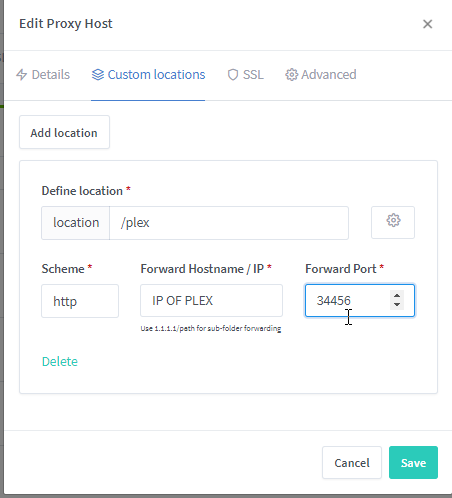
You can add your TLD example.com and under custom locations point it to /plex.
-
I have updated and found that the Webgui now supports DNS challenge. Has anyone successfully gotten this to work with Ionos? (1and1.com)? I would really like a wildcard to be able to load to local resources.
-
-
Im not exactly sure what happened, but when I upgraded to beta 30. I can only see 8 of my 27 drives. The rest appear as missing and I received a "Array Stopped - Stale Configuration" error. I rebooted, same, rolled back to Beta 29 and still have the issue. Im thinking either my expanders or one of my cards stopped responding, perhaps due to a driver change? Diags attached. Server unusable until resolved. All drives present and working prior to the update. arcanine-diagnostics-20201014-1627.zip
-
I have began having an odd problem where my Network Stats are not working. They say "vnstat service must berunning STARTED to view network stats." So I checked: /etc/rc.d/rc.vnstat start received: Error: Not enough free diskspace available in "/var/lib/vnstat/", exiting. My array/cache/ has plenty of space far beyond any need this would have so I checked: ls -l /var/lib/vnstat total 4 -rw-r--r-- 1 root root 0 Jul 29 16:49 vnstat.db Any ideas?
-
I also vote for all the icons in this thread be added to the repo - this script is amazing and the icons are too!
-
I have attempted to install Linux VMs and Windows VMs. When creating I set 120-240GB depending on which I want at the time. Loading the Client OS Installer, selecting the created virtual hard drive - it shows no space available or partitionable. Vdisk.img = 56kb in size. I believe that the VM Creation tool is not provisioning QCow or raw drives space correctly. Image from WIn10 install post-driver installation shows the drive with zero space for easier clarity.
-
Updated my AMD and Intel boxes to trial [6.9.0-beta25] and Intel boots fine, AMD Threadripper 1950x Kernel panics. Unable to boot.
-
In the Tools Menu, I am unable to roll back to Stable directly. Have to back peddle. This occurs on both of my servers, Intel and AMD. I created a GIF to save space of the screen record, showing what occurs. I have used a clean install on one server, to test rolling up and back, and the symptoms are the same. Steps to reproduce - Goto Tools - Update OS - click dropdown of "next" change to "stable" it refreshes back to Next every time.
-
This was either my fault or the beta enabled a feature I did not expect causing loss of LAN connectivity due to misrouting. Under Docker Settings (Array stopped) Host access to custom networks: Enabled Preserve user defined networks: Yes was corrected to: Host access to custom networks: Disabled Preserve user defined networks: No And now I have access again.
-
Ok, I have reloaded both dockers, and still can not access the WebUI for them, There is no error indicating why I can not access. One box is on 6.9.0-beta24 and the other is on stable. Any ideas of what I can look at? I verified the correct port and protocol. I simply can not access the WebUI as if it wasn't there, but it shows it started.
-
I have two DeludgeVPN dockers, I can no longer access the WebUI in either of them, but run command shows the WebUI started. 2020-07-09 13:17:30,298 DEBG 'watchdog-script' stdout output: [info] Starting Deluge Web UI... 2020-07-09 13:17:30,299 DEBG 'watchdog-script' stdout output: [info] Deluge Web UI started
-
Upgraded two servers - one is an AMD board and the other is Intel - R420 Dell server. The R420 no longer recognizes the Mellanox card at all. the PCI riser is working, as the USB connected to it is the boot device, but the card itself is a no go in this version. It worked in 6.9.0-beta22 but not in 24, and when I rolled back to 22, it doesn't work anymore. I had to roll back to Stable for the card to begin working again.
-
To expand on my answer, If #6 / #7 occur, my two server licences will instantly be joined by 6 more so I can convert my entire server farm from ESXi to unraid. I would also likely add more servers if expansion worked.
-
Have you read this: http://lime-technology.com/forum/index.php?topic=3846.msg34018#msg34018 Seems moving /boot is needed.

