





Reynald
Members
-
Joined
-
Last visited
Everything posted by Reynald
-
Oh, and already replied DMs
-
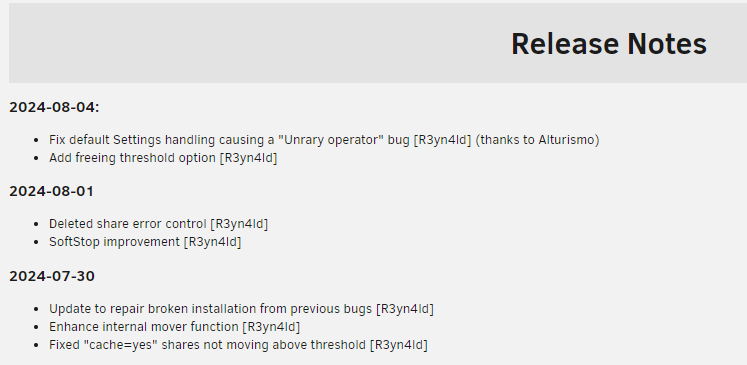
Yes, a user had an error a couple of page ago regarding a deleted share, so I added a check and some verbosity. It is in release notes However, as deleted shares are skipped, it shall not affect moving operations but can effectively throw some errors. I may have a deeper look, please @everyone do not hesitate to copy/paste some logs snippets in this thread when you see errors, so I can debug or/and improve error handling.
-
Thanks for your tests. The setting is taken into account. In the different logs you show me here, pool usage is missing, but in the diagnostic zip it's the threshold. I'm uploading a new version that has better verbosity so the log will help us. I'm in the final testing stage and update shall land within a couple of hours
-
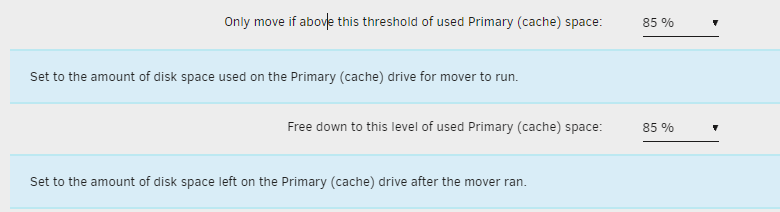
Sure, it's there in settings (wording may change a little):
-
Hello @PPH Seems there is a problem with Freeing Threshold which is blank: Aug 4 09:45:34 LittleBox move: Using global moving threshold: 75 % Aug 4 09:45:34 LittleBox move: Using global freeing threshold: % Can you please change it in settings and retry? (shall be handled by plugin installation script in next version) I will investigate this one. Can you post /tmp/ca.mover.tuning/Filtered_filelist and Moving_action please? In PM if filenames are sensitives
-
Will be corrected in the future version, threshold will be converted to movingThreshold and freeingThreshold in configfile
-
No, mover.old is not used by mover tuning anymore. It caused issue with hardlinks, plus the "Synchronize cache files to array" cannot work with old mover. Then limits are not set correctly (I myself had this situation quite a few times, it can happen on any system) That's the normal behavior of Cache:Prefer with an out of space situation. If you want Mover Tuning to ignore appdata, domains, and system, you can use this option: And all in all, if the tradeoff brang by 2024.07+ versions are too much for you, you may stick with 2023 version. I proposed several options to reach your desired behaviour, I'm pretty sure you'll manage something that suits you

-
Arghhh, sorry for that It's a side effect of "Alturismo likes tennis" new freeing threshold option 😇
-
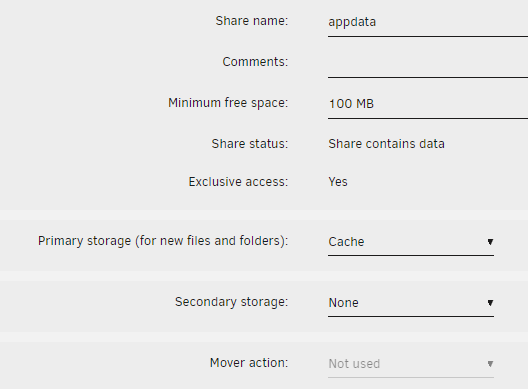
No, it won't prevent that because the file list is presented by the OS via the find command. Usually it's by inode number, which is an increasing number: https://serverfault.com/a/181815 You'd better set these Primary: cache; Secondary None, with a very low minimum free space. This is my setting: If you set correctly the Cache:Yes and Cache:Prefer shares (sorry for using old naming, it's quicker) with larger Minimum free space (like xxGB or even xxxGB) you will never have out of space froblem for Cache:Only shares. Yes, good point (It's already in the next version, will redo a pass to check on the UI)
-
Update: 2024-08-04 Fix default Settings handling causing a "Unary operator" bug (R3yn4ld) (thanks to @alturismo) Add freeing threshold option (R3yn4ld) Coming next: Fixing not ignoring hidden files bug Better repair of shares when files out of there intended place (i.e. cache: only on array, cache: no on cache, cach2 files on cache1...)
-
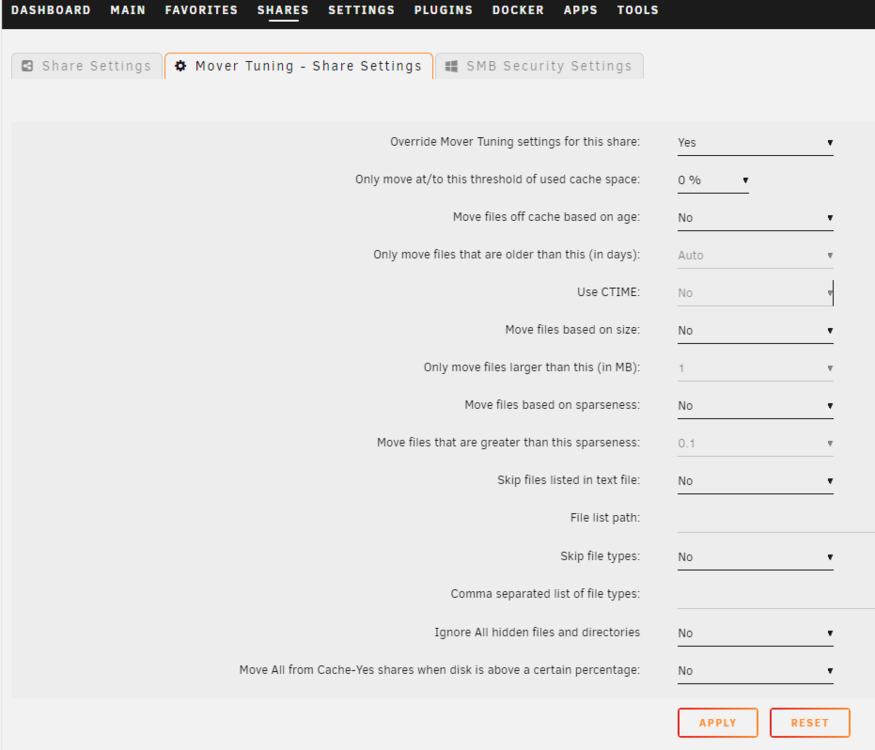
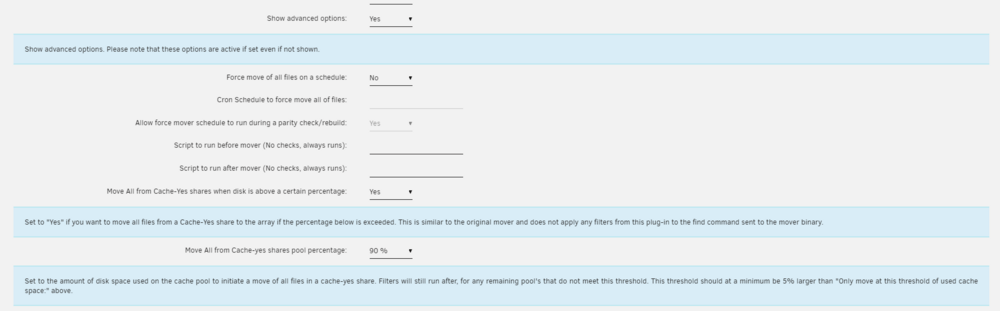
Thank you for explanation ! You can set Share B to Cache:Yes (Cache->Array) and a share settings for mover tuning like this: Then ALL files from share B will be moved to Array Files of share A that are on Array will be moved back to share A if any, and if there are not enough space on cache during moving, then the overflow from cache to array will occur for older files. You may as well use these settings instead: (not much tested for 2024 version, please report) If share B is set to Cache:Prefer (Array->Cache), then the most recent files from A and B stays on cache. I believe that this is the most efficient way to use a cache: keep most recent files. The difference (without setting a custom config for a share) from 2023 to 2024 version here is that Cache=Yes (cache->array) files can be kept if they are recent enough wereas 2023 move all files with no question.
-
I'm sorry some notions are missing from your answer. You want to keep older files on cache and overflow to array? No need for mover then. When do you want files to move from cache to array? At a threshold? At age? Never? (so you basically want Cache: Only plus an overflow for new files?) To have a similar behavior that 2023 version, I'm going to not sort files by date when something different from age=auto is selected.
-
I'm not sure to understand what you try to achieve. In 2024 versions, mover will move/keep most recent files to cache (not moving from array if cache mode is Yes/Cache->Array), and move older files to cache. What do you try to achieve? What is the expected behavior?
-
Thanks for the log. Filtered_files are to be understood as Files found according to filters, not excluded files. Mover_actions list what going to happen (or what happend if test mode = no) to listed files. The fact that media/.files/Screenshot 2024-07-29 at 10.45.53 AM.png is moved is a bug, I'm going to investigate while the filter list it and publish a new plugin version
-
Can you please pack /tmp/ça.mover.tuning/ and share the zip here or via PM?
-
I need this TVShow function for my own use case also (I've teased this function already, based on an old script of mine), and I need a tester because it's a major change and I cannot test (think about) all scenarios before releasing. Actually, my code is just reviewed and tested by Gemini and Copilot AI. So if you agree, I need your help and if you have also some spare time, we could experiment together! I'm going to create a beta version for those willing to try.
-
It might also be a stupid bug (I won't tell, because you are using an old version and due to respect I have to other devs of this plugins, I won't tell the previous dev is stupid, he's not, probably, certainly,... ) Can you please post the log ? We will focus on a line stating: skipfilelist string: find "/mnt/ ....
-
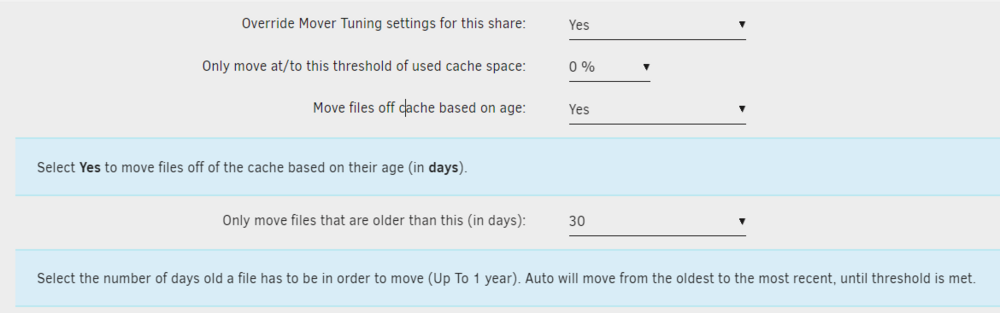
Analyzing your logs: ------------------------------------------------------------ Settings for Games share ----------------------------------------------------------- Settings override: ------------------ Share threshold: 90 % Age: no = 0 ; daysold: 30 OK here you set Age = NO and daysold =30, which is ignored. You probably want this settings for your game share: (or maybe 90% threshold according to your use case, I let the default here, focusing on age)
-
OK, the low treshold option will land soon for the TVShow, I need to make a separate beta as it's a major modification. This can happen mid august. Can you please PM me to give me some details about the player, the Alturismo's way to make the excluded list... ?
-
OK I think I get your point. TV Shows and torrent caching will come later, for sure. Can you please explain how would you set Mover Tuning for your use case if there where two thresholds?
-
OK I will investigate. Was this the case with older versions (prior to 2024.06) ?
-
Correct, and in my opinion, this is an efficient way to use cache: set the threshold at 100% minus your period (daily, hourly) usage minus some margin Correct, and in my opinion, this is a waste of cache free space until you fill it up again I do prefer ping pong because it takes advantage of cache space. You can set threshold to 65% and set your schedule so that you avoid out of disk space situation. You can think about two scenarios: - 90~95% hourly - 60~70 daily I think the result (depending of your cache filling speed) is quite similar but the first one take better advantage of the cache. Anyway, I understood your wish of playing tennis (60~93% daily) instead of ping pong (89~92% hourly) and will think about bringing a low threshold. That could be: - schedule + high threshold trigger the mover - cache is emptied (cache:prefer, cache:yes) or filled (cache:prefer) down/up to low threshold Any thought anyone?
-
Something with this option probably: I guess you updated without uninstalling previous version (that's completly supported, normally...), so that during update the plugin install keep the previous config right? If so that's a bug, I see what I missed (default values when config not set is empty instead of "no"). Is this section in your log says: ----------------------------------------------------------------- Global settings -------------------------------------------------------------- [...] No Repair argument provided [...] In any case can you please: Set Repair Cache Only/No share option to yes, apply, to no, apply? just to confirm my guess? Normally unless I made a typo in variable names in the code, the "Unrary" error should disappear.

-
No, the threshold, as before, is a condition to start or not the age_mover

-
The log will indicate the Default threshold, the share threshold, and the choosen one (if share threshold exists, it choose it, else it choose the default one)





