Reynald
Members
-
Joined
-
Last visited
Everything posted by Reynald
-
Please enable Mover logging. What is the first parameter of Mover Tuning settings ? This one: With your settings, Mover Tuning filter are applied only on scheduled (cron) run, that is on the 28th of the month. You need to set this to also invoke Mover Tuning on "Move Now" button press:


-
Can you please post screenshots of mover and mover tuning scheduler settings?
-
No problem Yock. The behavior you describe is likely that you have filter preventing moving files. Between the two turbo writes line in the log you should see something like: ionice $ioLevel nice -n $niceLevel $age_mover_str or ionice $ioLevel nice -n $niceLevel /usr/local/sbin/mover.old $options Here is the behavior I have with 7.0.0-beta.1 and 2024-07-07 mover plugin: (edit: it seems that force turbo write is working as we have mdcmd returns)

-
Oh OK I see. Is there another workaround than rebooting the server that you can me point to so I can see if something can be made by mover plugin please? However, I cannot see how this bug can prevent mover plugin to work, as there is no error control on the Force Turbo Write piece of code There is probably something else. Are list created in /tmp/Mover ? Is test mode enable ? (it shall be set to "no" if above lists are OK )
-
Can you be more specific about this force turbo problem you encounter @Yock please? I have not touched this part, yet.
-
Hi all, I made a new version of the plugin. This fork replaces @hugenbdd's plugin which is not maintained anymore and will land in community applications if your feedbacks are positive. It worth the upgrade if you want: - Automatic age - Compatibility with 7.0.0 without playing with symlinks - Minor fixes Please see README / Changelog for more informations: R3yn4ld/ca.mover.tuning (github.com). I use it hourly and it shall work correctly. I had not made extensive testing on 7.0.0 however (just a couple of days, seems OK). Please report any bug/problem. Here is the plugin: ca.mover.tuning.plg Please remove hugenbdd's one before installing (at the moment via Plugins/Install plugin/insert above URL). Please note that you'll have to reconfigure mover tuning. Advise: enable Test Mode and verify the Mover_Tuning_{date}T{time}list in the /tmp/Mover directory. This file contain the files that would be moved by original mover with Test Mode off. If everything seems OK you can turn off Test mode. @SimonF, would you please check my plugin script and tell me if it seems OK for you to publish on CA? I've worked on renaming and symlinking files and hope I did not break reverse compatibility (should be OK but I'd like a review please)
-
Mover_Tuning_2024-06-23T010001.list shall present you a list of file that would have been moved if testmode was set to no. Is this list empty? Please set TestMode to "No" to effectively move.
-
OK, thank you @hugenbdd. I'm going to test my version (with autoage) further and prepare a new repo. I have a selfhosted dev server that will allow to easyly pack versions and so on. I need a couple of week to take over (I'm on the move right now from Paris to Lyon, France, plus have a couple of week of holydays in july, so no hurry there. @Swarles would you like to participate to a new plugin fork?
-
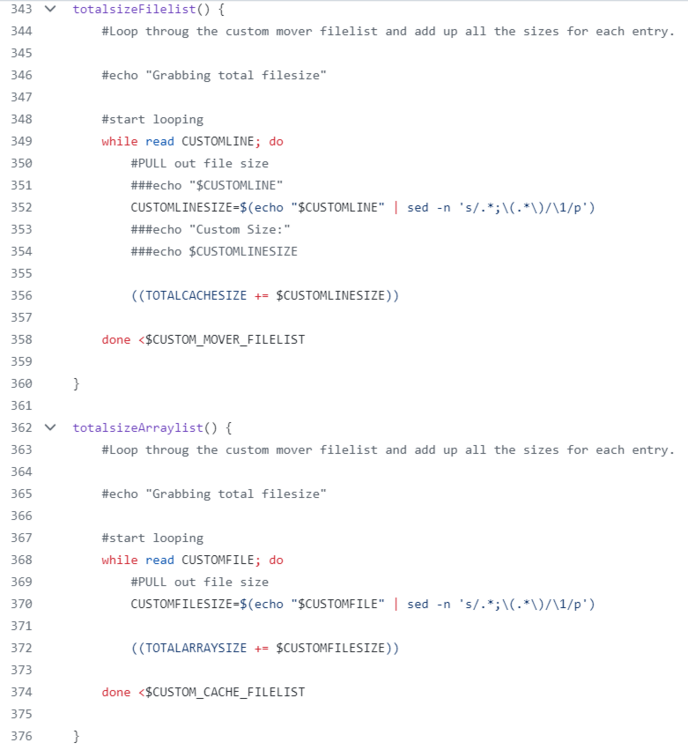
I don't see the same😲: You see that: But here I see that: which is correct. OK, got it... The packages seem not to be made from the github but rather from hugenbdd system. The totalsizeArraylist has the bug in ca.mover.tuning-2023.12.19-x86_64-1 (latest plugin version) but not in ca.mover.tuning-2023.08.22-x86_64-1 (previous plugin version) @hugenbdd if you like, I can save you some time and take over the repo maintenance I may as well create a "beta" repo and plugin so hugenbdd keep the official stable ones. (P.S.: that is all kidness, not rebellion 😊😇)
-
Hi, From command line or within the plugin, independently from destructive mode, to be able to destroy I need to rename the dataset to something different than a share name. I think the behaviour is because of sshfs, mdm, or something else regarding share mounts. I think that's not a problem, but a concept or a feature 😁 Hope this helps
-
It's running once an hour since a couple of hour, moving old files as torrents downloads... However, I've only one cache pool (with several shares). Seems solid at the moment. As all it does is deleting lines from $CUSTOM_MOVER_FILELIST in totalsizeFilelist() while looping for $TOTALCACHESIZE, the worse thing that could happen is that it does not move enough files because $CUSTOM_MOVER_FILELIST wouldn't be populated enough. (and lead to an Out Of Space situation for shares on Cache Only) Before deleting lines, two fields are added in place of $FILECOUNT in customFilelist(), it's the ctime/mtime date and the usage quota of cache. Then $CUSTOM_MOVER_FILELIST is sorted according to date. At the end, date and quotas are replaced by line number of the file, in replacement of $FILECOUNT (which is finally the same) I've forked master branch from hugenbdd repo. Yes, mine does when "Auto" age is selected. It can be extended to other filters easily anyway. I tried to keep original behaviour as much as possible
-
In the mover tuning settings, ctime is creation time. Else modification time is took into account. Also, until my fork/commit, custom file list which is sent to mover is not sorted by ctime or atime (which is in the released plugin only a filter) but as explained here on StackExchange: this re-order is very likely to happen on ZFS or BTRFS. Access time is worthless (but could be tested) as nextcloud scans your file library from time to time, so all files are accessed periodically. Same is true for media (plex) libraries
-
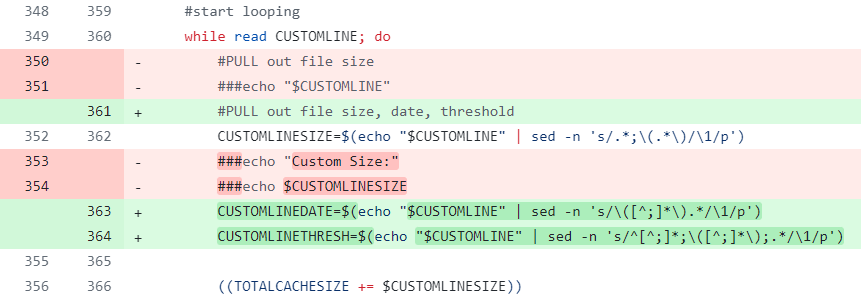
I haven't check the file proposed by hugenbdd, but I can see your commit is already in the code: (please don't mind the changes, I've just checked in mine that was still opened in my browser)
-
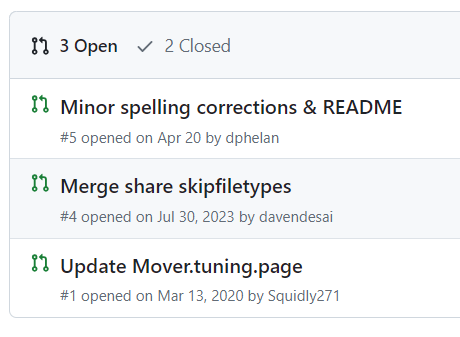
Hi, First, thanks and congrats to dev and contributors for this plugin ! I made a fork, and will request a pull if people are interested and if contributors review/comment/agree. My commit add a feature I missed: What it does under the hood is to sort by date and reduce to the necessary files only the custom file list sent to the mover Repo is there: R3yn4ld/ca.mover.tuning at automatic-age-threshold (github.com) Commit is here: https://github.com/R3yn4ld/ca.mover.tuning/commit/560cf0791459eb1206d3cb091017849aa3e040b6 @hugenbdd I would be happy to contribute if you like. I'm skilled in bash but... do you still take pull requests?

-
Ohh, OK I see. To bad we cannot find official Unraid Kernel publicly. I'm going to do it differently then
-
Where can I find supported kernel versions please? Do I have to pack my own bz images? As seen here, I shall be able to use up to 6.6.13 https://github.com/ich777/unraid-coral-driver/releases and been able to install your plugins.
-
Yes I did, but the 6775 module is not found. (unless I missed something).
-
Hello all, @ich777 awsome work with these plugin. I'm running Unraid OS 6.12.3 with stock kernel. However, I need to update the kernel so modules for the NCT6775 can be loaded. I also use BTRFS extensively in my pools (for data bandwidth), and features and bugfixes are frequent on this FS within linux kernel updates. I also need drivers for Coral TPU and nvidia GPU. I can see that your plugins goes up to kernel 6.6.13-unraid. Where can I find the bz* corresponding images please?
-
I confirm this is working
-
Hello, I've sorted the claim thing by adding a volume and claiming via script. It survives reboots Added this volume mount in the template: /var/lib/netdata/cloud.d/ -> /mnt/user/appdata/netdata/cloud.d/ As per read here: https://learn.netdata.cloud/docs/agent/claim#connect-an-agent-running-in-docker (well, this doc is quite outdated because mounting /etc/netdata or /var/lib/netdata won't work as we know...) Then ran this command on host: docker exec -it netdata netdata-claim.sh -token=TOKEN -url=https://api.netdata.cloud As per documentation: https://learn.netdata.cloud/docs/agent/claim#using-docker-exec Maybe 'netdata-claim.sh -token=TOKEN -url=https://api.netdata.cloud' works in container console from unraid GUI instead of ssh'ing in the host (but as I'm an SSH man ...) Happy supervision! Reynald
-
Awsome ! Thank you very much. I recall having a USB watchdog needing a specific kernel driver compiled, now I may play again with that !
-
Hello, Thank you for your interest and warm words @hugenbdd ! This script takes me quiet some hours of thinking/scripting. I was not aware of mover binary. If I'm not mistaken the /usr/local/sbin/mover.old script where you find your piece of script for your example was invoking rsync in the past. I recall having picked rsync options (-aH) from this mover.old script My strategy is not to move, but to archive-sync in both direction (same as mover), and to delete from cache depending on disk usage, not deleting on array. Some benefits: - File is not overwritten if identical, latest copy is on cache if it exists on cache. --> Moving from cache to array and vice-versa will take more time than duplicating data (mover will also not move, but sync and delete). --> Copying from array to cache let the data secured by parity --> Having control on deletion allows to handle hardlinks (a torrent seeded by transmission from cache is also available for plex). Mover will preserve them also as it move a whole directory, but I'm moving files. --> I can bypass cache "prefer/yes/no/only" directives, and set mover so it won't touch my "data" share until I'm short on space on cache(i.e if this smart-cache script is killed). --> Using rsync with -P parameters while debugging/testing give some status/progress info Drawbacks: - data is duplicated - deletion and modification from array using /mnt/user0 or /mnt/diskN is not synced to /mnt/cache. This is not possibble if we use /mnt/user for the 'data' share. But thanks to your suggestion (with the filelist idea), I have an idea about how to sync cache only files (i.e fresh transmission downloads during quiet hours) to array. Also, mover may do some extra checks from array to cache. From cache to array, I use unraid shfs mechanism as I sync to /mnt/user0 (and not to /mnt/diskN), same for hardlink that are well handled by shfs. If you want to use this script for plex only, you can: - set $TRANSMISSION_ENABLED to false or if you want to clean the script: - remove #Transmission parameters, transmission_cache fonction and its call ('$TRANSMISSION_ENABLED && transmission_cache') at the bottom of the script. I may extend to other torrent client later.
-
Updated: v0/5/14: - Improvement on verbosity (new settings) - Added parameter CACHE_MAX_FREE_SPACE_PCT="85" in addition to CACHE_MIN_FREE_SPACE_PCT="90" => When cache usage exceed CACHE_MIN_FREE_SPACE_PCT (here 90%), it is freed until CACHE_MAX_FREE_SPACE_PCT is achieved, here 85%
-
Hello all, I updated the script 2 days ago, it's holding tight ! I have very very few spinup now, because 1.4To of most recent data are duplicated on SSD. It's on my github: https://bit.ly/Ro11u5-GH_smart-cache Shall I make this a plugin?
-
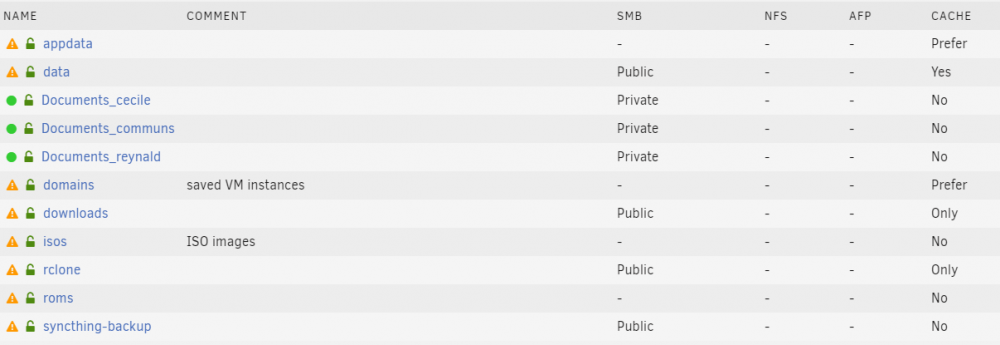
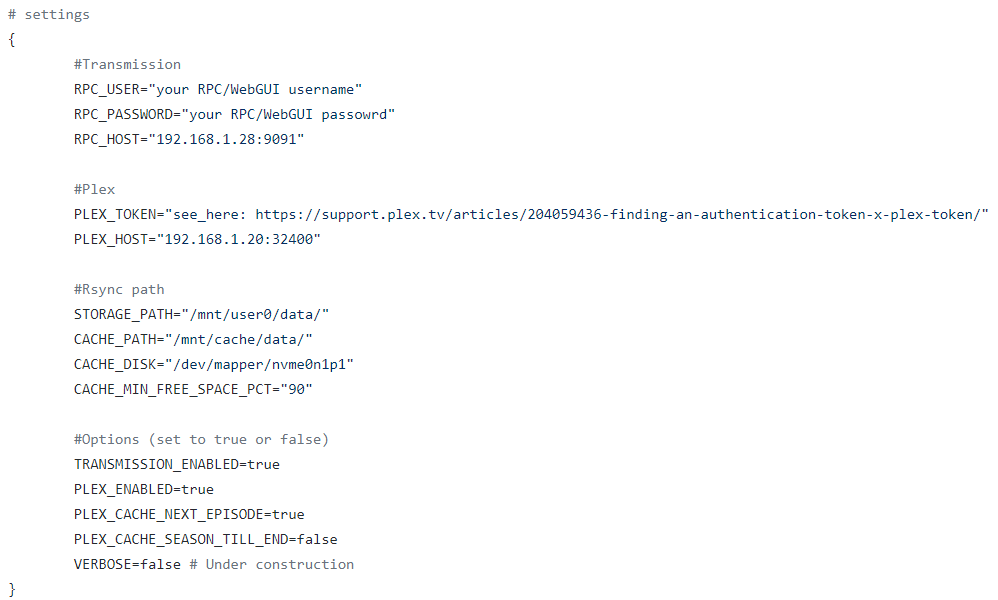
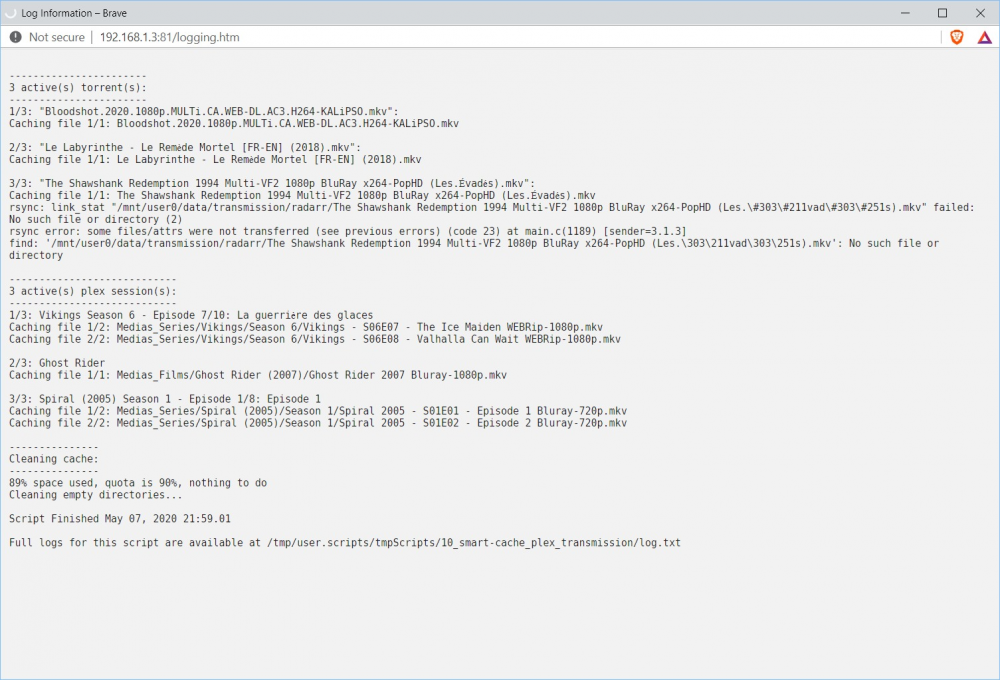
Hello all, Depcrecation information This script is not maintened anymore. You may find updated version in page 2 from other users. I've started to work again on it but: there is issue with ZFS I'm working on Mover Tuning script, which will include smart moving from array to cache, and is already including the smart cleaning part of this cript (well, renamed "Automatic age" and largely revamped but equivalent in termes of functionality): Background I have a 8 mechanical HDD 40TB array in a Unraid server v6.8.2 DVB. I have 40GB memory, only about 8GB are used. I don't use memory for caching, for now. I have a 2TB SSD mounted as cache and hosting docker appdata and VM domains, and until now I was using Unraid cache system to store only new files from a data share, with a script moving to array when SSD was 90% full. With this method, only latest written file were on the cache, so I rethought the whole thing, see below. I use plex to stream to several devices on LAN (gigabit ethernet) or WAN (gigabit fiber internet), and also seed torrents with transmission. Here is my share setup: So I wanted to dynamically cache file from data share to SSD. Main file consumers are plex and transmission, which have their data in a data share As a fail-safe, I set mover to only move file if cache usage is more than 95%. I wrote a script to handle automagically caching of the data share to use SSD up to 90% (including appdata and VMs). What the script needs: a RPC enabled transmission installation (optional) access to Plex web API (optional) path to a share on cache path to same share on array What the script do: When you start it, it makes basic connection and path checks and then 3 main functions are executed: Cleans selected share on cache to have at least 10% free (configurable). To free space, oldest data are copied back to array then deleted from cache. Retrieves the list of active torrents from transmission-rpc daemon and copy to cache without removing from array. (note: active-torrents are those downloading and seeding during the last minute, but also starting and stopping, that's a caveat if you start/stop a batch of torrent and launch the script in the minute) Retrieves the list of active playing sessions from Plex and copy (rsync, same as mover or unbalance) movies to cache without removing from array. For series, there are options to copy: current and next episode or all episodes from current to the end of season Cleans again Note: to copy, rsync is used, like mover or unbalance, so it syncs data (don't overwrite if existing) in addition, hard-links, if any (from radarr, sonarr, etc...), are recreated on destination (cache when caching, array when cleaning cache) if you manually send file to the share on cache, it will be cleaned when getting old you may write a side script then (for working files, libraries, etc..) Because of shfs mechanism accessing a file from /mnt/user will read/write fro cache if it exists, then from array. Duplicate data are not a problem and globally speed up things. The script is very useful when, like me, you have noisy/slow mechanical HDDs for storage, and quick and quiet SDD to serve files. Script installation: I recommend copy/paste it in a new script created with User Scripts. Script configuration: No parameters are passed to the script, so it's easy to use with User Scripts plugin. To configure, a relevant section is at the beginning of the script, parameters are pretty much self explanatory: Here is a log from execution: Pretty neat hum? Known Previous issues (update may came to fix them later): At the moment, log can become huge if, like me, you run the script every minute. This is the recommended interval because transmission-RPC active torrent list contain only the ones from last minute. Edit 13-02-2020: corrected in latest version At the moment, a orphan file (only on cache) being played or seeded is detected, but not synced to the array until it needs to be cleaned (i.e: fresh torrents, recent movies fetched by *arr and newsgroup, etc...). Edit 13-02-2020: corected in latest version: it sync back to array during set day (noisy) hours. I don't know if/how shfs will handle the file on cache. I need more investigation/testing to see if it efficiently read the file from cache instead of array. I guess transmission/plex need to close and reopen the file to pick it from new location? (my assumption is that both read chunks, so caching shall work). Edit 13-02-2020: yes, after checking with File Activity plugin, that's the case and its plex/transmission take the file on cache as soon as it is available! Conclusion, disclaimer, and link: The script run successfully in my configuration since yesterday. Before using rsync I was using rclone which has a cache back-end, a similar plex caching function, plus a remote (I used it for transmission), but it's not as smooth and quick as rsync. Please note that, even if I use it 1440 times a day (User Scripts, Custom schedule * * * * *), this script is still experimental and can: erase (or most likely fill up) your SSD, Edit 13-02-2020: but I did not experienced this, error handling improved erase (not likely) your array Edit 13-02-2020: Technically, this script never delete anything on array, it won't happen kill your cat (sorry) make your mother in law move to your home and stay (I can do nothing for that) break your server into pieces (you can keep these) Thanks for reading to this point, you deserve to get the link to the script (<- link is here). If you try it or have any comment, idea, recommendation, question, etc..., feel free to reply Take care, Reynald