




(Small).png.20e01e54adf9a0993af949e43e312763.png)
CorneliousJD
Members
-
Joined
-
Last visited
-
Change :latest to :2
-
FYI incase anyone finds this later - the mac address didn't follow the IP and kept changing (i had the docker IP set static and it still changed) I ended up just using wg0 tunnel built into unraid to connect proton VPN and push the traffic for hte container thru that.
-
Hi all, using latest unraid w/ docker set to macvlan and I have a static MAC set on the container in the extra parameters via setting -mac-address 02:42:aa:00:ff:XX This WORKS, however when I reboot the server itself and the container auto-starts up, it gets a random MAC. If i force-update the conatiner after that it pulls the static MAC I have set again. Is there a way to make sure this always gets the static MAC even after reboots? I can't figure out why a server reboot is causing the MAC to randomly generate again. NOTE: This is for VPN purpsoes and routing via UniFi firewall w/ a VPN client on the firweall. I want to ensure that the container always routes all traffic via the VPN and nothing else - if the VPN is down then the traffic should cease. If there's a better way to go about this I'm all ears...
-
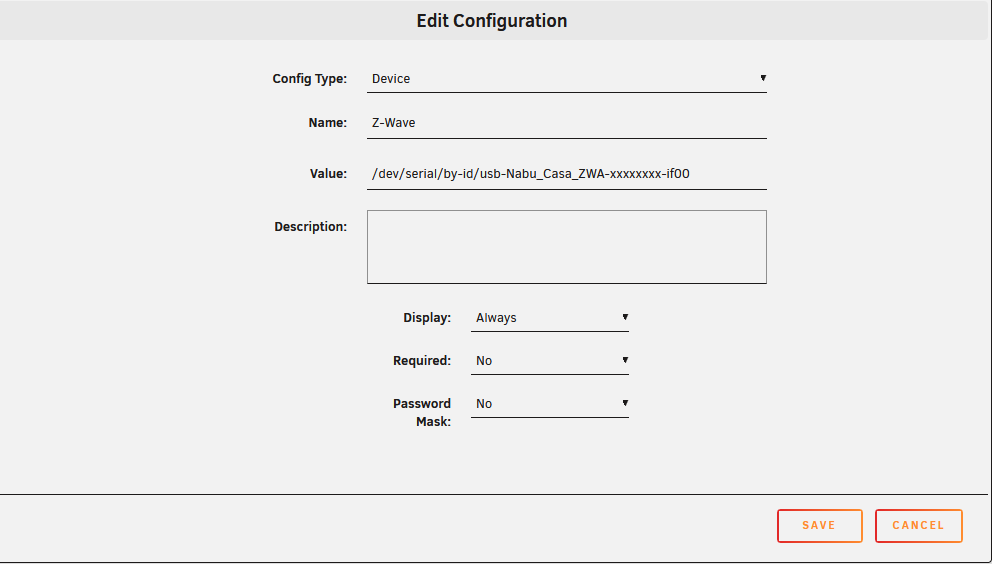
I'm trying to pass the new ZBT-2 device through to homeassistant container w/ internal container device of /dev/zwave/ External of /dev/serial/by-id/usb-Nabu_Casa_ZBT-2_xxxxxxxxxxxxx However this option seems gone in the latest 7.2.x branch of unraid -- not sure if this is a bug or not? You used to be able to give a different internal device name to the container vs what you're passing through but that now seems to be impossible?
-
See here: https://github.com/louislam/uptime-kuma/wiki/Migration-From-v1-To-v2 The tag "2" will give you latest v2 stable.
-
updated thank you for the tag. changed container port from 8080 to 80 now moving forward. will take a full hours to pull into CA.
-
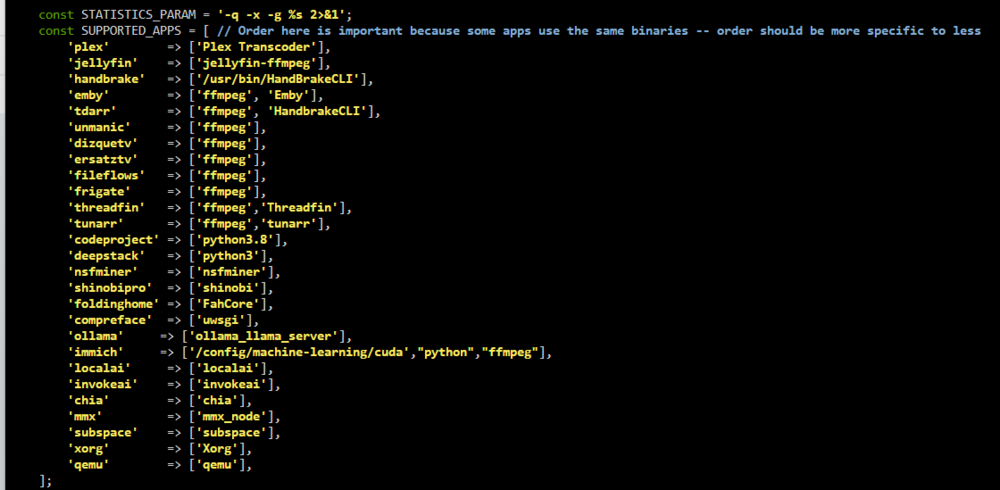
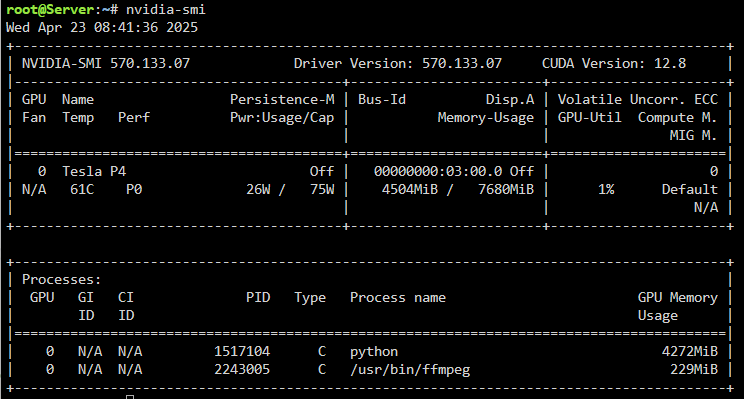
FYI I had to add /usr/bin/ollama to /usr/local/emhttp/plugins/gpustats/lib/Nvidia.php for the ollama line for it to detect it properly. Also I had to add back in "python" again for Immich to actually show up properly? This is my nvidia.php file now.

-
Unfortunately right now all my images are uploaded and categorized properly as of last night, so I have no large batches of photos to import to trigger something here sadly. Even If i add a few photos it will complete in a few seconds, faster than I can get the commands ran.
-
no problem - will this get auto-fixed in a new update to the plugin or will users have to manually do this change?
-
"python" instead of "python3" worked here.
-
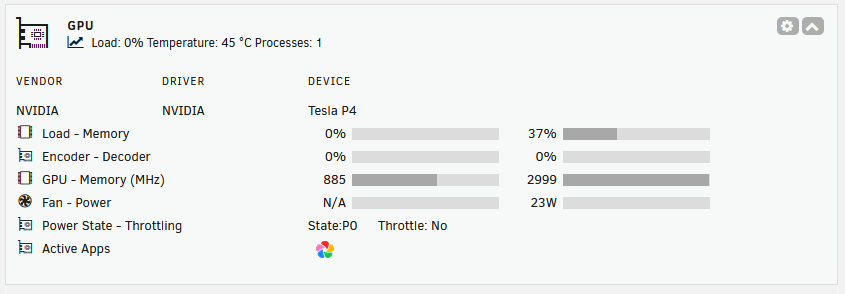
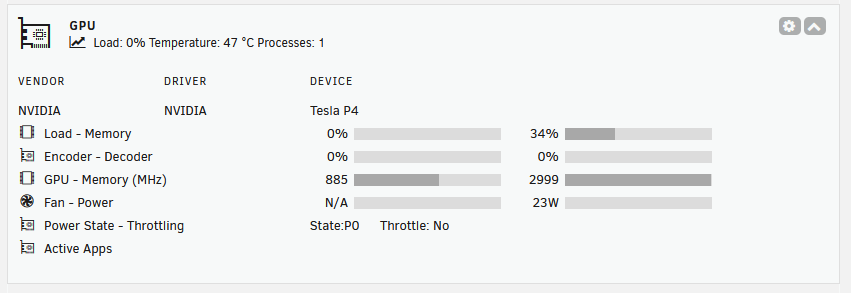
I did as you suggested - installed latest plugin version ran the command, verified the gpuappsnv exists (cat'd it, but its empty) It still doesn't end up showing up the icon though for Immich nvidia-smi shows python as the running process again.


-
Suggestion: When it does get put into CA make sure the "Support thread" link for the plugin points here - the folderview2 I have installed is still pointing to the old thread FYI
-
Sure thing - here you go! root@Server:~# nvidia-smi -q -x <?xml version="1.0" ?> <!DOCTYPE nvidia_smi_log SYSTEM "nvsmi_device_v12.dtd"> <nvidia_smi_log> <timestamp>Wed Apr 23 10:16:01 2025</timestamp> <driver_version>570.133.07</driver_version> <cuda_version>12.8</cuda_version> <attached_gpus>1</attached_gpus> <gpu id="00000000:03:00.0"> <product_name>Tesla P4</product_name> <product_brand>Tesla</product_brand> <product_architecture>Pascal</product_architecture> <display_mode>Disabled</display_mode> <display_active>Disabled</display_active> <persistence_mode>Disabled</persistence_mode> <addressing_mode>N/A</addressing_mode> <mig_mode> <current_mig>N/A</current_mig> <pending_mig>N/A</pending_mig> </mig_mode> <mig_devices> None </mig_devices> <accounting_mode>Disabled</accounting_mode> <accounting_mode_buffer_size>4000</accounting_mode_buffer_size> <driver_model> <current_dm>N/A</current_dm> <pending_dm>N/A</pending_dm> </driver_model> <serial>0324217034962</serial> <uuid>GPU-b66cd31a-0bd7-b94d-ce2d-24507ee05576</uuid> <minor_number>0</minor_number> <vbios_version>86.04.55.00.01</vbios_version> <multigpu_board>No</multigpu_board> <board_id>0x300</board_id> <board_part_number>900-2G414-0000-000</board_part_number> <gpu_part_number>1BB3-895-A1</gpu_part_number> <gpu_fru_part_number>N/A</gpu_fru_part_number> <platformInfo> <chassis_serial_number>N/A</chassis_serial_number> <slot_number>N/A</slot_number> <tray_index>N/A</tray_index> <host_id>N/A</host_id> <peer_type>N/A</peer_type> <module_id>1</module_id> <gpu_fabric_guid>N/A</gpu_fabric_guid> </platformInfo> <inforom_version> <img_version>G414.0200.00.03</img_version> <oem_object>1.1</oem_object> <ecc_object>4.1</ecc_object> <pwr_object>N/A</pwr_object> </inforom_version> <inforom_bbx_flush> <latest_timestamp>N/A</latest_timestamp> <latest_duration>N/A</latest_duration> </inforom_bbx_flush> <gpu_operation_mode> <current_gom>N/A</current_gom> <pending_gom>N/A</pending_gom> </gpu_operation_mode> <c2c_mode>N/A</c2c_mode> <gpu_virtualization_mode> <virtualization_mode>None</virtualization_mode> <host_vgpu_mode>N/A</host_vgpu_mode> <vgpu_heterogeneous_mode>N/A</vgpu_heterogeneous_mode> </gpu_virtualization_mode> <gpu_reset_status> <reset_required>Requested functionality has been deprecated</reset_required> <drain_and_reset_recommended>Requested functionality has been deprecated</drain_and_reset_recommended> </gpu_reset_status> <gpu_recovery_action>None</gpu_recovery_action> <gsp_firmware_version>N/A</gsp_firmware_version> <ibmnpu> <relaxed_ordering_mode>N/A</relaxed_ordering_mode> </ibmnpu> <pci> <pci_bus>03</pci_bus> <pci_device>00</pci_device> <pci_domain>0000</pci_domain> <pci_base_class>3</pci_base_class> <pci_sub_class>2</pci_sub_class> <pci_device_id>1BB310DE</pci_device_id> <pci_bus_id>00000000:03:00.0</pci_bus_id> <pci_sub_system_id>11D810DE</pci_sub_system_id> <pci_gpu_link_info> <pcie_gen> <max_link_gen>3</max_link_gen> <current_link_gen>3</current_link_gen> <device_current_link_gen>3</device_current_link_gen> <max_device_link_gen>3</max_device_link_gen> <max_host_link_gen>3</max_host_link_gen> </pcie_gen> <link_widths> <max_link_width>16x</max_link_width> <current_link_width>16x</current_link_width> </link_widths> </pci_gpu_link_info> <pci_bridge_chip> <bridge_chip_type>N/A</bridge_chip_type> <bridge_chip_fw>N/A</bridge_chip_fw> </pci_bridge_chip> <replay_counter>0</replay_counter> <replay_rollover_counter>0</replay_rollover_counter> <tx_util>47350 KB/s</tx_util> <rx_util>340600 KB/s</rx_util> <atomic_caps_outbound>N/A</atomic_caps_outbound> <atomic_caps_inbound>N/A</atomic_caps_inbound> </pci> <fan_speed>N/A</fan_speed> <performance_state>P0</performance_state> <clocks_event_reasons> <clocks_event_reason_gpu_idle>Not Active</clocks_event_reason_gpu_idle> <clocks_event_reason_applications_clocks_setting>Not Active</clocks_event_reason_applications_clocks_setting> <clocks_event_reason_sw_power_cap>Not Active</clocks_event_reason_sw_power_cap> <clocks_event_reason_hw_slowdown>Not Active</clocks_event_reason_hw_slowdown> <clocks_event_reason_hw_thermal_slowdown>Not Active</clocks_event_reason_hw_thermal_slowdown> <clocks_event_reason_hw_power_brake_slowdown>Not Active</clocks_event_reason_hw_power_brake_slowdown> <clocks_event_reason_sync_boost>Not Active</clocks_event_reason_sync_boost> <clocks_event_reason_sw_thermal_slowdown>Not Active</clocks_event_reason_sw_thermal_slowdown> <clocks_event_reason_display_clocks_setting>Not Active</clocks_event_reason_display_clocks_setting> </clocks_event_reasons> <sparse_operation_mode>N/A</sparse_operation_mode> <fb_memory_usage> <total>7680 MiB</total> <reserved>81 MiB</reserved> <used>280 MiB</used> <free>7321 MiB</free> </fb_memory_usage> <bar1_memory_usage> <total>256 MiB</total> <used>2 MiB</used> <free>254 MiB</free> </bar1_memory_usage> <cc_protected_memory_usage> <total>0 MiB</total> <used>0 MiB</used> <free>0 MiB</free> </cc_protected_memory_usage> <compute_mode>Default</compute_mode> <utilization> <gpu_util>5 %</gpu_util> <memory_util>1 %</memory_util> <encoder_util>10 %</encoder_util> <decoder_util>0 %</decoder_util> <jpeg_util>N/A</jpeg_util> <ofa_util>N/A</ofa_util> </utilization> <encoder_stats> <session_count>1</session_count> <average_fps>98</average_fps> <average_latency>2015</average_latency> </encoder_stats> <fbc_stats> <session_count>0</session_count> <average_fps>0</average_fps> <average_latency>0</average_latency> </fbc_stats> <dram_encryption_mode> <current_dram_encryption>N/A</current_dram_encryption> <pending_dram_encryption>N/A</pending_dram_encryption> </dram_encryption_mode> <ecc_mode> <current_ecc>Enabled</current_ecc> <pending_ecc>Enabled</pending_ecc> </ecc_mode> <ecc_errors> <volatile> <single_bit> <device_memory>0</device_memory> <register_file>N/A</register_file> <l1_cache>N/A</l1_cache> <l2_cache>N/A</l2_cache> <texture_memory>N/A</texture_memory> <texture_shm>N/A</texture_shm> <cbu>N/A</cbu> <total>0</total> </single_bit> <double_bit> <device_memory>0</device_memory> <register_file>N/A</register_file> <l1_cache>N/A</l1_cache> <l2_cache>N/A</l2_cache> <texture_memory>N/A</texture_memory> <texture_shm>N/A</texture_shm> <cbu>N/A</cbu> <total>0</total> </double_bit> </volatile> <aggregate> <single_bit> <device_memory>0</device_memory> <register_file>N/A</register_file> <l1_cache>N/A</l1_cache> <l2_cache>N/A</l2_cache> <texture_memory>N/A</texture_memory> <texture_shm>N/A</texture_shm> <cbu>N/A</cbu> <total>0</total> </single_bit> <double_bit> <device_memory>0</device_memory> <register_file>N/A</register_file> <l1_cache>N/A</l1_cache> <l2_cache>N/A</l2_cache> <texture_memory>N/A</texture_memory> <texture_shm>N/A</texture_shm> <cbu>N/A</cbu> <total>0</total> </double_bit> </aggregate> </ecc_errors> <retired_pages> <multiple_single_bit_retirement> <retired_count>0</retired_count> <retired_pagelist> </retired_pagelist> </multiple_single_bit_retirement> <double_bit_retirement> <retired_count>0</retired_count> <retired_pagelist> </retired_pagelist> </double_bit_retirement> <pending_blacklist>No</pending_blacklist> <pending_retirement>No</pending_retirement> </retired_pages> <remapped_rows>N/A</remapped_rows> <temperature> <gpu_temp>48 C</gpu_temp> <gpu_temp_tlimit>N/A</gpu_temp_tlimit> <gpu_temp_max_threshold>94 C</gpu_temp_max_threshold> <gpu_temp_slow_threshold>91 C</gpu_temp_slow_threshold> <gpu_temp_max_gpu_threshold>N/A</gpu_temp_max_gpu_threshold> <gpu_target_temperature>N/A</gpu_target_temperature> <memory_temp>N/A</memory_temp> <gpu_temp_max_mem_threshold>N/A</gpu_temp_max_mem_threshold> </temperature> <supported_gpu_target_temp> <gpu_target_temp_min>N/A</gpu_target_temp_min> <gpu_target_temp_max>N/A</gpu_target_temp_max> </supported_gpu_target_temp> <gpu_power_readings> <power_state>P0</power_state> <average_power_draw>N/A</average_power_draw> <instant_power_draw>23.87 W</instant_power_draw> <current_power_limit>75.00 W</current_power_limit> <requested_power_limit>75.00 W</requested_power_limit> <default_power_limit>75.00 W</default_power_limit> <min_power_limit>60.00 W</min_power_limit> <max_power_limit>75.00 W</max_power_limit> </gpu_power_readings> <gpu_memory_power_readings> <average_power_draw>N/A</average_power_draw> <instant_power_draw>N/A</instant_power_draw> </gpu_memory_power_readings> <module_power_readings> <power_state>P0</power_state> <average_power_draw>N/A</average_power_draw> <instant_power_draw>N/A</instant_power_draw> <current_power_limit>N/A</current_power_limit> <requested_power_limit>N/A</requested_power_limit> <default_power_limit>N/A</default_power_limit> <min_power_limit>N/A</min_power_limit> <max_power_limit>N/A</max_power_limit> </module_power_readings> <power_smoothing>N/A</power_smoothing> <power_profiles> <power_profile_requested_profiles>N/A</power_profile_requested_profiles> <power_profile_enforced_profiles>N/A</power_profile_enforced_profiles> </power_profiles> <clocks> <graphics_clock>885 MHz</graphics_clock> <sm_clock>885 MHz</sm_clock> <mem_clock>2999 MHz</mem_clock> <video_clock>784 MHz</video_clock> </clocks> <applications_clocks> <graphics_clock>885 MHz</graphics_clock> <mem_clock>3003 MHz</mem_clock> </applications_clocks> <default_applications_clocks> <graphics_clock>885 MHz</graphics_clock> <mem_clock>3003 MHz</mem_clock> </default_applications_clocks> <deferred_clocks> <mem_clock>N/A</mem_clock> </deferred_clocks> <max_clocks> <graphics_clock>1531 MHz</graphics_clock> <sm_clock>1531 MHz</sm_clock> <mem_clock>3003 MHz</mem_clock> <video_clock>1379 MHz</video_clock> </max_clocks> <max_customer_boost_clocks> <graphics_clock>1113 MHz</graphics_clock> </max_customer_boost_clocks> <clock_policy> <auto_boost>N/A</auto_boost> <auto_boost_default>N/A</auto_boost_default> </clock_policy> <voltage> <graphics_volt>N/A</graphics_volt> </voltage> <fabric> <state>N/A</state> <status>N/A</status> <cliqueId>N/A</cliqueId> <clusterUuid>N/A</clusterUuid> <health> <bandwidth>N/A</bandwidth> <route_recovery_in_progress>N/A</route_recovery_in_progress> <route_unhealthy>N/A</route_unhealthy> <access_timeout_recovery>N/A</access_timeout_recovery> </health> </fabric> <supported_clocks> <supported_mem_clock> <value>3003 MHz</value> <supported_graphics_clock>1531 MHz</supported_graphics_clock> <supported_graphics_clock>1518 MHz</supported_graphics_clock> <supported_graphics_clock>1506 MHz</supported_graphics_clock> <supported_graphics_clock>1493 MHz</supported_graphics_clock> <supported_graphics_clock>1480 MHz</supported_graphics_clock> <supported_graphics_clock>1468 MHz</supported_graphics_clock> <supported_graphics_clock>1455 MHz</supported_graphics_clock> <supported_graphics_clock>1442 MHz</supported_graphics_clock> <supported_graphics_clock>1430 MHz</supported_graphics_clock> <supported_graphics_clock>1417 MHz</supported_graphics_clock> <supported_graphics_clock>1404 MHz</supported_graphics_clock> <supported_graphics_clock>1392 MHz</supported_graphics_clock> <supported_graphics_clock>1379 MHz</supported_graphics_clock> <supported_graphics_clock>1366 MHz</supported_graphics_clock> <supported_graphics_clock>1354 MHz</supported_graphics_clock> <supported_graphics_clock>1341 MHz</supported_graphics_clock> <supported_graphics_clock>1328 MHz</supported_graphics_clock> <supported_graphics_clock>1316 MHz</supported_graphics_clock> <supported_graphics_clock>1303 MHz</supported_graphics_clock> <supported_graphics_clock>1290 MHz</supported_graphics_clock> <supported_graphics_clock>1278 MHz</supported_graphics_clock> <supported_graphics_clock>1265 MHz</supported_graphics_clock> <supported_graphics_clock>1252 MHz</supported_graphics_clock> <supported_graphics_clock>1240 MHz</supported_graphics_clock> <supported_graphics_clock>1227 MHz</supported_graphics_clock> <supported_graphics_clock>1215 MHz</supported_graphics_clock> <supported_graphics_clock>1202 MHz</supported_graphics_clock> <supported_graphics_clock>1189 MHz</supported_graphics_clock> <supported_graphics_clock>1177 MHz</supported_graphics_clock> <supported_graphics_clock>1164 MHz</supported_graphics_clock> <supported_graphics_clock>1151 MHz</supported_graphics_clock> <supported_graphics_clock>1139 MHz</supported_graphics_clock> <supported_graphics_clock>1126 MHz</supported_graphics_clock> <supported_graphics_clock>1113 MHz</supported_graphics_clock> <supported_graphics_clock>1101 MHz</supported_graphics_clock> <supported_graphics_clock>1088 MHz</supported_graphics_clock> <supported_graphics_clock>1075 MHz</supported_graphics_clock> <supported_graphics_clock>1063 MHz</supported_graphics_clock> <supported_graphics_clock>1050 MHz</supported_graphics_clock> <supported_graphics_clock>1037 MHz</supported_graphics_clock> <supported_graphics_clock>1025 MHz</supported_graphics_clock> <supported_graphics_clock>1012 MHz</supported_graphics_clock> <supported_graphics_clock>999 MHz</supported_graphics_clock> <supported_graphics_clock>987 MHz</supported_graphics_clock> <supported_graphics_clock>974 MHz</supported_graphics_clock> <supported_graphics_clock>961 MHz</supported_graphics_clock> <supported_graphics_clock>949 MHz</supported_graphics_clock> <supported_graphics_clock>936 MHz</supported_graphics_clock> <supported_graphics_clock>923 MHz</supported_graphics_clock> <supported_graphics_clock>911 MHz</supported_graphics_clock> <supported_graphics_clock>898 MHz</supported_graphics_clock> <supported_graphics_clock>885 MHz</supported_graphics_clock> <supported_graphics_clock>873 MHz</supported_graphics_clock> <supported_graphics_clock>860 MHz</supported_graphics_clock> <supported_graphics_clock>847 MHz</supported_graphics_clock> <supported_graphics_clock>835 MHz</supported_graphics_clock> <supported_graphics_clock>822 MHz</supported_graphics_clock> <supported_graphics_clock>810 MHz</supported_graphics_clock> <supported_graphics_clock>797 MHz</supported_graphics_clock> <supported_graphics_clock>784 MHz</supported_graphics_clock> <supported_graphics_clock>772 MHz</supported_graphics_clock> <supported_graphics_clock>759 MHz</supported_graphics_clock> <supported_graphics_clock>746 MHz</supported_graphics_clock> <supported_graphics_clock>734 MHz</supported_graphics_clock> <supported_graphics_clock>721 MHz</supported_graphics_clock> <supported_graphics_clock>708 MHz</supported_graphics_clock> <supported_graphics_clock>696 MHz</supported_graphics_clock> <supported_graphics_clock>683 MHz</supported_graphics_clock> <supported_graphics_clock>670 MHz</supported_graphics_clock> <supported_graphics_clock>658 MHz</supported_graphics_clock> <supported_graphics_clock>645 MHz</supported_graphics_clock> <supported_graphics_clock>632 MHz</supported_graphics_clock> <supported_graphics_clock>620 MHz</supported_graphics_clock> <supported_graphics_clock>607 MHz</supported_graphics_clock> <supported_graphics_clock>594 MHz</supported_graphics_clock> <supported_graphics_clock>582 MHz</supported_graphics_clock> <supported_graphics_clock>569 MHz</supported_graphics_clock> <supported_graphics_clock>556 MHz</supported_graphics_clock> <supported_graphics_clock>544 MHz</supported_graphics_clock> <supported_graphics_clock>531 MHz</supported_graphics_clock> <supported_graphics_clock>518 MHz</supported_graphics_clock> <supported_graphics_clock>506 MHz</supported_graphics_clock> <supported_graphics_clock>493 MHz</supported_graphics_clock> <supported_graphics_clock>480 MHz</supported_graphics_clock> <supported_graphics_clock>468 MHz</supported_graphics_clock> <supported_graphics_clock>455 MHz</supported_graphics_clock> </supported_mem_clock> <supported_mem_clock> <value>405 MHz</value> <supported_graphics_clock>455 MHz</supported_graphics_clock> </supported_mem_clock> </supported_clocks> <processes> <process_info> <gpu_instance_id>N/A</gpu_instance_id> <compute_instance_id>N/A</compute_instance_id> <pid>3358454</pid> <type>C</type> <process_name>/usr/bin/ffmpeg</process_name> <used_memory>277 MiB</used_memory> </process_info> </processes> <accounted_processes> </accounted_processes> <capabilities> <egm>disabled</egm> </capabilities> </gpu> </nvidia_smi_log> root@Server:~#
-
Immich is processing stuff right now and it looks like it shows python (not sure why, maybe the machine learning?) plus ffmpeg right now.
-
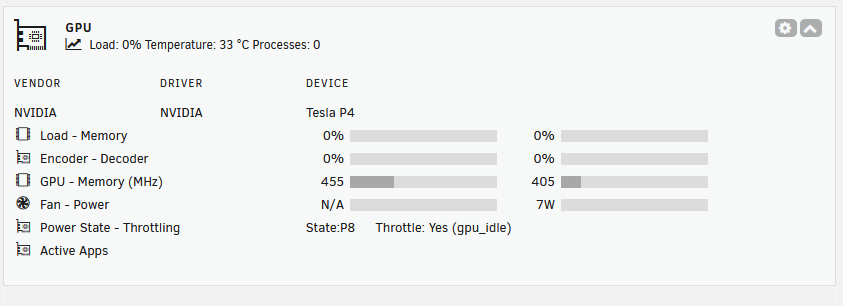
I'm using a Telsa P4 -- let me know if you need anything else from me on this one!
(Small).thumb.png.b884b0484e848c502a315fc27b995f59.png)



