






sreknob
Members
-
Joined
-
Last visited
Everything posted by sreknob
-
Just did the update from rc35 to rc1 and had a warning about my cache pool missing devices. Funny thing is that it's showing up in the GUI, the pool appears to work and I can find nothing obvious in the logs. Array and caches are encrypted but unlock on boot. What am I missing here (I'm sure it's obvious :-)? Thanks.
-
Glad it helped [mention]oskarom [/mention] I’ve been stuck in many an adoption loop before - even outside of docker networking! Adopting a USG into an existing infrastructure can be a real pain... but always worth it in the end :-) Sent from my iPhone using Tapatalk
-
When I attempt to use the Flash Backup in the GUI, the zip is created but a download never starts. Logs show: Nov 9 11:21:16 Neo nginx: 2020/11/09 11:21:16 [error] 27222#27222: *3553324 upstream timed out (110: Connection timed out) while reading response header from upstream, client: 192.168.20.5, server: , request: "POST /webGui/include/Download.php HTTP/1.1", upstream: "fastcgi://unix:/var/run/php5-fpm.sock", host: "neo.local", referrer: "http://neo.local/Main/Flash?name=flash" Granted, this particular server has old hardware and the zip takes a while to complete, but even when checking the zip is finished in /mnt/user/system the download does not initiate. Any chance this is due to the change of backup location moving from root? Thanks!
-
Thanks @Cpt. Chaz and @nitewolfgtr for this. Just one minor thing - might want to double quote $BACKUP_DIR in the code to prevent globbing and word splitting in case of backup directories with spaces. EDIT: Does not appear to work on 6.9b30 as the backups are being stored on /mnt/user/system rather than / The GUI backup appears to also not work due to this as well. I've posted on the beta thread to see if it's just me.... EDIT 2: For 6.9b30 the move line needs to be changed to reflect the new location, then works nicely. echo 'Move Flash Zip Backup from Root to Backup Destination' mv /mnt/user/system/*-flash-backup-*.zip "$BACKUP_DIR"
-
Thanks and.... cheers 🙂
-
@edgespresso - the repeat host ports are for TCP and UDP which are listed separately for docker. - LOCAL Xbox users do not need phantom, they will see the LAN game automatically already. - The use case for this is that is needs to run on the same network as the REMOTE Xbox (not on the same network as your server) and phantom created a bridge to make it look like your server is on the same LAN as that REMOTE Xbox. @binhex There is something wrong with the template or the start.sh script you have not constructing the "MINECRAFT_SERVER'" variable correctly as when starting the container, I get: 2020-06-06 13:29:48,460 INFO Included extra file "/etc/supervisor/conf.d/phantom.conf" during parsing 2020-06-06 13:29:48,460 INFO Set uid to user 0 succeeded 2020-06-06 13:29:48,463 INFO supervisord started with pid 7 2020-06-06 13:29:49,465 INFO spawned: 'start-script' with pid 57 2020-06-06 13:29:49,465 INFO reaped unknown pid 8 2020-06-06 13:29:49,471 DEBG 'start-script' stdout output: [crit] No Minecraft Bedrock server specified via env var 'MINECRAFT_SERVER', exiting... This is using the template with no modifications except entering an address for REMOTE_MINECRAFT_IP I also noted that you pinned "latest" release tag as v0.3.1 in your pull rather than the latest release, Phantom is now at 0.5.1. Thanks!
-
You can use pretty much anything with this, that's part of the beauty of it! Best to get something that can stream HTTP or RTSP, best with x264 video probably. I have a couple of EZVIZ Husky 1080p PoE Bullet Cameras I picked up on clearance for cheap and they work well as outdoor cameras. I also have some motorola wifi baby monitors, a couple of D-link DCS-2530Ls and my OctoPi camera as well.
-
@pg93 - did you try syncing the clock using: -v /etc/localtime:/etc/localtime:ro You can either add it as a custom variable or add it to your template as a read-only path I can't guarantee it works with this container though, I'm using the official one from ccrisan/motioneye
-
Glad it worked for you @block134 @linuxserver.io - looking through this thread, I see lots of adoption issues. I wonder if adding the set-inform address in the controller should be part of the instructions to save frustration. I think that many may be running into this problem depending on their docker network setup. For those having adoption problems, if you want to check your devices to see where they're getting stuck with adoption loops, you can SSH into the device and run "info" which will show the current set-inform IP address. This can be done though a usual SSH session or opening a debug terminal from your controller (click on the device, then the tools button, then debug terminal) depending on the state of your device.
-
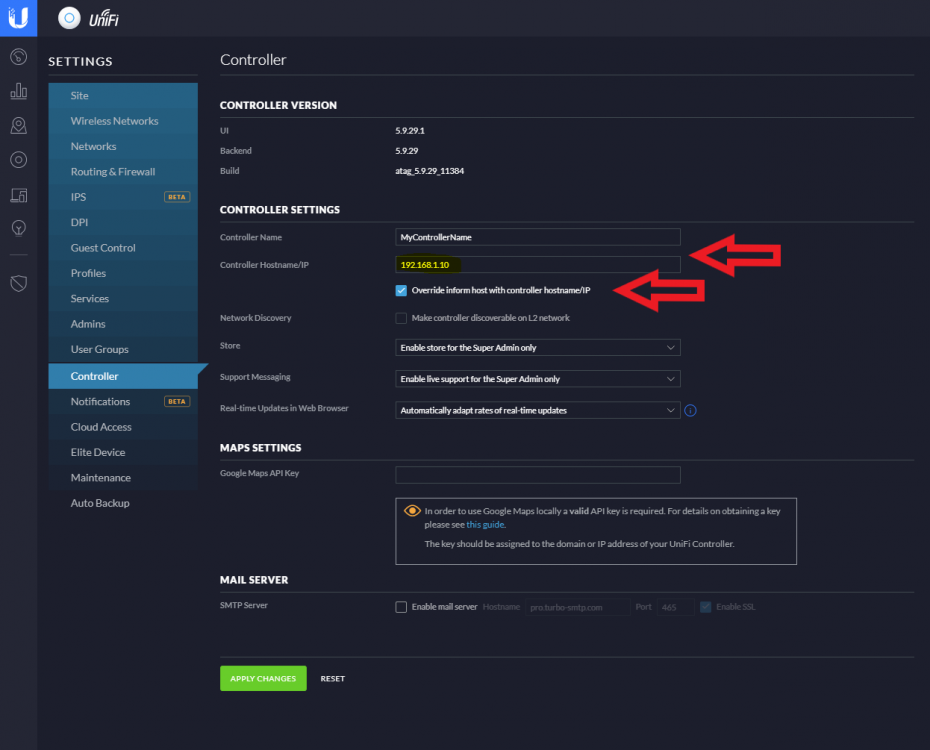
Big thanks as usual to the team! For those having adoption issues, I vaguely remember having issues before about that. In case you don't already have custom IP in controller settings, you might want to make sure that you have set the IP under settings. I had a issue where the controller was trying to set-inform with my private docker IP (172.17..1.X) instead. See screenshot below, checking "Override inform host with controller hostname/IP" and entering the IP of your server above that.
-
+1
-
Just came to say a big thanks to @Fireball3 and the community! Just flashed two H310s and the scripts made it super ridiculously easy. I did have to cover pins B5-B6 to get the system to boot but everything went smoothly.


