





Dyon
Members
-
Joined
-
Last visited
Everything posted by Dyon
-
I fully understand what you wish to achieve, but sadly I do not think I can help with this. I do not use PIA myself and have no experience with it. The process of the PIA Portforwarding also seems quite complex. You can still try to give it a shot yourself. The GitHub Page (https://github.com/pia-foss/manual-connections) says that you need to run the following; git clone https://github.com/pia-foss/manual-connections.git cd manual-connections sudo ./run_setup.sh I do not think my container has git installed and sudo is also unnecessary, so I think you would need to run to following inside my container: apt update && apt upgrade -y && apt install -y git cd /tmp git clone https://github.com/pia-foss/manual-connections.git cd manual-connections ./run_setup.sh (Or any other script than run_setup.sh) Try to read the GitHub page and see how far you can get. Hopefully someone else has more experience with it and can help you. If I need to include something minor to the container to make stuff like this work for PIA users, I'm willing to do that.
-
Unfortunately Unraid didn't send me an email notification about this. But I'll look into it, but it looks like SABNZBd changed the way of how to compile it, so I have to look into this. I'll let you know if I updated it. Edit: It's updated
-
This error is caused by the 'WEBUI_PASSWORD' environment variable. Could you verify that your WEBUI_PASSWORD environment variable is set and has no weird special characters that might cause this issue? I'll also make the error message more clear, so it won't cause confusion if it is the VPN password or WEBUI password.
-
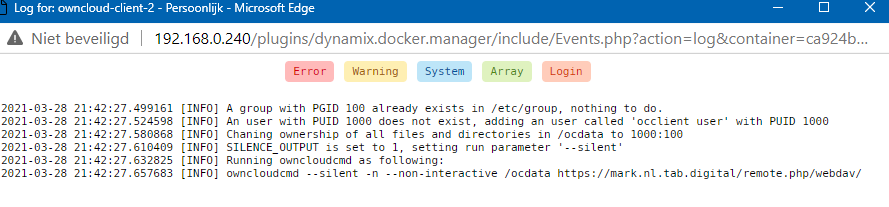
@vvzvlad This works for me OC_USER: USERNAME or EMAIL OC_PASS: PASSWORD OC_SERVER: mark.nl.tab.digital (ADDRESS MIGHT BE DIFFERENT FOR YOU, CHECK YOUR URL WHEN ACCESSING THE WEB INTERFACE) OC_URLPATH: / OC_FILEPATH: / RUN_UID: Your Unraid User ID RUN_GID: Your Unraid User's Group ID TRUST_SELFSIGN: 0 - Advanced settings - OC_WEBDAV: rempte.php/webdav OC_PROTO: https SYNC_HIDDEN: 0 SILENCE_OUTPUT: 1 RUN_INTERVAL: 30

-
I see they offer a free 8GB account, I'll create one and look into it how to configure it. You are right about the OC_SERVER section in the README, I'll update that later. If I figured it out, I'll mention you in a new reply.
-
I believe that is corrent indeed, for OpenVPN atleast. I've also played around with that in the past. However, I don't think this would work if you use Wireguard. And since WireGuard and OpenVPN both would need different settings (the --device /dev/net/tun or something else for WireGuard), the privileged mode is an universal 'fix'. Unless there won't be a conflict running the container with multiple --device parameters. But I wouldn't know which one WireGuard would use.
-
Dutch: Het kan misschien zijn dat de passthrough container verbinding verliest met je VPN provider, hierdoor herstart de passthroughvpn container om de verbinding opnieuw op te bouwen. Kan je in de logs kijken of je kan zien wanneer de passthroughvpn container voor het laatst herstart is? Anders kan je ook de console openen van de passthrough container en bijvoorbeeld 'ping google.com' of ping '1.1.1.1' doen. Ik heb ook een script gemaakt die automatisch alle containers herstart die door de passthroughvpn container gelust worden. Ik heb hier ook een uitleg geschreven over hoe je een script kan toevoegen die automatisch alle containers herstart wanneer de passthroughvpn container offline is geweest: English: It might be that the passthrough container loses connection with your VPN provider, which causes the passthroughvpn container to restart in order to rebuild the connection. Can you look in the logs to see when the passthroughvpn container was last restarted? Otherwise you can also open the console of the passthrough container and do for example 'ping google.com' or ping '1.1.1.1'. I also created a script that automatically restarts all containers routed through the passthroughvpn container. I also wrote a tutorial here on how to add a script that automatically restarts all containers when the passthroughvpn container has been offline:
-
Very annoying, Unraid Forums does not send me emails, even though I do follow all my threads... Sorry for the late reply. Will look into this, but I honestly think the script I made basically does the same as what rebuild-dndc seems to do, but has more (in my opinion) useless options. Nevertheless, it does seem interesting and will see if I will make a tutorial for how to use it with my container. Could you perhaps give a more extensive explanation with examples? Should be possible if you thinker around with ports numbers. Do all Docker containers become unreachable, only passthroughvpn or only the Docker that you route through it?
-
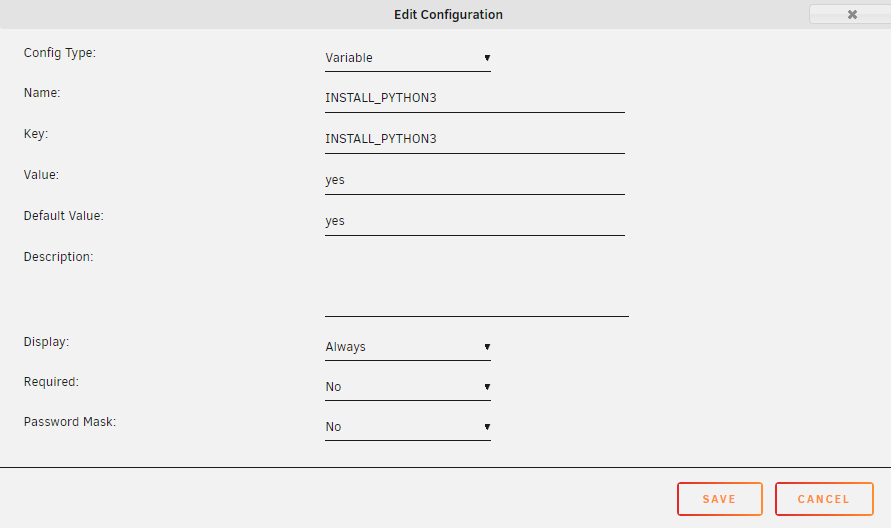
Sorry for late reply. Unraid Forums does not send me emails about replied on posts Done. Update the container and add a new Environment Variable named 'INSTALL_PYTHON3' and set it to yes.
-
That is quite odd. I've made a note for myself to look at this later this week. I'll do some testing to see if I can find a solution, or find what's going wrong.
-
In Unraid, you must see something like this in the Docker tab: +----------------+--------------------------+-------------------------------------------+ | Application | Network | Port Mappings | +================+==========================+===========================================+ | Plex | container:passthroughvpn | :32400/TCP <==> :32400 | +----------------+--------------------------+-------------------------------------------+ | passthroughvpn | bridge | 172.17.0.x:32400 <==> 192.168.0.100:32400 | +----------------+--------------------------+-------------------------------------------+ (172.17.0.x and 192.168.0.100 would obviously be your own IPs) This means that in order to access Plex, you must go to http(s)://192.168.0.100:32400 The 172.17.0.4:32400 you see in Plex is most likely the same 172.17.0.x IP the passthrough container has. How do you try to access your Plex server right now? You should use the 2nd IP shown at the port mappings (for me that would be 192.168.0.100:32400).
-
> my example will test each of my containers Ah, yeah I see! That's quite nice then! 👍 I believe all containers use the IP of the passthrough containers. NZBGet, Sonarr and Radarr would all share the same IP. If you pass NZBGet through the VPN, in Sonarr and Radarr you would need to get the IP of the download client to either 127.0.0.1 or the IP of the passthrough container, which would be the 172-address that you can see on the Docker dashboard in Unraid. If NZBGet, Sonarr/Radarr are passed through the passthrough container, they should still be able to communicate with your actual local network, since the LAN_NETWORK variable of the passthrough container is 'responsible' for that. I hope it make sense 😉
-
@sonic6 I've made a script that will check every 10 seconds if the `passthroughvpn` container did restart. If it did restart, it will restart all containers that are routed through it. To install this script: In Unraid, go to the Apps section and install "CA User Scripts" from Squid Open the terminal in Unraid and run the following 3 commands: mkdir -p /boot/config/plugins/user.scripts/scripts/passthrough_restart echo 'This script will check if the passthroughvpn container has restarted and restart the passed through containers' > /boot/config/plugins/user.scripts/scripts/passthrough_restart/description wget -q https://raw.githubusercontent.com/DyonR/docker-passthroughvpn/master/restart-passed-through-containers.sh -O /boot/config/plugins/user.scripts/scripts/passthrough_restart/script In Unraid, go to Settings -> (User Utilities at the bottom) -> User Scripts Here you will see a script called 'passthrough_restart'. Set the schedule to At Startup of Array. And press Apply. Select Run In Background to start the script immediately. I hope this helps 😁 You actually shouldn't run random script on your server from a stranger online, so you can read the source of the script here: https://github.com/DyonR/docker-passthroughvpn/blob/master/restart-passed-through-containers.sh
-
I am working on a script right now that can be added to the User Scripts plugin. This script will check every x seconds if the passthroughvpn container has restarted. If it did restart, it will also restart all the containers that are getting passed through No, not possible.
-
First of all, excuse me all for being late with replies. Unraid Forums does not auto-follow threads you post, so I did not receive any email notifications unfortunately. First question; in what scenario would I not want it to restart automatically This depends, if you pass an torrent client through this container, it probably won't matter when it restarts, since most torrent clients will just continue downloading the files and move on. (Yes, there are VPN torrent Dockers, but this is an example of a 'less important' program). Another example would be a small private webserver that you host, or a reverse proxy host. These programs won't be affected by abruptly shutting down. Some game servers, to give an example that I've had experience and 'issues' with is Minecraft. Minecraft does not continuously save player activity to the disk, so if the container thinks it is down, and abruptly restarts, this could result in a minor rollback or item loss. I consider programs that basically continuously access to disk to save unrecoverable progress 'important'. The problem is that pinging a host to check if the connection is actually up or down is not really reliable in my opinion at all, even though this is exactly what the container does. I've had enough times that the container thought it was down based on 1 failed ping, but was actually still up. I did test this by sending my a Telegram message instead of abruptly shutting down the container. I might look into a better solution to do, for example 10 pings and see if >30% failed, if so, restart the container. Second question; If this is set to no and the connection is dropped for some reason such as if the VPN server goes offline, will the service begin working again once that specific VPN server comes online again or does the killswitch mean it stays offline until it restarts? This is actually an interesting question which I am not 100% certain about, this is not something I ever tested really. Since I just wanted the highest uptime for my containers. For now, I believe this is the case: If the connection is actually drops, and once again, one ping is actually a bad indicator, the connection will never come back, unless it restarts, since it can reestablish the connection before applying the iptables killswitch. OpenVPN uses tun0 as network interface and WireGuard uses the wg0 interface. The iptables killswitch is quite strict, it allows only connections to get in and out via tun0 or wg0 (with exception of the local network). So, if OpenVPN or WireGuard goes actually down it would never be able to communicate again. I don't know if WireGuard or OpenVPN have some auto-reconnection going on, this is something I actually would like to look in to. This is something I will look in to, but I can't promise when. I should probably also include something like this in the documentation on the GitHub page. As @numblock699 said, 'curl ifconfig.io' is probably the quickest way to do this. Privoxy is something I've literally never worked with since I have always just been passingthrough containers through this container. I do not know what the other usecase for Privoxy would be. I thought it was always used to proxy programs like Torrent clients, Sonarr, Radarr, Jackett, etc before there were any 'vpn' Dockers of those programs available. To be honest, I do not feel like supporting a product that I do not use myself. Also, what about getting a Privoxy Docker and route that Privoxy container through this passthrough container? 😉 I think that would give the same result, wouldn't it? This is intended behaviour, it is possible that your container loses connection with your VPN provider (Session timeout for example), so, if 1 test ping to HEALTH_CHECK_HOST (defaults to one.one.one.one if unset) fails, it will restart the container if RESTART_CONTAINER is set to 'yes'. Although, basing this of one ping is not the best way to do it, to quote my reply above; "The problem is that pinging a host to check if the connection is actually up or down is not really reliable in my opinion at all, even though this is exactly what the container does. I've had enough times that the container thought it was down based on 1 failed ping, but was actually still up. I did test this by sending my a Telegram message instead of abruptly shutting down the container. I might look into a better solution to do, for example 10 pings and see if >30% failed, if so, restart the container."
-
This container solves the problem of containers with no 'VPN' variant. After setting up this container, route your non-VPN Dockers through this one to protect your IP. Or, when you have no other 'VPN' containers. Or host, for example a game or webserver by using your VPN Provider's IP, if your VPN Provider supports forwarding. Both WireGuard and OpenVPN are supported. Check out https://github.com/DyonR/docker-passthroughvpn for setup instructions. Base: Debian 10-slim Docker Hub: https://hub.docker.com/r/dyonr/passthroughvpn/ GitHub: https://github.com/DyonR/docker-passthroughvpn

-
@mihu I have updated to container and it seems to work fine now. Please update the container in Unraid 😁 What I've changed; switched the Docker from being based on debian:10-slim to debian:bullseye-slim (Bullseye is Debian 11, but still actually in beta) and changed a minor thing in the run script. Since Debian Bullseye is beta, this will hopefully be a temporary solution for now. I was unable to find out why it stopped working in Debian 10 😔
-
That's odd. I haven't changed anything about the container for a long time and still works fine for me. I assume you just run Unraid, right? Edit: You are right, I am getting the same error after a clean install. I will look into this asap.
-
THIS PROJECT IS DEPRECATED Due to loss in interest in maintaining Docker container, this project is no longer being worked on and no updates can be expected. ------------------------------------- nzbgetvpn is a 'vpn container' in the list of my already other existing containers. My containers are based of a fork of MarkusMcNugen's qBittorrentvpn. However, I changed some things and added support for WireGuard. Overview: Docker container which runs NZBGet while connecting to WireGuard or OpenVPN with iptables killswitch to prevent IP leakage when the tunnel goes down. This project is based of my DyonR/jackettvpn, which is based of MarkusMcNugen's qBittorrentvpn. This containers has support for passing through other containers, the same way as Binhex his containers. As explained by SpaceInvaderOne; I personally do not use NZBGet, so I am unable to give support on the application level of this container. Base: Debian 10-slim Automated Build: Not yet Application: https://github.com/nzbget/nzbget Docker Hub: https://hub.docker.com/r/dyonr/nzbgetvpn/ GitHub: https://github.com/DyonR/docker-nzbgetvpn

-
A new version of my qbittorrent-vpn Docker has been pushed (should be available within 1 hour after posting this message). Most of these changes won't be noticeable, since qBittorrent still is qBittorrent 😉 However some background work has been done. The issue that @tmor2 had, should be fixed with this new version. Together with resolving that issue, the other new big change is the decision to switch to Libtorrent 2.0 instead of Libtorrent 1.2.xx. Hereby the changelog: * Switch to the Libtorrent RC_2_0 tag instead of RC_1_2. * Self-compilation of Boost to stay up to date with the newest software. * Forcing a fix of the IPv6 Issues people were reporting with certain VPN providers. This is done by adding `--pull-filter ignore route-ipv6 --pull-filter ignore ifconfig-ipv6` to the openvpn command when running it. Code cleanup: * Fixed 'if... then;' consistency in the the SSL Certificate section of the qbittorrent start.sh script * Removal of an unnecessary `wg-quick down` message (Contribution of @Cassidy) * Removal of obsolete info in README.md Mullvad was kindly enough to provide me with a short trial of their service so I could look more in depth into the IPv6 issues and test multiple scenarios of which I thought would be able to fix these issues. To everyone using Mullvad, or any one that did modify their OpenVPN config files by adding 'pull-filter ignore route-ipv6' and 'pull-filter ignore ifconfig-ipv6', please revert it back to it's original state and check if the updated version of my Docker qbittorrentvpn works as desired.
-
@Pieterz as @Cassidy explained you should change to 192.168.0.0/16. 192.168.0.0/24 are the IPs from 192.168.0.0 - 192.168.0.255 192.168.0.0/16 are all the IPs from 192.168.0.0 - 192.168.255.255 So indeed, you should change it to /16 and then it might work. WireGuard config looks fine indeed @Cassidy The reason wg0 gets called before wg-quick up is because of this: wg-quick: `wg0' already exists · Issue #18 · DyonR/docker-qbittorrentvpn (github.com) Which refers to this line in the code: docker-qbittorrentvpn/start.sh at master · DyonR/docker-qbittorrentvpn (github.com) So that is intended behaviour 😉
-
@Pieterz As you said, you use Portainers instead of Unraid, which is fine. I'll still try to help. Looking at your log I do not see anything wrong, it's basically identical to the log of when I run it, so that seems fine. I do want to verify a few things. 1. Double check that your LAN_NETWORK is indeed 192.168.1.0/24 and not 192.168.0.0/24 for example, minor mistake I've seen made before. If that is indeed correct, and you have not changed it, please do the following; 2. What is the IP-address of your Portainer? For example my Unraid is hosted on 192.168.0.240, thus I would need to access qBittorrent on http://192.168.0.240:8080/ (HTTP, since you have not defined ENABLE_SSL). Double check that your ports and IPs are indeed correct. If you are certain that is also correct, please do this; 3. What does your wg0.conf look like? Below is mine (censored obviously), which is the minimal that would be requied. Some VPN companies add additional rules to block traffic, which interferes with the qbittorrentvpn Docker. So if your wg0.conf has more lines than mine below, please make it look alike based on your config and try again Example of mine: [Interface] PrivateKey=@@@@@@@@@@@@@@@@@@@@@@@@@@@@@@@@@@@@@@@@@@@ Address=127.0.0.1/32 DNS=10.255.255.2 [Peer] PublicKey=@@@@@@@@@@@@@@@@@@@@@@@@@@@@@@@@@@@@@@@@@@@ AllowedIPs=0.0.0.0/0 Endpoint=ams-229-wg.whiskergalaxy.com:443 PresharedKey=@@@@@@@@@@@@@@@@@@@@@@@@@@@@@@@@@@@@@@@@@@@
-
Would you mind telling me what VPN Provider it is? I could perhaps look into it more detailed then and optimise my container for that provider, if they would be generous enough to provide me with a trial subscription. If it is PIA or AirVPN, I can remember that these two parties use out of the ordinary methods for OpenVPN and WireGuard configs. However, Binhex's qbittorrentvpn has support for both of these providers, so I recommend you use his instead then
-
Is one of these lines an IPv6 address instead of IPv4? remote [MASKED VPN server address] [MASKED port] Try deleting the line with an IPv6 address, and keep these removed; tun-ipv6 redirect-gateway ipv6
-
Try this removing these two lines: tun-ipv6 redirect-gateway ipv6


