





Dyon
Members
-
Joined
-
Last visited
Everything posted by Dyon
-
Can you send a new log?
-
The log says the following: 2020-09-26 16:10:01.325265 [ERROR] WireGuard config filename is not 'wg0.conf' 2020-09-26 16:10:01.342769 [ERROR] Rename /config/wireguard/Europe-NL1.conf to 'wg0.conf' Please rename the file Europe-NL1.conf to wg0.conf and restart the container
-
What doesn't work exactly? Opening the WebUI? Are you using a bridge network? Can you post the log?
-
@microbassIf you update the container, the issue should be fixed
-
A TOML parser might be nice, I also used a JSON parser for reading GitHub releases in the Docker File (jq). But, I only need to read 1 line from the WireGuard config file, for the iptables, so I don't think it would be worth switching. The only inconsistency that I could think of, would be this use-case. However, Mullvad, might be here to blame, since the TOML-spec doesn't give any examples without spaces around '='-signs. I might look into it, but no promises 😉
-
This is caused by the 'sed' command used to get the Endpoint Line. It looks for 'Endpoint =', notice the space after the word enpoint. I will push an update tomorrow/later tonight to fix this. For now: replace '=' with ' = ' in your config
-
I've added a new environment variable called 'INSTALL_PYTHON3', to the master branch, If you wish to install python3, set this variable to 'yes'. Hope this works for you 😃
-
Please refer to this video of SpaceInvader One:
-
@ceyo14 Everything @Cassidy said, I agree with. I am not gonna incorporate special workarounds for VPN providers that do not provide plain WireGuard config files. Technically I probably could, but it's honestly not something I would want to bother with, since I just want to keep my containers as plain and straightforward as possible. I am unsure if you would be able to access the qbittorrent webui when doing this, but give it a try For setting up docker-wireguard-pia I recommend the following: Go to the Docker tab > Scroll all the way to the bottom > Select the 'Add A Container Button' > Change the slider in the top right to advanced view. Enter the following: Name: wireguard-pia Repository: thrnz/docker-wireguard-pia Docker Hub URL: https://hub.docker.com/r/thrnz/docker-wireguard-pia (Console Shell command: Bash, personal preference though) Privileged: On Now keep on Adding another port, path variable, label or device for all the ENV Vars on the Docker page. One example: Config Type: Variable Name: LOCAL_NETWORK Key: LOCAL_NETWORK Value: 192.168.1.0/24 >Also, add a Port mapping for you qbittorrent webui, but I don't know what ports you use After setting up this container, go back to any qBittorrentvpn container (can also be one without VPN now honestly) and do the following (as Cassidy also said): Top right, set the slider to advanced view Extra parameters: --net=container:wireguard-pia Network Type: None
-
-
I've added zip, p7zip, unzip and unrar to the master branch of the container. If you check for updates, there should be one available!
-
Python would indeed increase the size of the container significantly. I'll later at how much this increase will be and consider if I would add this to the main branch. I could also choice to add a separate branch called 'python' also. I'll think about it and let you know later 🙂 Kinda busy with other stuff right now
-
Good call! I will add zip, p7zip, unzip and unrar in the next update. You can expect it soon
-
THIS PROJECT IS DEPRECATED Due to loss in interest in maintaining Docker container, this project is no longer being worked on and no updates can be expected. ------------------------------------- Welcome to my firth Docker Container that I've created. sabnzbdvpn, a fork of MarkusMcNugen's qBittorrentvpn, but with WireGuard support, and naturally SABNZBd instead of qBittorrent! Overview: Docker container which runs SABNZBd while connecting to WireGuard or OpenVPN with iptables killswitch to prevent IP leakage when the tunnel goes down. This project is based of my DyonR/jackettvpn, which is based of MarkusMcNugen's qBittorrentvpn. I personally do not use SABNZBd, so I am unable to give support on the application level of this container. Base: Debian 10-slim Automated Build: Not yet Application: https://github.com/sabnzbd/sabnzbd Docker Hub: https://hub.docker.com/r/dyonr/sabnzbdvpn/ GitHub: https://github.com/DyonR/docker-qbittorrentvpn

-
It's a fairly common error with OpenVPN, on Google/Reddit a lot of people report about it. There are ways to fix this by adding certain configuration changes to your .ovpn file. https://www.google.com/search?q=Authenticate%2FDecrypt+packet+error%3A+bad+packet+ID
-
I personally haven't seen that error message before. Odd. To check your IP you can do the following: Open the console of the Container Enter execute the following command to install curl: apt update && apt -y install curl After that run this command: curl ifconfig.me This will return the IP used to connect to ifconfig.me Check the IP of you home connection by going to https://ifconfig.me/ If the IP of you home connection and the container match, the VPN is not working. If they are different it should be working. If you get a timeout or unreachable error, your VPN is not working
-
I've pushed an update to the container. The container will now check if the new environment variable called ENABLE_SSL is set to yes, if so, it will execute checks and fix the config to make it compatible. By default this is set to 'yes' if you use the new template, which should be live within a few hours on CA. If you would like to Enable SSL/HTTPS now please do the following: Update the container (Stop the container) Edit the container (bottom of page): Add another Path, Port, Variable, Label or Device Config type: Variable Name: ENABLE_SSL Key: ENABLE_SSL Value: yes Press add Scroll up to the top right and set the slider from basic view to advanced view Change 'http' in the WebUI section to 'https' Apply You should now have the container running with https.
-
I never used SABnzbd, so I don't know how that program works and how to install it. But based of the documentation on their website it seems relatively simple. I might look at it later, will also let you know via a private message if it's done, or if I need someone to test 😜
-
Unfortunately it seems to be caused by some policy of browsers. I think this is what causes this issue: If you have a Docker that hosts an application with the same Cookie name that qBittorrent also uses, called SID (session id cookie), it is unable to overwrite this cookie because qBittorrent is by default http, and a http website can not overwrite a https cookie. See also this error message from Chrome. I'll look into generation of https certificates by default of this Docker to bypass this.
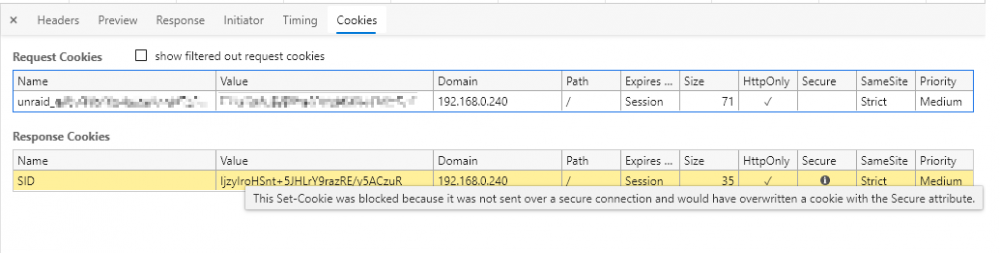
-
Go to your appdata share and remove qBittorrent.conf: (appdata)/qbittorrentvpn/qBittorrent/config/qBittorrent.conf Can also run this from the Unraid terminal (if you didn't change the config/appdata path): rm /mnt/user/appdata/qbittorrentvpn/qBittorrent/config/qBittorrent.conf This will remove all the qBittorrent settings, and install a clean config when the container starts up again.
-
I'm sorry, but I havent been able to replicate your issue. I only get the message 'RTNETLINK answers: File exists' if I use a custom IP (which is, as a side note, not recommended). Could you maybe tell more about the setup that you are using? Did you keep the Docker settings as default? Does the WireGuard config work on other devices like your PC or Phone?
-
Could you check if you would be able to log in using a In-Private/Incognito window? Edit: I was able to replicate the issue. It seems to be a caching issue from a browser. If you use Chromium-based browsers (Google Chrome, the new Microsoft Edge, Brave), Press F12, go to the Applications tab, select 'Clear Storage'. Note that this will also clear the cookies related to Unraid itself.
-
@rukiftw I'll investigate. Are you running the container in Bridge mode or with an own IP (like br0 custom IP)?
-
I haven't changed any settings myself, except disabling the temp-storage. Connection: TCP/µTP Port 8999, use UPnP/NAT-PMP Connection limits: 50/10/20/4 Bittorrent: DHT/PeX/Local Discovery With how many DHT Nodes are you connected, shown at the bottom of the page. Also; If you click on a torrent and go to the Peers section, do you see others? And, what is the status of the trackers? Do they show as Working, Updating or Not working?
-
Do you have this problem with no vpn, WireGuard or OpenVPN? I personally have been using WireGuard for the past two days and I've uploaded more than 33GB already, which is normal for my speed.


