Dyon
Members
-
Joined
-
Last visited
Everything posted by Dyon
-
Does 'Server Error' show when you try to start/stop the Docker? Or do you see this in the WebUI of qBittorrent? If it is the WebUI, could you also share the Docker log of the container and the /config/qBittorrent/data/logs. PLEASE MAKE SURE YOUR IP IS HIDDEN FROM BOTH LOGS
-
THIS PROJECT IS DEPRECATED Due to loss in interest in maintaining Docker container, this project is no longer being worked on and no updates can be expected. ------------------------------------- Welcome to my fourth Docker Container that I've ever created. qbittorrentvpn, a fork of MarkusMcNugen's qBittorrentvpn, but with WireGuard support! Overview: Docker container which runs the latest qBittorrent-nox client while connecting to WireGuard or OpenVPN with iptables killswitch to prevent IP leakage when the tunnel goes down. This project is based of my DyonR/jackettvpn, which is based of MarkusMcNugen's qBittorrentvpn. Base: Debian 10.5-slim Automated Build: Not yet Application: https://github.com/qBittorrent/qBittorrent Docker Hub: https://hub.docker.com/r/dyonr/qbittorrentvpn/ GitHub: https://github.com/DyonR/docker-qbittorrentvpn Because this project is quite similar to MarkusMcNugen's Project, I asked permission of him beforehand.

-
Hello, by default every 300 seconds the container sends out a ping to one.one.one.one by default. If this domain is unreachable the container will shutdown, and normally automatically restart. This normally happens if the connection with the VPN is not working anymore. Could you verify the following: Click the jackettvpn Docker, select Edit, in the top right change to slider to Advanced View and check if Extra Parameters has the following: `--restart unless-stopped` This makes it so that the container automatically restarts if it goes offline when the domain is unreachable.
-
That's a good question, however, how Magneticod exactly works is beyond my knowledge. From my own testing I noticed that a higher neighbor count increases the amount of torrents found per hour, and lower numbers resulted in lower results, so it seems logicial that it has to do with to how many nodes it connect. However, when running `netstat` on my machine to check the amount of connections I didn't see a significant change in open connections. magnetico has, in my opinion, no real good documentation about this. The GitHub Issues page of magnetico often gets replies from people with more knowledge about it. If you wish to know how it works you can ask there 😄
-
Welcome to the third Docker Container that I've ever created. owncloud-client. A Docker to synchronize with other ownCloud like environments, a project forked from the GitHub user toughIQ and altered to my wishes, with Unraid in mind. I couldn't find something that did this, thus I made it myself. Overview: This Docker runs an owncloudcmd instance that connects to an ownCloud-like environment and authorises using netrc The reason I created this is because I wanted to sync Trans IP's STACK to my Unraid server. That product is based on Nextcloud/ownCloud. This Docker should therefore work with any of those environments. This Docker can also be used to sync with a Nextcloud server that a friend hosts for example. Base: Debian 10 Automated Build: No Application: https://github.com/owncloud/client Docker Hub: https://hub.docker.com/r/dyonr/owncloud-client/ GitHub: https://github.com/DyonR/docker-owncloud-client
-
magneticod does not support proxies. Hence the Docker does also not support this. I do recommend routing the Docker through another Docker that suppots a VPN. Spaceinvader One has an amazing video about how to do this right here:
-
Awesome! You can also play around with the neighbors value to see at what point it stops works. I believe that the neighbors value basically means with how many nodes magneticod will connect, so the more the better. Also, don't forget to disable verbose. Since the log file can build up quite quickly.
-
Could you do the same but with MAGNETICOD_NEIGHBORS set to 100?
-
That is quite odd. Out of the box without any configuration it should work fine. It could be possible that your network/router blocks the traffic, since it's a quite heavy application on the network. I personally route the container through a VPN (I do it via my Firewall, but routing it through any of Binhex's VPN containers should work also, for reference check out this Spaceinvader One tutorial about on how to do this: https://www.youtube.com/watch?v=znSu_FuKFW0. Could you set the environment variable 'MAGNETICOD_VERBOSE' to 'true', open the console of the container and execute the following command: 'tail -f ./Logs/magneticod.txt' This is what a normal working environment should look like: If yours doens't look like this, most likely not 'Fetching' anything, I recommend submitting an issue to the magnetico GitHub. Note, there are multipe reports about magneticod not discovering torrents, but these are all quite old: https://github.com/boramalper/magnetico/issues/85 https://github.com/boramalper/magnetico/issues/132 Edit: another thing that you could try is lowering the MAGNETICOD_NEIGHBORS to 100 for example, default is 1000. Edit 2: About the databases, you can take the database of someone else and use that, but you can also let magneticod generate it's own database, this is what gets generated in /mnt/user/appdata/magnetico, you don't need to place anything there.
-
Magneticod indexes the DHT network. Before it is able to find torrents, it needs to crawl around on the DHT network and find torrents. It is kinda like hosting your own torrent website, but it does look for torrents by itself and not depend on submissions of .torrent. Note that I did not develop magneticod or magneticow, thus I recommend looking at the project page over here: https://github.com/boramalper/magnetico There is also a community database dump, in which multiple people that run magnetico all merged their database together: https://github.com/boramalper/magnetico/issues/218 The latest dump is from the GitHub user kescherCode and can be found here: https://www.kescher.at/magneticod-db. This database contains about 13 million torrents and is about 40GB decompressed. I really think this project in interesting, thus I decided to make a Docker container for it, since it's more flexable than the Dockers provided by magnetico itself
-
Welcome to my second Docker Container that I've ever created. magnetico-environment. A Docker to run the magnetico project. Overview: This Docker runs a magneticow and magneticod instance. In short: magneticod crawls the BitTorrent DHT and adds torrent information that it finds to its database. magneticow is the simple http interface that you can use to search the database. Base: Debian 10 Automated Build: No Application: https://github.com/boramalper/magnetico Docker Hub: https://hub.docker.com/r/dyonr/magnetico-environment/ GitHub: https://github.com/DyonR/docker-magnetico-environment
-
I do not maintain linuxserver/jackett, however, you can try force updating the container by selecting advanced view in the top right in the Docker tab of unRAID. Then it will show you more information about all containers, including a Force Update button next to the container.
-
The last update from 3 hours ago should've fixed it. The creators of Jackett accidentally removed a line in their program: https://github.com/Jackett/Jackett/releases/tag/v0.14.299 Please update your Docker in unraid to fix it
-
I haven't had report of users yet. Have you already tried to remove the Docker, appdata and completely re-install jackettvpn? It's hard for me to troubleshoot an issue that only one user so far reported.
-
If a new version of Jackett gets released, a new Docker gets build. Edit: you don't need to update when a new version gets released. But if you don't it is possible that some of the trackers/websites you use in Jackett won't work. That's pretty weird. It still should work fine. I'll look at this in a few moments.
-
Hello, sorry for the late reply, but I didn't get a notification that someone did reply on here. Do you still have this issue? If so, I can get an AirVPN trial and look in what the problem may be.
-
Thanks for your reply! ? I don't think that the project I forked was based on a Binhex docker. I also didn't find any references to Privoxy in the project I forked either. The only binhex's thing that I could find in my project is 'openvpn/start.sh' For me personally it was easier to create a docker that uses OpenVPN since I never used privoxy, or docker, before. "translating/restructuring" the project I forked from qBittorrent to Jackett was do-able for me, since I had no experience with Docker also. Besides that, I also don't want to create containers that need to depend on others containers. For example; If I had a jackett+privoxy+openvpn, and entered the proxy in 5 other containers, if my jackett+privoxy+openvpn gets taken offline, none of my other containers would have access to the internet. And my experiences with using proxies aren't that good either. But of course, you could use a standard Jackett and enter a proxy/privoxy server address. I just perfer using a separate OpenVPN client for all my containers.
-
Welcome to my very first Docker Container that I've ever created. jackettvpn. A fork of MarkusMcNugen's qBittorrentvpn. Overview: Docker container which runs the latest headless Jackett Server while connecting to WireGuard (Experimental) or OpenVPN with iptables killswitch to prevent IP leakage when the tunnel goes down. This project is a revamped version of MarkusMcNugen's qBittorrentvpn. Reason: I put this container together because I couldn't find a Jackett Docker that supported WireGuard or OpenVPN, just like qBittorrentvpn does. Some internet service provides over the world have blocked access to certain torrent websites, which makes Jackett unable to query them. Jackett natively does support a proxy, but not everyone has access to a proxy. A VPN is more common than a proxy. Base: Ubuntu 18.04 Automated Build: Yes Application: https://github.com/Jackett/Jackett Docker Hub: https://hub.docker.com/r/dyonr/jackettvpn/ GitHub: https://github.com/DyonR/docker-jackettvpn

-
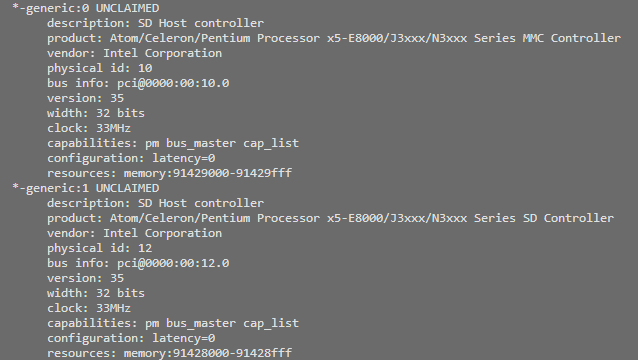
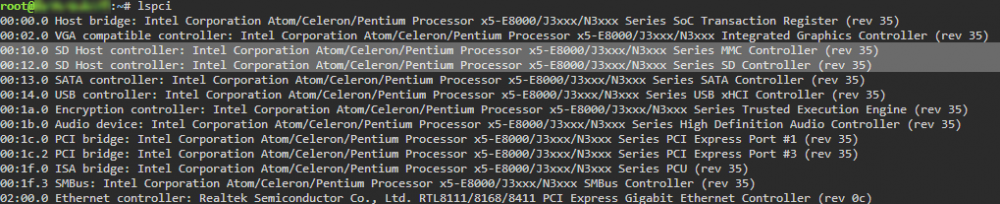
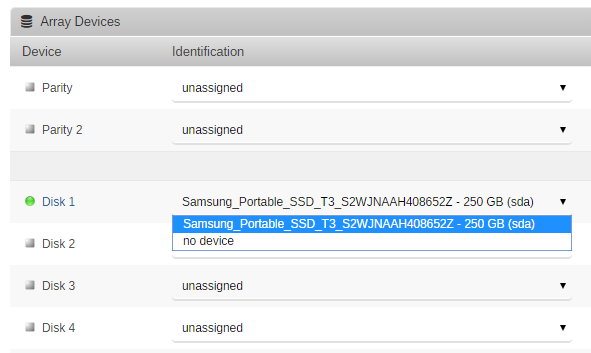
Hello, Today is my first day of trying out unRAID, but I am running into a problem already. So, I am using a UDOO x86 as my unRAID device, but unRAID doesn't detect the MicroSD slot, and the 32GB of eMMC. What I've tried: - lshw, lspci, DOES show the device - BIOS detects the device, Windows installed on [eMMC] it works fine - Updating the BIOS to the latest version, didn't work - Changed the eMMC from APCI to PCI - Changed the BIOS from EFI to Legacy and vice vera Sadly all of that didn't result in the extra storage/disks showing up anywhere. I hope anyone here has an idea of how I can fix this If you need any more information, please let me know!