






Boldly_Goes
Members
-
Joined
-
Boldly_Goes changed their profile photo
-
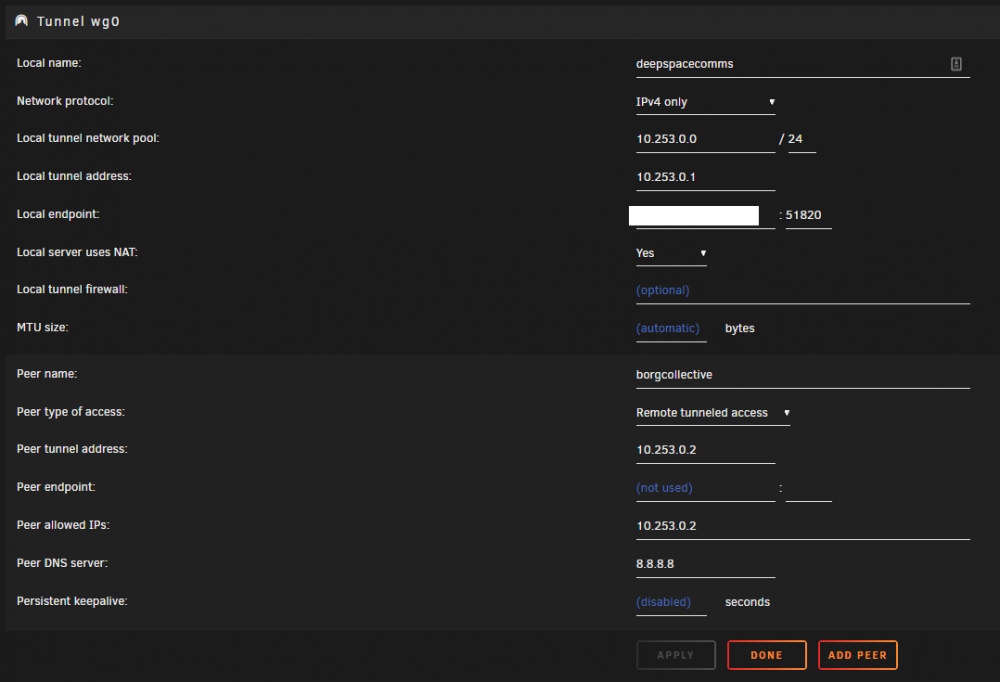
Hey there, I'm having issues getting the WireGuard figured out as well. I have Unraid Server 1 (192.168.33.x) and Unraid Server 2 (192.168.1.x) and two different locations. I want to map a share from Server 2 on Server 1 so that I can run remote backups (back up Server 1 files TO a share on Server 2). I have WireGuard configured per the screenshot below AND the connection is good - handshake transmits data, if I hit the ping button I get a reply. So now what? If I try to map a share using Unassigned devices it can't find anything even when specifying the IP. Is there something else I'm supposed to do?
-
I really like the new Netdata cloud feature, I sign in, claimed my node and ran the script they provide for dockers. I get an automatic update and now that claimed node is unreachable and I have to go through the process, over, and over, and over. How can I configure Netdata so it's name persists so I can get updates but also keep it sync'd with their cloud?
-
Every single day when I check for updates, NetData comes up as having an update. Sometimes 2x a day. Are updates really being published for this app this frequently? The last post on this forum was early June...so I'm wondering if I've just been updating over itself over and over this whole time???
-
Hey, I'm running 6.3.5 installed your plugin from the app mart. Not seeing it listed on my plugins page. Nor when I go to Settings/IPMI is anything loading. Help!

