





JohnyClassic
Members
-
Joined
-
Last visited
Everything posted by JohnyClassic
-
Thanks for all the tips cybrnook! I got it to work after deleting both network.cfg and network-rules.cfg. But all of this is great advice to get everything set up and working correctly.
-
Thanks for the help! I got it to work after deleting both network.cfg and network-rules.cfg. Not sure why.
-
Hi, I've been using unraid for a a couple of years. I'm just migrating to new hardware. From what I understand it's supposed to be pretty easy and straight forward but for the life of me I can't get it to generate an IP and connect to the network. I'm going from an FX-8350 to a TR 2950x using a X399D8A-2T mobo. A fresh install of unraid on another usb drive generates an IP and connects just fine. But I need my existing setup to work, I have important work systems on there. My best guess is that I left network configs from my old system that don't apply to this one but I'm not sure. I've tried the troubleshooting steps listed here: I've tried copying the network.cfg from the fresh install, i've tried deleting the network.cfg, i've tried setting a static IP in the network.cfg, I've also tried booting from a USB 2.0 port. I still can't get it to connect. The onboard NICs are intel and should work fine according to other posts on the forum. But I also moved over the PCIE NIC card from my old system that was working fine before and it doesn't connect when I'm plugged into those ports either. I'm not sure if it's related but I'm getting "modprobe: ERROR: could not insert 'it87': No such device". But that's a temp sensor thing correct? I've attached my diagnostics file. I'd really appreciate the help getting this figured out. Thanks! origin-diagnostics-20210530-1049.zip
-
Hey, Cybrnook. I finally got around to buying the X399D8A-2T. But for some reason I can't get my existing unraid usb to boot and get an IP assigned. When go to the ip address I get the IPMI login screen but I can't get to the unraid main screen. A fresh unraid install boots just fine, it gets an IP and I can navigate to the unraid page. Did you have that problem with yours?
-
EDIT: Nevermind, I figured it out. I used Krusader and I had no permissions issues. Thanks! Hi everyone, I'm new to docker and running a Minecraft Bedrock server. I'm having trouble moving my existing world to the server's Worlds folder. I'm getting "Permission Denied. You need to be granted permission by user/nobody." I'm accessing the appdata share from Windows 10. How do I grant my self access? Thanks so much! So far, everything else is working great!
-
Hey, just wondering if anyone has experience running Unraid on the the AsRock Rack X399D8A-2T motherboard for Threadripper seen here: https://www.asrockrack.com/general/productdetail.asp?Model=X399D8A-2T#Specifications Found a couple of threads by people considering running it but not sure if anyone has actually used it. I'm especially curious if the on board Intel X550-AT2 10gb nic will work? Thanks!
-
Thanks for the reply, even with everything default it still doesn't work.
-
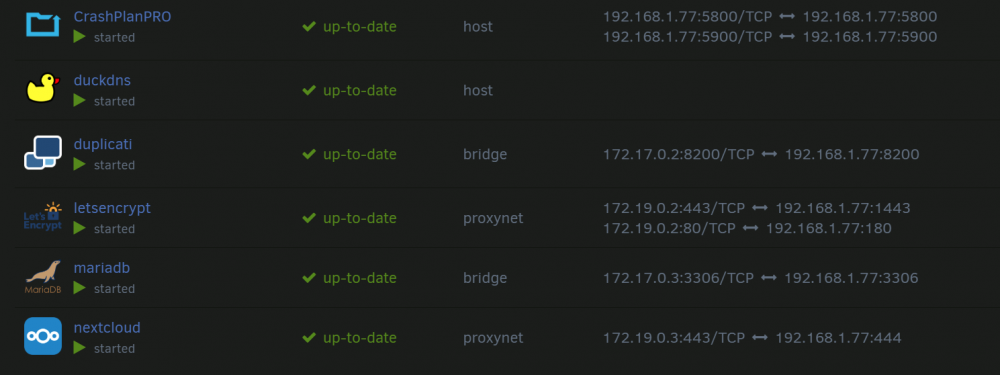
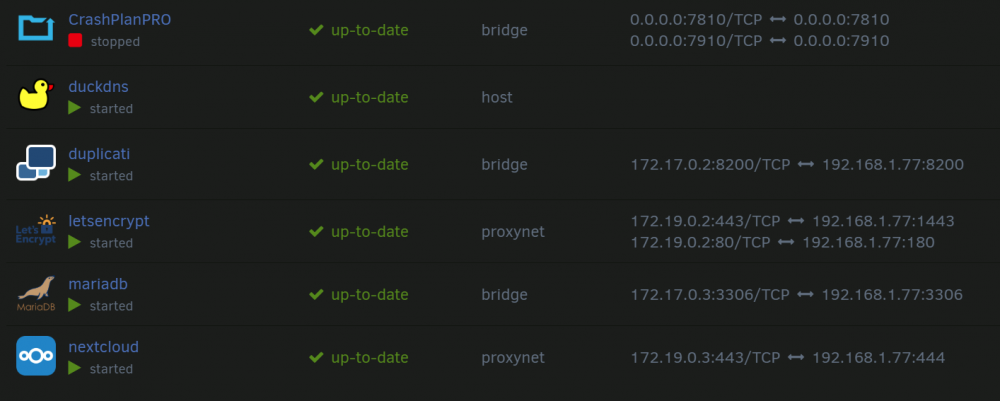
Hi everyone, I'm having trouble getting my Crashplan Pro docker to connect. When I login it just says 'unable to sign-in'. Crashplan Pro works fine on my main PC and the same network. I think it may be an internal port conflict. I have a few other docker services running (see attached). Anyone know if this can be a problem or how to fix it?
-
Hey, thanks for the reply. I hadn't set up nextcloud to be accessible from the internet yet. It's still set to be accessible via the local network IP. But when I call that local network IP or click webGUI it doesn't connect. According to Spaceinvaderone's video, even once it's set up to be accessible from the internet, you should still be able to access the webGUI calling the local network IP. Do you happen to know if there is anything that could cause that?
-
Hi Everyone, I'm having an odd problem I can't figure out. I'm following Spaceinvaderone's guide to installing Nextcloud and letsencrypt/reverse proxy to connect remotely. I set up the Nextcloud and Mariadb dockers and everything worked fine. But I had to get a new router because my old one wouldn't port forward properly to allow Letsencrypt to generate a certificate. After setting up the new router and getting Letsencrypt to work I can no longer access the Nextcloud WebGUI. The static IPs assigned in the router are the same as before. My other dockers and VMs seem to work fine. When I right click the Nextcloud docker and click WebGUI or when I type in the IP and port manually (https://192.168.1.77:444) I get 'This page isn’t working 192.168.1.77 is currently unable to handle this request. HTTP Error 500'. May not be caused by the router but all the settings seem to be fine. Anyone know what could be causing it and how to fix it?

