






GuildDarts
Members
-
Joined
-
Last visited
Everything posted by GuildDarts
-
Update Added: New icon style label-tab (image below, thanks @hernandito) Added: Only animate icon on hover This will pause gif/svgs that are animating and only animate them when hovering over folder. Added: Preview icons grayscaled as option Added: Preview display only on hover Change: Expand button style default Fixed: Prevent a bit more bad input Fixed: Improve dashboard expanded started only It does not fix it entirely but should be a bit better.

-
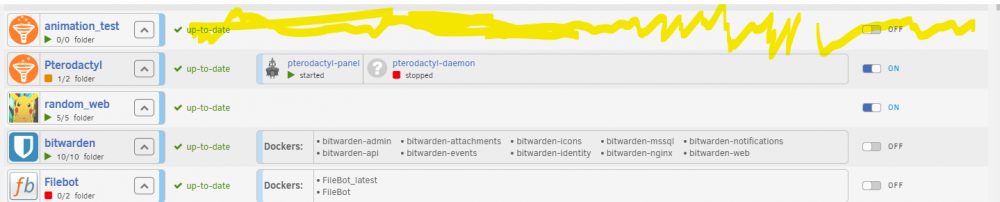
@Josiah an update about animating on hover I have got i working and also working with gifs. Im not using object as it was causing issues (like not being able to open context menu). Im inserting the svg into the dom, which fixes the use with context and allows me to edit the svg with javascirpt. Unsure if there might be a conflict if a svg uses the same id has some element in unraid, but i guess time will tell Something i have been playing with is animating it when you hover over any part of the folder and not just the icon. I feel this lets you see the sweet animations more often (the lazy yellow also triggers animation). The way i'm doing the hover on animate, funnily only works with the icons that are always animating and not the ones set to hover on animate. The ones set to hover on animate will only animate when hovering over the icon itself.
-
It looks like svg hover animation does not work with img. Thats why next version im trying to make them into object for svg so it can animate. Having some issues with it but should be able to get it working
-
Yeah sorry about that. Right now its not so good with special characters. I would stick with english letters and _-
-
Thanks for reporting, it has not been reported yet. Will fix in next version And also thanks for the very clear instructions
-
Hey it really love your icons the animations are just so cool, my only thing is that i feel it gets a bit to busy with them animating all the time. When i saw your original intent was to only animate on hover i was like please please can i have. After a bit of playing found out that if you use and object instead of img it will animate on hover. Will make it use object instead of img for svgs next update
-
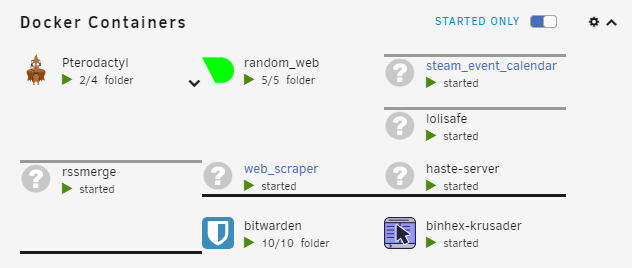
Might do it in the future, is there a bug report for the webui not showing with docker as network type? I would kinda want the issue fixed, so i dont have to do the xml parsing lazy me Also cloud you point me to a guide on how to "specify a container as the Network Type" i dont know how or what its for About the Dashboard alignment, im guessing you're referring to when its expanded, or is this another bug
-
I always get scared when i hear about messed up config (hoping its just a one of) In any case will add a check to stop user from making a folder with the same name as an existing one Thanks for the kind words above
-
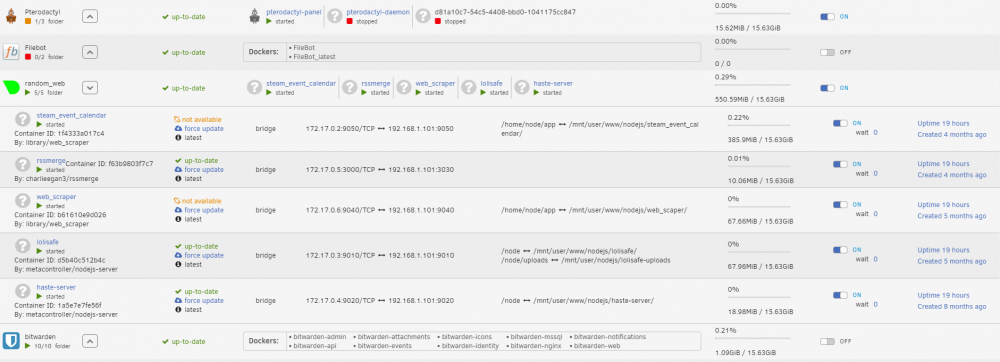
Update Preview and expanded folder style changes, picture bellow (thanks @hernandito) Display current folder for dockers in editFolder Allow moving docker from one folder to another Added: preview no-icon context-menu Added: regex docker selection Added: WebUI subcommand doing [DOCKER:some_docker_name] will get that dockers webui settings. It does not parse the xml just gets the element (sorry @JesterEE) Fixed: preview icon breaking save sort-order There are a few more changes but they are minor
-
Hey i kinda get what you're describing just can't seem to break it The next version changes a few things about sorting and the preview, so might somehow fix it. If you still have the issue after the next version could you make a short video showing the bug? New verison should be out in a day or two Edit: Disregard everything above, found the issue while looking for another issue
-
Ah makes total sense now Can definitely add that About adding the folder, i think right now it prevents you from adding a docker thats in a folder to another folder. Will think about also adding that as i can see it being anoying having to first remove then add the docker
-
Hey i can look into being able to CTRL-drag a docker into a folder. I'm unsure what you're referring to as 'current page' could you make a img showing kinda what you want. Also about the graying out not being very noticeable, im asuming your using dark mode, will try and see if i can make it a bit better with that
-
I think what was in my head was some svg magic will look into doing that as it might be cool still love the icons thanks again, just thought i would be cool to let the user change the folders color without having to use photoshop
-
Awesome job man thanks for the contribution ♥ (really love the pirate) is it possible to change part of icon color with code, ie make a color picker for the blue/yellow folder part?
-
Did you fix your issue, just curious
-
I would check browser console on the docker page and see if you get any errors. Just so i fully understand on the docker page the folder is not displaying, but it does on dashboard? And it's only that one folder right? very weird
-
That would be very cool. If you want you can start a thread
-
It should hopefully be under 'ADVANCED VIEW' i have added extra options there just so it's a bit less cluttered (not the most intuitive )
-
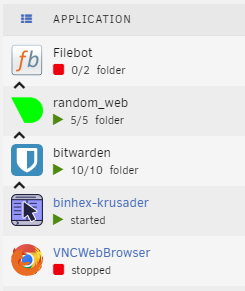
Update Add new expansion button Add docker preview Thanks again @hernandito for the visuals, tried my best to make it look like it If you think something looks of please tell me and i will try to fix it A few extra things I could make the old button not take the extra space like this (looks a bit odd) Another thing is that if you have a few folders it starts to take a while to change the same setting on all of them. Maybe i should add a way to change the same setting on multiple folders

-
wow that was fast yeah disregard my think matching colors hehe will try and make i look like your img, that looks dang slick
-
When you say 'icon can also have a choice of being the same color ones' do you mean that the icons in the preview should be selected based on matching colors? about greyscale/transparent will see how busy it gets and then got from there
-
First of lets me just say thanks for the amazing visuals and suggestions About the expansion chevron never noticed as i just leave mine in advanced view, but yeah thats alot of wasted space I also love the idea of having a preview to the side, think i will add both with and without icons and give the user the option to decide Thanks again for the great suggestions
-
Great that its working im thinking that the main reason why its taking long to load, is that i store the icons in the folders.json file and that bloating the file size. could you export your folders (add folder -> import/export -> export all folders) then either add the file to a post or you can check 1. how many custom icons there are, will be the lines that start with "icon": "data:image\/...... 2. the size of the exported json file
-
Update Memory load should now display MiB GiB, heck this baby will go up to Yobibyte @Mitch.Petersen Fixes an issue with not waiting for folders to load. The way i fixed this can potencaily cause folders to load in later than dockers, will look for a way to fix that but for now better than not loading at all @Natcoso9955 Dashboard expanded will now also work with more than 3 rows of dockers, for those of you using CA Dynamix Unlimited Width
-
hey i have had one user report issues with folders not loading, but i have not been able to figure it out. Your edit2 gave me a clue, it might be that the folders dont get loaded before the loadlist command gets run (loadlist is what loads in the entire page) will try and make everthing into a folder like you did in edit and see if it breaks for me. sorry for the inconvenience edit: Yeah looks like folders are not loading before loadlist triggers. will fix this in the next update, should be within the next 24hours (its 3am for me so im going to bed)






