





crspangenberg
Members
-
Joined
-
Last visited
Everything posted by crspangenberg
-
CPU has been replaced, segfault errors have seemed to resolved. Thank you @JorgeB.
-
@JorgeB same issue occured with a different stick of RAM.
-
No, I will try with a different RAM stick next.
-
@JorgeB, I pull out all sticks of RAM except 1, ran Memtest on that stick which passed, and started the server back up. Here are the updated logs, seems to be the same issue. Based on what you're seeing, is it same to assume this is a CPU failure? tangosierra-diagnostics-20250506-0710.zip
-
Thanks for the quick reply Jorge, oh man, that's really a bummer. Doing a quick search I am not seeing any fixes, is that correct?
-
I still am having issues here. Either with general unresponsiveness, failed safe shutdowns, or parity checks not completing / hanging up. I am debating on starting fresh, but would like another opinion before I take this drastic action. Obviously I will keep all of my data as described in other form posts, but I need to figure something out, so I can get back to a stable system. Edit: I have updated to unraid 7.0.1. My system specs as follows: M/B:ASUSTeK COMPUTER INC. ProArt Z790-CREATOR WIFI Version Rev 1.xx s/n 230418558400358 BIOS:American Megatrends Inc. Version 2302 Dated 05/28/2024 CPU:Intel® Core™ i7-14700K @ 5445 MHz HVM:Enabled IOMMU:Enabled Cache:L1 Cache: 384 KiB, L1 Cache: 256 KiB, L2 Cache: 16 MiB, L3 Cache: 33 MiB, L1 Cache: 384 KiB, L1 Cache: 768 KiB, L2 Cache: 12 MiB, L3 Cache: 33 MiB Memory:128 GiB DDR5 (max. installable capacity 256 GiB) Network:bond0: fault-tolerance (active-backup), mtu 1500 Kernel:Linux 6.6.78-Unraid x86_64 OpenSSL:3.4.1 tangosierra-diagnostics-20250505-0721.zip
-
@ola doe, I uninstalled the Unraid Connect plugin and reinstalled. That seemed to fix the issue. I also updated to Unraid 7.0.1. I have been up for 3 days 6 hours so far, and so far so good.
-
I will disable and report back, thank you!
-
Good morning wonderful Unraid Folks, twice in the past week the unraid web ui has locked up, and I have had to reboot using SSH. My VMs and Dockers still function when this occurs. I have attached my diagnostics and hopefully they will paint a better picture. Thanks in advance for the help. tangosierra-diagnostics-20250403-0737.zip tangosierra-diagnostics-20250407-0921.zip
-
@JorgeB, Please disregard previous post. I copied over the plugins folder and everything seems to be working as intended. I just need to transfer the license over and we should be good to go. Thank you so much for your help. Is there anything else I should do to make sure this is function as it should?
-
@JorgeB sorry for the confusion. But if I restore from the backup that I have and add in a new cache drive, will everything go back to normal? All plugins / drives / etc. No more modifications.
-
@JorgeB, correct Cache doesn't exist. Changing the shares does fix the issue, however Inoticed that my Plugins are now missing as well. If I restore from the backup and add in a new Cache drive will I cause any issues? I really would like to be back to where I was before this all started occuring. I've made so many changes to the system over the years that I really don't know where to begin in getting everything back to where it was.
-
@JorgeB Okay, array is back up. Shares are now showing errors: I see in my community application backup there is a flash back from a few days ago. Would my best course of action be to replace the SSD with a drive of the same size as a cache pool. And then restore from this backup?
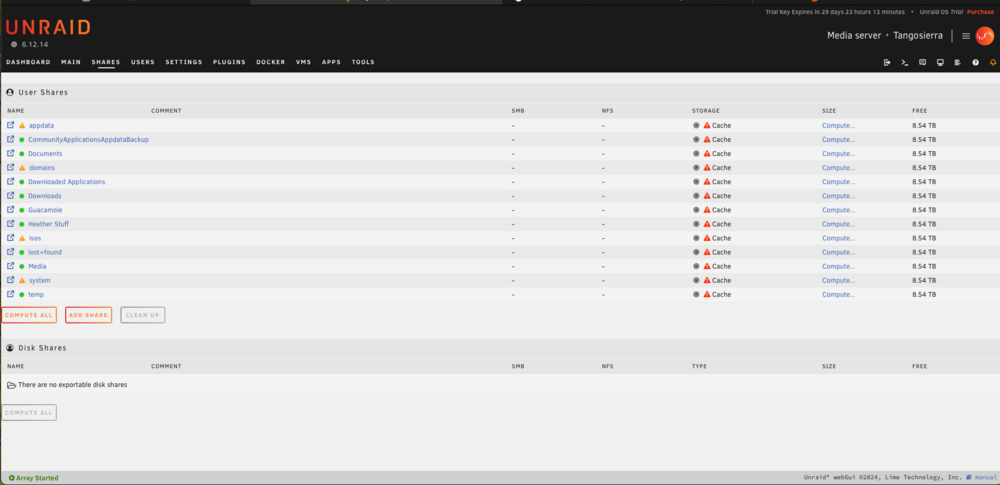

-
@JorgeB, that cache drive that started this whole thing isn't being recognized, before I start the array, should I replace the drive with a different ssd? Does it matter the size? In reality, I don't necessarily need the drive, could I use one of the existing NVME drives, and adjust the shares accordingly?
-
Thank you @JorgeB , anything I should be careful of as I configure this thing? When I create the new USB, should I utilize the existing OS Version? Or should I update to the latest?
-
No, unfortunately the flash drive went belly up. Can any of this information be gathered from the diagnostics that were run on the server before this happened?
-
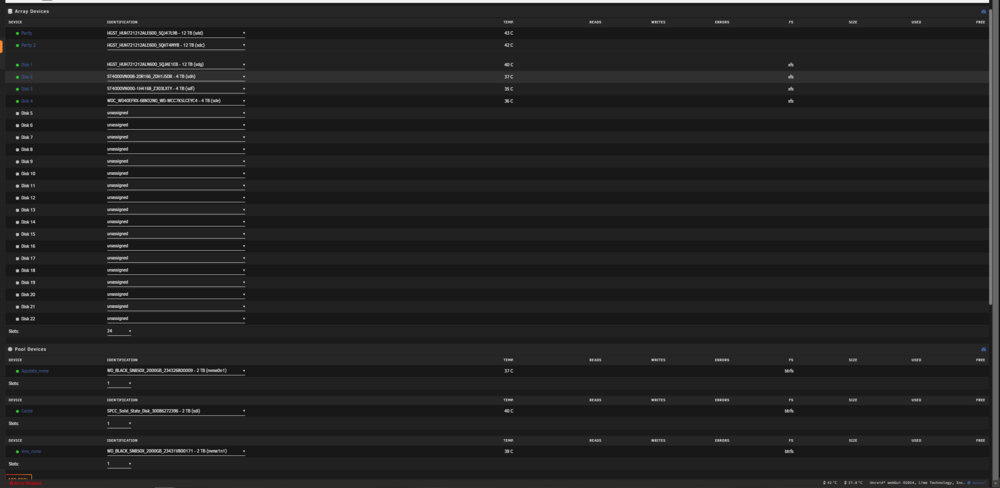
So how screwed am I, for whatever reason the cloud based flash backup is no longer active and I can't generate a backup from there (even though I have been able to in the past). The USB drive is now unreadable... I have a picture of the drive assignments but that is about it...
-
Sounds good, thank you Jorge, I will go pickup a new flash drive today and get that provisioned. Appreciate your help as always.
-
Thanks Jorge, what do you think that cause is? A faulty flash drive or maybe a different port? This drive was installed less than a year ago. Attached are the updated logs with the system running for about 16 hours. tangosierra-diagnostics-20241205-0626.zip
-
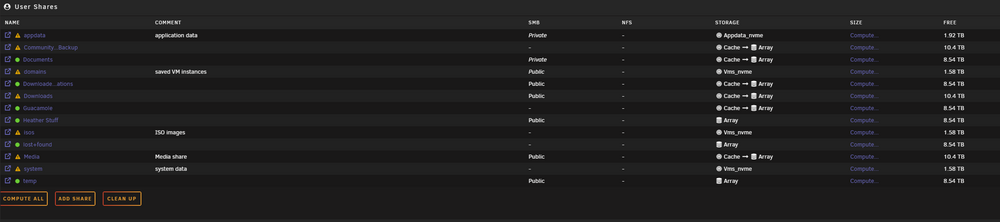
I was able to get the docker containers to fire back up by doing a force update on them. I still have about 200gb on the Cache Drive, I can shut the system off and bring it back online and move some of the data, however I am not sure this is good for the system as a whole. Any help would be greatly appreciated. Current Unraid Version 6.12.13 Array (2) 12TB Parity (1) 12TB Data (3) 4TB Data (1) 2TB NVME for AppData (1) 2TB NVME for VMs (1) 2TB SSD for "Cache" Mapping per below: I am happy to use one of the NVME drives ILO of the SSD. Just need to know what my best course of action is here. Thanks!
-
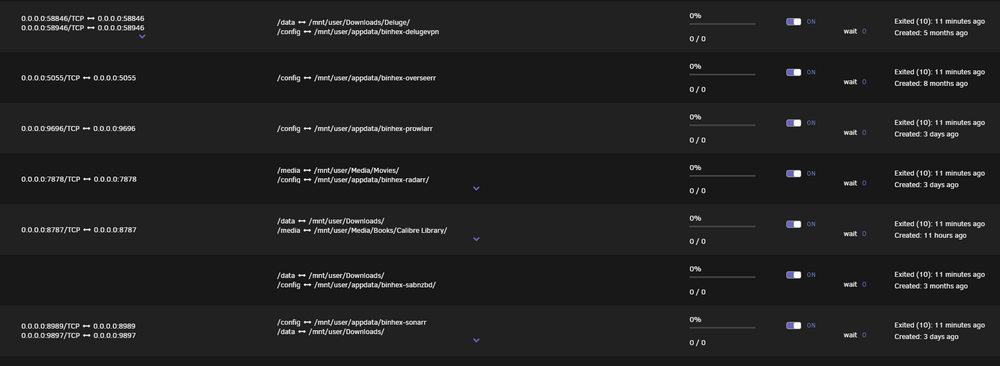
Another restart and the cache drive is back.. The following containers aren't running:
-
Restarted Unraid, Cache Drive is unavailable agian.

-
Hello Wonderful Unraid folks, I was having an issue with AppData Backup Failing to Run, and noticed my Cache Drive was not mountable. I restarted unraid and the drive came back momentarily and then off again it went. I shut my server down, disconnected and reconnected the drive and now certain dockers are not functioning. Cna you help me get my system back up and running? Diagnostics attached. tangosierra-diagnostics-20241204-1137.zip
-
I am having a similar issue, I went to access a recipe and noticed it was gone. I found the receip online again and added it but it has a (1) appended to the name, when I try to change the name I get the error that the recipe already exists. Something odd as well, when I try to log in all recipes are gone. If I am logged out the receipes are visible, exist the recipes that originally disappeared. Any help on this would be great, I love this software.
-
I performed a bios update, and moved the data back onto the drives, no issues for almost a week. Thank you for all of your help.



