




Shyrka973
Members
-
Joined
-
Last visited
Everything posted by Shyrka973
-
Hi @dlandon, In zmeventnotification.ini.default, the [mqtt] section is missing. Thanks.
-
I finally understood how the script is launched: /etc/my_init.d/999_advanced_script.sh. This is a basic feature of the image. Thanks again.
-
Thank dlandon ! In your last commit, i do not see how this script is launched? I do not see any changes in the 40_firstrun.sh script.
-
Yes. I understand. I need to execute these commands in this docker after its update: apt-get install python-pip pip install opencv-python apt install libsm6 libxext6 libxrender1 Can you add the execution of a script (example: update.sh ) if it is present in /config each time the docker is launched ? Thanks.
-
Hi dlandon, Thank you very very much. Look this: 2018-10-28 12:03:59 zmeventnotification 1051 INF hook script returned with text:detected:person:100% diningtable:77% chair:64% cell phone:52% exit:0 Now, I do not have any more false alarm because it must detect someone to warn me. To test in the long term. Can you remove "chmod -R 666 /config/hook" ? I put executable scripts in /config/hook/ folder that are copied to /usr/bin folder in the docker but after restarting the docker, the scripts are no longer executable. If it interests the world, I can write a howto. If it interests a lot of people, maybe dlandon can integrate it into the docker or create a specific docker.
-
Il use mosquitto with MQTT. Extract from here (read the original): zmeventnotification.ini now contains a hook attribute. If you specify a script file there, every time the notification server detects an alarm (it interacts with ZM using shared memory and checks the shared_data structure for events), it passes the event id, monitor id and monitor name to this script. The script can do what it chooses and if it returns 0 then the event server will process the notification and send it out to listeners. If it returns 1 it will not. So the script is where all the action is. I then used this framework to do object detection and based on the results, either notify or not. The goal: be notified of vehicles and people.
-
II disable ssl and I configure mqtt. This container is the only one I do not update automatically. No problem. I'm waiting for your solution. Thank you very much. Do you already test or do you think to integrate as an option (a cocker variable ?) this: detect_wrapper.sh ? Just add the necessary: detect_wrapper.sh, openCV, yolov3-tiny.weights, yolov3.weights, yolov3-tiny.cfg, yolov3.cfg, coco.names, ...
-
Hi, At each update of the container, I lose the modifications of zmeventnotification.ini. Can you copy the new zmeventnotification.ini to /config/zmeventnotification.ini.template ? And if /config/zmeventnotification.ini does not exist (new install), create it with /config/zmeventnotification.ini.template. This is just an example. Tkanks.
-
Hi, With the new iOS app, I can see log files now. Thanks.Hi, With this latest version, I have the same access problem. I: 2018/10/03 22:27:30 app.go:57: controlr v2.14.0-394-675a295-v2018.10.03 starting ... I: 2018/10/03 22:27:30 app.go:65: No config file specified. Using app defaults ... I: 2018/10/03 22:27:30 core.go:73: starting service Core ... I: 2018/10/03 22:27:30 core.go:266: Created system sensor ... I: 2018/10/03 22:27:30 core.go:287: Created apc ups ... I: 2018/10/03 22:27:30 server.go:94: Starting service Server ... I: 2018/10/03 22:27:30 server.go:113: Serving files from /usr/local/emhttp/plugins/controlr I: 2018/10/03 22:27:30 server.go:173: Server started listening http on :2378 I: 2018/10/03 22:27:30 server.go:185: Server started listening https on :2379 I: 2018/10/03 22:27:30 api.go:46: Starting service Api ... I: 2018/10/03 22:27:30 api.go:94: Api started listening https on :2382 I: 2018/10/03 22:27:30 app.go:85: Press Ctrl+C to stop ... W: 2018/10/03 22:27:40 core.go:153: Unable to get unRAID state (dockers): Get https://127.0.0.1/plugins/dynamix.docker.manager/include/DockerContainers.php: dial tcp 127.0.0.1:443: connect: connection refused W: 2018/10/03 22:27:47 server.go:291: error reading from connection: EOF
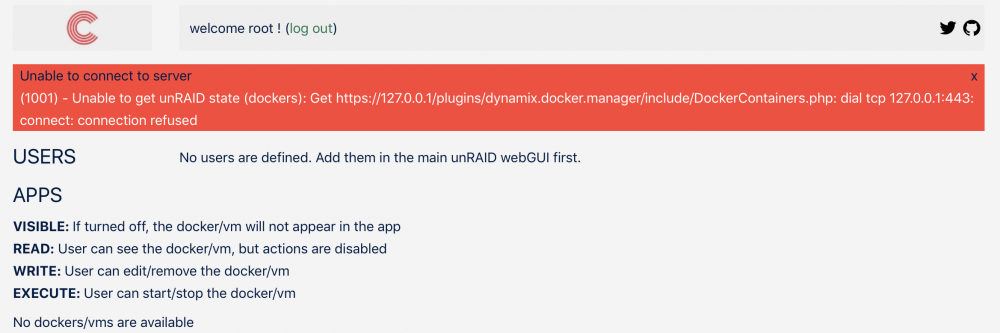 Ok. I understood. I am now in 13.0.6. Thanks.Ok, I'm waiting this week. Thanks. I have already tried to update via the webui but it does not end successfully. Just for 13.0.0 to 13.0.6 ? 😓 No, I'm waiting the rebuild.😅 Thanks.Yes. I run letsencrypt container but not to access the admin interface of the server. I did a test by disabling the container: it's same problem.Hi, You use this source https://download.nextcloud.com/server/releases/latest.tar.bz2 for build this container. The last NextCloud version is 13.0.6 ? Can you just rebuild this container ? Thanks.You are right. SSL Settings Is set to "auto". But I can't add the server with port 443 ans SSL on in app. If I connect to http://tower:2378, i am redirected to https://tower:2379/#/permissions and I get this error after login: welcome root ! (log out) Unable to connect to server (1001) - Unable to get unRAID state (dockers): Get https://127.0.0.1/plugins/dynamix.docker.manager/include/DockerContainers.php: dial tcp 127.0.0.1:443: connect: connection refused controlr.log: I: 2018/08/29 22:55:21 server.go:173: Server started listening http on :2378 I: 2018/08/29 22:55:21 server.go:185: Server started listening https on :2379 I: 2018/08/29 22:55:21 api.go:46: Starting service Api ... I: 2018/08/29 22:55:21 api.go:90: Api started listening https on :2382 I: 2018/08/29 22:55:21 app.go:85: Press Ctrl+C to stop ... W: 2018/08/29 22:56:06 core.go:153: Unable to get unRAID state (dockers): Get https://127.0.0.1/plugins/dynamix.docker.manager/include/DockerContainers.php: dial tcp 127.0.0.1:443: connect: connection refused SSL Settings is set to 'auto' and https port to 443. Why can not I connect to unraid on port 443 ? This may be the problem that prevents the proper functioning of Controlr.I dont use SSL to connect to the server. Is there a debug mode ?Access rights on the logs: root@Tower:~# ls -l /var/log/syslog -rw-r--r-- 1 root root 228417 Aug 28 23:15 /var/log/syslog root@Tower:~# ls -l /var/log/docker.log -rw-rw-rw- 1 root root 0 Aug 28 03:22 /var/log/docker.log root@Tower:~# ls -l /var/log/libvirt/libvirtd.log -rw------- 1 root root 0 Aug 28 03:23 /var/log/libvirt/libvirtd.log controlR log: root@Tower:~# cat /boot/logs/controlr.log I: 2018/08/28 07:50:55 app.go:57: controlr v2.12.0-385-e4f90d2-v2018.07.14 starting ... I: 2018/08/28 07:50:55 app.go:65: No config file specified. Using app defaults ... I: 2018/08/28 07:50:55 core.go:73: starting service Core ... I: 2018/08/28 07:50:55 core.go:266: Created system sensor ... I: 2018/08/28 07:50:55 core.go:287: Created apc ups ... I: 2018/08/28 07:50:55 server.go:94: Starting service Server ... I: 2018/08/28 07:50:55 server.go:113: Serving files from /usr/local/emhttp/plugins/controlr I: 2018/08/28 07:50:55 server.go:173: Server started listening http on :2378 I: 2018/08/28 07:50:55 server.go:185: Server started listening https on :2379 I: 2018/08/28 07:50:55 api.go:46: Starting service Api ... I: 2018/08/28 07:50:55 api.go:90: Api started listening https on :2382 I: 2018/08/28 07:50:55 app.go:85: Press Ctrl+C to stop ...Thank you very much. Very useful your application. ? Everything is OK except the display of logs (ControlR plugin is installed and actived).Hi jbrodriguez, Your application is not available in french AppStore. Can you publish it in, please ? Thanks.I just tried it and it works: the data comes back from cache to array. I have only one SSD for the cache. I have to buy another one to secure my data. Thank you very much.Hi, I do not know if it's due to this plugin, but after pressing "Move now", more than 100Go moved from array to cache. This concerns two shares that have the option "Use cache disk" to "prefer". These two shares are no longer on any of the three disks in the array, but only on the cache. I'm surprised because mover should move data from cache to array but not vice versa. I am wrong ? How to force mover to move the data from the array to the cache ? mover every hour: Aug 25 23:00:01 Tower root: Cache used space threshhold (60) not exceeded. Used Space: 22. Not moving files manual mover: Aug 25 23:12:27 Tower emhttpd: req (18): shareMoverSchedule=0+*%2F1+*+*+*&shareMoverLogging=yes&cmdStartMover=Move+now&csrf_token=**************** Aug 25 23:12:27 Tower emhttpd: shcmd (21540): /usr/local/sbin/mover |& logger & Aug 25 23:12:27 Tower root: Manually starting mover Aug 25 23:12:27 Tower move: move: file /mnt/disk1/Logiciels/Mac/Apple/xxx.dmg Aug 25 23:12:48 Tower move: move: file /mnt/disk1/Logiciels/Mac/Apple/xxxxx].d# stat -c '%U:%G' /var/cache/zoneminder nobody:users # stat -c '%U:%G' /var/cache/zoneminder/events root:www-data # stat -c '%U:%G' /var/cache/zoneminder/images root:www-data # stat -c '%U:%G' /var/cache/zoneminder/temp root:www-dataI forgot this info: # stat -c '%U:%G' /var/cache/zoneminder nobody:usersHi, Whenever zm docker is restarted, zm is not available for an hour or more because I have a lot of camera events. The problem comes from the script 40_firstrun.sh that positions rights on /var/cache/zoneminder. If he does not find root:www-data just on /var/cache/zoneminder directory, it positions the rights on all the tree. But the rights on this directory change. I do not know when (reboot?). Can you change these lines: # Check the ownership on the /var/cache/zoneminder directory if [ `stat -c '%U:%G' /var/cache/zoneminder` != 'root:www-data' ]; then echo "Correcting /var/cache/zoneminder ownership..." chown -R root:www-data /var/cache/zoneminder fi by these; # Check the ownership on the /var/cache/zoneminder directory if [ `stat -c '%U:%G' /var/cache/zoneminder/events` != 'root:www-data' || `stat -c '%U:%G' /var/cache/zoneminder/images` != 'root:www-data' || `stat -c '%U:%G' /var/cache/zoneminder/temp` != 'root:www-data' || ]; then echo "Correcting /var/cache/zoneminder ownership..." chown -R root:www-data /var/cache/zoneminder fi Thanks.


