





ibasaw
Members
-
Joined
-
Last visited
Everything posted by ibasaw
-
new psu, no more shutdowns
-
shutdown under memtest, test multiple times, same results i have ordered a new psu => same model my temperatures are all fines, all is under monitoring ++
-
hi, since yesterday, my server running unraid shutdown itself here the log i will do memtest for the day ++ the-beast-diagnostics-20250704-0849.zip
-
ok, i had give up, i had re install a new fresh os on my internal disk, not my SSD, no passthrought, i will do snapshot for backup thank you for your time.
-
this is a physical disk, i use ssd as passthrought Any idea to fix that ? i can boot my computer with that disk, if i disconnect my usb unraid media. windows 11 works as itself on that disk, i used this disk in anotther computer with linux on it, but it works for months like this just one day, it does not boot anymore.
-
<?xml version='1.0' encoding='UTF-8'?> <domain type='kvm'> <name>Windows 11 passthrough</name> <uuid>xxx</uuid> <metadata> <vmtemplate xmlns="unraid" name="Windows 11" icon="windows11.png" os="windowstpm" webui=""/> </metadata> <memory unit='KiB'>8388608</memory> <currentMemory unit='KiB'>8388608</currentMemory> <memoryBacking> <nosharepages/> <source type='memfd'/> <access mode='shared'/> </memoryBacking> <vcpu placement='static'>8</vcpu> <cputune> <vcpupin vcpu='0' cpuset='4'/> <vcpupin vcpu='1' cpuset='12'/> <vcpupin vcpu='2' cpuset='5'/> <vcpupin vcpu='3' cpuset='13'/> <vcpupin vcpu='4' cpuset='6'/> <vcpupin vcpu='5' cpuset='14'/> <vcpupin vcpu='6' cpuset='7'/> <vcpupin vcpu='7' cpuset='15'/> </cputune> <os> <type arch='x86_64' machine='pc-i440fx-7.2'>hvm</type> <loader readonly='yes' type='pflash'>/usr/share/qemu/ovmf-x64/OVMF_CODE-pure-efi.fd</loader> <nvram>/etc/libvirt/qemu/nvram/xxx_VARS-pure-efi.fd</nvram> </os> <features> <acpi/> <apic/> <hyperv mode='custom'> <relaxed state='on'/> <vapic state='on'/> <spinlocks state='on' retries='8191'/> <vpindex state='on'/> <synic state='on'/> <stimer state='on'/> <vendor_id state='on' value='none'/> </hyperv> </features> <cpu mode='host-passthrough' check='none' migratable='on'> <topology sockets='1' dies='1' clusters='1' cores='4' threads='2'/> <cache mode='passthrough'/> </cpu> <clock offset='localtime'> <timer name='hpet' present='no'/> <timer name='hypervclock' present='yes'/> </clock> <on_poweroff>destroy</on_poweroff> <on_reboot>restart</on_reboot> <on_crash>restart</on_crash> <devices> <emulator>/usr/local/sbin/qemu</emulator> <disk type='file' device='cdrom'> <driver name='qemu' type='raw'/> <source file='/mnt/user/Isos/virtio-win-0.1.248-1.iso'/> <target dev='hda' bus='sata'/> <readonly/> <address type='drive' controller='0' bus='0' target='0' unit='0'/> </disk> <disk type='block' device='disk'> <driver name='qemu' type='raw' cache='writeback' discard='ignore'/> <source dev='/dev/disk/by-id/ata-Samsung_SSD_870_EVO_250GB_S61WNF0RA10151V'/> <target dev='hdc' bus='sata' rotation_rate='1'/> <serial>vdisk1</serial> <boot order='1'/> <address type='drive' controller='0' bus='0' target='0' unit='2'/> </disk> <controller type='sata' index='0'> <address type='pci' domain='0x0000' bus='0x00' slot='0x04' function='0x0'/> </controller> <controller type='virtio-serial' index='0'> <address type='pci' domain='0x0000' bus='0x00' slot='0x03' function='0x0'/> </controller> <controller type='pci' index='0' model='pci-root'/> <controller type='usb' index='0' model='nec-xhci' ports='15'> <address type='pci' domain='0x0000' bus='0x00' slot='0x07' function='0x0'/> </controller> <interface type='bridge'> <mac address='52:54:00:fa:e8:ec'/> <source bridge='virbr0'/> <model type='e1000'/> <address type='pci' domain='0x0000' bus='0x00' slot='0x02' function='0x0'/> </interface> <serial type='pty'> <target type='isa-serial' port='0'> <model name='isa-serial'/> </target> </serial> <console type='pty'> <target type='serial' port='0'/> </console> <channel type='unix'> <target type='virtio' name='org.qemu.guest_agent.0'/> <address type='virtio-serial' controller='0' bus='0' port='1'/> </channel> <input type='tablet' bus='usb'> <address type='usb' bus='0' port='2'/> </input> <input type='mouse' bus='ps2'/> <input type='keyboard' bus='ps2'/> <graphics type='vnc' port='-1' autoport='yes' websocket='-1' listen='0.0.0.0' keymap='fr' sharePolicy='ignore'> <listen type='address' address='0.0.0.0'/> </graphics> <audio id='1' type='none'/> <video> <model type='qxl' ram='65536' vram='65536' vgamem='16384' heads='1' primary='yes'/> <address type='pci' domain='0x0000' bus='0x00' slot='0x1e' function='0x0'/> </video> <hostdev mode='subsystem' type='usb' managed='no'> <source> <vendor id='0x041e'/> <product id='0x324d'/> </source> <address type='usb' bus='0' port='1'/> </hostdev> <memballoon model='virtio'> <address type='pci' domain='0x0000' bus='0x00' slot='0x06' function='0x0'/> </memballoon> </devices> </domain>
-
@JorgeB this is not multiboot, just my windows 11
-
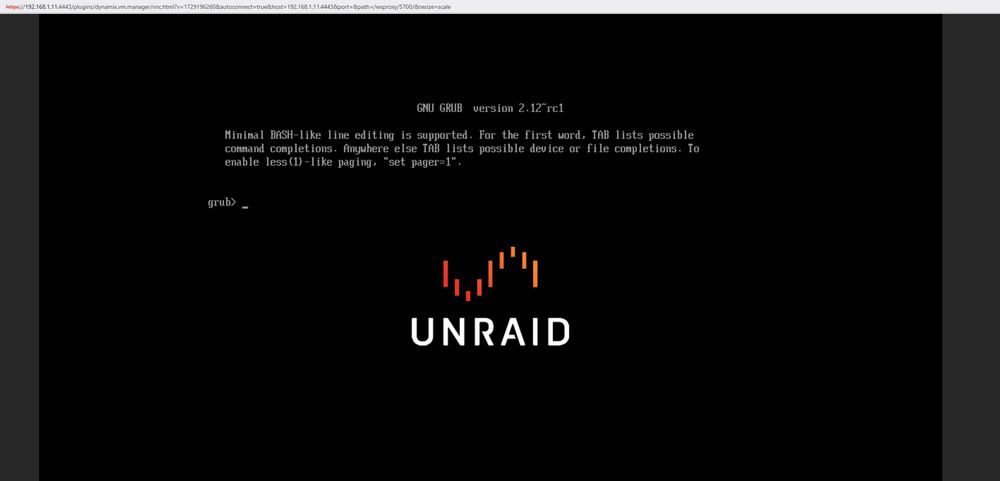
this is not normal, we don't have to do that, this is an os issue software (not windows)
-
i think i got same problem...
-
hi lately, my vm don't want to boot up anymore, i did not touch my vm or configuration in the device, i put the /dev/disk/by-id/ata-Samsung_SSD_870_EVO_250GB_S61WNF0RA10151V i got the grub screen, cant boot my windows disk here the device log Apr 1 20:50:46 THE-BEAST kernel: ata4: SATA max UDMA/133 abar m2048@0xa5617000 port 0xa5617280 irq 128 Apr 1 20:50:46 THE-BEAST kernel: ata4: SATA link up 6.0 Gbps (SStatus 133 SControl 300) Apr 1 20:50:46 THE-BEAST kernel: ata4.00: supports DRM functions and may not be fully accessible Apr 1 20:50:46 THE-BEAST kernel: ata4.00: ATA-11: Samsung SSD 870 EVO 250GB, SVT02B6Q, max UDMA/133 Apr 1 20:50:46 THE-BEAST kernel: ata4.00: 488397168 sectors, multi 1: LBA48 NCQ (depth 32), AA Apr 1 20:50:46 THE-BEAST kernel: ata4.00: Features: Trust Dev-Sleep NCQ-sndrcv Apr 1 20:50:46 THE-BEAST kernel: ata4.00: supports DRM functions and may not be fully accessible Apr 1 20:50:46 THE-BEAST kernel: ata4.00: configured for UDMA/133 Apr 1 20:50:46 THE-BEAST kernel: ata4.00: Enabling discard_zeroes_data Apr 1 20:50:46 THE-BEAST kernel: sd 4:0:0:0: [sde] 488397168 512-byte logical blocks: (250 GB/233 GiB) Apr 1 20:50:46 THE-BEAST kernel: sd 4:0:0:0: [sde] Write Protect is off Apr 1 20:50:46 THE-BEAST kernel: sd 4:0:0:0: [sde] Mode Sense: 00 3a 00 00 Apr 1 20:50:46 THE-BEAST kernel: sd 4:0:0:0: [sde] Write cache: enabled, read cache: enabled, doesn't support DPO or FUA Apr 1 20:50:46 THE-BEAST kernel: sd 4:0:0:0: [sde] Preferred minimum I/O size 512 bytes Apr 1 20:50:46 THE-BEAST kernel: ata4.00: Enabling discard_zeroes_data Apr 1 20:50:46 THE-BEAST kernel: sde: sde1 sde2 sde3 sde4 Apr 1 20:50:46 THE-BEAST kernel: sd 4:0:0:0: [sde] Attached SCSI disk Apr 1 20:51:53 THE-BEAST emhttpd: online: Samsung_SSD_870_EVO_250GB_S61WNF0RA10151V (sde) 512 488397168 Apr 1 20:51:56 THE-BEAST emhttpd: read SMART /dev/sde Apr 1 20:52:28 THE-BEAST kernel: ata4.00: Enabling discard_zeroes_data Apr 1 20:52:28 THE-BEAST kernel: sde: sde1 sde2 sde3 sde4 Apr 3 13:12:29 THE-BEAST kernel: ata4.00: Enabling discard_zeroes_data Apr 3 13:12:29 THE-BEAST kernel: sde: sde1 sde2 sde3 sde4 Apr 3 13:12:30 THE-BEAST kernel: ata4.00: Enabling discard_zeroes_data Apr 3 13:12:30 THE-BEAST kernel: sde: sde1 sde2 sde3 sde4 Apr 3 13:12:30 THE-BEAST kernel: ata4.00: Enabling discard_zeroes_data Apr 3 13:12:30 THE-BEAST kernel: sde: sde1 sde2 sde3 sde4 Apr 3 13:13:37 THE-BEAST kernel: ata4.00: Enabling discard_zeroes_data Apr 3 13:13:37 THE-BEAST kernel: sde: sde1 sde2 sde3 sde4 Apr 3 13:15:45 THE-BEAST kernel: ata4.00: Enabling discard_zeroes_data Apr 3 13:15:45 THE-BEAST kernel: sde: sde1 sde2 sde3 sde4 Apr 3 13:15:46 THE-BEAST kernel: ata4.00: Enabling discard_zeroes_data Apr 3 13:15:46 THE-BEAST kernel: sde: sde1 sde2 sde3 sde4 Apr 3 13:15:46 THE-BEAST kernel: ata4.00: Enabling discard_zeroes_data Apr 3 13:15:46 THE-BEAST kernel: sde: sde1 sde2 sde3 sde4 Apr 3 13:18:48 THE-BEAST kernel: ata4.00: Enabling discard_zeroes_data Apr 3 13:18:48 THE-BEAST kernel: sde: sde1 sde2 sde3 sde4 Apr 3 13:18:59 THE-BEAST kernel: ata4.00: Enabling discard_zeroes_data Apr 3 13:18:59 THE-BEAST kernel: sde: sde1 sde2 sde3 sde4 Apr 3 13:18:59 THE-BEAST kernel: ata4.00: Enabling discard_zeroes_data Apr 3 13:18:59 THE-BEAST kernel: sde: sde1 sde2 sde3 sde4 Apr 3 13:18:59 THE-BEAST kernel: ata4.00: Enabling discard_zeroes_data Apr 3 13:18:59 THE-BEAST kernel: sde: sde1 sde2 sde3 sde4 Apr 3 13:19:28 THE-BEAST kernel: ata4.00: Enabling discard_zeroes_data Apr 3 13:19:28 THE-BEAST kernel: sde: sde1 sde2 sde3 sde4 Apr 3 13:19:52 THE-BEAST kernel: ata4.00: Enabling discard_zeroes_data Apr 3 13:19:52 THE-BEAST kernel: sde: sde1 sde2 sde3 sde4 Apr 3 13:19:52 THE-BEAST kernel: ata4.00: Enabling discard_zeroes_data Apr 3 13:19:52 THE-BEAST kernel: sde: sde1 sde2 sde3 sde4 Apr 3 13:19:52 THE-BEAST kernel: ata4.00: Enabling discard_zeroes_data Apr 3 13:19:52 THE-BEAST kernel: sde: sde1 sde2 sde3 sde4 Apr 3 13:20:33 THE-BEAST kernel: ata4.00: Enabling discard_zeroes_data Apr 3 13:20:33 THE-BEAST kernel: sde: sde1 sde2 sde3 sde4 Apr 3 13:21:09 THE-BEAST kernel: ata4.00: Enabling discard_zeroes_data Apr 3 13:21:09 THE-BEAST kernel: sde: sde1 sde2 sde3 sde4 Apr 3 13:21:10 THE-BEAST kernel: ata4.00: Enabling discard_zeroes_data Apr 3 13:21:10 THE-BEAST kernel: sde: sde1 sde2 sde3 sde4 Apr 3 13:21:10 THE-BEAST kernel: ata4.00: Enabling discard_zeroes_data Apr 3 13:21:10 THE-BEAST kernel: sde: sde1 sde2 sde3 sde4 Apr 3 13:29:10 THE-BEAST kernel: ata4.00: Enabling discard_zeroes_data Apr 3 13:29:10 THE-BEAST kernel: sde: sde1 sde2 sde3 sde4 Apr 3 13:29:37 THE-BEAST kernel: ata4.00: Enabling discard_zeroes_data Apr 3 13:29:37 THE-BEAST kernel: sde: sde1 sde2 sde3 sde4 Apr 3 13:29:38 THE-BEAST kernel: ata4.00: Enabling discard_zeroes_data Apr 3 13:29:38 THE-BEAST kernel: sde: sde1 sde2 sde3 sde4 Apr 3 13:29:38 THE-BEAST kernel: ata4.00: Enabling discard_zeroes_data Apr 3 13:29:38 THE-BEAST kernel: sde: sde1 sde2 sde3 sde4 Apr 3 13:29:51 THE-BEAST kernel: ata4.00: Enabling discard_zeroes_data Apr 3 13:29:51 THE-BEAST kernel: sde: sde1 sde2 sde3 sde4 Apr 3 13:31:22 THE-BEAST kernel: ata4.00: Enabling discard_zeroes_data Apr 3 13:31:22 THE-BEAST kernel: sde: sde1 sde2 sde3 sde4 Apr 3 13:32:04 THE-BEAST kernel: ata4.00: Enabling discard_zeroes_data Apr 3 13:32:04 THE-BEAST kernel: sde: sde1 sde2 sde3 sde4 Apr 3 13:32:14 THE-BEAST kernel: ata4.00: Enabling discard_zeroes_data Apr 3 13:32:14 THE-BEAST kernel: sde: sde1 sde2 sde3 sde4 Apr 3 13:32:14 THE-BEAST kernel: ata4.00: Enabling discard_zeroes_data Apr 3 13:32:14 THE-BEAST kernel: sde: sde1 sde2 sde3 sde4 Apr 3 13:32:14 THE-BEAST kernel: ata4.00: Enabling discard_zeroes_data Apr 3 13:32:14 THE-BEAST kernel: sde: sde1 sde2 sde3 sde4 Apr 3 13:33:09 THE-BEAST kernel: ata4.00: Enabling discard_zeroes_data Apr 3 13:33:09 THE-BEAST kernel: sde: sde1 sde2 sde3 sde4 Apr 3 13:34:12 THE-BEAST kernel: ata4.00: Enabling discard_zeroes_data Apr 3 13:34:12 THE-BEAST kernel: sde: sde1 sde2 sde3 sde4 Apr 3 13:34:13 THE-BEAST kernel: ata4.00: Enabling discard_zeroes_data Apr 3 13:34:13 THE-BEAST kernel: sde: sde1 sde2 sde3 sde4 Apr 3 13:34:13 THE-BEAST kernel: ata4.00: Enabling discard_zeroes_data Apr 3 13:34:13 THE-BEAST kernel: sde: sde1 sde2 sde3 sde4 Apr 3 13:37:33 THE-BEAST kernel: ata4.00: Enabling discard_zeroes_data Apr 3 13:37:33 THE-BEAST kernel: sde: sde1 sde2 sde3 sde4 Apr 3 13:38:51 THE-BEAST kernel: ata4.00: Enabling discard_zeroes_data Apr 3 13:38:51 THE-BEAST kernel: sde: sde1 sde2 sde3 sde4 Apr 3 13:38:52 THE-BEAST kernel: ata4.00: Enabling discard_zeroes_data Apr 3 13:38:52 THE-BEAST kernel: sde: sde1 sde2 sde3 sde4 Apr 3 13:38:52 THE-BEAST kernel: ata4.00: Enabling discard_zeroes_data Apr 3 13:38:52 THE-BEAST kernel: sde: sde1 sde2 sde3 sde4 Apr 3 13:43:02 THE-BEAST kernel: ata4.00: Enabling discard_zeroes_data Apr 3 13:43:02 THE-BEAST kernel: sde: sde1 sde2 sde3 sde4 Apr 3 13:43:20 THE-BEAST kernel: ata4.00: Enabling discard_zeroes_data Apr 3 13:43:20 THE-BEAST kernel: sde: sde1 sde2 sde3 sde4 Apr 3 13:43:21 THE-BEAST kernel: ata4.00: Enabling discard_zeroes_data Apr 3 13:43:21 THE-BEAST kernel: sde: sde1 sde2 sde3 sde4 Apr 3 13:43:21 THE-BEAST kernel: ata4.00: Enabling discard_zeroes_data Apr 3 13:43:21 THE-BEAST kernel: sde: sde1 sde2 sde3 sde4 Apr 3 13:45:57 THE-BEAST kernel: ata4.00: Enabling discard_zeroes_data Apr 3 13:45:57 THE-BEAST kernel: sde: sde1 sde2 sde3 sde4 Apr 3 13:46:21 THE-BEAST kernel: ata4.00: Enabling discard_zeroes_data Apr 3 13:46:21 THE-BEAST kernel: sde: sde1 sde2 sde3 sde4 Apr 3 13:46:21 THE-BEAST kernel: ata4.00: Enabling discard_zeroes_data Apr 3 13:46:21 THE-BEAST kernel: sde: sde1 sde2 sde3 sde4 Apr 3 13:46:21 THE-BEAST kernel: ata4.00: Enabling discard_zeroes_data Apr 3 13:46:22 THE-BEAST kernel: sde: sde1 sde2 sde3 sde4 Apr 3 13:46:50 THE-BEAST kernel: ata4.00: Enabling discard_zeroes_data Apr 3 13:46:50 THE-BEAST kernel: sde: sde1 sde2 sde3 sde4 Apr 3 13:47:20 THE-BEAST kernel: ata4.00: Enabling discard_zeroes_data Apr 3 13:47:20 THE-BEAST kernel: sde: sde1 sde2 sde3 sde4 Apr 3 13:47:20 THE-BEAST kernel: ata4.00: Enabling discard_zeroes_data Apr 3 13:47:20 THE-BEAST kernel: sde: sde1 sde2 sde3 sde4 Apr 3 13:47:20 THE-BEAST kernel: ata4.00: Enabling discard_zeroes_data Apr 3 13:47:20 THE-BEAST kernel: sde: sde1 sde2 sde3 sde4 Apr 3 13:47:34 THE-BEAST kernel: ata4.00: Enabling discard_zeroes_data Apr 3 13:47:34 THE-BEAST kernel: sde: sde1 sde2 sde3 sde4 Apr 3 13:47:55 THE-BEAST kernel: ata4.00: Enabling discard_zeroes_data Apr 3 13:47:55 THE-BEAST kernel: sde: sde1 sde2 sde3 sde4 Apr 3 13:47:55 THE-BEAST kernel: ata4.00: Enabling discard_zeroes_data Apr 3 13:47:55 THE-BEAST kernel: sde: sde1 sde2 sde3 sde4 Apr 3 13:47:55 THE-BEAST kernel: ata4.00: Enabling discard_zeroes_data Apr 3 13:47:55 THE-BEAST kernel: sde: sde1 sde2 sde3 sde4 the disk is fine and boot properly, i try it on the server, and i was able to login to my desktop windows 11 ++ the-beast-diagnostics-20250403-1745.zip
-
Parity Parity is valid Last check completed on Saturday, 11 January 2025, 00:04 (today) Duration: 6 hours, 27 minutes, 19 seconds. Average speed: 129.1 MB/s Finding 5 errors Next check scheduled on Monday, 5 May 2025, 00:00 Due in: 113 days, 12 hours, 46 minutes i did another parity check with corrections ON, same issue, always 5 errors on the raid. the-beast-diagnostics-20250111-0943.zip
-
it will not do partity check 20 times, i don't understand.
-
i had already done it ? again ? @JorgeB
-
both result of the extended test are : Completed without error so what should i do now ?
-
hi, i got 5 errors on my parity i had done a parity check with corrections after that i redone a parity without corrections and today the result is the same. i know that i have some disk with smart errors, until they are working, i keep them. ++ the-beast-diagnostics-20250108-1304.zip
-
i will try with acronis. thank you @JonathanM
-
hi, i have windows11 on my desktop computer on a ssd. There are many partitions and it's boot ok. My computer boot with UEFI and the MBR of windows11 on C drive partition. i had already try to convert this physical disk to a raw image with linux dd, after that i had convert to .qcow2 image, create a new template on unraid VM section i had spent many many hours to try/test this conversion. https://unraid.net/wiki/index.php/UnRAID_6/VM_Management#Physical_to_Virtual_Machine_Conversion => broken link But when i start the vm, windows is broken, it failed to boot, and failed to be repared, try all options recover with windows without success. How to convert my physical disk to a VM raw (qcow2) image ? ++ simply go to uefi bios into the VM, select windows boot manager and go on ....
-
@sekator just login again to your plex pass account, then come back to the dashboard
-
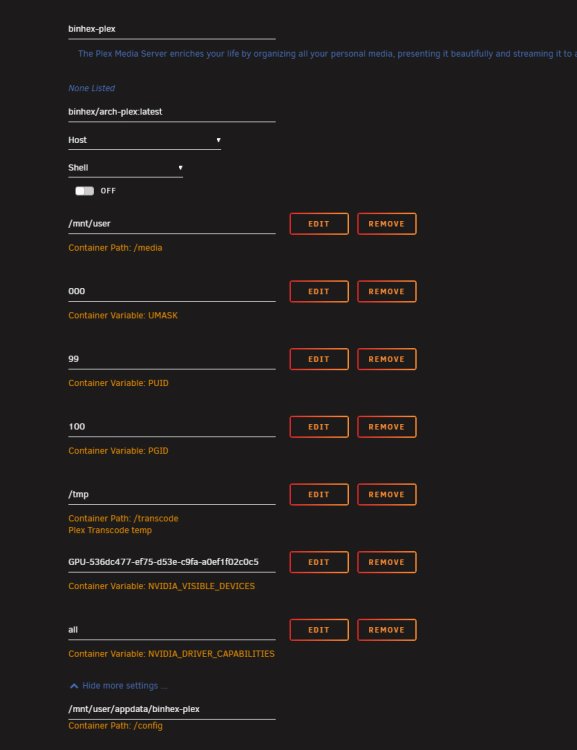
[solved] it was a login issue... hi binhex/arch-plex:latest i got an error since few days 16/02/202413:14:07 2024-02-16 08:14:07,918 INFO success: plexmediaserver entered RUNNING state, process has stayed up for > than 1 seconds (startsecs) 16/02/202413:14:22 2024-02-16 08:14:22,291 DEBG 'plexmediaserver' stdout output: 16/02/202413:14:22 Critical: libusb_init failed the homepage is not loading => infinite loader ++
-
hi, i try to use my lsi card into my desktop, but it seem not to be reconized by bios, not see in post bios, unraid did not find the card with the command lspci i had already try to swith the card to another pci express port what is wrong ? ++
-
i had bought a new setup, waiting for it. I hope it will be fonctionnal.
-
i think i can buy this product https://www.amazon.com/Internal-3-3ft-SFF-8087-4xSATA-Transmission/dp/B088H2QLBQ/ref=sr_1_15?crid=65WETASXCB3N&keywords=SAS%2B8087&qid=1694856612&sprefix=sas%2B8087%2Caps%2C234&sr=8-15&th=1 if i buy 2 of this, i could wire 8 drives. is that correct to say if i plug only my "datas" drive on theses cable to my LSI 9210-8I, and my 2 partity drives and the cache drive to the motherboard itself, is my unraid build will reconize my all disk and datas ? i really need to access again to my datas. ++
-
hi, i got LSI 9210-8I (IT MODE) with 10 drives 3.5 HDD, my datas are on the raid. i got 2 drives for partiy, one ssd for cache, and 6 drives for datas + 1 spare drive for vm. i need to buy new harware but i don't know wich one. My old SuperMicro 846E16-R1200B W/ X9DRI-F 24 died ! i would like to stay below 1000 € if possible. i would like to have an ATX tower, to put inside my LSI 9210-8I and 10 drives + 1 nvidia GTX 1070 card. how to connect 10 drives as SAS with the LSI 9210-8I (IT MODE) on a motherboard ? best regards
-
same here, i don't see the goal of zfs for unraid !?
-
hi, In this section, i can't find the support thread in https://forums.unraid.net/forum/47-docker-containers/ ++



