ProZac
Members
-
Joined
-
Last visited
-
Hi. So I have read several posts and guides for replacing drives, but was wondering now with all the changes in the last few releases if there was any other or easier/faster way to replace multiple drives now? Atm I have a 14TB parity and an array with 11 disks, from 14TB down to 3TB. I'm going to replace two of the drives (8TB and a 4TB) so I bought a new 14TB drive to replace both the old drives. My first thought is to just swap the 4TB with the new 14TB, but as I have enough space, is there an easier way to do this now if I empty the drive and just swap it so I don't need to rebuild? Or would the normal "replace drive" method still be the way to go? After this, is the "Remove drives then rebuild parity with new config" still the way to go as explained here? https://docs.unraid.net/legacy/FAQ/shrink-array/
-
Thank you for this post, saved my night hehe. Had same issue. Ipv6 might be the bad egg here too, kill and restart nginx from ssh solved the dead gui and then I disabled Ipv6. Hopefully the problem don't come back (2nd time now since 6.12.0 update)
-
Hey. So I'm prty sure this is a plex and not a docker issue, but I can't seem to find this info anywhere. An episode from a TV Show is unplayable. When I try to go to the episode in Plex, error message: Something went wrong An unexpected error occurred. I figured the episode file was broken and tried to delete it from plex, but this gives error message: There was a problem deleting this item. (I can do this with any other episode no problem) So then I went to sonarr, deleted the show, restarted sonarr and plex, same issue, episode is listed, can't play or delete it. Then tried to delete the entire show from plex, same error message. Then I deleted the entire show from sonarr and restarted the unraid server, show is still listed and I cant delete it. And now I cant view the show at all. Figured I would try to delete all the metadata and media files from appdata for this show, but can't find out how I can find the corresponding metadata or files in appdata for this show Is there a way for find the corresponding metadata and media files in appdata plex folder? Or maybe another way to solve this issue? All other shows work fine, this is only a problem with this 1 show, and worked fine a few weeks ago.
-
It references the error you get in the code, just go to @binhex FAQ and do as stated, should hopefully sove your problem. Some locations are still a bit buggy when it comes to new settings, so you might have to try a few vpn locations. https://github.com/binhex/documentation/blob/master/docker/faq/vpn.md Ref Q19 and Q22
-
Hey all. Been a while since I have been on the forums, for either help or giving support, and have now ran into a weird problem. As several before have stated, some issues with PIA when using ovpn lately. I have always been a fan of Wireguard since they started coming into unraid support, and figured rather than troubleshooting more, I would swap my dockers from ovpn to wireguard. Followed the quick guide from @binhex as usual, no troubles and they started as they should. Now a few days later I notice that my sab is having issues reaching the same speeds as before. Tested this trough 3 different servers from PIA and ofc tested without vpn and on other applications. Only issue is with PIA vpn trough Wireguard. All other tests gives me full speed. Is there some limitation I am not aware of there? Can't see that there is any info about this anywhere, or I might have overlooked it Most of the time I average somewhat around 25-35MB/s instead of my normal 50+, sometimes it creeps up and gives me the normal 50, but not often, no logs posted as I doubt this is my server that is the issue?, but please correct me if not hehe
-
All of his updates run on auto scheduler. So as soon as it is available for his scripts, it will automaticly update. No need to ask for it
-
Tnx for the post, I finally realized it was just me being stupid. When viewing the logs, I was connected trough my vpn to my VM that I hadn't changed the timezone on the computer itself. So the computer was running US timezone. Now at home, everything is correct, and this is also why my phone was showing the correct timezone
-
So yesteday I realized something is funky with the logging in my Tautulli. When i view the History tab, the timestamps are wrong compared to when the episode/movie was played. This was correct just a few days ago. Both Tautulli and Plex run with same timezone, and if I open the Tautulli app on my android phone, the History tab shows the correct timestamps, so it's only in the Tautulli docker that the timestamps are wrong. Not really sure how this happend? Ran update on both plex and tautulli, no change. Correct in app, wrong in docker. Run command is pretty basic, no big changes. root@localhost:# /usr/local/emhttp/plugins/dynamix.docker.manager/scripts/docker run -d --name='tautulli' --net='bridge' --cpuset-cpus='0,2,4,6,8,10,1,3,5,7,9,11' --log-opt max-size='50m' --log-opt max-file='1' -e TZ="Europe/Berlin" -e HOST_OS="Unraid" -e 'PUID'='99' -e 'PGID'='100' -p '8181:8181/tcp' -v '/mnt/user/FTP/':'/logs':'ro' -v '/mnt/user/appdata/tautulli':'/config':'rw' 'linuxserver/tautulli' Running 6.7.0 unraid atm.
-
All of his dockers get's auto updated as soon as it is available, just give it a few hours if its not already updated.
-
I went over his supervisor log and run command, can't find a reason why this ain't working, exactly same setup as me from what I can see. Also using PIA with Czech endpoint. He tried several endpoint (or so he said) so not really sure what is causing this issue. Does anything work with 2.0 when the VPN is enabled @Wob76 ? Is it GUi that's down but couch/radarr/sonarr and such reach it?
-
When you say you try to access the web GUI, you launch the GUI from the docker tab? Can't see any errors out of the box from your log above, might be something in your run command
-
Yepp Sent from my SM-G975F using Tapatalk
-
Hehe true that, dont use it much anymore, but the few times it would be nice to just use something I already have up and running, will try some different variations. No need to get the network share to work if it is a lot of work, was just wondering as it seemed like a function that was supposed to work :)
-
Tested installed and ran with no issues on 6.7.0. Yet another awesome docker. How would it be to use this to transfer a few files here and there instead of launching krusader (assuming you give the docker access to the correct folders) and Browse network triggers error: Failed to open "/on"? Operation not supported. (in the file browser)
-
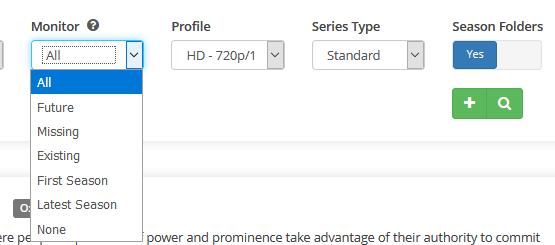
It all depends on how you add the show. The monitor status will tell your system if it should actively search for episodes or not. Then you have the add button on the end, where you can select just Add or the Add and Search for missing episodes.