





stlrox
Members
-
Joined
-
Last visited
Everything posted by stlrox
-
Hi, Last week, I updated my server to the latest version, but it's been crashing randomly ever since. Last night, I tried disabling most of the containers and only kept a few running, but the server still crashed." I enabled SysLog server setting and attached syslog file from the USB drive. Also, I attached diagnostics file from 2/19. This server has been running smoothly for the last five years until the latest upgrade. I updated all plugins and installed Docker patch plugin. I tried changing the Docker network type from ipvlan to macvlan and back to ipvlan, but it didn't help me solve this issue. I appreciate any assistance in resolving this problem. syslog tower-diagnostics-20240219-1948.zip
-
Suddenly MQTT container stopped working. There is no information in the logs. This container worked without any issues for the last two years. Recently I upgraded to OS 6.10.3. I verified directory path and there is no issue with the permissions. I tried to restart this several times but didn't produce any helpful information in the logs. I appreciate any tips for solving this issue.
-
I have Dell T30 Server with default config (1 TB) which I use for Home Assistant and other containers. I bought a new 4 TB Western Digital Red Plus SSD drive which I would like to add to the array. I didn't install any parity drives. I don't have that much data. Few questions. 1. How do I transfer contents of 1 TB to 4 TB drive? 2. If the above is possible, how do I setup 1 TB drive as parity drive for now (later I will buy another 4 TB drive to upgrade that). Thank you
-
Thank you. I cleared cache and was able to access Nextcloud UI via subdomain1.duckdns.org When I am at home why can't I access Nextcloud UI using the IP address? Just curious.
-
Nice. Thank you for the tip. I did that and default file appeared back. I left that default file as it is and made changes 'nextcloud.subdomain.conf' file. Could someone confirm these entries in this file. As of now when I browse to 'WebUI' from NextCloud container, am getting 'Welcome to our server' message. This setup worked before and don't know what changes I made to make this break. server { listen 443 ssl; server_name subdomain1.*; root /config/www; include /config/nginx/ssl.conf; client_max_body_size 0; location / { include /config/nginx/proxy.conf; resolver 127.0.0.11 valid=30s; set $upstream_nextcloud nextcloud; proxy_max_temp_file_size 2048m; proxy_pass https://$upstream_nextcloud:443; } }
-
After setting up port forwarding everything worked correctly with Nextcloud container. I was able to access Nextcloud using duckdns domain. But in the excitement of that working correctly then I tried to set up for Home Assistant duckdns external access. But I messed up with Nginx configuration files and screwed up both Nextcloud and Home Assistant setup. Could someone point out from where I can grab the original nginx\site-confs\default file. Thank you
-
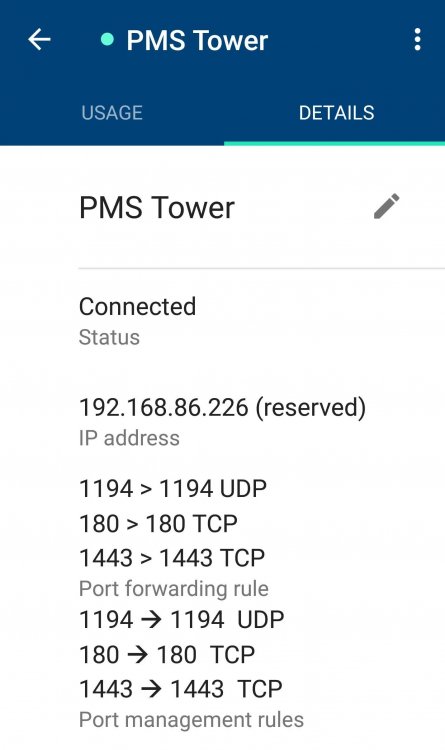
You, sir, deserve an award. I corrected port forwarding in Google Wifi and bingo! 2048 bit DH parameters present SUBDOMAINS entered, processing SUBDOMAINS entered, processing Only subdomains, no URL in cert Sub-domains processed are: -d subdomain1.duckdns.org -d subdomain2.duckdns.org E-mail address entered: [email protected] http validation is selected Generating new certificate Saving debug log to /var/log/letsencrypt/letsencrypt.log Plugins selected: Authenticator standalone, Installer None Obtaining a new certificate Performing the following challenges: http-01 challenge for subdomain1.duckdns.org http-01 challenge for subdomain2.duckdns.org Waiting for verification... Cleaning up challenges IMPORTANT NOTES: - Congratulations! Your certificate and chain have been saved at: /etc/letsencrypt/live/subdomain1.duckdns.org/fullchain.pem Your key file has been saved at: /etc/letsencrypt/live/subdomain1.duckdns.org/privkey.pem Your cert will expire on 2019-04-09. To obtain a new or tweaked version of this certificate in the future, simply run certbot again. To non-interactively renew *all* of your certificates, run "certbot renew" - If you like Certbot, please consider supporting our work by: Donating to ISRG / Let's Encrypt: https://letsencrypt.org/donate Donating to EFF: https://eff.org/donate-le New certificate generated; starting nginx [cont-init.d] 50-config: exited 0. [cont-init.d] done. [services.d] starting services [services.d] done. New certificate generated; starting nginx [cont-init.d] 50-config: exited 0. [cont-init.d] done. [services.d] starting services [services.d] done. Server ready
-
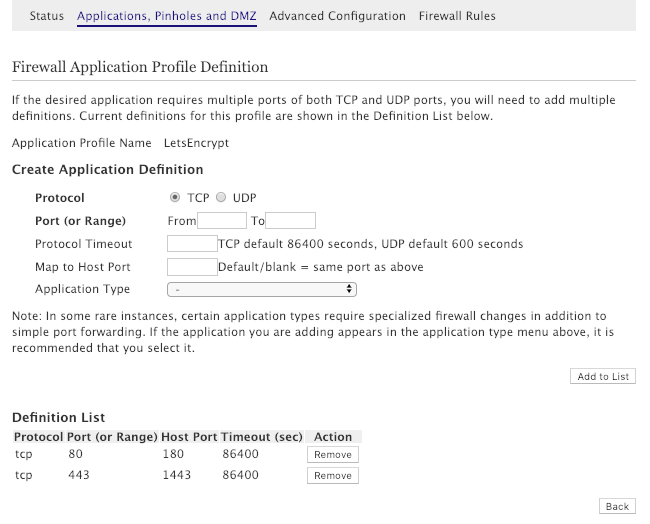
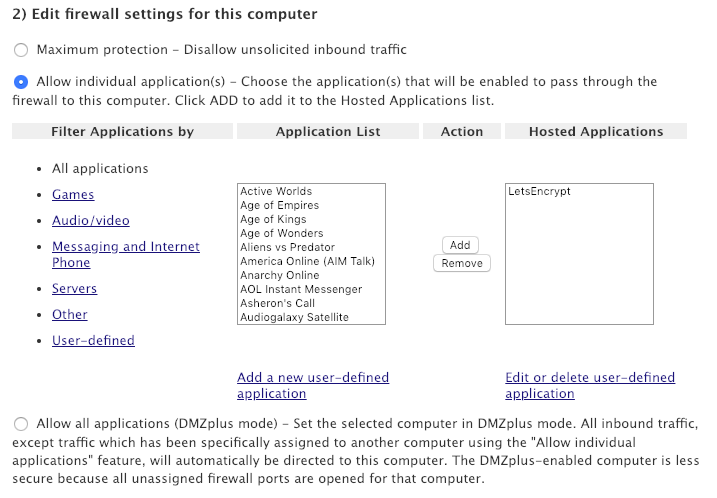
Yes, I tried but that didn't work. Here are the screenshots. Let me know if I entered the wrong information here. Isn't this applies to all devices to connect to ATT router (and Google Wifi)?
-
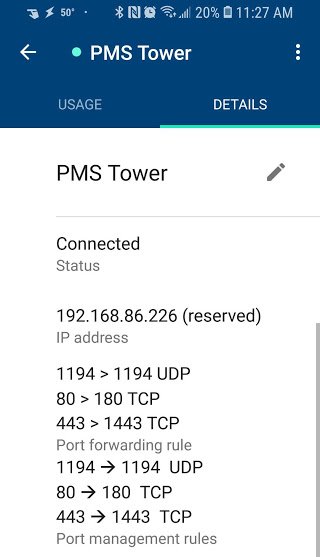
I verified both IP addresses and they match. Here is Google Wifi router port forwarding settings and these settings worked before. I deleted these and added them again but still the same issue. My setup is --> ATT Uverse router --> Google Wifi router --> ethernet --> unraid server I ran port scanner tool and found both 80 and 443 ports were timed out (Connection timed out). But when I connected to a VPN service then same ports were open. I checked with my ISP (AT&T) and they do not block 80 and 443 ports. I watched SpaceInvader video again and modified LE docker settings but still the same error. Variables set: PUID=99 PGID=100 TZ=America/Chicago URL=duckdns.org SUBDOMAINS=subdomain1,subdomain2 EXTRA_DOMAINS= ONLY_SUBDOMAINS=true DHLEVEL=2048 VALIDATION=http DNSPLUGIN= [email protected] STAGING= 2048 bit DH parameters present SUBDOMAINS entered, processing SUBDOMAINS entered, processing Only subdomains, no URL in cert Sub-domains processed are: -d subdomain1.duckdns.org -d subdomain2.duckdns.org E-mail address entered: [email protected] http validation is selected Generating new certificate Saving debug log to /var/log/letsencrypt/letsencrypt.log Plugins selected: Authenticator standalone, Installer None Obtaining a new certificate Performing the following challenges: http-01 challenge for subdomain1.duckdns.org http-01 challenge for subdomain2.duckdns.org Waiting for verification... Cleaning up challenges Here is the error message: - The following errors were reported by the server: Domain: subdomain1.duckdns.org Type: connection Detail: Fetching http://subdomain1.duckdns.org/.well-known/acme-challenge/token: Timeout during connect (likely firewall problem) Domain: subdomain2.duckdns.org Type: connection Detail: Fetching http://subdomain2.duckdns.org/.well-known/acme-challenge/token2: Timeout during connect (likely firewall problem) ERROR: Cert does not exist! Please see the validation error above. The issue may be due to incorrect dns or port forwarding settings. Please fix your settings and recreate the container I am running out of ideas, to fix this issue.
-
I verified my IP address and that was not changed. Looks like this issue started from last week change to LetsEncrypt docker. As of now, there is a new update for this container. How do we know what changes were made in the new update? "Jan 5 04:40:03 Tower root: Fix Common Problems: Warning: Docker Application letsencrypt has an update available for it" No idea. I used SpaceInvaderOne video for reference and kept same settings. Please if I need to change any setting related to this. Thank you
-
My Letsencrypt docker container stopped working. It was working fine till last week and suddenly I couldn't browse to my Home Assistant duckdns (subdomain1.mydomainname.duckdns.org) and NextCloud duckdns (subdomain2.mydomainname.duckdns.org) sites. Based on the log file, it was not an issue related to cert renewal. There were no errors in letsencrypt.log file and don't know where to start looking to fix this issue. I appreciate your help. ------------------------------------- GID/UID ------------------------------------- User uid: 99 User gid: 100 ------------------------------------- [cont-init.d] 10-adduser: exited 0. [cont-init.d] 20-config: executing... [cont-init.d] 20-config: exited 0. [cont-init.d] 30-keygen: executing... using keys found in /config/keys [cont-init.d] 30-keygen: exited 0. [cont-init.d] 50-config: executing... Variables set: PUID=99 PGID=100 TZ=America/Chicago URL=mydomainname.duckdns.org SUBDOMAINS=subdomain1,subdomain2 EXTRA_DOMAINS= ONLY_SUBDOMAINS=true DHLEVEL=2048 VALIDATION=http DNSPLUGIN= [email protected] STAGING= 2048 bit DH parameters present SUBDOMAINS entered, processing SUBDOMAINS entered, processing Only subdomains, no URL in cert Sub-domains processed are: -d subdomain1.mydomainname.duckdns.org -d subdomain2.mydomainname.duckdns.org E-mail address entered: [email protected] http validation is selected Certificate exists; parameters unchanged; starting nginx [cont-init.d] 50-config: exited 0. [cont-init.d] done. [services.d] starting services [services.d] done. Server ready I get the following page when I browse to those sites. This site can’t be reached subdomain2.mydomainname.duckdns.org took too long to respond. Try: Checking the connection Checking the proxy and the firewall ERR_CONNECTION_TIMED_OUT
-
Is there any way to renew from the command line? Earlier I used Letsencrypt along with Home Assistant on Raspberry Pi and every three months I used to renew Letsencrypt certs manually.
-
I have Duckdns container and it's running to update any changes to IP address. Also verified IP address from my router to the IP address at the duckdns page and they both match. And my ISP doesn't block port 80. This issue happening since last week and the only thing that was changed was an update to this container.
-
Suddenly my configuration is not working. I use this to connect to my Home Assistant from outside my home network. I didn't make any changes and the only thing recently did was to update this container to the latest version. Anyone can help me out to figure out this issue? Here is the log file: <-------------------------------------------------> cronjob running on Sun Nov 25 21:48:37 CST 2018 Running certbot renew Saving debug log to /var/log/letsencrypt/letsencrypt.log - - - - - - - - - - - - - - - - - - - - - - - - - - - - - - - - - - - - - - - - Processing /etc/letsencrypt/renewal/xx.my.duckdns.org.conf - - - - - - - - - - - - - - - - - - - - - - - - - - - - - - - - - - - - - - - - Cert is due for renewal, auto-renewing... Plugins selected: Authenticator standalone, Installer None Running pre-hook command: if ps aux | grep [n]ginx: > /dev/null; then s6-svc -d /var/run/s6/services/nginx; fi Renewing an existing certificate Performing the following challenges: http-01 challenge for xx.my.duckdns.org http-01 challenge for yy.my.duckdns.org Performing the following challenges: http-01 challenge for xx.my.duckdns.org http-01 challenge for yy.my.duckdns.org Waiting for verification... Cleaning up challenges Attempting to renew cert (xx.my.duckdns.org) from /etc/letsencrypt/renewal/xx.myduckdns.org.conf produced an unexpected error: Failed authorization procedure. xx.my.duckdns.org (http-01): urn: ietf:params:acme:error:connection :: The server could not connect to the client to verify the domain :: Fetching http://xx.my.duckdns.org/.well-known/acme-challenge/[tokencode]: Timeout during connect (likely firewall problem), yy.my.duckdns.org (http-01): urn:ietf:params:acme:error:connection :: The server could not connect to the client to verify the domain :: Fetching http://yy.my.duckdns.org/.well-known/acme-challenge/[tokencode]: Timeout during connect (likely firewall problem). Skipping. All renewal attempts failed. The following certs could not be renewed: /etc/letsencrypt/live/xx.my.duckdns.org/fullchain.pem (failure) - - - - - - - - - - - - - - - - - - - - - - - - - - - - - - - - - - - - - - - - All renewal attempts failed. The following certs could not be renewed: /etc/letsencrypt/live/xx.test.duckdns.org/fullchain.pem (failure) - - - - - - - - - - - - - - - - - - - - - - - - - - - - - - - - - - - - - - - - Running post-hook command: if ps aux | grep 's6-supervise nginx' | grep -v grep > /dev/null; then s6-svc -u /var/run/s6/services/nginx; fi; cd /config/keys/letsencrypt && openssl pkcs12 -export -out privkey.pfx -inkey privkey.pem -in cert.pem -certfile chain.pem -passout pass: && sleep 1 && cat {privkey,fullchain}.pem > priv-fullchain-bundle.pem Hook command "if ps aux | grep 's6-supervise nginx' | grep -v grep > /dev/null; then s6-svc -u /var/run/s6/services/nginx; fi; cd /config/keys/letsencrypt && openssl pkcs12 -export -out privkey.pfx -inkey privkey.pem -in cert.pem -certfile chain.pem -passout pass: && sleep 1 && cat {privkey,fullchain}.pem > priv-fullchain-bundle.pem" returned error code 1 Error output from if: cat: {privkey,fullchain}.pem: No such file or directory
-
@spants I compared your version of config file with the one that I worked earlier. I enabled the following setting and now I noticed more topics in the log file. I am researching this further on my end to retrieve the retained value. persistence true
-
@spants Finally, MQTT container worked but Home Assistant couldn't able to subscribe/publish for all topics. I am not sure if there are any 'write' settings needed to be changed for MQTT container. I can manually publish a topic from Home Assistant and that shows up in MQTT. I can connect using MQTTFx client tool and from there I can subscribe and publish topics. But I couldn't figure out why Home Assistant couldn't publish topics. There were no error messages in Home Assistant log file. EDIT: Please ignore the following. I did this inside docker container which will be rewritten when I restart the container. I used your instructions (passwords.README) to create user and password and passwords.mqtt file was written. I created a password for MQTT user. /etc/mosquitto # mosquitto_passwd -c /etc/mosquitto/pwfile hauser Password: Reenter password: /etc/mosquitto # Here are the contents mosquitto.conf (/etc/mosquitto) which I used in my previous configuration on Raspberry Pi. # Place your local configuration in /etc/mosquitto/conf.d/ # # A full description of the configuration file is at # /usr/share/doc/mosquitto/examples/mosquitto.conf.example pid_file /var/run/mosquitto.pid persistence true persistence_location /var/lib/mosquitto/ log_dest file /var/log/mosquitto/mosquitto.log allow_anonymous false password_file /etc/mosquitto/pwfile listener 1883 MQTT log file contents: (192.168.86.226 on port 1883 -> Home Assistant) I expect lot of topics but very few were shown. 1537387495: mosquitto version 1.4.10 (build date 2017-04-06 15:52:09+0000) starting 1537387495: Config loaded from /config/mosquitto.conf. 1537387495: Opening ipv4 listen socket on port 1883. 1537387495: Opening ipv6 listen socket on port 1883. 1537387495: Opening websockets listen socket on port 9001. 1537387657: New connection from 192.168.86.226 on port 1883. 1537387657: New client connected from 192.168.86.226 as home-assistant-1 (c1, k60, u'hauser'). 1537387657: Sending CONNACK to home-assistant-1 (0, 0) 1537387660: Received SUBSCRIBE from home-assistant-1 1537387660: home/garage-camera/motion (QoS 0) 1537387660: home-assistant-1 0 home/garage-camera/motion 1537387660: Sending SUBACK to home-assistant-1 1537387660: Received SUBSCRIBE from home-assistant-1 1537387660: /usps/packages (QoS 0) 1537387660: home-assistant-1 0 /usps/packages 1537387660: Sending SUBACK to home-assistant-1 1537387660: Received SUBSCRIBE from home-assistant-1 1537387660: home/garage-camera/brightness (QoS 0) 1537387660: home-assistant-1 0 home/garage-camera/brightness 1537387660: Sending SUBACK to home-assistant-1 1537387660: Received SUBSCRIBE from home-assistant-1 1537387660: home/garage-camera (QoS 0) 1537387660: home-assistant-1 0 home/garage-camera 1537387660: Sending SUBACK to home-assistant-1 1537387660: Received SUBSCRIBE from home-assistant-1
-
No. There are other docker containers but none of them use port 1883. Is this container works only for 'bridge' Network Type?
-
I installed MQTT docker container on my unRAID server but it's failed to start successfully. I noticed Docker image was pulled successfully and the container was created. I didn't change any default settings for the template. I made sure no other docker containers using these ports (1883, 9001) How do I resolve this error? Command: root@localhost:# /usr/local/emhttp/plugins/dynamix.docker.manager/scripts/docker run -d --name='MQTT' --net='bridge' -e TZ="America/Los_Angeles" -e HOST_OS="unRAID" -p '1883:1883/tcp' -p '9001:9001/tcp' -v '/mnt/user/appdata/MQTT':'/config':'rw' 'spants/mqtt' fc6bddb7beff82df28c84b2444d6a406164a3de3005b512401e4371950de4c5d /usr/bin/docker: Error response from daemon: driver failed programming external connectivity on endpoint MQTT (07b5d4fff7293d9cc2de96ec8c1bf4d9f3f9cc26ddc822b523ebc6ceaad25288): Error starting userland proxy: listen tcp 0.0.0.0:1883: bind: address already in use. The command failed. TIA

-
Yes. I downloaded the profile from OpenVPN-AS WebUI and imported that to OpenVPN app. Here is snippet from the log file: 15:29:37.586 -- Connecting to [myhost.duckdns.org]:1194 (MYPUBLIC IP) via UDPv4 15:29:47.438 -- EVENT: CONNECTION_TIMEOUT 15:29:47.449 -- EVENT: DISCONNECTED 15:29:47.470 -- EVENT: CORE_THREAD_INACTIVE 15:29:47.472 -- Tunnel bytes per CPU second: 0 15:29:47.472 -- ----- OpenVPN Stop ----- But if I try same VPN profile when I am on my home Wifi network then everything works fine. Looks like the router is blocking traffic on port 1194. I don't know how to troubleshoot that. Dummy question. Assume I fix this router issue and everything works correctly. And if connect to openvpn access server using OpenVPN app (via data plan) then can I connect to any device which is on my home network?
-
I still couldn't connect using OpenVPN app from my phone using 'data' connection. I followed instructions from SpaceInvaderOne video. Docker container settings: network type: host interface : bond0 host port : 1194 Router: forwarded port 1194 (UDP) OpenVPN Admin WebUI settings: created new user user authentification: local server network settings hostname : myhost.duckdns.org server network settings protocol : UDP server network settings port number : 1194 I have three sub-domains for my duckdns.org account. Each one has a different IP address. Only one has correct IP from my ISP provider and the other two were created when I used 'binhex-delugevpn' PIA (Privoxy) as proxy. Which one should I use under 'Server Network Settings' in OpenVPN WebUI?
-
I verified port forwarding set up at my router (UVerse) and that was set correctly. Here is the container log snippet. 08:31:09.505 -- ----- OpenVPN Start -----08:31:09.506 -- EVENT: CORE_THREAD_ACTIVE08:31:09.514 -- Frame=512/2048/512 mssfix-ctrl=125008:31:09.515 -- UNUSED OPTIONS4 [nobind] 12 [sndbuf] [100000] 13 [rcvbuf] [100000] 16 [verb] [3] 25 [CLI_PREF_ALLOW_WEB_IMPORT] [True] 26 [CLI_PREF_BASIC_CLIENT] [False] 27 [CLI_PREF_ENABLE_CONNECT] [True] 28 [CLI_PREF_ENABLE_XD_PROXY] [True] 29 [WSHOST] [name.duckdns .org :943] 30 [WEB_CA_BUNDLE] [-----BEGIN CERTIFICATE----- xxxxxxx...] 31 [IS_OPENVPN_WEB_CA] [1] 32 [ORGANIZATION] [OpenVPN, Inc.]08:31:09.516 -- EVENT: RESOLVE08:31:09.811 -- Contacting PUBLIC IP:1194 via UDP08:31:09.812 -- EVENT: WAIT08:31:09.821 -- Connecting to [name.duckdns .org ]:1194 (PUBLIC IP) via UDPv408:31:19.500 -- Server poll timeout, trying next remote entry...08:31:19.529 -- EVENT: RECONNECTING08:31:19.532 -- EVENT: RESOLVE08:31:19.533 -- Contacting PUBLIC IP:1194 via UDP08:31:19.534 -- EVENT: WAIT08:31:19.541 -- Connecting to [name.duckdns.org ]:1194 (PUBLIC IP) via UDPv408:31:29.498 -- Server poll timeout, trying next remote entry...08:31:29.519 -- EVENT: RECONNECTING08:31:29.526 -- EVENT: RESOLVE08:31:29.534 -- Contacting PUBLIC IP:1194 via UDP08:31:29.535 -- EVENT: WAIT08:31:29.546 -- Connecting to [ name.duckdns .org ]:1194 (PUBLIC IP) via UDPv408:31:39.503 -- Server poll timeout, trying next remote entry...08:31:39.518 -- EVENT: RECONNECTING08:31:39.522 -- EVENT: RESOLVE08:31:39.552 -- Contacting PUBLIC IP:1194 via UDP08:31:39.552 -- EVENT: WAIT08:31:39.578 -- Connecting to [name.duckdns .org ]:1194 (PUBLIC IP) via UDPv408:31:49.507 -- Server poll timeout, trying next remote entry...08:31:49.537 -- EVENT: RECONNECTING08:31:49.542 -- EVENT: RESOLVE08:31:49.559 -- Contacting PUBLIC IP:1194 via UDP08:31:49.560 -- EVENT: WAIT08:31:49.597 -- Connecting to [name.duckdns .org ]:1194 (PUBLIC IP) via UDPv408:31:59.512 -- Server poll timeout, trying next remote entry...08:31:59.539 -- EVENT: RECONNECTING08:31:59.545 -- EVENT: RESOLVE08:31:59.550 -- Contacting PUBLIC IP : 1194 via UDP08:31:59.550 -- EVENT: WAIT08:31:59.582 -- Connecting to [name.duckdns .org ]:1194 (PUBLIC IP) via UDPv408:32:09.511 -- EVENT: CONNECTION_TIMEOUT08:32:09.514 -- EVENT: DISCONNECTED08:32:09.524 -- EVENT: CORE_THREAD_INACTIVE08:32:09.525 -- Tunnel bytes per CPU second: 008:32:09.525 -- ----- OpenVPN Stop -----
-
I recently installed this Docker container. I followed SpaceInvaderOne video and completed all the steps. I don't have a static IP address. So I used duckdns (installed Docker container) and added that server name under "Hostname or IP Address:" at "Server Network Settings" page (via openvpn-as Docker UI) I can connect to the server when I am on home wifi but I couldn't connect when I turn off WiFi on my phone and using same credentials. When I try on my phone (with WifI Off), I get OpenVPN connection timeout error. "There was an error attempting to connect to the selected server" I would like to know how to troubleshoot this issue? TIA
-
Thanks for the detailed reply. I use DuckDns to access Home Assistant from outside. I was just curious to know the use case under unRAID. So far I didn't use any docker interfaces remotely but I understood the concept.
-
Thanks for quick reply. I am currently using PIA via binhex-delugeVPN container. When I registered for new sub-domain at duckdns, I noticed it shows my actual IP from ISP. But when I checked my IP address via online tools then it shows random IP address from PIA via binhex-delugevpn container. When I did the ping mysubdomain.duckdns.org then it shows my actual IP from ISP. What is the use of this container under unRAID? ?
-
I watched SpaceInvader One video regarding this Docker container. I added this container and completed all the steps. Everything works fine. From the log file, I noticed that IP address gets updated. Your IP was updated at Thu May 31 11:25:01 PDT 2018 Is that changing IP to random address or making sure IP address stays same for mysubdomain.duckdns.org? I am confused regarding what are the use cases for this? TIA


