Cobragt88
Members
-
Joined
-
Last visited
-
So I don't normally use VNC to view my VCM's I just use RDP but its a tad hard to use RDP when I'm trying to install an OS. I have a Test box with 7.4 RC2 on it VNC is working on that. I rebooted my box and my server nothing seemed to help. lowenas-diagnostics-20261027-1118.zip
-
ah cool thanks per5fect 4TB now zfs
-
what is the easiest way to create a 2TB x2 hard drive pool without being set to mirror I don't need or want it in mirror. I require 4TB of pool space not only 2TB? thanks.
-
I just set it to Auto spilt any dir as required it wasn't set to that I think that was it. thanks. It was set to that setting I don't remember how it got changed but it's now at that setting. I'll monitor it and see if it starts using all 6 6TB hhds again.
-
My Share setting are as this min free space 585.5 GB I only have an array so that's set. Allocation method Most Free. Problem It is only using disk 1 and disk 5 and filling them up 100%. This seems to have started ever sense unraid OS version 7.3.2 was installed. It used to use all 6 drives before so something is not working as it should. lowebackup-diagnostics-20260811-1009.zip
-
Hello, So I'm having a problem with sonarr on certain TV Shows it is not grabbing the episodes .jpg files i'm hoping it's a simple fix. i'm not sure what files will help. So here is two. sonarr.debug.txt sonarr.txt
-
So I have this flash drive that the Unraid USB creator says is black listed I was hoping to get it removed. GUID: 0781-5571-3510-021023183504 Thanks
-
More of an FYI I figured out why i was getting the CPU errors CPU 8 HT 24 was Isolated and pinned to a VM once I switched it off those 2 errors have gone away... yippy
-
It completed the ram test no errors. is this somthing i need to add somewhere "edac_mce_amd module instead" thanks for the help
-
Hello all, Every now then and then i get this hardware error in syslog. I don't know how to use "edac_mce_amd module instead" Mar 21 07:39:17 LoweNas kernel: mce: [Hardware Error]: Machine check events logged Mar 21 07:39:17 LoweNas kernel: [Hardware Error]: Deferred error, no action required. Mar 21 07:39:17 LoweNas kernel: [Hardware Error]: CPU:1 (19:21:2) MC18_STATUS[-|-|-|-|-|-|Deferred|-|-]: 0x9090909090909090 Mar 21 07:39:17 LoweNas kernel: [Hardware Error]: IPID: 0x0000000000000000 Mar 21 07:39:17 LoweNas kernel: [Hardware Error]: Bank 18 is reserved. Mar 21 07:39:17 LoweNas kernel: [Hardware Error]: cache level: RESV, tx: INSN Mar 21 08:33:51 LoweNas root: Fix Common Problems: Error: Machine Check Events detected on your server Mar 21 08:33:51 LoweNas root: mcelog: ERROR: AMD Processor family 25: mcelog does not support this processor. Please use the edac_mce_amd module instead. lowenas-diagnostics-20250321-0843.zip
-
So i tested 1 of 8TB hhds by using sata power it spins up at 1st power on too so basicly i'm not sure but its running without problems now hooked up to the mobo, also my friend google says that the LSI 9300-8i will give full support to thoses 8TB's with 12Gbps vs the current 6 that my LSI card does. i'd say this can be closed thanks for all the advise.
-
Um ok so what does that mean? Is a major problem how can it be fixed if possible? So a hard drive should be using 5V to be powered why is it taking 3.3V?
-
Hello JorgeB, I have the molex to sata power thing attached to one of the 8TB with the Sata cable diect connected, where do I do in unraid to find out 3.3V power? Or is it an app i need?
-
Hi JorgeB, how do I do this in unraid? The only thing I see is this "SATA version:SATA 3.2, 6.0 Gb/s (current: 3.0 Gb/s)"
-
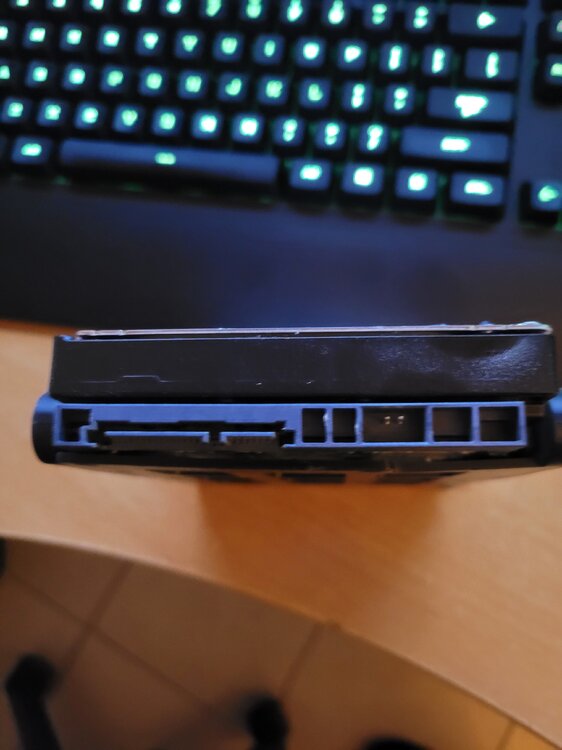
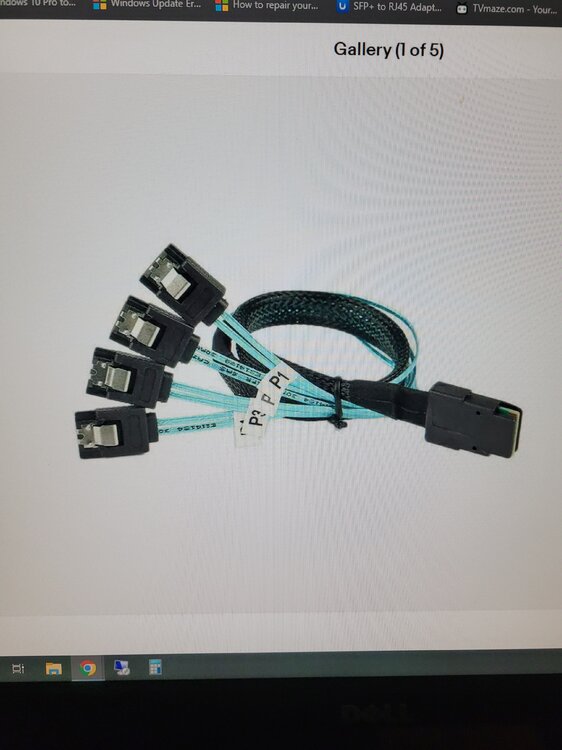
Good morning Frank1940, Here is my is my finding on the back side of these 8TB hhds, attached is a picture showing that it does have a shroud. With this said now and the back plain being that it touchs first does it still mean WD is saying to use Sata Gen 2 cables that do not have the lock on them? Or is it an LSI card upgrade to the 9300 8i which fully supports the 8TB hhd? As you can see the picture of the 8087 SAS to Sata 3 cables goes from the LSI card to the back side of the black plain again the sata side does not touch the 8TB hhd only the back plain could it be the back plain causing this? Or an very out dated LSI card? Thanks