thostr
Members
-
Joined
-
Last visited
Everything posted by thostr
-
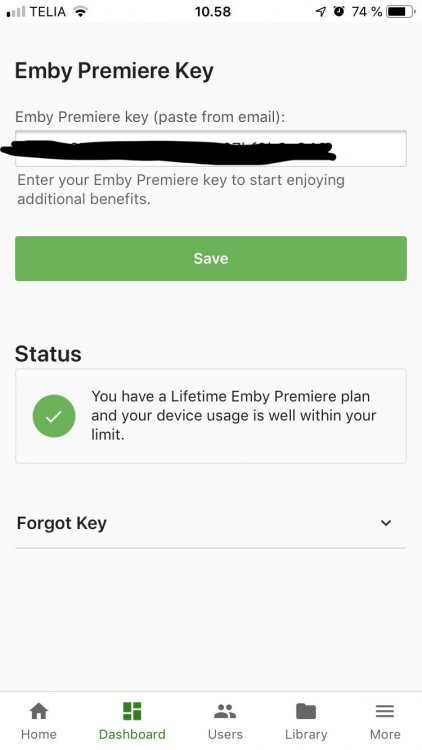
Okay I will contact Emby with this. But Emby has accepted my key as Premiere Subscription on server dashboard (see screenshot)
-
Sorry forgot to mention I do have a Emby Premiere Lifetime subscription. So it shouldn't be the issue. Unless the docker isn't build for Emby Premiere 😊
-
Hey @binhex After upgrading to 4.0, Ive lost my HW transcoding options. I have passed through /dev/dri/renderD128 as before, but somehow the section in Emby is missing. (see screenshot) I have crossposted on Emby forums aswell, because im not sure where the error lies.
-
Not correct. Emby 4.0 has been released. Docker images is already updated https://emby.media/announcing-emby-server-40.html
-
For those of you familiar with Plex and the plugin Sub-Zero. The creator of Sub-Zero is combining forces with Bazarr, witch is the reason I hope for a Binhex container See below https://www.reddit.com/r/PleX/comments/9n9qjl/subzero_the_future/
-
I just love your containers, and have a request Are you planning building a container for Bazarr? (https://github.com/morpheus65535/bazarr) Its a subtitle managment tool for Sonarr and Radarr
-
Please forgive me, im still new to servers and network. So im not sure if its Sonarr related or due to my download clients run though VPN aswell. Anyway, I have an issue with Sonarr not connecting to rTorrentNPN or SABnbdVPN in br0 mode. Sonarr cant find my downloaders then. The reason I want to do this, is because I have several downloaders and I run with remote path mapping to make sure Sonarr grabs files from the correct folder (my downloaders are mapped directly to the subfolders) My optimal solution was to keep the containers in bridge mode and connect to the downloaders with hostname ( have added a hostname parameter to containers) I have made a workarround, but imo not a viable solution if I get more downloaders.

-
Im not sure if its Plex or unRAID related, so ill try here at first. My Plex server keeps getting warnings in my log. Could anyone tell me what they mean and how to fix them? I think this is why my server has trouble playing media files smoothly Thank you Jul 12, 2018 12:12:09.522 [0x1528511fe700] WARN - PubSub: Received notifyConnectivity event with incorrect async identifier (5a8a0b75-e3b7-40a4-baa5-56a71ed00f68, expected ) Jul 12, 2018 12:12:09.542 [0x1528513ff700] WARN - PubSub: Received notifyConnectivity event with incorrect async identifier (5a8a0b75-e3b7-40a4-baa5-56a71ed00f68, expected ) Jul 12, 2018 12:13:10.272 [0x1528513ff700] WARN - PubSub: Received notifyConnectivity event with incorrect async identifier (bcfdd7ab-1750-44d5-a1d6-7db8acfbcbbe, expected ) Jul 12, 2018 12:13:10.272 [0x1528511fe700] WARN - PubSub: Received notifyConnectivity event with incorrect async identifier (bcfdd7ab-1750-44d5-a1d6-7db8acfbcbbe, expected ) Jul 12, 2018 12:14:09.528 [0x1528513ff700] WARN - PubSub: Received notifyConnectivity event with incorrect async identifier (27c17a1a-ff48-42fa-99be-ced9ae38be70, expected ) Jul 12, 2018 12:14:09.528 [0x1528511fe700] WARN - PubSub: Received notifyConnectivity event with incorrect async identifier (27c17a1a-ff48-42fa-99be-ced9ae38be70, expected ) Jul 12, 2018 12:15:09.556 [0x1528513ff700] WARN - PubSub: Received notifyConnectivity event with incorrect async identifier (3e79a271-8196-4bec-bc51-e8559e0cfca5, expected ) Jul 12, 2018 12:15:09.556 [0x1528511fe700] WARN - PubSub: Received notifyConnectivity event with incorrect async identifier (3e79a271-8196-4bec-bc51-e8559e0cfca5, expected ) Jul 12, 2018 12:16:09.809 [0x1528513ff700] WARN - PubSub: Received notifyConnectivity event with incorrect async identifier (d2971543-2fc1-447c-928c-1f53ce0f851e, expected ) Jul 12, 2018 12:16:09.809 [0x1528511fe700] WARN - PubSub: Received notifyConnectivity event with incorrect async identifier (d2971543-2fc1-447c-928c-1f53ce0f851e, expected ) Jul 12, 2018 12:17:09.988 [0x1528513ff700] WARN - PubSub: Received notifyConnectivity event with incorrect async identifier (aeac3032-304c-4957-b2ff-e8685dc033ad, expected ) Jul 12, 2018 12:17:09.988 [0x1528511fe700] WARN - PubSub: Received notifyConnectivity event with incorrect async identifier (aeac3032-304c-4957-b2ff-e8685dc033ad, expected ) Jul 12, 2018 12:18:09.926 [0x1528511fe700] WARN - PubSub: Received notifyConnectivity event with incorrect async identifier (96b0ad63-d673-44f0-a2f9-9ed3ca7431e0, expected ) Jul 12, 2018 12:18:09.926 [0x1528513ff700] WARN - PubSub: Received notifyConnectivity event with incorrect async identifier (96b0ad63-d673-44f0-a2f9-9ed3ca7431e0, expected ) Jul 12, 2018 12:19:09.497 [0x1528513ff700] WARN - PubSub: Received notifyConnectivity event with incorrect async identifier (ea0babb1-fcb4-4e65-b28d-39ee92956998, expected ) Jul 12, 2018 12:19:09.497 [0x1528511fe700] WARN - PubSub: Received notifyConnectivity event with incorrect async identifier (ea0babb1-fcb4-4e65-b28d-39ee92956998, expected ) Jul 12, 2018 12:20:09.581 [0x1528513ff700] WARN - PubSub: Received notifyConnectivity event with incorrect async identifier (8351d38b-ab8e-4b27-8b93-81ba4a742d88, expected ) Jul 12, 2018 12:20:09.596 [0x1528513ff700] WARN - PubSub: Received notifyConnectivity event with incorrect async identifier (8351d38b-ab8e-4b27-8b93-81ba4a742d88, expected ) Jul 12, 2018 12:21:09.566 [0x1528513ff700] WARN - PubSub: Received notifyConnectivity event with incorrect async identifier (4a187a86-8db8-4de9-97c9-cb0e6d053eda, expected ) Jul 12, 2018 12:21:09.568 [0x1528513ff700] WARN - PubSub: Received notifyConnectivity event with incorrect async identifier (4a187a86-8db8-4de9-97c9-cb0e6d053eda, expected )
-
Im not sure if its Plex related ,or specific to this docker container. But every time I scan my TV shows library, Plex thinks files have been renamed, then remove all entries and add all again because Plex thinks those are new files. Could it be folder permissions, or anything I can change? Plex Scanner Log have 13 minuttes of simular entries. Thank you. Jun 27, 2018 22:59:31.526 [0x152408e67700] INFO - Plex Media Scanner v1.13.3.5208-20455f518 - ubuntu docker x86_64 - build: linux-ubuntu-x86_64 - GMT 02:00 Jun 27, 2018 22:59:31.527 [0x152408e67700] INFO - Linux version: 4.14.49-unRAID (#1 SMP Mon Jun 11 16:21:07 PDT 2018), language: en-US Jun 27, 2018 22:59:31.527 [0x152408e67700] INFO - Processor Intel(R) Core(TM) i7-3770T CPU @ 2.50GHz Jun 27, 2018 22:59:31.527 [0x152408e67700] INFO - /usr/lib/plexmediaserver/Plex Media Scanner --scan --refresh --section 2 Jun 27, 2018 22:59:37.210 [0x1524145de800] INFO - Part rename detected [/media/TV Shows/[Dansk TV]/[Serier]/Langt fra Las Vegas (2001) | tt0272993/Season 05/Langt.Fra.Las.Vegas.S05E01.DANiSH.DVDRip.x264-DanskKulturskat.mp4] was renamed [/media/TV Shows/[Dansk TV]/[Serier]/Langt fra Las Vegas (2001) | tt0272993/Season 05/Langt.Fra.Las.Vegas.S05E01.DANiSH.DVDRip.x264-DanskKulturskat.mp4] Jun 27, 2018 22:59:37.358 [0x1524145de800] WARN - Held transaction for too long (../Library/Episode.cpp:187): 0.130000 seconds Jun 27, 2018 22:59:37.360 [0x1524145de800] WARN - Held transaction for too long (../Library/MetadataItem.cpp:3049): 0.140000 seconds Jun 27, 2018 22:59:37.438 [0x1524145de800] INFO - Part rename detected [/media/TV Shows/[Dansk TV]/[Serier]/Langt fra Las Vegas (2001) | tt0272993/Season 05/Langt.Fra.Las.Vegas.S05E02.DANiSH.DVDRip.x264-DanskKulturskat.mp4] was renamed [/media/TV Shows/[Dansk TV]/[Serier]/Langt fra Las Vegas (2001) | tt0272993/Season 05/Langt.Fra.Las.Vegas.S05E02.DANiSH.DVDRip.x264-DanskKulturskat.mp4] Jun 27, 2018 22:59:37.711 [0x1524145de800] INFO - Part rename detected [/media/TV Shows/[Dansk TV]/[Serier]/Langt fra Las Vegas (2001) | tt0272993/Season 05/Langt.Fra.Las.Vegas.S05E03.DANiSH.DVDRip.x264-DanskKulturskat.mp4] was renamed [/media/TV Shows/[Dansk TV]/[Serier]/Langt fra Las Vegas (2001) | tt0272993/Season 05/Langt.Fra.Las.Vegas.S05E03.DANiSH.DVDRip.x264-DanskKulturskat.mp4] Jun 27, 2018 22:59:37.837 [0x1524145de800] INFO - Part rename detected [/media/TV Shows/[Dansk TV]/[Serier]/Langt fra Las Vegas (2001) | tt0272993/Season 05/Langt.Fra.Las.Vegas.S05E04.DANiSH.DVDRip.x264-DanskKulturskat.mp4] was renamed [/media/TV Shows/[Dansk TV]/[Serier]/Langt fra Las Vegas (2001) | tt0272993/Season 05/Langt.Fra.Las.Vegas.S05E04.DANiSH.DVDRip.x264-DanskKulturskat.mp4] Jun 27, 2018 22:59:37.970 [0x1524145de800] INFO - Part rename detected [/media/TV Shows/[Dansk TV]/[Serier]/Langt fra Las Vegas (2001) | tt0272993/Season 05/Langt.Fra.Las.Vegas.S05E05.DANiSH.DVDRip.x264-DanskKulturskat.mp4] was renamed [/media/TV Shows/[Dansk TV]/[Serier]/Langt fra Las Vegas (2001) | tt0272993/Season 05/Langt.Fra.Las.Vegas.S05E05.DANiSH.DVDRip.x264-DanskKulturskat.mp4]
-
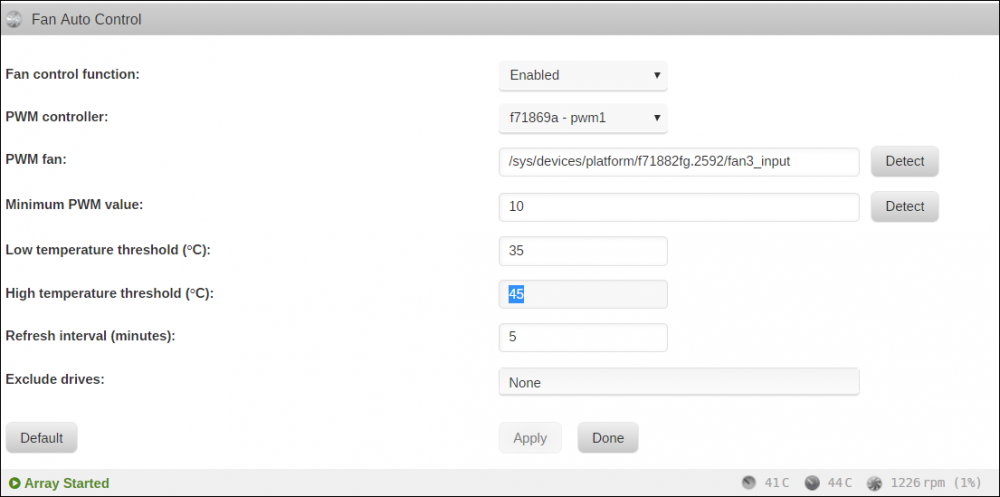
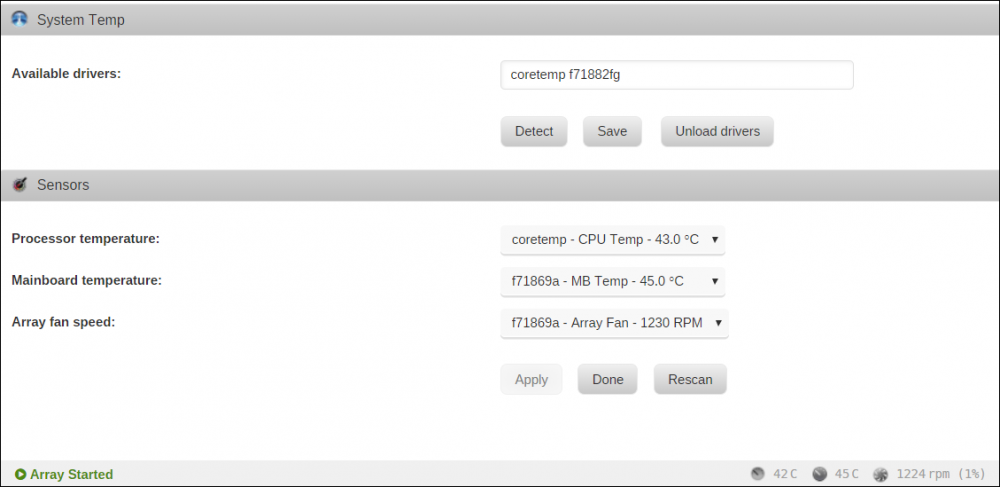
Please forgive me for asking, but how to I configure Autofan plugin? I have both System Temp and AutoFan Control installed, but my fans is constantly doing 1200+RPM on low temperature, and I dont know wich numbers to manipulate in order to lower RPM. Attached I have my current settings: