





jj_uk
Members
-
Joined
-
Last visited
Everything posted by jj_uk
-
I've had this problem for a while now. A long time ago, I renamed a share from CamelCase, to lowercase. Ever since doing that, the camel case share comes back at system reboot. For the old camel case share, I've deleted all the share's folders from all disks and the cache drive using MC, and i've deleted the share in the 'shares' tab UI, but upon reboot, the share re-appears - I just can't get rid of it, then fix common problems detects duplicate shares again. Any ideas how to delete the old share, forever?
-
Google Chrome / Win10 Click on the MAIN tab, move mouse over a disk and the grey bar flashes. Click on something and it stops flashing. Click on DASHBOARD tab: Move over Docker containers and the grey background doesn't look correct around docker logos. Hover over Shares or Users or CPUs or Array: every-other line gets a grey bar, not every line. I can see this is useful for lists of items that span the whole page width, e.g. on the Shares (tab), Dockers (tab), VMS (tab), definitely not required on the dashboard tab.
-
Yes, that's what it was. Not sure what to do about it so disabled it.
-
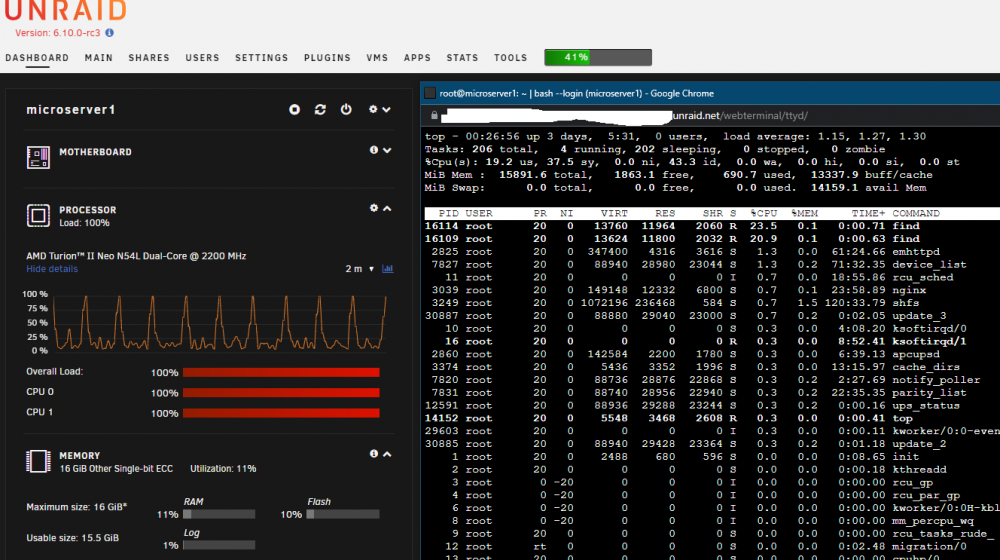
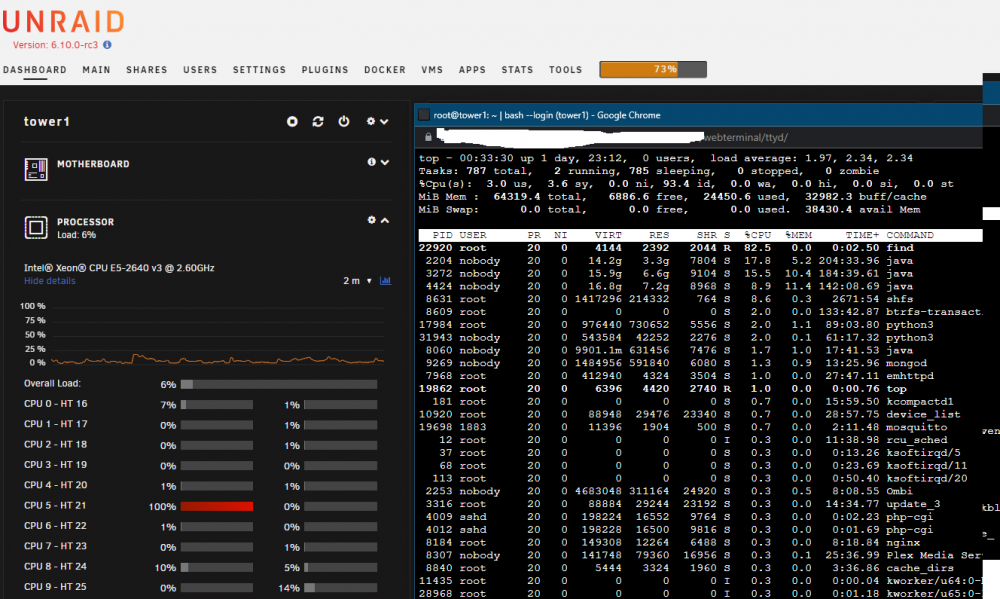
Both my servers are spiking CPU usage due to "find", about every 7 seconds. The CPU high load lasts about a second. What is "find" and why is it spiking the CPU so often? It's not a problem on my "Tower 1" sever, but it is a problem on my low-power "microserver1".
-
Thanks guys. I've updated to rc3. changed settings -> docker -> `Docker custom network type` to `ipvlan`. I've scrubbed the cache disk and the docker volume, no errors found. Hopefully that'll fix it. I have had a few issues with macvlan in the past taking down the server.
-
My server crashed again. This time syslog was being mirrored to flash so I have something to show. Attached is `syslog` from /flash/logs/. There was nothing unusual before the cropped section. It completed its appdata backup as usual at 3am, then crashed at just before 9am. The server was hard-reset and is now running a parity check. This happens every few weeks. What can I do to fix this? EDIT: Attached a diagnostics dump. syslog-cropped.txt tower1-diagnostics-20220315-1044.zip
-
If I ping a device from windows, I get a reply and wireshark shows the ping. If I ping the same device from unraid console, I get a reply but wireshark shows nothing. Any idea why this would be?
-
I think -A is the default, so not explicitly required.
-
My understanding is the script will automatically fox this for you.
-
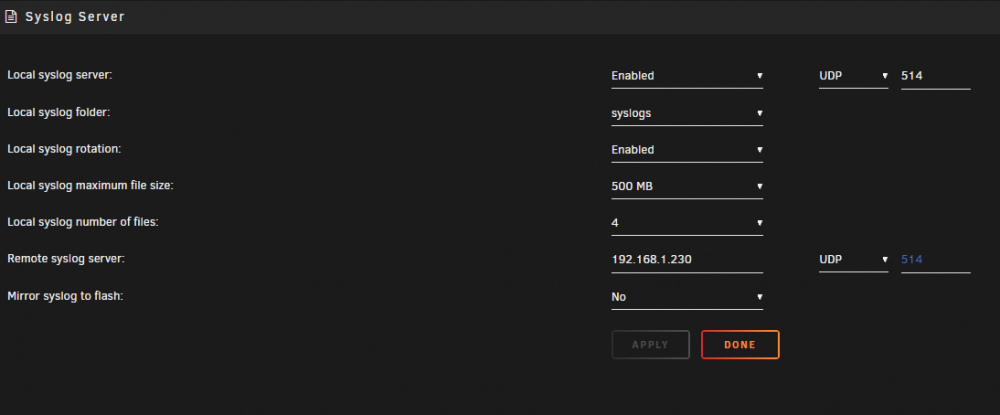
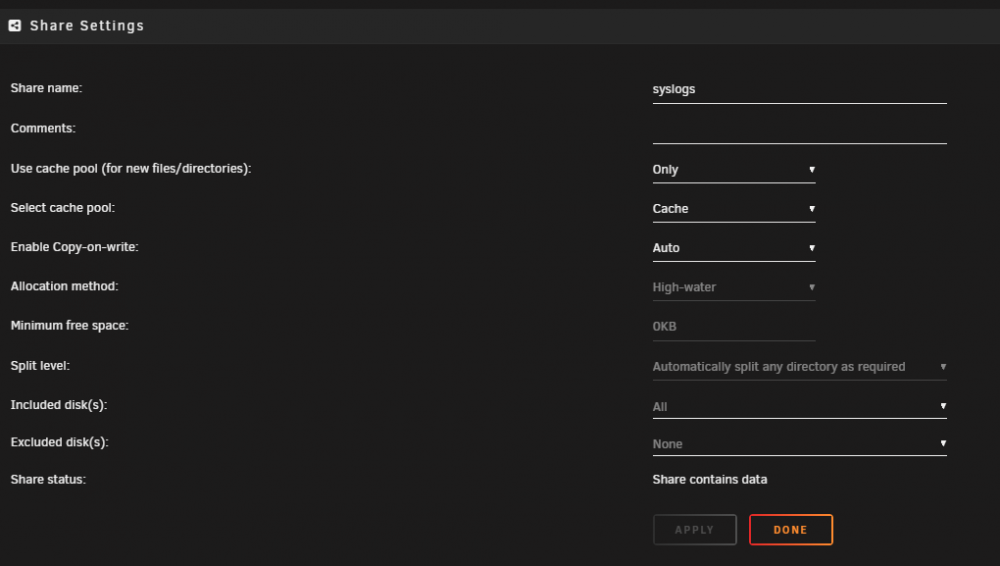
My server keeps crashing; it was every 6 months, now its every few weeks. I've set up syslog server to capture server logs, but they are written to a share. When the server crashes, the syslog shows no logging around the time of the crash, it shows the community apps backup run at 3am, then nothing until the hard reset at 1:16am. The server crashed at about 12:45am. So my question is how can I capture system logs to a directory on the array rather than a share? Maybe the crash isn't capturing logs because the crash is killing the shares?
-
I've also had these issues. I didn't find a solution.
-
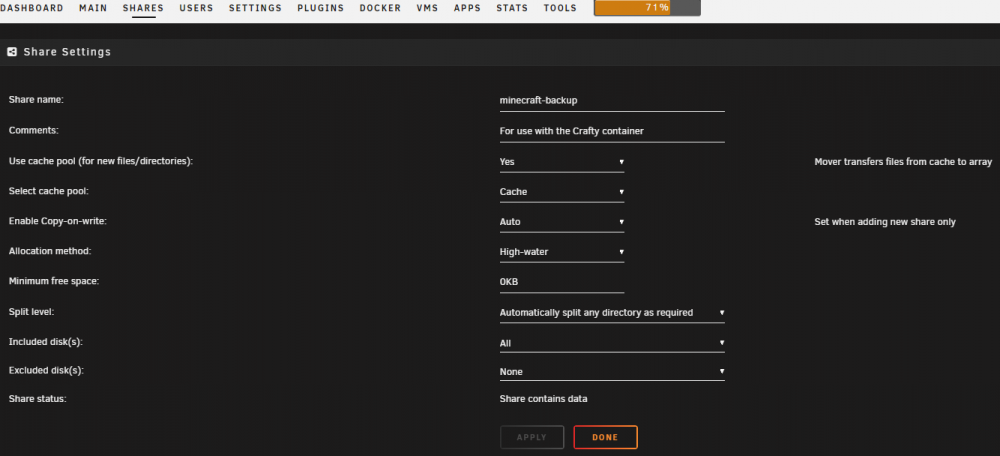
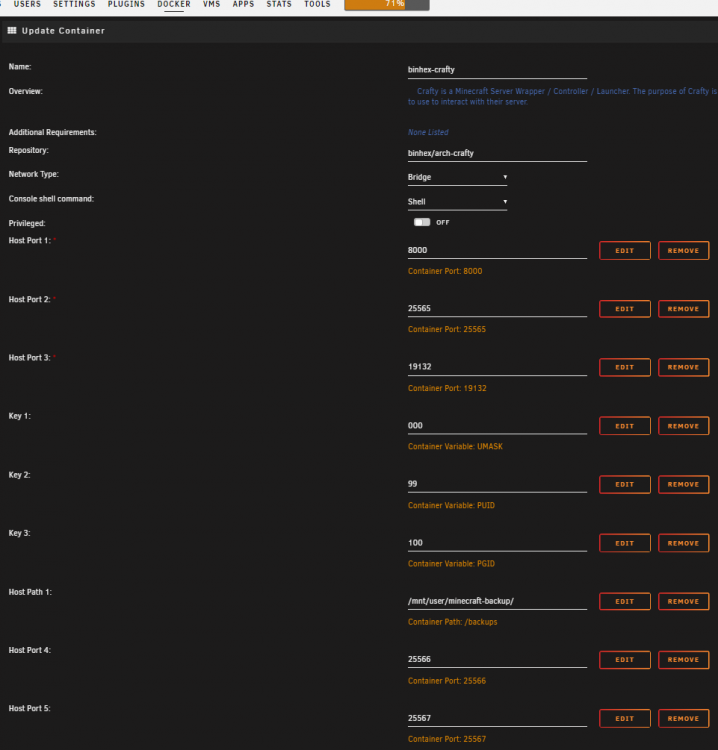
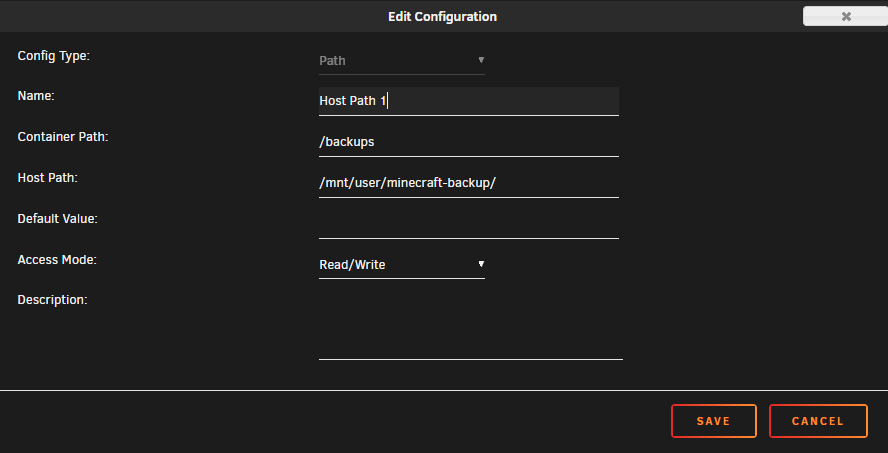
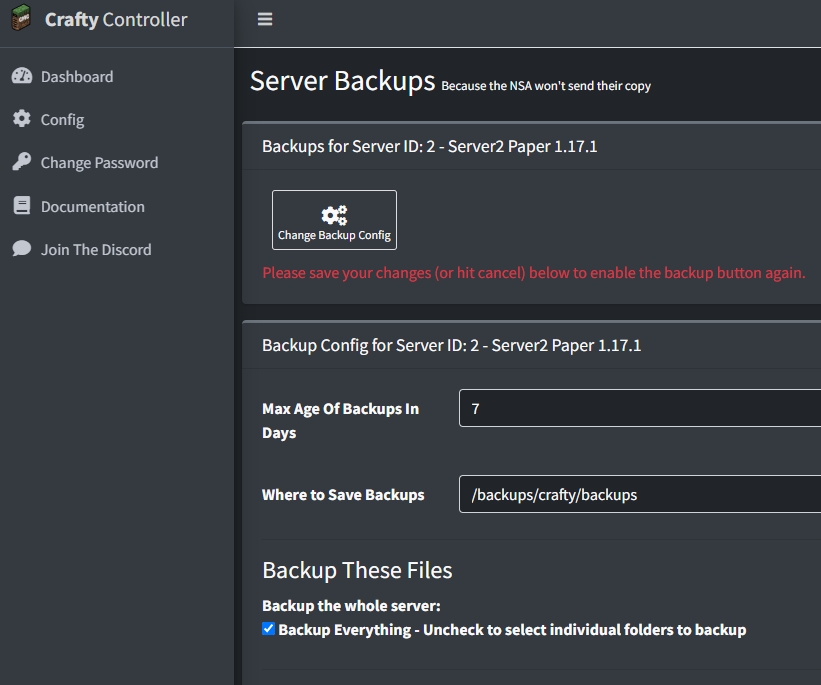
Be careful here. Depending on your unraid setup, the backups could be being saved to the cache (ssd?) drive, and backups are huge. It's probably a good idea to create a new share on unraid ('use cache = yes') and map that share into the docker container, then save the backups there instead. Unraid share: Container setup: Crafty config: The resulting file system. Crafty auto-creates a folder for each server. I have 3 servers:

-
Does this docker still work? After adding a YT channel and clicking "Add", the input box is cleared and nothing happens. The screen looks exactly as it did previously.
-
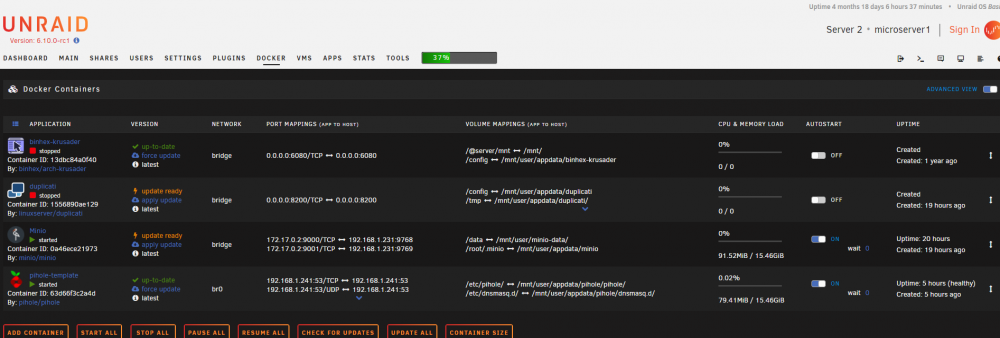
The logs show this, which suggests it updated last night, but it didn't. I updated PiHole eariler today manually, and the other 2 dockers are still showing updates avaliable.
-
My dockers don't seem to have been auto-updated for a while, on the docker list, they're all showing "apply update". I went into the auto-update docker settings, and "update all docker applications" is set to yes. I set that to no, then the dockers are shown, and they're all set to dont update. Does the "update all docker applications" over-ride the individual settings when set to 'yes'? It doesn't appear to.
-
I thought that disks needed to be roughly balanced usage-wise? e.g. all about the same amount of data on each? no? I've always done that. uhh..
-
The disk was added to the array yesterday, then Unraid started a disk clear. I've fixed this by formatting again. The disk is now part of the array and working correctly. Next: Move files to the new disk from the old disk to re-balance usage.
-
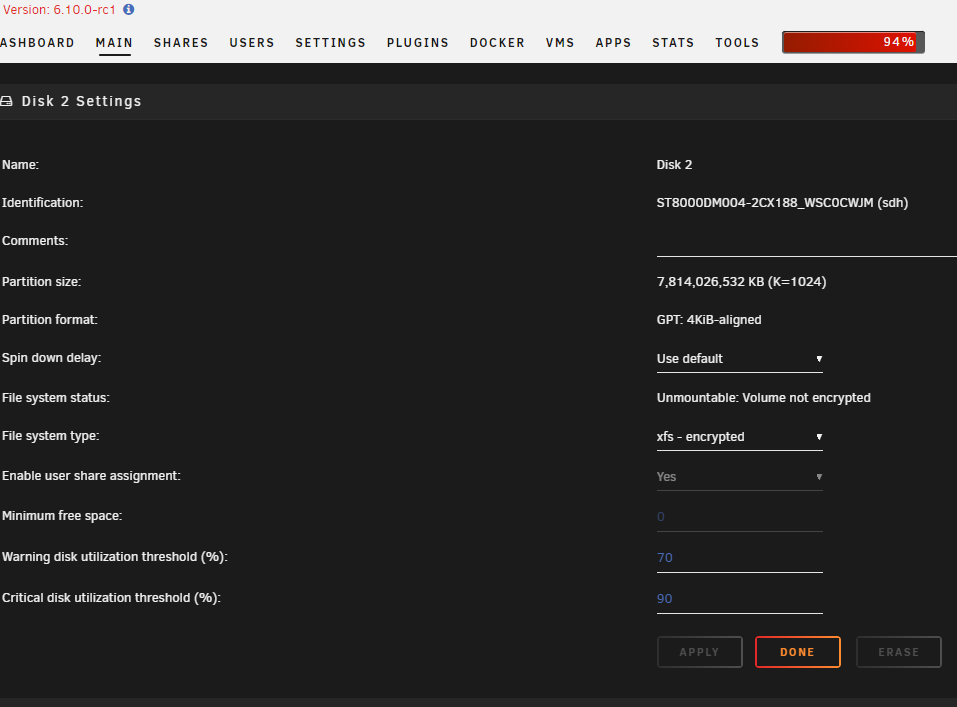
Unraid finished clearing my disk overnight. I deleted the drive's 'Historic Devices' entry in the Main tab GUI, then formatted the disk as Unraid was reporting it can't be added because it was not formatted. Following the format, which only took a few seconds(?), the disk is showing as "unmountable: volume not encrypted". The disk settings are showing as "encrypted". So, again, i'm stuck. What do I need to do to add this new disk? Attached is the log file. syslog-127.0.0.1.log

-
Oh no, It looks like I misconfigured the syslog server. It's logging to a share, which would have stopped when the array stopped. darn.
-
I use a syslog server so I have the logs, attached. syslog-192.168.1.230.log.zip
-
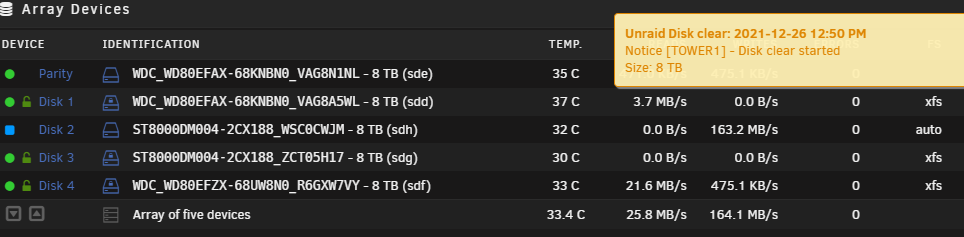
I restarted the server and tried again. It has allowed the drive to be added this time, and it's (annoyingly) clearing the drive, which was supposed to be done by the preclear script!
-
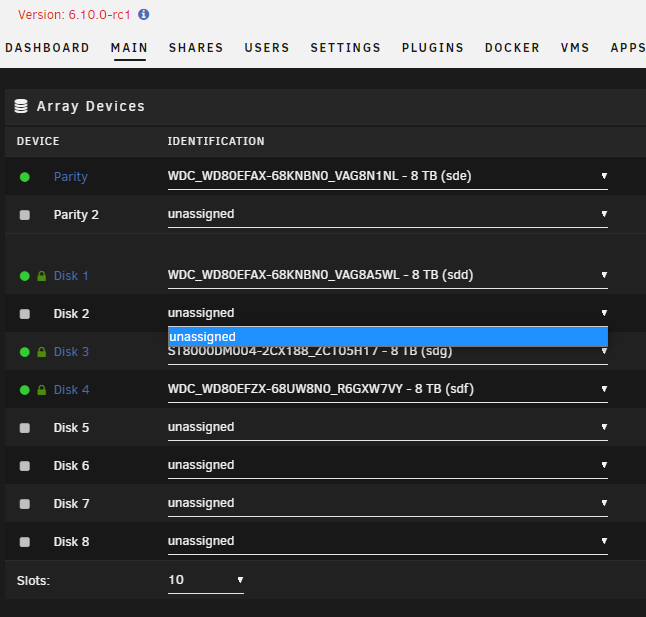
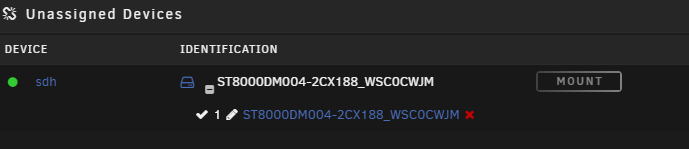
I've just finished pre-clearing a disk using the Binhex preclear docker. All successful. The new drive is 'sdh'. I stopped the array, and selected the new disk from the drop-down menu in the MAIN tab - 'Array Devices'. The page refreshed after selection, but the drop-down set itself back to 'unassigned', and now the disk doesn't appear in the drop-list. My array is still 3 drives + cache. It should be 4 drives + cache with the new disk added. I can see the disk in "unassigned devices". How can I add the new disk to the array?
-
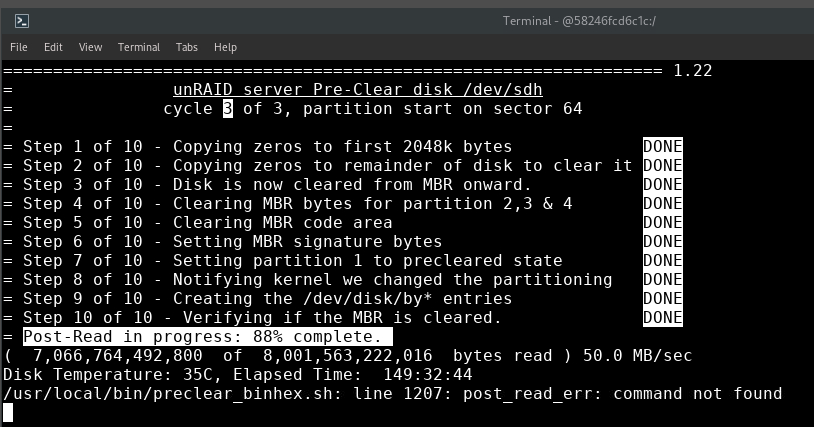
Just coming to the end of my run. This error "post_read_err: command not found" is flashing up on the screen. It is something to be concerned about? The process seems to be continuing as normal.
-
Thanks for your help. I'll run the preclear with -A.
-
Thanks for the reply. The doc states: "-C 64 = convert an existing pre-cleared disk to use sector 64 as a starting sector" So do I run my pre-clear as normal, ignoring the warning (as per prev post's image), then run the -C 64 command when it's finished? How can I know if the other drives in my system are 63 or 64? They were pre-cleared using the plugin back in 2018.





