





jj_uk
Members
-
Joined
-
Last visited
Everything posted by jj_uk
-
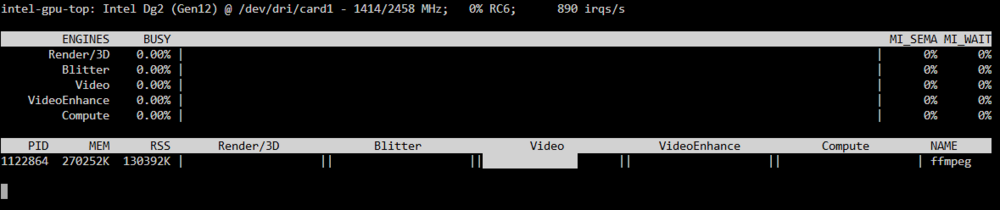
I'm trying to figure out if my GPU or CPU is being used to do video encoding. When I start process, I see this in intel_gpu_top. My ARC A380 card is card1. The Video is 0.00%, but below that, the process is showing video to be about 75%. Confused... The command is run in the console of tdarr container. ffmpeg -hwaccel qsv -hwaccel_output_format qsv -qsv_device /dev/dri/card1 -i "/temp/test/test_in.mkv" -c:v av1_qsv -global_quality 30 -preset 4 -c:a copy -c:s copy -y "/temp/test/test_out.mkv" Is this CPU or GPU encoding?
-
Is there a list of valid repositories that can be used for the updating of the container? I'm on lscr.io/linuxserver/nextcloud:28.0.3, tried lscr.io/linuxserver/nextcloud:28.0.9 but it said invalid.
-
Following an update from 6.12.13 to 6.12.14, I'm getting buffering when streaming music from Plex Media Server (as a docker), to a windows 10 PC in Chrome browser. I'm assuming this might be the issue mentioned in the release notes regarding a driver that needs to be uninstalled? As the release notes didn't give any specific instructions on what to uninstall and how to do it, I simply ignored the release notes - sorry. Can someone please take a look at my diagnostic logs from 6.12.14 (attached) and please give me a hint on what I need to do to fix this. I use music streaming a lot, and would also like to keep unraid up to date. I've rolled back to 6.12.13, and everything is working fine again. tower1-diagnostics-20241206-1806.zip
-
When running a docker scrub, the progress is never updated. Refreshing the page updates the progress. ( cache scrub updates progress every 1 second )
-
Doesn't seem to be doing anything? Should it rebuild on it's own? There's no button to press to force it as far as I can see?

-
I just pulled the 1st cache disk and replaced it as per the instructions. How do I know when the rebuid has finished? There's no indication anywhere that I can see that says the cache disks are rebuilding?
-
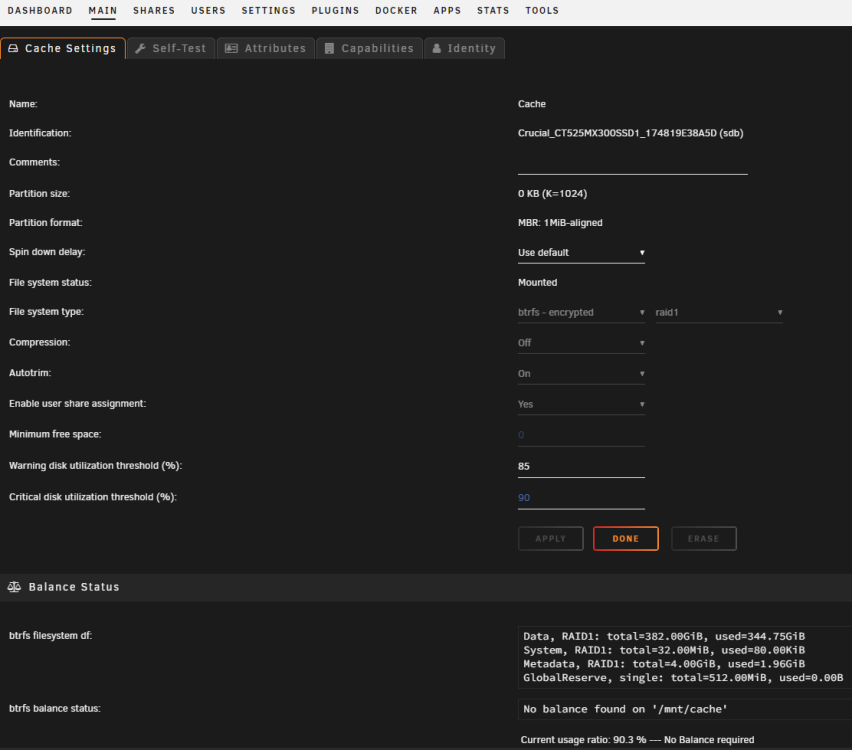
OK, yes, it's RAID1, so I should be good.
-
Thanks for the reply. I found this https://docs.unraid.net/unraid-os/manual/storage-management/#replace-a-disk-in-a-pool. What does "redundant" mean? It's the cache pool, so it's definitely in use!
-
What's the process for replacing both cache drives in a btrfs pool? Unplug a drive, plug in the new one, wait for rebuild, then repeat for the other disk? I'm replacing both disks with 1T drives.

-
Is the config file needed?
-
Actually, it doesn't work.. backup.log and config.json are missing from the copied files. Any idea why? Are these files locked when the port-run script is executed?
-
Thanks for the reply. I came up with this, seems to work. #!/bin/sh # Destination folder that will be cleared and will receive the copied data: dest="/mnt/user/backup/CommunityApplicationsAppdataBackup/appdata-latest" # The expected path of the source data (for sanity checking) src_must_contain="/mnt/user/backup/CommunityApplicationsAppdataBackup/appdata/ab_" # Sent arguments: post-run, destination path, true|false (true on backup success, false otherwise) today=$(date +'%Y-%m-%d_%H%M%S') logfile="/mnt/user/backup/CommunityApplicationsAppdataBackup/appdata/port-run-$today.log" { # required for logging, see EOF for closing brace. src="$2" backup_status="$3" echo "log: $logfile" echo echo "params:" echo "param 1 = $1" echo "param 2 = $2" echo "param 3 = $3" echo if [ $1 != "post-run" ]; then echo "ERROR: param 1 not \"post-run\", exiting." exit 0 fi # check param indicates the backup was successful: if [ $backup_status != "true" ]; then echo "ERROR: backup_status is not true, exiting." exit 0 fi # check source path contains the expected path: if [[ $src != *"$src_must_contain"* ]]; then echo "ERROR: src path appears to be at an unexpected location, exiting." exit 0 fi # check source is a directory: if [ -d $src ]; then echo "source: $src" else echo "ERROR: src is not a directory, exiting." exit 0 fi # check destination is a directory: if [ -d $dest ]; then echo "dest: $dest" else echo "ERROR: dest is not a directory, exiting." exit 0 fi # empty destination directory: rm -rf $dest/* echo "Copying src to dest..." # copy source to destination cp -r $src/ $dest/ echo echo echo "finished, exiting." exit 0 } 2>&1 | tee -a $logfile
-
I'd like to create a script to run after the backup has successfully completed. The script needs to run only if the backup was successful, then: Empty the `/mnt/user/CommunityApplicationsAppdataBackup/appdata-latest/` folder. Copy the folder that was just created by the backup tool to the above path. I've not written any scripts before. Does anyone have any example scripts?
-
I recently changed the fixed IP address that unraid is using to allow me to move it outside of the DCHP range. I've changed the proxy settings in radarr/sonarr to use the new unraid ip address:8118, and they can connect to the indexers again. But SAB can't connect to the downloader servers. Clicking the spanner in Sab, I see this: Local IPv4 address 10.27.4.254 Public IPv4 address Connection failed! IPv6 address None Nameserver / DNS Lookup OK Not sure what to do, I can't see a proxy setting in Sab to force the use of privoxy. Any idea?
-
Is it possible to exclude folders everywhere that have a certain name? I use the recycle bin plugin and I don't want to include .Recycle.Bin folders in my backups. I'd like to globally exclude .DS_Store, *.tmp, .Recycle.Bin
-
I've just turned on an unraid server that's been off for 3 years. when I go to the IP address of the server, it redirects to https://**removed**.unraid.net But there's an error page: This site can’t be reached Check if there is a typo in **removed**.unraid.net. If spelling is correct, try running windows network Diagnostics. DNS_PROBE_FINISHED_NXDOMAIN It was working ok when the server was shut off a few years ago. Any ideas? I don't have a monitor cable to connect to the server at the moment, so no console.
-
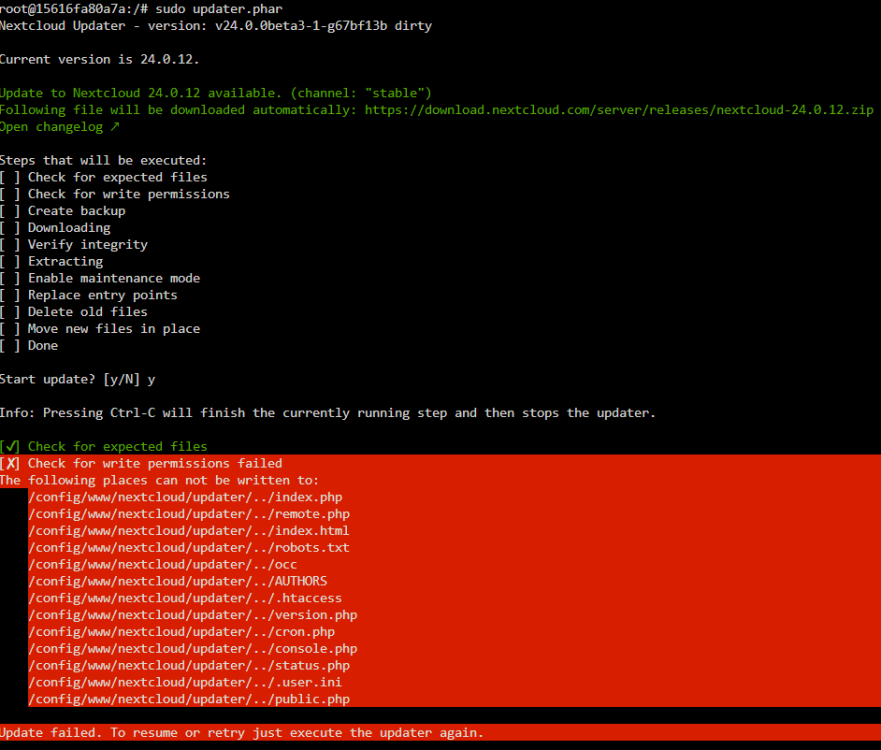
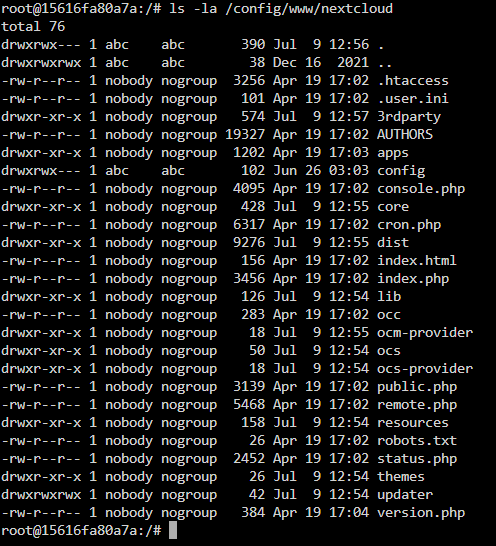
Hi- I'm trying to fix nextcloud following the instructions here: https://info.linuxserver.io/issues/2023-06-25-nextcloud/ but i'm stuck. I changed the repository back to lscr.io/linuxserver/nextcloud:version-24.0.12 and restarted. I had some warnings about /nextcloud/nginx/nginx.conf and /nextcloud/nginx/site-confs/default.conf being out of date, so i deleted them and restarted the container. They were recreated. The log file now shows only this: When accessing the nextcloud webgui ip address, I get this: When trying to update, I get this: I read my notes from past updates and run the command that I always use: sudo -u abc php /config/www/nextcloud/updater/updater.phar but get the same write permission error as above. Here's my nextcloud appdata, the user/group seems to be nobody/nogroup. I can't remember if this was user/group abc/abc previously? I'm now stuck and don't know what to do to get nextcloud working again? I've tried as much as I can, but this is beyond me. EDIT: I ran chown -R abc:abc /config/www sudo -u abc php /config/www/nextcloud/updater/updater.phar The updater is now running. We'll see what happens. EDIT 2: This is working for me. Nextcloud updated once and I was able to access the GUI.
-
It's copying from /mnt/disk2/MediaServer to /mnt/disk1/MediaServer So that's disk to disk, right? /mnt/user/MediaServer <-- is that a user share?
-
So the data is just lost? ok, i'm moving the data off the drive i'd like to remove using the Dynamix File Manager plugin. I'll take a look at unBalance.
-
The process of changing the parity drive to a 20T drive, and replacing a faulty disk has now completed. I've now replaced another small data disk with a 20T disk. As I now have loads of free space on the server, I'd like to remove a disk. The process to remove a drive is to reset the config, choosing to preserve assignments, changing the disk to be removed to 'unassigned' then starting the array (in maintenance mode, for speed). As a disk has been removed, what happens here? Does Unraid try recreate the removed disk's data onto the remaining disks? In my case, there will definitely be enough space for this to happen, but what happens if there's not enough space? What happens to the share settings if they're set to use, or exclude that disk? This isn't covered in the FAQ. https://wiki.unraid.net/Manual/Storage_Management#Removing_data_disk.28s.29
-
OK, I'll stop worrying now. Seems to be reading and writing only the new parity drive. Was this fixed in a newer Unraid version (I'm using 6.10.2) ? I'm planning on replacing a data drive with a 20T once this parity check finishes.

-
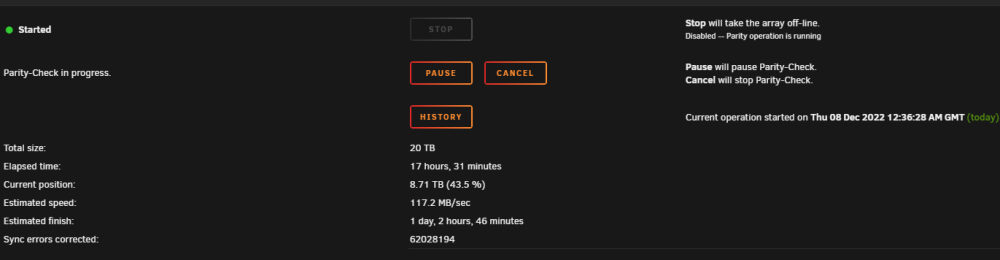
I followed the procedure 'exactly' to perform the parity swap. The old parity drive was 8T, the new parity drive is 20T. I have the following drives (image below) : The parity swap process completed successfully. The last part of the instructions states that running a parity check is optional. So I chose to run it. There are literally millions of sync errors being corrected by the parity check! - What's going on ?! The parity check position is past 8T (my largest data drive). Is this simply the parity drive being reset to a known state and nothing to worry about? The new parity drive was precleared before use. Should I be worried?? tower1-diagnostics-20221208-1820.zip

-
The mention of the cache drive was a mistake, I was supposed to be referring only to the parity and data drives. Yes- Once they've done a few weeks of preclearing on the binhex-preclear docker, i'll pop them out of the usb cases and attach then via sata.
-
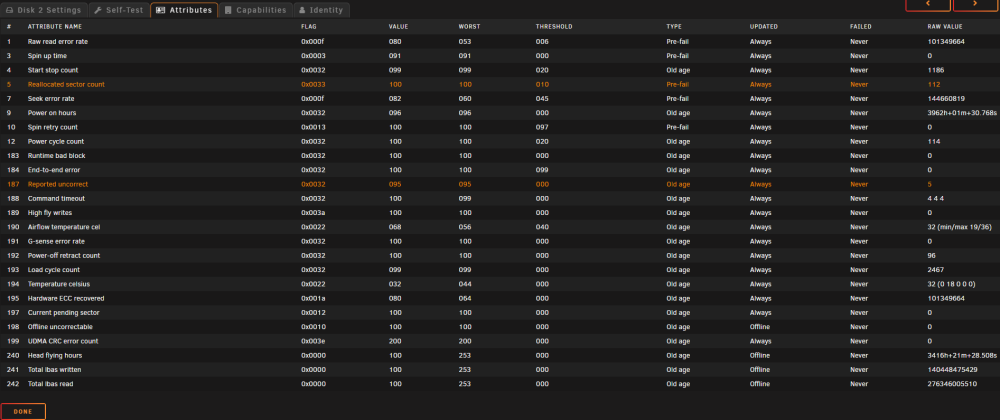
I have a data disk that is showing smart errors. The disk is about 12 months old, and annoyingly a 3-cycle preclear didn't show any errors, but that's life. The drive was ripped from a USB backup box so it has no warranty. Bye bye cash. My server is running low on storage, so I've bought two 20TB drives (usb backup drives, currently connected via usb and preclearing 3x cycles). All data disks and the parity disk are currently 8TB. To insert the 20T disks, I'll also need to replace the cache drive as it must be >= the largest data disk. Would I be OK swapping out the parity drive with a 20T, rebuilding the array then swapping the failing drive with the old parity drive? Or should I do a the parity swap procedure instead ? (https://wiki.unraid.net/The_parity_swap_procedure)
-
So I do, thanks!!


