





Grobalt
Members
-
Joined
-
Last visited
Everything posted by Grobalt
-
sorry , sadly i cannot remember any restore or manual changes that may help you.
-
unraid-diagnostics-20240829-1422.zipunraid-diagnostics-20241031-2110.zipunraid-diagnostics-20250522-1324.zip here we are .. dont know why i store them at that time
-
the diagnostic was taken after i created 5 shares to increase the counter .. so after this kodicache .. the next was 101 .. up to 105, so creating another 3 dublicates. i have diagnostic files from may 2025 and, october august 2024 if you like to compare ? stick is same.. maybe i deleted the network.cfg once but not 100% sure.
-
makes sense, sorry unraid-diagnostics-20260903-1359.zip
-
hi, i created a new share today and experienced wrong paths used to write. i found double fsid root@Unraid:/boot/config/shares# grep -rn "Fsid" /boot/config/shares/ /boot/config/shares/download.cfg:19:shareExportNFSFsid="101" /boot/config/shares/serien.cfg:19:shareExportNFSFsid="103" /boot/config/shares/domains.cfg:19:shareExportNFSFsid="0" /boot/config/shares/kodicache.cfg:19:shareExportNFSFsid="100" /boot/config/shares/doku-archiv.cfg:19:shareExportNFSFsid="100" /boot/config/shares/filme.cfg:19:shareExportNFSFsid="102" /boot/config/shares/musik.cfg:19:shareExportNFSFsid="101" /boot/config/shares/appdata.cfg:18:shareExportNFSFsid="0" /boot/config/shares/system.cfg:19:shareExportNFSFsid="0" /boot/config/shares/3d-filme.cfg:19:shareExportNFSFsid="0" /boot/config/shares/Fridgemaster.cfg:19:shareExportNFSFsid="0" /boot/config/shares/backup.cfg:19:shareExportNFSFsid="0" /boot/config/shares/isos.cfg:19:shareExportNFSFsid="0" why us unraid using fsid that is already used ? why have so many fsid="0" ? yes, i can fix it manually for my new kodicache share, but it will happen again
-
okay .. i reconfigured transcoding to use /dev/shm instead of /tmp and checking df -h in parallel .. it seems after 20 minutes that maximum ram usage if 3.1G for transcoding and nothing is filling up anywhere.
-
Hi Guys, one of my friends (i am doing the administration) has issues with his system. It is very simple, not much services, just jellyfin media server. From time to time playback stops, gui is unresponsive and it recovers after a while, Log file has some entries but i cannot figure out the issue. any idea ? tower-diagnostics-20260110-2038.zip
-
I am using the dynamix sleep plugin and tried to set Set WOL options before sleep to ug but it is not saving the option if i select ug together. it saves u ... it saves g standalone - but if i select both it is not stored. if u use this command it stores the setting .. to the NIC can do it but not via plugin GUI Config. ethtool -s eth0 wol ug
-
i had no issues updating to 2.0 several weeks ago on 4 clients, all unraid. did not yet update to 2.0.2
-
i had to delete some stuff today .. it deletes the files from cache but if they are synced to array, it will not touch array files :( so i have to delete them twice unter /mnt/user ... ok, it was worth a try, but like this it is not usable with "sync"
-
ok, because it was for every folder :D
-
The option clean empty folders is not working: Aug 1 18:18:43 Unraid move: Deleting empty folder /mnt/cache/filme/Donnie Darko (2001) 2160p Aug 1 18:18:43 Unraid move: rmdir: failed to remove '/mnt/cache/filme/Donnie Darko (2001) 2160p': No such file or directory
-
yeah, now figuring out how to copy thousands of jpg to cache in the correct folder structure :D
-
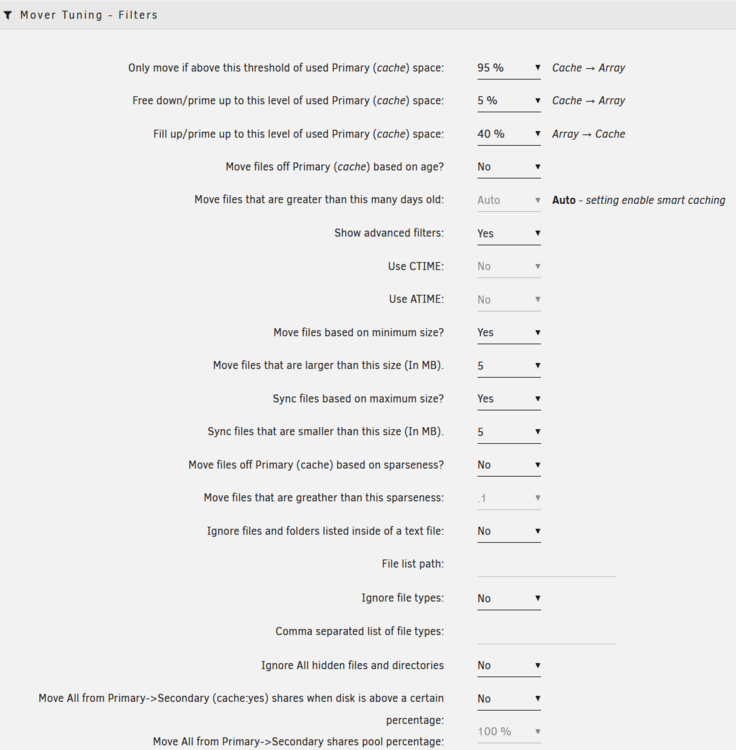
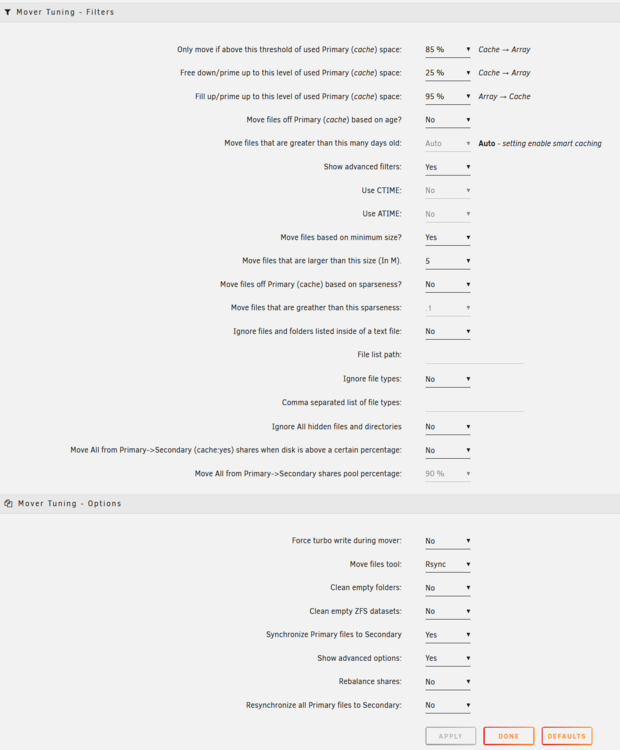
using these settings maybe i achieved what i tried to achieve
-
okay, seems sync will never work as i would like to do .. so maybe a new plugin is needed. i am not able to code myself .. but i have no issue paying a few dollars for development
-
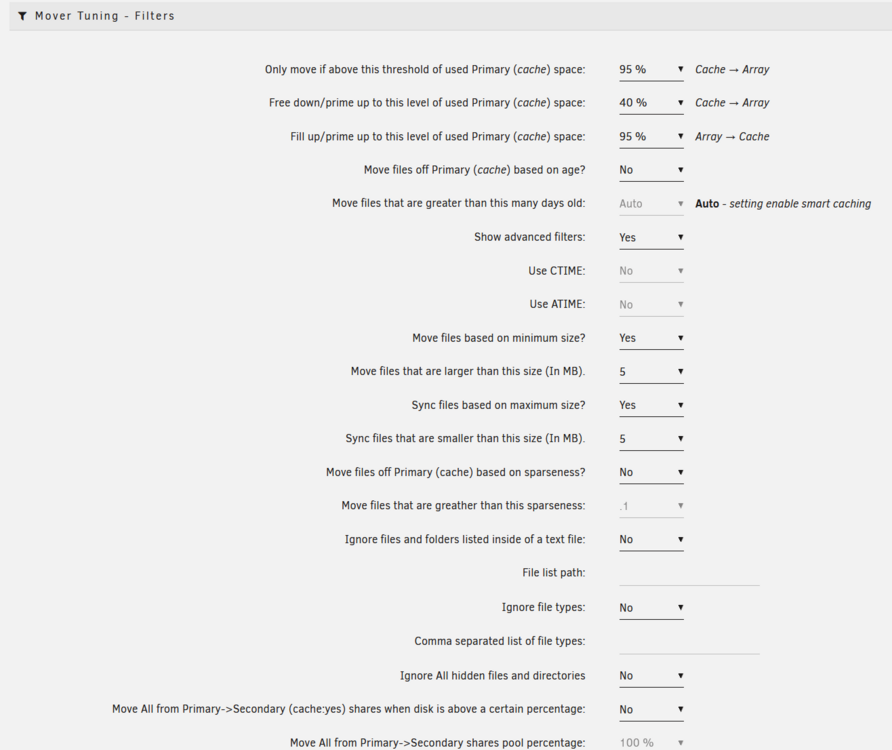
okay, until then i have no parity protection .. that is not the intention :D large files should be threshold independant .. always on array will this work as temporary workaround ? i still have issues understanding the 3 thresholds ... best would be without tresholds

-
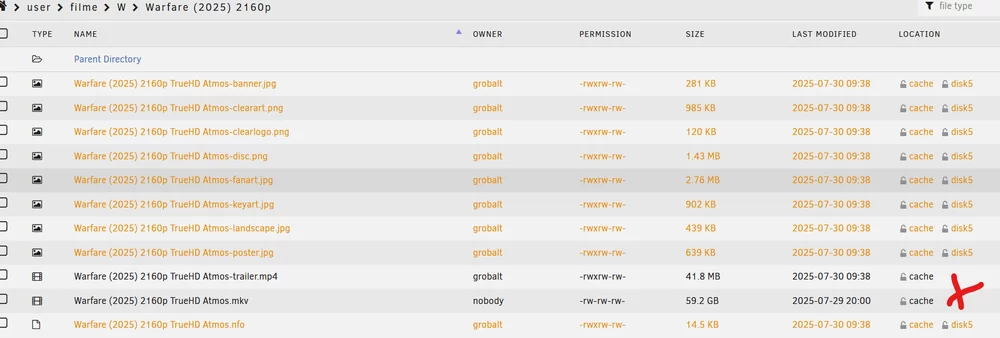
not yet :) small files perfectly synchronized to cache and array, but large files need to be moved to array
-
if sync means "duplicate" that would be perfect
-
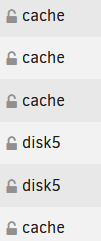
okay, i deleted all small files, renamed my movie .. removed from cache etc .. and recreated all files with the movie scraper to have "fresh" files. changed the threshold to 0% now it moved the large files to array (good) but did not create duplicates of the small files to the array.
-
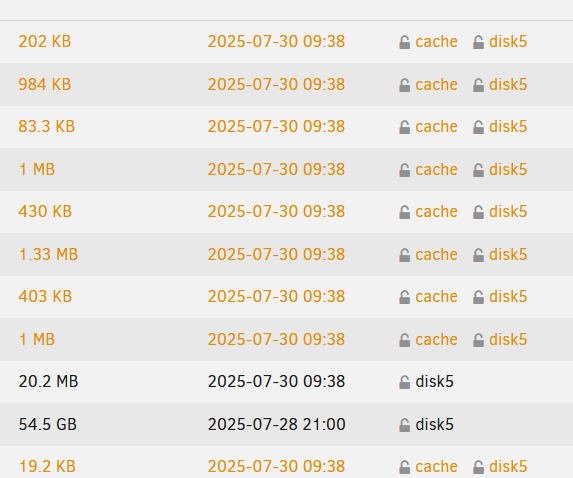
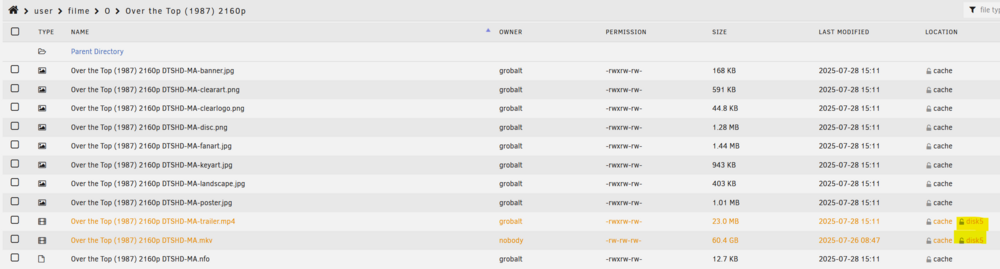
okay, so maybe i still misconfigure everything. what i would like to achieve is having all small files below a certain size copied to array - making duplicates - and moving the larger files to array only as you see in my screenshot the result is the opposite, the large files are duplicated to array and stay on cache
-
Thanks - now the result is exactly the opposite :D the large files should be array only, the small files on both
-
yeah, file extensions would be sufficient. example .. a movie collection usually has the movies in folders with moviename, in the folder then JPG, PNG, MKV, AVI, MP4 etc. To show the movies in the player GUI it is great to have the small text files and pictures on fast cache and the large files on array. but for reliability, copies on cache, not cache only.
-
white list for files that should be duplicated on cache and array
-
i need the opposite ... a whitelist and not a blacklist. it would be great to use the mover tuning to make unraid a tiered storage solution .. small, quick access files on nvme (but a redundant copy on parity protected array) and large, streaming files on array.
-
that would be awesome .. for the movie collection share create a duplicate for everything on the array to the cache except .mkv and .mp3 :) that would be the best possible filter setting. in dependent of any threshold ... i see when my cache is getting full :D





