Grobalt
Members
-
Joined
-
Last visited
Everything posted by Grobalt
-
okay .. i reconfigured transcoding to use /dev/shm instead of /tmp and checking df -h in parallel .. it seems after 20 minutes that maximum ram usage if 3.1G for transcoding and nothing is filling up anywhere.
-
Hi Guys, one of my friends (i am doing the administration) has issues with his system. It is very simple, not much services, just jellyfin media server. From time to time playback stops, gui is unresponsive and it recovers after a while, Log file has some entries but i cannot figure out the issue. any idea ? tower-diagnostics-20260110-2038.zip
-
I am using the dynamix sleep plugin and tried to set Set WOL options before sleep to ug but it is not saving the option if i select ug together. it saves u ... it saves g standalone - but if i select both it is not stored. if u use this command it stores the setting .. to the NIC can do it but not via plugin GUI Config. ethtool -s eth0 wol ug
-
i had no issues updating to 2.0 several weeks ago on 4 clients, all unraid. did not yet update to 2.0.2
-
i had to delete some stuff today .. it deletes the files from cache but if they are synced to array, it will not touch array files :( so i have to delete them twice unter /mnt/user ... ok, it was worth a try, but like this it is not usable with "sync"
-
ok, because it was for every folder :D
-
The option clean empty folders is not working: Aug 1 18:18:43 Unraid move: Deleting empty folder /mnt/cache/filme/Donnie Darko (2001) 2160p Aug 1 18:18:43 Unraid move: rmdir: failed to remove '/mnt/cache/filme/Donnie Darko (2001) 2160p': No such file or directory
-
yeah, now figuring out how to copy thousands of jpg to cache in the correct folder structure :D
-
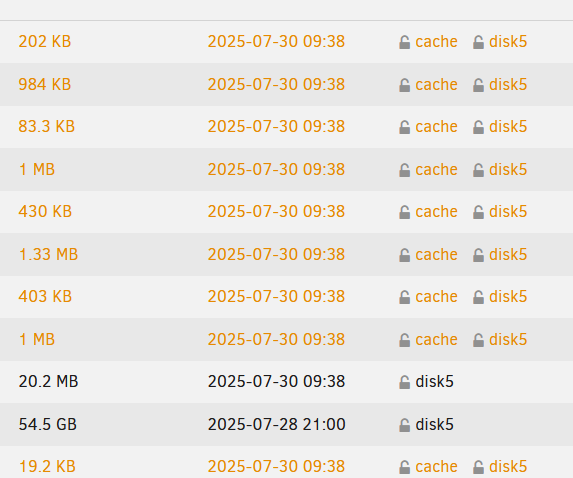
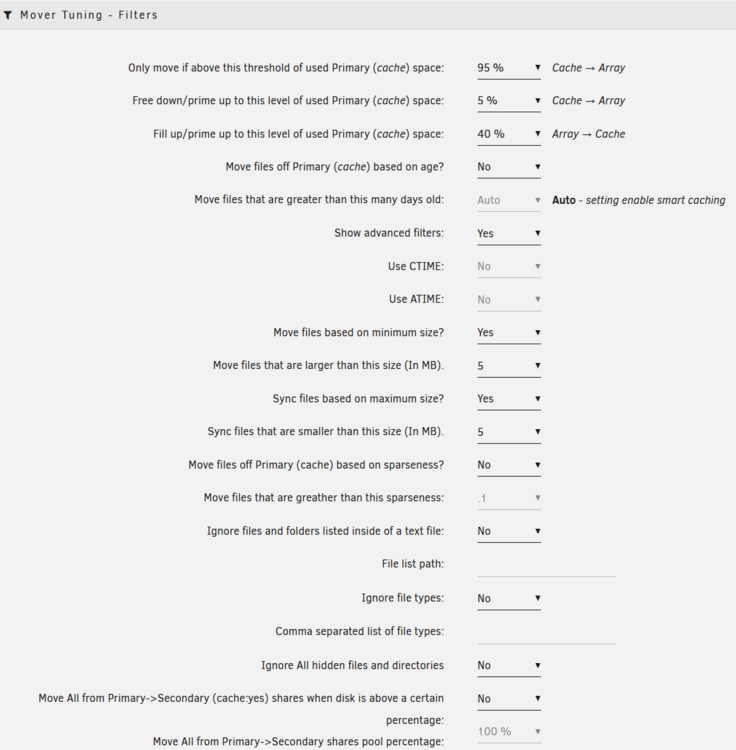
using these settings maybe i achieved what i tried to achieve
-
okay, seems sync will never work as i would like to do .. so maybe a new plugin is needed. i am not able to code myself .. but i have no issue paying a few dollars for development
-
okay, until then i have no parity protection .. that is not the intention :D large files should be threshold independant .. always on array will this work as temporary workaround ? i still have issues understanding the 3 thresholds ... best would be without tresholds

-
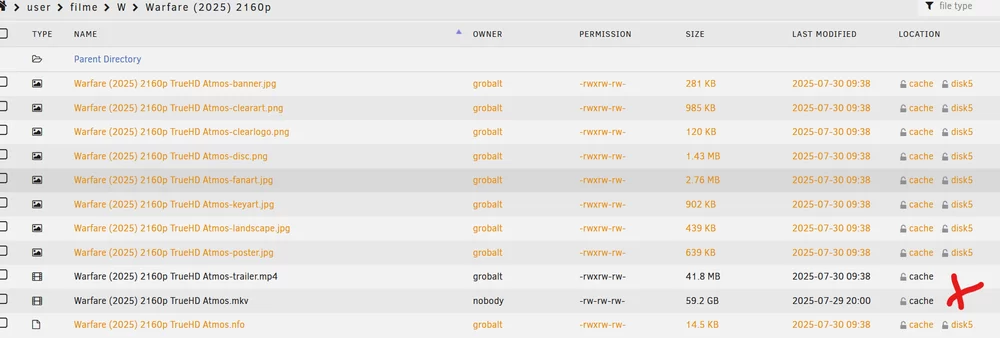
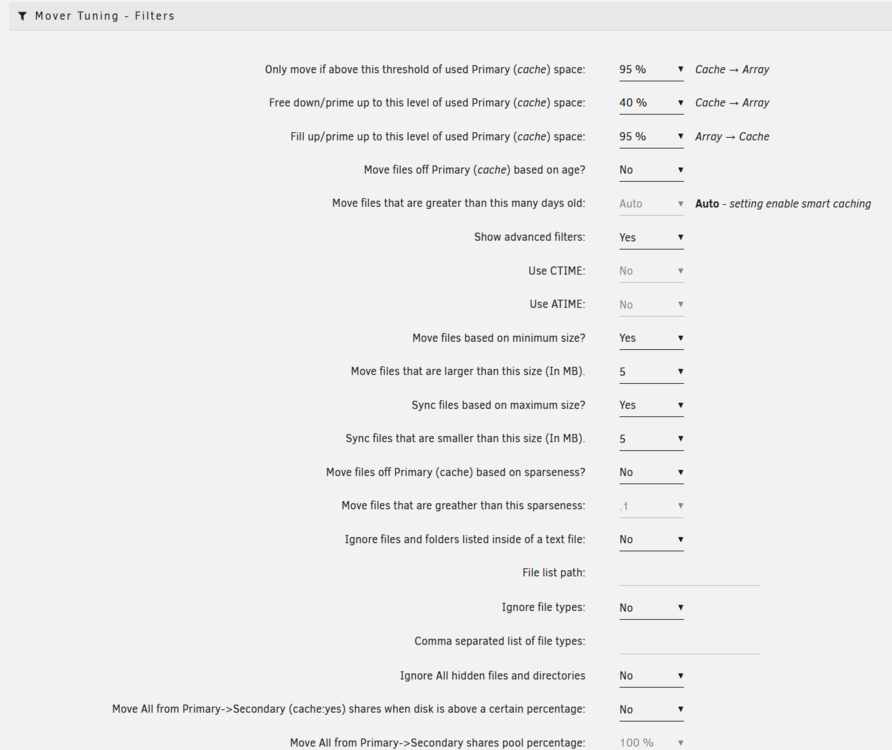
not yet :) small files perfectly synchronized to cache and array, but large files need to be moved to array
-
if sync means "duplicate" that would be perfect
-
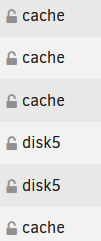
okay, i deleted all small files, renamed my movie .. removed from cache etc .. and recreated all files with the movie scraper to have "fresh" files. changed the threshold to 0% now it moved the large files to array (good) but did not create duplicates of the small files to the array.
-
okay, so maybe i still misconfigure everything. what i would like to achieve is having all small files below a certain size copied to array - making duplicates - and moving the larger files to array only as you see in my screenshot the result is the opposite, the large files are duplicated to array and stay on cache
-
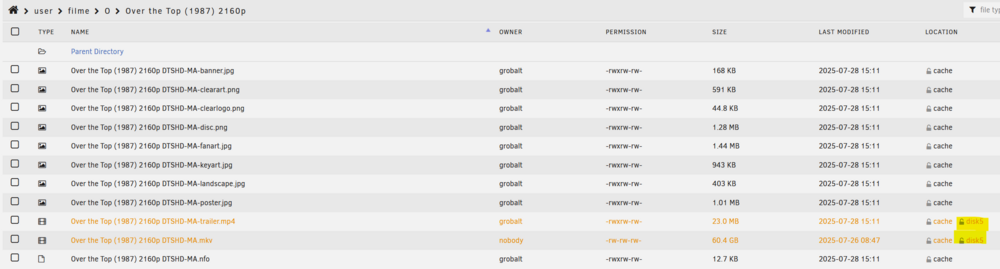
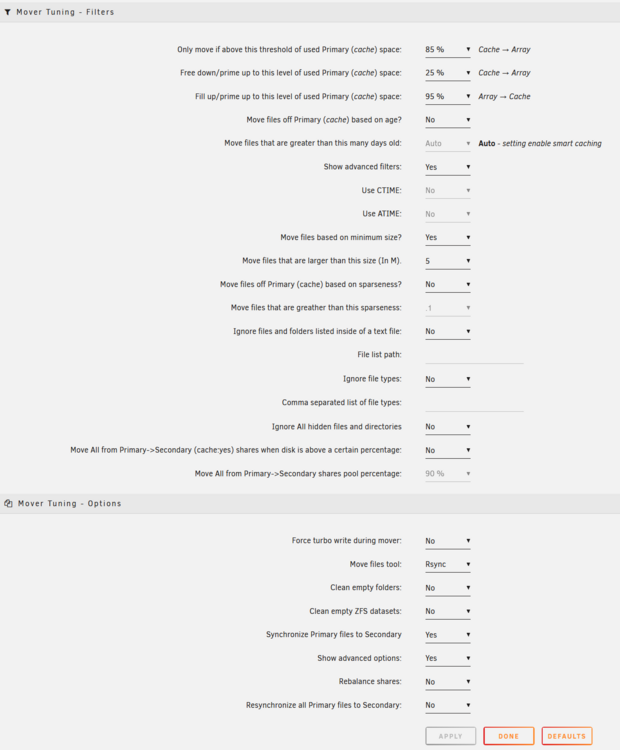
Thanks - now the result is exactly the opposite :D the large files should be array only, the small files on both
-
yeah, file extensions would be sufficient. example .. a movie collection usually has the movies in folders with moviename, in the folder then JPG, PNG, MKV, AVI, MP4 etc. To show the movies in the player GUI it is great to have the small text files and pictures on fast cache and the large files on array. but for reliability, copies on cache, not cache only.
-
white list for files that should be duplicated on cache and array
-
i need the opposite ... a whitelist and not a blacklist. it would be great to use the mover tuning to make unraid a tiered storage solution .. small, quick access files on nvme (but a redundant copy on parity protected array) and large, streaming files on array.
-
that would be awesome .. for the movie collection share create a duplicate for everything on the array to the cache except .mkv and .mp3 :) that would be the best possible filter setting. in dependent of any threshold ... i see when my cache is getting full :D
-
Test Mode (dry run) is by default activated when the addon is installed ..
-
ca.mover.tuning-debug-20250724-1949.zip i want copies/duplicates of the small files to the parity protected array and keep them on cache/nvme for quick movie scraping etc
-
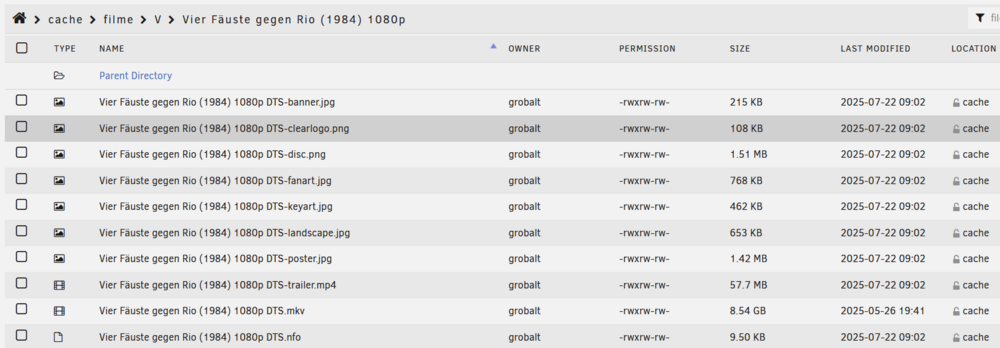
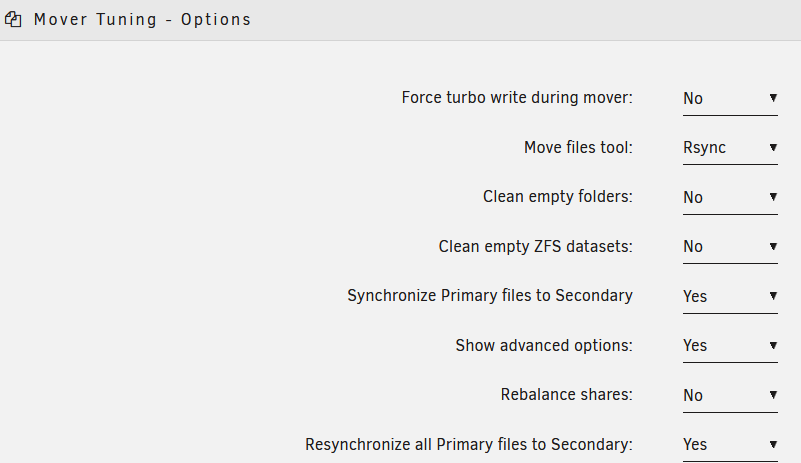
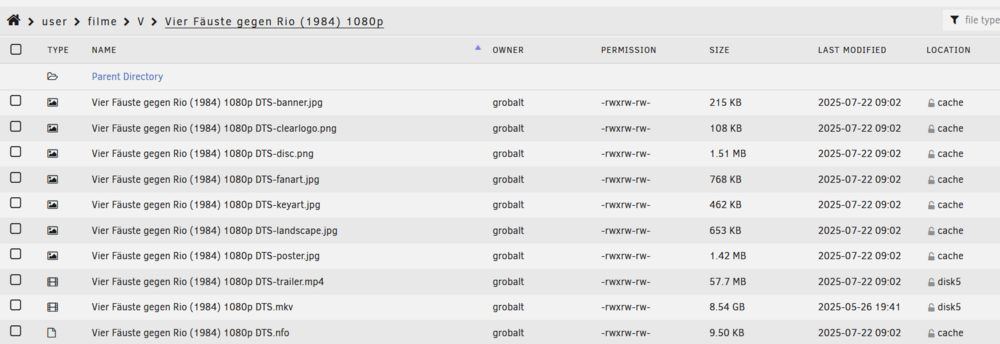
i copied to unraid this: synchronize is enabled Jul 24 12:26:40 Unraid move: ************************************************************ ANALYSING MOVING ACTIONS *********************************************************** Jul 24 12:26:40 Unraid move: Deciding the action (move/sync/keep) for each file. There are 6 files, it can take a while... Jul 24 12:26:40 Unraid move: A total of 2 files representing 8.1GiB will be moved/synced: Jul 24 12:26:40 Unraid move: - 2 files representing 8.1GiB will be moved/sync from cache to secondary Jul 24 12:26:40 Unraid move: Action started at: 12:26:40 Jul 24 12:26:40 Unraid move: *********************************************************** LET THE MOVING SHOW BEGIN ! ********************************************************* Jul 24 12:26:40 Unraid move: Moving "/mnt/cache/./filme/V/Vier Fäuste gegen Rio (1984) 1080p/Vier Fäuste gegen Rio (1984) 1080p DTS-trailer.mp4" to /mnt/user0/ Jul 24 12:26:40 Unraid move: 1 files remaining from caches to array 8.0GiB Jul 24 12:26:40 Unraid move: Moving "/mnt/cache/./filme/V/Vier Fäuste gegen Rio (1984) 1080p/Vier Fäuste gegen Rio (1984) 1080p DTS.mkv" to /mnt/user0/ Jul 24 12:26:44 Unraid emhttpd: read SMART /dev/sdb Jul 24 12:26:44 Unraid emhttpd: read SMART /dev/sdf Jul 24 12:26:44 Unraid emhttpd: read SMART /dev/sdi Jul 24 12:26:56 Unraid move: 0 files remaining from caches to array 0B Jul 24 12:26:56 Unraid move: ------------------------------------------------------------------- Cleaning up ----------------------------------------------------------------- Jul 24 12:26:56 Unraid move: Cleaning lock and stop files Jul 24 12:26:56 Unraid move: Action ended at: 12:26:56 Jul 24 12:26:56 Unraid move: Elapsed time: 16 sec Jul 24 12:26:56 Unraid move: ****************************************************************** WE ARE DONE ! **************************************************************** Result, no copy on array of the small files unraid-diagnostics-20250724-1228.zip
-
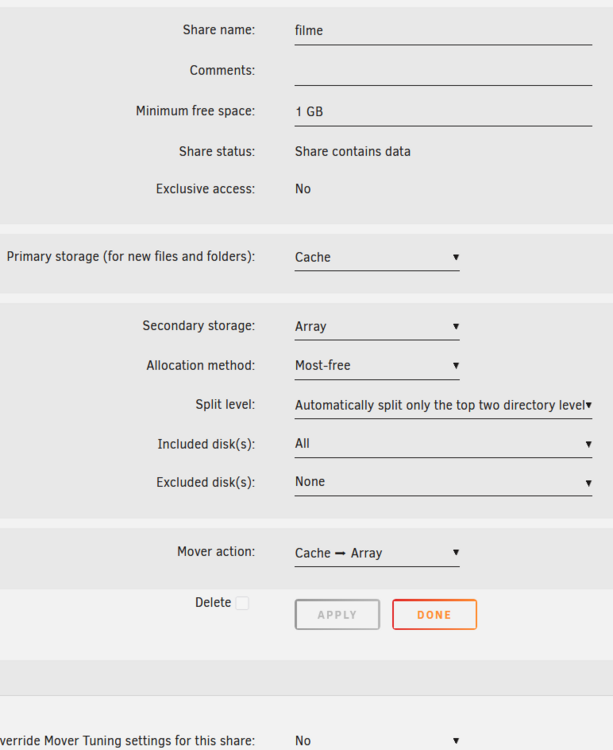
Mover Tuning NotificationA total of 0 files representing 0B were successfully moved/synced by Mover Tuning plugin. Elapsed time: 0 sec Jul 24 11:37:25 Unraid move: ------------------------------------------------------------ Processing [filme] share ----------------------------------------------------------- Jul 24 11:37:25 Unraid move: Primary storage: cache - size: 1.9TiB - used: 14 % (263GiB) Jul 24 11:37:25 Unraid move: Secondary storage: user0 Jul 24 11:37:25 Unraid move: Share Information: Name: filme - Path: /mnt/cache/filme Jul 24 11:37:25 Unraid move: Moving threshold: 0% (0B) ; Freeing threshold: 0% (0B) Jul 24 11:37:25 Unraid move: Mover action: cache->user0 (cache:yes). Pool is above moving threshold percentage: 14% >= 0%. Jul 24 11:37:25 Unraid move: => Will smart move old files from cache to user0. Nothing will be moved from user0 to cache Jul 24 11:37:25 Unraid move: Adding Size: 16 Jul 24 11:37:25 Unraid move: Updated Filtered filelist: /tmp/ca.mover.tuning/Filtered_files_2025-07-24T113724.list for filme
-
hi, i am struggling a bit .. my goal ist to keep small files like jpg, nfo on cache AND array and large files above 10MB just on array. what setting is wrong ?