clearzero
Members
-
Joined
-
Last visited
-
Hi DZMM. Thank you for the hard work on this. Much appreciated. I am posting this because I am having a problem getting it set up. I have used Rclone via PGBlitz and PlexGuide for like 4 years now and only post this to say this is not my first go with Rclone and a remote Gdrive set up. That said I am clearly missing something in getting this set up. Apologies if this has already been covered. 96 pages of a thread can be a beast. [Gdrive] type = drive client_id = {Private} client_secret = {Private} scope = drive.readonly token = {"access_token":"Obviously private"} team_drive = {I think this is also Private but it is the proper identifier for my Team Drive} root_folder_id = {left blank per instructions during set up} I think I should start here. I have run the script and it has crated a mount_mergefs folder with a sub folder named Gdrive but I can't see any files. It feels like I have missed something simple. Here is my script log which may be much more helpful. There are some errors that I can connect the dots on- /tmp/user.scripts/tmpScripts/rclone_mount/script: line 18: Gdrive: command not found 01.03.2021 21:05:20 INFO: Creating local folders. 01.03.2021 21:05:20 INFO: Creating MergerFS folders. 01.03.2021 21:05:20 INFO: *** Starting mount of remote 01.03.2021 21:05:20 INFO: Checking if this script is already running. 01.03.2021 21:05:20 INFO: Script not running - proceeding. 01.03.2021 21:05:20 INFO: *** Checking if online 01.03.2021 21:05:21 PASSED: *** Internet online 01.03.2021 21:05:21 INFO: Mount not running. Will now mount remote. 01.03.2021 21:05:21 INFO: Recreating mountcheck file for remote. 2021/03/01 21:05:21 DEBUG : rclone: Version "v1.54.0" starting with parameters ["rcloneorig" "--config" "/boot/config/plugins/rclone/.rclone.conf" "copy" "mountcheck" ":" "-vv" "--no-traverse"] 2021/03/01 21:05:21 DEBUG : Creating backend with remote "mountcheck" 2021/03/01 21:05:21 DEBUG : Using config file from "/boot/config/plugins/rclone/.rclone.conf" 2021/03/01 21:05:21 DEBUG : fs cache: adding new entry for parent of "mountcheck", "/usr/local/emhttp" 2021/03/01 21:05:21 DEBUG : Creating backend with remote ":" 2021/03/01 21:05:21 Failed to create file system for ":": config name contains invalid characters - may only contain 0-9, A-Z ,a-z ,_ , - and space 01.03.2021 21:05:21 INFO: *** Creating mount for remote 01.03.2021 21:05:21 INFO: sleeping for 5 seconds 2021/03/01 21:05:21 Failed to start remote control: start server failed: listen tcp 127.0.0.1:5572: bind: address already in use 01.03.2021 21:05:26 INFO: continuing... 01.03.2021 21:05:26 CRITICAL: mount failed - please check for problems. Stopping dockers radarr Error response from daemon: No such container: nzbget Error response from daemon: No such container: plex Error response from daemon: No such container: sonarr Error response from daemon: No such container: ombi Script Finished Mar 01, 2021 21:05.26 The line that says "config name contains invalid characters" has me stumped. I do not have a colon in the name of the script. it is just Gdrive. Seems like this may be the issue. Any help from DZMM or the group is appreciated. Thanks,
-
Thanks, I got it now. Figured out the problem. Hopefully. It's strange that you can get to the same place from 2 directions.
-
Unfortunately I don't even see /media in the settings in Sonarr. I suspect it is a mapping based on the container values. Based on the error, /media should be the "tv" folder in the container setting. Very odd.
-
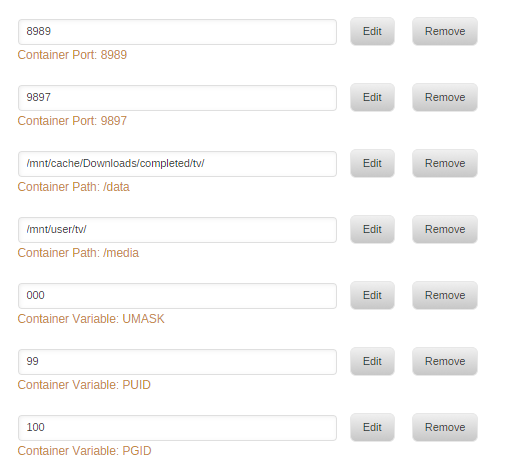
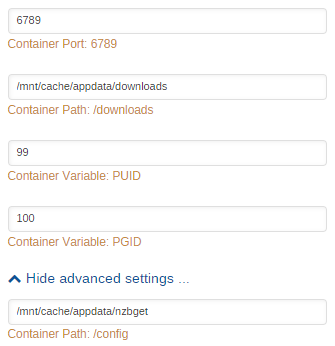
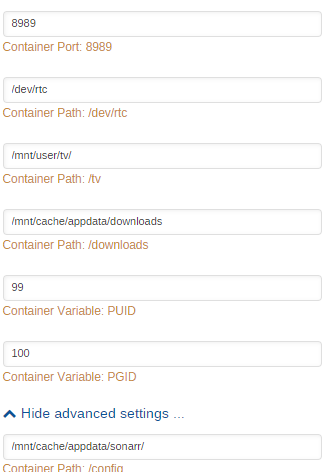
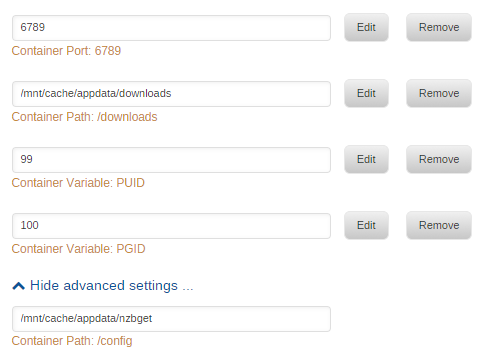
I agree that it has to be a mapping issue. Here are my container settings. They look right. Sonarr NZBGET
-
Not sure if this is the same issue but I have been having issues after a new install. I went back to the LS version of Sonarr which helped a bit but I am getting a couple of errors. First error is triggered under the normal script to scan for new downloads and rename and move. I get this- Now, if I try to manually move the file I get this- I'm kind of lost at the moment.


-
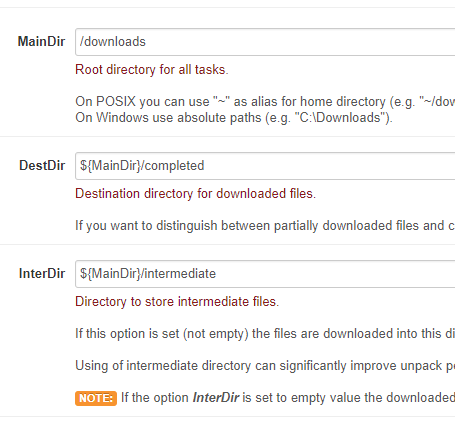
Thanks for the link Squid. My search before posting was a little off target. So I read through your post and it makes sense. I think I am still doing something incorrect. Here is the section I think I replicated- Here are my settings- With these setting It is still out of sync somewhere. I feel like I am missing a step somewhere.

-
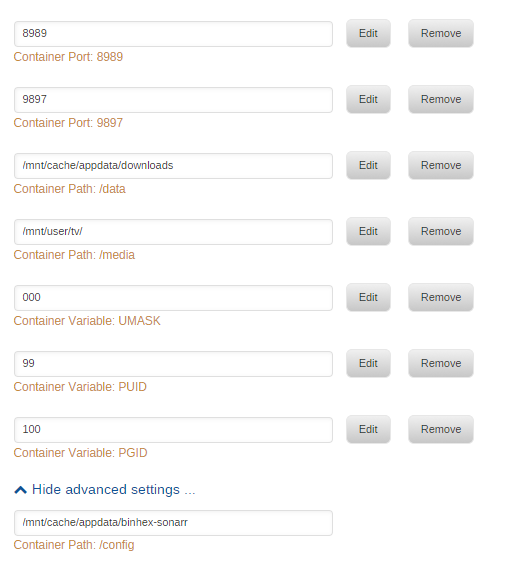
I had my boot USB go bad on Friday and unfortunately I didn't have a back up. So I started over and everything seems back to normal except one item. I can't get Sonarr to rename and move files. Everything seems to be set up correctly but here is the set up and the error- It looks like it is set up correctly but I seem to be doing something wrong. Any ideas?