





Pirate
Members
-
Joined
-
Last visited
Everything posted by Pirate
-
Ah ofcourse, it was ublock origin that caused the issue, thx
-
Having issues with Apps in chrome, when i try to install anything i got the loading animation, and then nothing happens. When i refresh the page i cant open the unraid webpage, i have to go in and delete all cookis to be able to log back in. The app page works in Edge thou. Running Unraid 6.11.2.
-
Is there any way to get the nextgen port working like with this? https://github.com/thrnz/docker-wireguard-pia/blob/master/extra/pf.sh or just sit tight until we get someting official from PIA.
-
Was weird that it worked with all the other dockers and only rtorrent crashing it, but i found the problem. It was a 16Gb ram stick that threw errors.
-
Weird, since yesterday rtorrent chrashes my server. Tried to delete the docker image and reapply the docker but all dockers i got installed works exept rtorrentvpn. Tried only the rtorrent after removing docker image but unraid chrashes after 5-10min. Any ideas whats causing this? No error in logs before the crash. Heres a snippet from the crash. Jan 22 20:49:55 Tower kernel: BUG: Bad page state in process shfs pfn:4c8407 Jan 22 20:49:55 Tower kernel: page:ffffea00132101c0 count:262144 mapcount:0 mapping:0000000000000000 index:0x1 Jan 22 20:49:55 Tower kernel: flags: 0x2fbff0000000000() Jan 22 20:49:55 Tower kernel: raw: 02fbff0000000000 dead000000000100 dead000000000200 0000000000000000 Jan 22 20:49:55 Tower kernel: raw: 0000000000000001 0000000000000000 00040000ffffffff 0000000000000000 Jan 22 20:49:55 Tower kernel: page dumped because: nonzero _count Jan 22 20:49:55 Tower kernel: Modules linked in: tun arc4 ecb md4 sha512_ssse3 sha512_generic cmac cifs ccm xt_nat macvlan ipt_MASQUERADE iptable_filter iptable_nat nf_nat_ipv4 nf_nat ip_tables xfs md_mod it87 hwmon_vid igb i2c_algo_bit e1000e edac_mce_amd kvm_amd kvm hid_logitech_hidpp k10temp crct10dif_pclmul crc32_pclmul crc32c_intel ghash_clmulni_intel pcbc i2c_piix4 ahci i2c_core libahci mpt3sas aesni_intel hid_logitech_dj wmi_bmof mxm_wmi aes_x86_64 crypto_simd cryptd ccp raid_class scsi_transport_sas glue_helper button wmi pcc_cpufreq acpi_cpufreq [last unloaded: i2c_algo_bit] Jan 22 20:49:55 Tower kernel: CPU: 4 PID: 25091 Comm: shfs Not tainted 4.19.94-Unraid #1 Jan 22 20:49:55 Tower kernel: Hardware name: System manufacturer System Product Name/PRIME X370-PRO, BIOS 5008 06/24/2019 Jan 22 20:49:55 Tower kernel: Call Trace: Jan 22 20:49:55 Tower kernel: dump_stack+0x67/0x83 Jan 22 20:49:55 Tower kernel: bad_page+0xec/0x106 Jan 22 20:49:55 Tower kernel: get_page_from_freelist+0x9f4/0xd0b Jan 22 20:49:55 Tower kernel: __alloc_pages_nodemask+0x150/0xae1 Jan 22 20:49:55 Tower kernel: ? __alloc_pages_nodemask+0x150/0xae1 Jan 22 20:49:55 Tower kernel: ? __switch_to_asm+0x35/0x70 Jan 22 20:49:55 Tower kernel: ? __switch_to_asm+0x41/0x70 Jan 22 20:49:55 Tower kernel: ? __switch_to_asm+0x35/0x70 Jan 22 20:49:55 Tower kernel: ? __switch_to_asm+0x41/0x70 Jan 22 20:49:55 Tower kernel: __do_page_cache_readahead+0x106/0x183 Jan 22 20:49:55 Tower kernel: ondemand_readahead+0x21d/0x22f Jan 22 20:49:55 Tower kernel: generic_file_read_iter+0x243/0x6d0 Jan 22 20:49:55 Tower kernel: __vfs_read+0xf9/0x132 Jan 22 20:49:55 Tower kernel: vfs_read+0xa4/0x124 Jan 22 20:49:55 Tower kernel: ksys_pread64+0x5d/0x79 Jan 22 20:49:55 Tower kernel: do_syscall_64+0x57/0xf2 Jan 22 20:49:55 Tower kernel: entry_SYSCALL_64_after_hwframe+0x44/0xa9 Jan 22 20:49:55 Tower kernel: RIP: 0033:0x154aa5f36e27 Jan 22 20:49:55 Tower kernel: Code: 08 89 3c 24 48 89 4c 24 18 e8 b5 f3 ff ff 4c 8b 54 24 18 48 8b 54 24 10 41 89 c0 48 8b 74 24 08 8b 3c 24 b8 11 00 00 00 0f 05 <48> 3d 00 f0 ff ff 77 2d 44 89 c7 48 89 04 24 e8 e5 f3 ff ff 48 8b Jan 22 20:49:55 Tower kernel: RSP: 002b:0000154a7f3f8a50 EFLAGS: 00000297 ORIG_RAX: 0000000000000011 Jan 22 20:49:55 Tower kernel: RAX: ffffffffffffffda RBX: 0000000000020000 RCX: 0000154aa5f36e27 Jan 22 20:49:55 Tower kernel: RDX: 0000000000020000 RSI: 0000154a602ba000 RDI: 0000000000000407 Jan 22 20:49:55 Tower kernel: RBP: 0000000000000000 R08: 0000000000000001 R09: 0000000000000000 Jan 22 20:49:55 Tower kernel: R10: 000000001aa6a000 R11: 0000000000000297 R12: 0000154a7f3f8c18 Jan 22 20:49:55 Tower kernel: R13: 0000000000000000 R14: 0000154a6003ab78 R15: 0000000000000000 Jan 22 20:49:55 Tower kernel: Disabling lock debugging due to kernel taint Jan 22 20:49:55 Tower kernel: BUG: Bad page state in process shfs pfn:4c840d Jan 22 20:49:55 Tower kernel: page:ffffea0013210340 count:1048576 mapcount:0 mapping:0000000000000000 index:0x1 Jan 22 20:49:55 Tower kernel: flags: 0x2efff0000000000() Jan 22 20:49:55 Tower kernel: raw: 02efff0000000000 dead000000000100 dead000000000200 0000000000000000 Jan 22 20:49:55 Tower kernel: raw: 0000000000000001 0000000000000000 00100000ffffffff 0000000000000000 Jan 22 20:49:55 Tower kernel: page dumped because: nonzero _count Jan 22 20:49:55 Tower kernel: Modules linked in: tun arc4 ecb md4 sha512_ssse3 sha512_generic cmac cifs ccm xt_nat macvlan ipt_MASQUERADE iptable_filter iptable_nat nf_nat_ipv4 nf_nat ip_tables xfs md_mod it87 hwmon_vid igb i2c_algo_bit e1000e edac_mce_amd kvm_amd kvm hid_logitech_hidpp k10temp crct10dif_pclmul crc32_pclmul crc32c_intel ghash_clmulni_intel pcbc i2c_piix4 ahci i2c_core libahci mpt3sas aesni_intel hid_logitech_dj wmi_bmof mxm_wmi aes_x86_64 crypto_simd cryptd ccp raid_class scsi_transport_sas glue_helper button wmi pcc_cpufreq acpi_cpufreq [last unloaded: i2c_algo_bit] Jan 22 20:49:55 Tower kernel: CPU: 4 PID: 25091 Comm: shfs Tainted: G B 4.19.94-Unraid #1 Jan 22 20:49:55 Tower kernel: Hardware name: System manufacturer System Product Name/PRIME X370-PRO, BIOS 5008 06/24/2019 Jan 22 20:49:55 Tower kernel: Call Trace: Jan 22 20:49:55 Tower kernel: dump_stack+0x67/0x83 Jan 22 20:49:55 Tower kernel: bad_page+0xec/0x106 Jan 22 20:49:55 Tower kernel: get_page_from_freelist+0x9f4/0xd0b Jan 22 20:49:55 Tower kernel: __alloc_pages_nodemask+0x150/0xae1 Jan 22 20:49:55 Tower kernel: ? __alloc_pages_nodemask+0x150/0xae1 Jan 22 20:49:55 Tower kernel: ? __switch_to_asm+0x35/0x70 Jan 22 20:49:55 Tower kernel: ? __switch_to_asm+0x41/0x70 Jan 22 20:49:55 Tower kernel: ? __switch_to_asm+0x35/0x70 Jan 22 20:49:55 Tower kernel: ? __switch_to_asm+0x41/0x70 Jan 22 20:49:55 Tower kernel: __do_page_cache_readahead+0x106/0x183 Jan 22 20:49:55 Tower kernel: ondemand_readahead+0x21d/0x22f Jan 22 20:49:55 Tower kernel: generic_file_read_iter+0x243/0x6d0 Jan 22 20:49:55 Tower kernel: __vfs_read+0xf9/0x132 Jan 22 20:49:55 Tower kernel: vfs_read+0xa4/0x124 Jan 22 20:49:55 Tower kernel: ksys_pread64+0x5d/0x79 Jan 22 20:49:55 Tower kernel: do_syscall_64+0x57/0xf2 Jan 22 20:49:55 Tower kernel: entry_SYSCALL_64_after_hwframe+0x44/0xa9 Jan 22 20:49:55 Tower kernel: RIP: 0033:0x154aa5f36e27 Jan 22 20:49:55 Tower kernel: Code: 08 89 3c 24 48 89 4c 24 18 e8 b5 f3 ff ff 4c 8b 54 24 18 48 8b 54 24 10 41 89 c0 48 8b 74 24 08 8b 3c 24 b8 11 00 00 00 0f 05 <48> 3d 00 f0 ff ff 77 2d 44 89 c7 48 89 04 24 e8 e5 f3 ff ff 48 8b Jan 22 20:49:55 Tower kernel: RSP: 002b:0000154a7f3f8a50 EFLAGS: 00000297 ORIG_RAX: 0000000000000011 Jan 22 20:49:55 Tower kernel: RAX: ffffffffffffffda RBX: 0000000000020000 RCX: 0000154aa5f36e27 Jan 22 20:49:55 Tower kernel: RDX: 0000000000020000 RSI: 0000154a602ba000 RDI: 0000000000000407 Jan 22 20:49:55 Tower kernel: RBP: 0000000000000000 R08: 0000000000000001 R09: 0000000000000000 Jan 22 20:49:55 Tower kernel: R10: 000000001aa6a000 R11: 0000000000000297 R12: 0000154a7f3f8c18 Jan 22 20:49:55 Tower kernel: R13: 0000000000000000 R14: 0000154a6003ab78 R15: 0000000000000000 Jan 22 20:49:55 Tower kernel: BUG: Bad page state in process shfs pfn:4c840e Jan 22 20:49:55 Tower kernel: page:ffffea0013210380 count:1310720 mapcount:0 mapping:0000000000000000 index:0x1 Jan 22 20:49:55 Tower kernel: flags: 0x2ebff0000000000() Jan 22 20:49:55 Tower kernel: raw: 02ebff0000000000 dead000000000100 dead000000000200 0000000000000000 Jan 22 20:49:55 Tower kernel: raw: 0000000000000001 0000000000000000 00140000ffffffff 0000000000000000 Jan 22 20:49:55 Tower kernel: page dumped because: nonzero _count Jan 22 20:49:55 Tower kernel: Modules linked in: tun arc4 ecb md4 sha512_ssse3 sha512_generic cmac cifs ccm xt_nat macvlan ipt_MASQUERADE iptable_filter iptable_nat nf_nat_ipv4 nf_nat ip_tables xfs md_mod it87 hwmon_vid igb i2c_algo_bit e1000e edac_mce_amd kvm_amd kvm hid_logitech_hidpp k10temp crct10dif_pclmul crc32_pclmul crc32c_intel ghash_clmulni_intel pcbc i2c_piix4 ahci i2c_core libahci mpt3sas aesni_intel hid_logitech_dj wmi_bmof mxm_wmi aes_x86_64 crypto_simd cryptd ccp raid_class scsi_transport_sas glue_helper button wmi pcc_cpufreq acpi_cpufreq [last unloaded: i2c_algo_bit]
-
The converter worked in windows though. But i got it working with serial so im pleased with that.
-
Easiest is to start and stop nut in cli, so u see what error it reports. /etc/rc.d/rc.nut start and rc.nut stop So change settings, start nut in cli and see what it says.
-
Was tinkering a bit with the USB to Serial converter but never manage to get it going, switched back to Serial and actual got it working this time. Settings as follow: nut.conf MODE = standalone ups.conf: [ups] driver = powercom port = /dev/ttyS0 type = BNT-other #numOfBytesFromUPS = 16 #methodOfFlowControl = no_flow_control #validationSequence = {{8,0},{8,0},{8,0}} #shutdownArguments = {{1,30},y} #frequency = {0.00027778,0.0000} #loadPercentage = {1.0000,0.0,1.0000,0.0} #batteryPercentage = {1.0000,0.0000,0.0000,1.0000,0.0000} #voltage = {2.0000,0.0000,2.0000,0.0000} I did use the # settings 1 time and after that the ups worked, after i got it working i added# and it still worked. upsmon.conf MONITOR ups@localhost 1 monuser monpass master The weird thing is that i used those settings earlier and they didnt work, might have been that i newer rebooted after installing nut, cause while i was tinkering i got it working (used terminal and started and stopped nut manually between each edit so i could see what it did). But it didnt display any nut detail or ups status, thou after a restart its all working. Thanks for the help Benson.
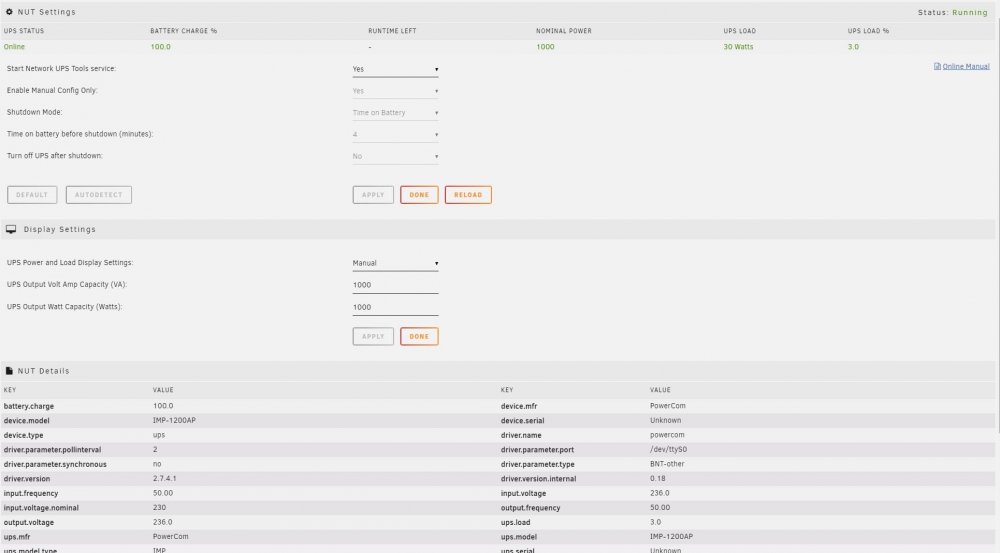
-
Thanks for the help, tried to go back to USB converter, but still bashing my head. nut.conf: MODE=standalone ups.conf: [powercom] driver = powercom port = /dev/ttyUSB0 type = BNT numOfBytesFromUPS = 16 methodOfFlowControl = no_flow_control validationSequence = {{11,0x42},{8,0},{8,0}} shutdownArguments = {{1,30},y} What happens when i try to start it: root@Tower:/etc/rc.d# rc.nut start Writing nut config Updating permissions... Network UPS Tools - UPS driver controller 2.7.4.1 Network UPS Tools - PowerCom protocol UPS driver 0.18 (2.7.4.1) data receiving error (validation check) data receiving error (validation check) Network UPS Tools upsd 2.7.4.1 fopen /var/run/nut/upsd.pid: No such file or directory listening on 127.0.0.1 port 3493 listening on ::1 port 3493 Connected to UPS [powercom]: powercom-powercom Network UPS Tools upsmon 2.7.4.1 fopen /var/run/nut/upsmon.pid: No such file or directory UPS: powercom@localhost (master) (power value 1) Warning: no shutdown command defined! am i missing something in my config?
-
I did try a USB to serial, but had no luck with either Nut or Native APC UPS. So i bought a internal com bracket to try to get serial connection to work but no luck with that either. I got the ups to work in a windows machine with powercom:s own software and the USB to serial cable without any problems. Everything i try in nut doesn´t work, if i edit the manual config with the values i found online, Nut doesn´t eaven start. Maybe all the UPS driver isnt in this package only the USB ones? Accordint to the Nut page, powercom should use custom powercom driver but when i assign it it says: Tower upsd[5472]: Can't connect to UPS [ups] (powercom-ups): No such file or directory
-
Hi. Im trying to get a Powercom ups to work, but it seems like im banging my head against a wall. Its a serial attached Powercom BNT 1000AP connected to /dev/ttyS0, but for the love of it i cant get it connected. Anyone that can point me in some sort of direction what to do to get it working?
-
Ah! That did the trick, thanks Binhex
-
Probably something i missed as always, but im trying to run the docker on vlan with 192.168.20.xx but i cant acess it from outside of the vlan. I can acess it from a pc on the vlan but not from lan (192.168.0.x) and had same problem acessing it from openvpn acess lan (192.168.1.x). Is there a way u can grant acess to the docker from the other lans?
-
Tried it but didnt work, so i deleted the docker and reinstalled it and now it works. Thanks for the help Binhex.
-
Here u have the current rtorrent.rc file, hope that u spot something unusual. rtorrent.rc
-
Weird, when im adding pieces.memory.max.set = 8192M it doesnt work. Im using notepad++ to edit the rtorrent.rc and the log only says: 2019-04-28 12:41:53,125 DEBG 'watchdog-script' stdout output: [info] Attempting to start rTorrent... 2019-04-28 12:41:53,133 DEBG 'watchdog-script' stdout output: Script started, file is /home/nobody/typescript 2019-04-28 12:41:53,213 DEBG 'watchdog-script' stdout output: Script done, file is /home/nobody/typescript 2019-04-28 12:42:22,308 DEBG 'watchdog-script' stdout output: [warn] Wait for rTorrent process to start aborted [info] Waiting for rTorrent process to start listening on port 5000... 2019-04-28 12:42:22,308 DEBG 'watchdog-script' stdout output: [warn] Wait for rTorrent process to start aborted [info] Waiting for rTorrent process to start listening on port 5000... *Edit: tried with everything between 2GB to 8GB
-
Tried with both variables: pieces.memory.max.set = 8192M and pieces.memory.max.set = 8GB Rtorrent doesnt start with any.
-
isnt the variable pieces.memory.max.set = valid anymore in rtorrent.rc? When i try it with both xxxxM and xGB rtorrent refuse to start.
-
Ah, thanks. Got a bit confused when it actually was working but reverted the changes in ui.
-
Was looking through this thread but didnt find any answer, so i´ll give it a shot. Was running delugevpn before and config through the webinterface worked fine, but when im trying to change the config in rtorrentvpn it reverts back in the web config when i cange something, thou it seems like its working, i changed the download folder and it downloads to that folder but in the web ui it reverts to default path. Am i missing something or doesnt config through web work?
-
Trying to get the daemon port to work, port 58846 is open in config, docker in bridge mode and privileged, core.conf has "allow_remote": true, and a user is set in auth file with user:password:10. I guess im missing something? do you have to create a user in the docker?

