





Jessie
Members
-
Joined
-
Last visited
Everything posted by Jessie
-
Thanks. Will look it up.
-
If the ping doesn't succeed that's ok. It's possible the router is not set to respond. What is important is that it is looking for the correct address. I would have thought it would work. What happens in the log when you restart it? Has it created a certificate yet?
-
I think it is something to do with the ports to recap in the router external port Internal port host 80 81 unraid ip 443 443 unraid ip If you ping your domain, does it point to your ip address? Are you sure 81 is not used elsewhere? Did you try 8088? (You would have to change 81 to 8088 in the router as well as the template)
-
So did it work? What did the logs say? All being good you should have got a certificate for www.???.duckdns.org
-
What is the syntax of the command?
-
No I was always reverse proxying. The systems are live and the sbs part can't go down. It was necessary to bypass the reverse proxy to keep it going. I only mentioned it to demonstrate that the system only failed when going through the proxy. The sbs machine is a separate machine. Although one of them is an unraid VM. Nevertheless, it has it's own Ip address. I had a very in depth look at this problem over the weekend. (without success) I am about to try copying the old letsencrypt files from a working machine to a non working machine and substituting the current certificates. No idea whether it will work and it won't solve the problem of upgrading certificates. But it might get the system up and running again. No that didn't work. The main reason is I don't actually know how to do it. In the end I tried changing the settings back to TLS-sni but it then attempted to recreate the certificates and failed. Is it possible to obtain the docker that was installed prior to the tls-SNI issue? I feel that something changed in nginx part of it which will no longer let me reverse proxy to the sbs server. Sigh!!!....
-
Log in as admin Goto settings and Basic settings (I think) and there is a update button. Works most of the time. It is fixable if it fails. Hint it may time out during step 4 and 5. Don't leave the page when this happens. It just means that the program hasn't finished downloading. Wait 15 mins and press the retry button If it fails again, wait a little longer. If it still fails, go to your config.php file and set update to false and you can start again. Another scenario I have encountered is that it downloads the file but doesn't go to the next step. That's an easy fix as well, but see how you go here first.
-
I had similar issues before upgrading to v13 of nextcloud. So if not running v13 yet, try the upgrade. The change from port 444 to the domain name is expected. That happens in your nextcloud config.php file. I also had issues logging in with the android app. In this case, there is a android beta app which works. (worked for me at least)
-
I shut down the relevant dockers and used krusader to delete the .rnd file. I was able to restart nextcloud and do the update. Everything seemed to work ok for me.
-
FWIW I also had issues with the Android app not connecting. I loaded the Android beta app and all was good.
-
Pretty sure Letsencrypt is working ok. It is also concurrently running 2 x nextcloud dockers on ports 444 and 446. They are both fine. I also have 3 other servers running sbs and nextcloud. 2 of them are still working because the certificates haven't expired yet, and I haven't had to upgrade letsencrypt to the http method. Ticking bomb though. When the certificates expire, sbs will stop as well. The 3rd one, the certificate expired and sbs stopped. For the short term, I have had to bypass the LE docker and forward port 443 directly to the sbs server. This means no nextcloud on that site. I'm keen to resolve this before the other 2 sites certificates expire. Back to the problem. I think that LE is trying to communicate with SBS successfully but SBS is not responding. That's where I get lost. I wonder whether the certificate is now different and now not compatible with SBS? Alternatively I was surprised when I originally set up lets encrypt that it let me reverse proxy to the sbs on port 443. The same port as the LE docker. Whether that is no longer possible, not sure. I should point out that SBS as an entity is working fine on the local network. It needs to pass through the le docker to provide remote access and to update emails on devices outside the local network. eg emails on phones etc. (Later) I was able to compare the specs for a certificate on a working sbs system and a non working one. They look identical. That points back to something in the LE docker. (maybe) Probably in the nginx part...
-
Sounds good. Also need to create an A record for cloud in your domain settings
-
Change Container port 80 to 81 or 8088. (whichever is not used elsewhere in the unraid server) In your router Forward port 443 to your unraid server In your router point external port 80 to internal port 81 or 8088 (Which ever you chose in the first line above) and forward to your unraid server. Restart letsencrypt.
-
aptalca said You never said what the problem is It doesn't work. Cannot access https://remote.mydomanename.com.au from the internet. Returns "Error 502" Bad gateway, nginx/1.12.2 on a browser on a computer outside the local network. (Site can be accessed inside the local network.)
-
listen 443 ssl; server_name remote.mydomanename.com.au; root /config/www; index index.html index.htm index.php; ###SSL Certificates ssl_certificate /config/keys/letsencrypt/fullchain.pem; ssl_certificate_key /config/keys/letsencrypt/privkey.pem; ###Diffie–Hellman key exchange ### ssl_dhparam /config/nginx/dhparams.pem; ###SSL Ciphers ssl_ciphers 'ECDHE-RSA-AES128-GCM-SHA256:ECDHE-ECDSA-AES128-GCM-SHA256:ECDHE-RSA-AES256-GCM-SHA384:ECDHE-ECDSA-AES256-GCM-SHA384:DHE-RSA-AES128-GCM-SHA256:DHE-DSS-AES128-GCM-SHA256:kEDH+AESGCM:ECDHE-RSA-AES128-SHA256:ECDHE-ECDSA-AES128-SHA256:ECDHE-RSA-AES128-SHA:ECDHE-ECDSA-AES128-SHA:ECDHE-RSA-AES256-SHA384:ECDHE-ECDSA-AES256-SHA384:ECDHE-RSA-AES256-SHA:ECDHE-ECDSA-AES256-SHA:DHE-RSA-AES128-SHA256:DHE-RSA-AES128-SHA:DHE-DSS-AES128-SHA256:DHE-RSA-AES256-SHA256:DHE-DSS-AES256-SHA:DHE-RSA-AES256-SHA:AES128-GCM-SHA256:AES256-GCM-SHA384:AES128-SHA256:AES256-SHA256:AES128-SHA:AES256-SHA:AES:CAMELLIA:DES-CBC3-SHA:!aNULL:!eNULL:!EXPORT:!DES:!RC4:!MD5:!PSK:!aECDH:!EDH-DSS-DES-CBC3-SHA:!EDH-RSA-DES-CBC3-SHA:!KRB5-DES-CBC3-SHA'; ###Extra Settings### ssl_prefer_server_ciphers on; # cancelled the following line after upgrade to nextcloud 13 # ssl_session_cache shared:SSL:10m; ### Add HTTP Strict Transport Security ### add_header Strict-Transport-Security "max-age=63072000; includeSubdomains"; add_header Front-End-Https on; client_max_body_size 0; # the next 2 lines allowed exchange in small business server send emails externally. The rest of this template is otherwise unchanged. proxy_request_buffering off; proxy_buffering off; location / { proxy_pass https://192.168.10.21:443/; proxy_max_temp_file_size 2048m; include /config/nginx/proxy.conf; I'm still having no luck resolving this issue. The above config is for the Small business server part of my LE docker. It worked prior to TLS-SNi being turned off. I originally blamed having to map port 80 to the docker to make the certificates work, however on reflection, I don't think this has anything to do with the problem. All certificates are generating without errors and the other dockers are working perfectly with their certificates. The anomaly with the SBS config is that it has to map to port 443. So in the router, port 443 maps to the LE docker, then the reverse proxy in the LE docker points to the Small business server on Port 443. Could this be the problem? ie LE and SBS having the same port number? (443) It worked before. Then there was a LE update. Is it possible NGINX is no longer letting me point to 443 for the SBS server?
-
What about loading the nextcloud and letsencrypt dockers in unraid and make files available via that?
-
Unless things have changed with 6.4, you can't pass through the onboard graphics. You can use it for the unraid cmd line interface. But plugin cards must be used for pass through. If you pass through more than 1 graphics card, the cards must be different. There are some demos on youtube. Have a look at them.
-
I'll put this in here in case it already hasn't been mentioned. I was having issues with unresponsive logins on the nextcloud android app. Solution:- Load the Beta version. All issues gone.
-
Is the certificate now different? If so maybe sbs doesn't like it.
-
1/ Correct. However prior to Letsencrypt breaking it worked perfectly using standard settings plus the 2 proxy buffering lines. Now it doesn't and I don't know why. 2/ Correct. In SBS, port 80 is used to get to http://remote.mydomain.com. If it is closed you can still get there via https://remote.mydomain.com through port 443. When going via http port 80, sbs redirects to https on port 443. Now, if I try to go to https://remote.mydomain.com I get an nginx 502 bad gateway error. I'm also running 2 nextcloud dockers through this proxy and they work fine.
-
The 2 lines above made the external emails work. (they are in the template above) Prior to the HTTPVAL modification I had port 80 ported to the sbs server. After the letsencrypt changes, I changed HTTPVAL to true and:- In the router I pointed 443 to the unraid server. I also pointed external port 80 to internal port 8088 in the router. To get the letsencrypt docker to work, I configured http as 8080 and https as 443. I wondered if I might have to redirect 8088 back to 80 to the sbs server. But I don't know how to do that. As an experiment I bypassed the letsencrypt docker and ported 443 back to the sbs server. Emails worked again. I then turned off porting on port 80 to the sbs server. The emails still worked. When I switched back to the letsencrypt docker, I lost external email functionality again. I also can't access remote.mydomain.com.au which is remote access to the sbs server. All of this worked before the letsencrypt changes. In the letsencrypt template http set at 8088 https set at 443 HTTPVAL = true
-
Prior to the letsencrypt change, the template below worked for small business server. There are 2 lines added to allow emails to be sent to external devices eg phones. After the letsencrypt change I changed the settings in the docker to HTTPVAL = true and redirected external port 80 to 8088 internally. Certificates worked again but no more emails can be received externally to phones etc. On the local network, sbs works normally. Any ideas? I wondered whether redirecting port 80 might have had an effect, but I bypassed the proxy by directing port 443 directly back to the sbs server and blocked port 80 and the emails worked normally. So it has to be an issue with the proxy. listen 443 ssl; server_name remote.mydomanename.com.au; root /config/www; index index.html index.htm index.php; ###SSL Certificates ssl_certificate /config/keys/letsencrypt/fullchain.pem; ssl_certificate_key /config/keys/letsencrypt/privkey.pem; ###Diffie–Hellman key exchange ### ssl_dhparam /config/nginx/dhparams.pem; ###SSL Ciphers ssl_ciphers 'ECDHE-RSA-AES128-GCM-SHA256:ECDHE-ECDSA-AES128-GCM-SHA256:ECDHE-RSA-AES256-GCM-SHA384:ECDHE-ECDSA-AES256-GCM-SHA384:DHE-RSA-AES128-GCM-SHA256:DHE-DSS-AES128-GCM-SHA256:kEDH+AESGCM:ECDHE-RSA-AES128-SHA256:ECDHE-ECDSA-AES128-SHA256:ECDHE-RSA-AES128-SHA:ECDHE-ECDSA-AES128-SHA:ECDHE-RSA-AES256-SHA384:ECDHE-ECDSA-AES256-SHA384:ECDHE-RSA-AES256-SHA:ECDHE-ECDSA-AES256-SHA:DHE-RSA-AES128-SHA256:DHE-RSA-AES128-SHA:DHE-DSS-AES128-SHA256:DHE-RSA-AES256-SHA256:DHE-DSS-AES256-SHA:DHE-RSA-AES256-SHA:AES128-GCM-SHA256:AES256-GCM-SHA384:AES128-SHA256:AES256-SHA256:AES128-SHA:AES256-SHA:AES:CAMELLIA:DES-CBC3-SHA:!aNULL:!eNULL:!EXPORT:!DES:!RC4:!MD5:!PSK:!aECDH:!EDH-DSS-DES-CBC3-SHA:!EDH-RSA-DES-CBC3-SHA:!KRB5-DES-CBC3-SHA'; ###Extra Settings### ssl_prefer_server_ciphers on; # cancelled the following line after upgrade to nextcloud 13 # ssl_session_cache shared:SSL:10m; ### Add HTTP Strict Transport Security ### add_header Strict-Transport-Security "max-age=63072000; includeSubdomains"; add_header Front-End-Https on; client_max_body_size 0; # the next 2 lines allowed exchange in small business server send emails externally. The rest of this template is otherwise unchanged. proxy_request_buffering off; proxy_buffering off; location / { proxy_pass https://192.168.10.21:443/; proxy_max_temp_file_size 2048m; include /config/nginx/proxy.conf; } }
-
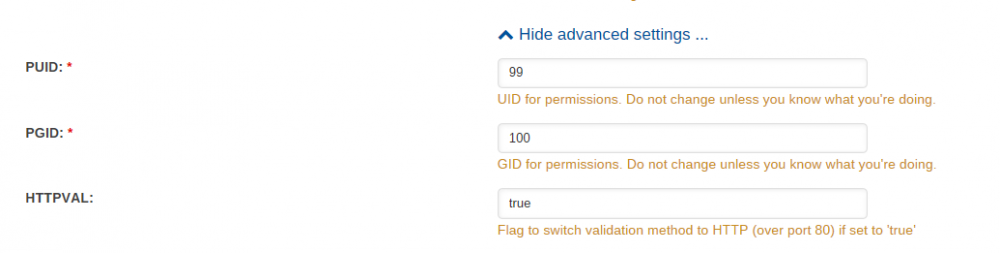
Ahh I get it. Sorry I'm still getting my head around finding things in this forum. I didn't go back far enough. If anyone is interested and had a previously working Letsencrypt docker which stopped:- Change container port 80 to something that is not 80 on the docker config page. (I used 8088) Go to advanced settings on the Docker config page and make HTTPVAL: = true. In your router, point external port 80 to internal port 8088 (or the internal port of your choice) to the ip address of the unraid server. All other settings as you had them. (The rest of it was set up as per CHBMB's Guide) Restart the Dockers. Worked for me.

-
So I've made httpval = true. pointed port 80 to the unraid server. I tried to change the http setting in the docker panel to 80 but it fails. It says 80 is already allocated, though I'm not sure to what. Back to 8088 which was my previous setting. It starts but no certificate. I checked previous posts but missed the answer if it is there. Will you be updating your guide to give us a hint? Does the docker still work?
-
Client with the currently selected authenticator does not support any combination of challenges that will satisfy the CA. My letsencrypt just broke with the above error. I have read that certbot has changed the way it works externally. Does this mean that this docker is broken till further notice? Will my other servers stop when their certificate expires?

