vanes
Members
-
Joined
-
Last visited
-
Отлично, продолжай в том же духе.
-
Hi guys, need some help. I set up zfs-zed using this post Zed is working fine, but now my syslog full of this: Mar 6 07:41:54 unRaid zed[3601]: Invoking "all-syslog.sh" eid=82 pid=25649 Mar 6 07:41:54 unRaid zed: eid=82 class=config_sync pool_guid=0xD30AFB4571F3B450 Mar 6 07:41:54 unRaid zed[3601]: Finished "all-syslog.sh" eid=82 pid=25649 exit=0 Mar 6 07:46:57 unRaid zed[3601]: Invoking "all-syslog.sh" eid=83 pid=29036 Mar 6 07:46:57 unRaid zed: eid=83 class=config_sync pool_guid=0xD30AFB4571F3B450 Mar 6 07:46:57 unRaid zed[3601]: Finished "all-syslog.sh" eid=83 pid=29036 exit=0 Mar 6 07:52:00 unRaid zed[3601]: Invoking "all-syslog.sh" eid=84 pid=32653 Mar 6 07:52:00 unRaid zed: eid=84 class=config_sync pool_guid=0xD30AFB4571F3B450 Mar 6 07:52:00 unRaid zed[3601]: Finished "all-syslog.sh" eid=84 pid=32653 exit=0 Mar 6 07:57:03 unRaid zed[3601]: Invoking "all-syslog.sh" eid=85 pid=4478 Mar 6 07:57:03 unRaid zed: eid=85 class=config_sync pool_guid=0xD30AFB4571F3B450 Mar 6 07:57:03 unRaid zed[3601]: Finished "all-syslog.sh" eid=85 pid=4478 exit=0 Mar 6 08:02:05 unRaid zed[3601]: Invoking "all-syslog.sh" eid=86 pid=8041 Mar 6 08:02:05 unRaid zed: eid=86 class=config_sync pool_guid=0xD30AFB4571F3B450 Mar 6 08:02:05 unRaid zed[3601]: Finished "all-syslog.sh" eid=86 pid=8041 exit=0 Mar 6 08:07:08 unRaid zed[3601]: Invoking "all-syslog.sh" eid=87 pid=10773 Mar 6 08:07:08 unRaid zed: eid=87 class=config_sync pool_guid=0xD30AFB4571F3B450 Mar 6 08:07:08 unRaid zed[3601]: Finished "all-syslog.sh" eid=87 pid=10773 exit=0 Mar 6 08:12:11 unRaid zed[3601]: Invoking "all-syslog.sh" eid=88 pid=13372 Mar 6 08:12:11 unRaid zed: eid=88 class=config_sync pool_guid=0xD30AFB4571F3B450 Mar 6 08:12:11 unRaid zed[3601]: Finished "all-syslog.sh" eid=88 pid=13372 exit=0 Please help to stop zed spam syslog.
-
@Jcloud, please tell us about the support of the v3 protocol with this container. https://storj.io/blog/2018/10/introducing-the-storj-v3-white-paper/
-
run these inside nextcloud docker container: cd /config/www/nextcloud/ sudo -u abc php7 occ files:scan --all
-
vanes changed their profile photo
-
unRaid_Dashboard - Google Chrome 02.09.2018 22_53_34.mp4 This is what i found. If i edit manualy i440fx-2.1.1 to i440fx-3.0 result is the same. 6.5.3 Windows 10.xml
-
What board do you have? Did you tried this? if you don`t need i915, try to edit you syslinux append line like this: append nomodeset initrd=/bzroot
-
i915 is not loading by default! To activate it add this to go file if I turn i915 off, I cant use intel hd graphics for plex/emby hardware transcoding sorry for my English ?
-
I see most of unraid boot process till the i915 driver is loaded. Screen becomes black near the final part of the boot process... If I don't load i915 (modprobe i915) everything works fine.
-
Yes, it works. it works until i915 driver boot, then screen becomes black. latest BMC and bios 2.60 5/17/2018 BIOS 07.12.00 11/15/2017 BMC
-
Will user script help? Can it work together with vfs objects = recycle ? I have Recycle-bin plugin installed, will this affect? Both lines will be ok? ?? vfs objects = recycle vfs objects = btrfs PS: Or to add in one line? vfs objects = recycle btrfs
-
Very interesting! Tell me please how to implement this on the current version
-
I recently bought AsRock e3c236d2i and I can confirm that it allows to use intel video core, but only for video encoding/decoding, not for display....
-
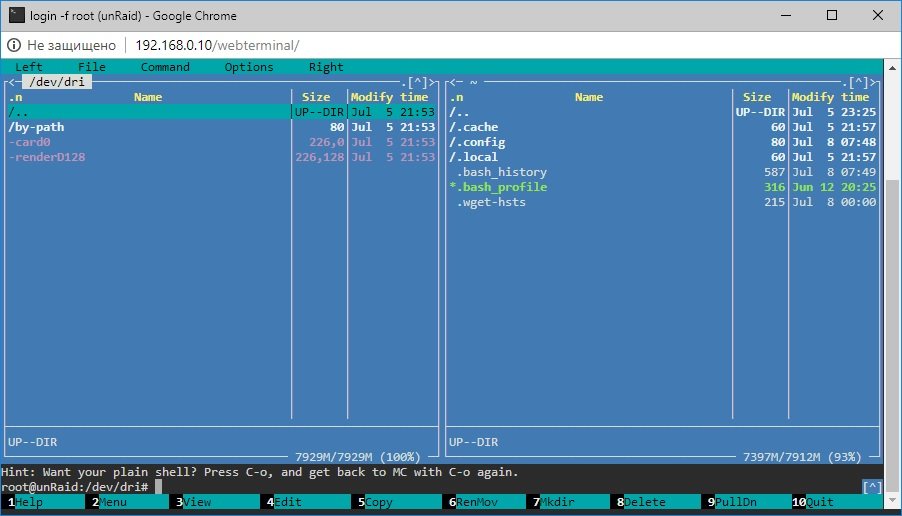
@jang430 open terminal, type mc, th en go to /dev/dri folder. U see renderd128 ?
-
take a look at this. double check all bios settings, nomodeset , go file, etc
-
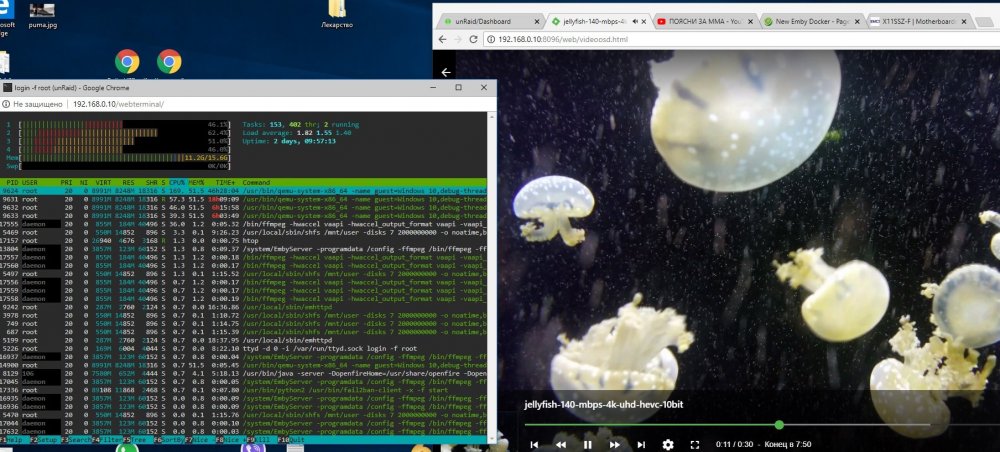
@jang430 try htop in terminal