





Lelo
Members
-
Joined
-
Last visited
-
I think the reason was an old QXL driver that was still installed ... now it seems to be working again!
-
this is new ...
-
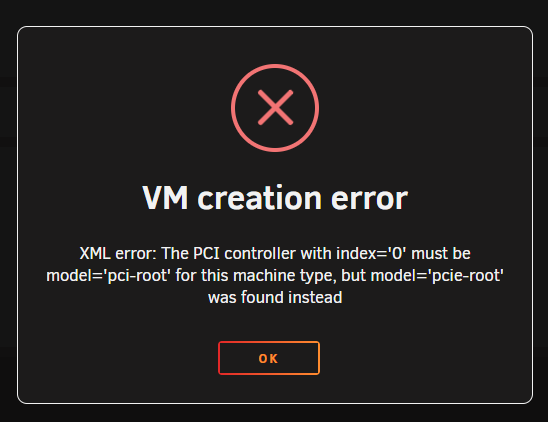
Hi, i have a similar problem - VM starts and runs for a while (with high CPU usage) and suddenly VM and Unraid crashes/reboots. Also AMD CPU (AMD Ryzen 7 8845HS w/ Radeon 780M Graphics) and Nvidia 1660s gpu-passthrough. Tried without gpu and VNC - same issue. When booting Windows 11 in secure mode (with network drivers), everything works fine?!? Restart in "normal mode" without gpu-passthrough leaded to crash again .... No idea what is the reason for this, but it seams to be cause by something within the Windows VM (-> very high CPU load + Windows Update pending - never finished due to crash). Maybe a driver issue with AMD CPUS? My Linux VM (Zorin OS) works without any issue. Please tell me when you solved your problem. Thanks
-
this is the Log File: Error: Cannot read: at module.exports (/myspeed/server/util/speedtest.js:65:29) at process.processTicksAndRejections (node:internal/process/task_queues:95:5) at async module.exports.run (/myspeed/server/tasks/speedtest.js:57:21) at async module.exports.create (/myspeed/server/tasks/speedtest.js:95:20) at async module.exports.runTask (/myspeed/server/tasks/timer.js:18:5) Test #82 was executed successfully in 13s. 🏓 10 ⬇ 624.93️ ⬆ 64.08️ Looking for network interfaces... Found interface eth0 with IP 192.168.0.112 Test #83 was executed successfully in 20s. 🏓 12 ⬇ 0.74️ ⬆ 64.31️ Looking for network interfaces... Found interface eth0 with IP 192.168.0.112 Error: Cannot read: at module.exports (/myspeed/server/util/speedtest.js:65:29) at process.processTicksAndRejections (node:internal/process/task_queues:95:5) at async module.exports.run (/myspeed/server/tasks/speedtest.js:57:21) at async module.exports.create (/myspeed/server/tasks/speedtest.js:95:20) at async module.exports.runTask (/myspeed/server/tasks/timer.js:18:5) Test #84 was executed successfully in 15s. 🏓 14 ⬇ 628.34️ ⬆ 64.47️ Looking for network interfaces... Found interface eth0 with IP 192.168.0.112 Test #85 was executed successfully in 26s. 🏓 10 ⬇ 1.03️ ⬆ 47.52️ Looking for network interfaces... Found interface eth0 with IP 192.168.0.112 Error: Latency test failed at module.exports (/myspeed/server/util/speedtest.js:65:29) at process.processTicksAndRejections (node:internal/process/task_queues:95:5) at async module.exports.run (/myspeed/server/tasks/speedtest.js:57:21) at async module.exports.create (/myspeed/server/tasks/speedtest.js:95:20) at async module.exports.runTask (/myspeed/server/tasks/timer.js:18:5) Test #86 was executed successfully in 15s. 🏓 12 ⬇ 628.81️ ⬆ 64.32️ Looking for network interfaces... Found interface eth0 with IP 192.168.0.112 Test #87 was executed successfully in 21s. 🏓 11 ⬇ 5.87️ ⬆ 64.03️ Looking for network interfaces... Found interface eth0 with IP 192.168.0.112 Test #88 was executed successfully in 12s. 🏓 9 ⬇ 630.01️ ⬆ 64.69️ Looking for network interfaces... Found interface eth0 with IP 192.168.0.112 Test #89 was executed successfully in 12s. 🏓 10 ⬇ 630.13️ ⬆ 64.29️ Looking for network interfaces... Found interface eth0 with IP 192.168.0.112 Test #90 was executed successfully in 11s. 🏓 9 ⬇ 630.99️ ⬆ 64.19️ Looking for network interfaces... Found interface eth0 with IP 192.168.0.112 Test #91 was executed successfully in 13s. 🏓 9 ⬇ 629.67️ ⬆ 64.48️ Looking for network interfaces... Found interface eth0 with IP 192.168.0.112 Test #92 was executed successfully in 15s. 🏓 10 ⬇ 629.96️ ⬆ 44.97️ Looking for network interfaces... Found interface eth0 with IP 192.168.0.112 Test #93 was executed successfully in 10s. 🏓 10 ⬇ 630.04️ ⬆ 64.37️ Looking for network interfaces... Found interface eth0 with IP 192.168.0.112 Test #94 was executed successfully in 20s. 🏓 10 ⬇ 13.82️ ⬆ 63.33️ Looking for network interfaces... Found interface eth0 with IP 192.168.0.112 Test #95 was executed successfully in 23s. 🏓 10 ⬇ 7.37️ ⬆ 42.33️ Looking for network interfaces... Found interface eth0 with IP 192.168.0.112 Test #96 was executed successfully in 19s. 🏓 13 ⬇ 6.61️ ⬆ 63.66️ Looking for network interfaces... Found interface eth0 with IP 192.168.0.112 Error: Latency test failed at module.exports (/myspeed/server/util/speedtest.js:65:29) at process.processTicksAndRejections (node:internal/process/task_queues:95:5) at async module.exports.run (/myspeed/server/tasks/speedtest.js:57:21) at async module.exports.create (/myspeed/server/tasks/speedtest.js:95:20) at async module.exports.runTask (/myspeed/server/tasks/timer.js:18:5) Test #97 was executed successfully in 21s. 🏓 10 ⬇ 4.27️ ⬆ 41.66️ Looking for network interfaces... Found interface eth0 with IP 192.168.0.112 Test #98 was executed successfully in 23s. 🏓 12 ⬇ 4.06️ ⬆ 62.9️ Looking for network interfaces... Found interface eth0 with IP 192.168.0.112 Error: Latency test failed at module.exports (/myspeed/server/util/speedtest.js:65:29) at process.processTicksAndRejections (node:internal/process/task_queues:95:5) at async module.exports.run (/myspeed/server/tasks/speedtest.js:57:21) at async module.exports.create (/myspeed/server/tasks/speedtest.js:95:20) at async module.exports.runTask (/myspeed/server/tasks/timer.js:18:5) Test #99 was executed successfully in 17s. 🏓 14 ⬇ 614.37️ ⬆ 46️ Test #100 was executed successfully in 24s. 🏓 11 ⬇ 3.23️ ⬆ 45.54️ Error: Cannot read: at module.exports (/myspeed/server/util/speedtest.js:65:29) at process.processTicksAndRejections (node:internal/process/task_queues:95:5) at async module.exports.run (/myspeed/server/tasks/speedtest.js:57:21) at async module.exports.create (/myspeed/server/tasks/speedtest.js:95:20) at async /myspeed/server/routes/speedtests.js:26:21 Test #101 was executed successfully in 11s. 🏓 11 ⬇ 629.81️ ⬆ 63.51️ Error: Latency test failed at module.exports (/myspeed/server/util/speedtest.js:65:29) at process.processTicksAndRejections (node:internal/process/task_queues:95:5) at async module.exports.run (/myspeed/server/tasks/speedtest.js:57:21) at async module.exports.create (/myspeed/server/tasks/speedtest.js:95:20) at async /myspeed/server/routes/speedtests.js:26:21 Test #103 was executed successfully in 17s. 🏓 13 ⬇ 631.1️ ⬆ 35.28️ Test #104 was executed successfully in 19s. 🏓 166 ⬇ 2.84️ ⬆ 63.32️ Error: Cannot open socket at module.exports (/myspeed/server/util/speedtest.js:65:29) at process.processTicksAndRejections (node:internal/process/task_queues:95:5) at async module.exports.run (/myspeed/server/tasks/speedtest.js:57:21) at async module.exports.create (/myspeed/server/tasks/speedtest.js:95:20) at async /myspeed/server/routes/speedtests.js:26:21 Test #105 was executed successfully in 15s. 🏓 14 ⬇ 629.75️ ⬆ 63.48️
-
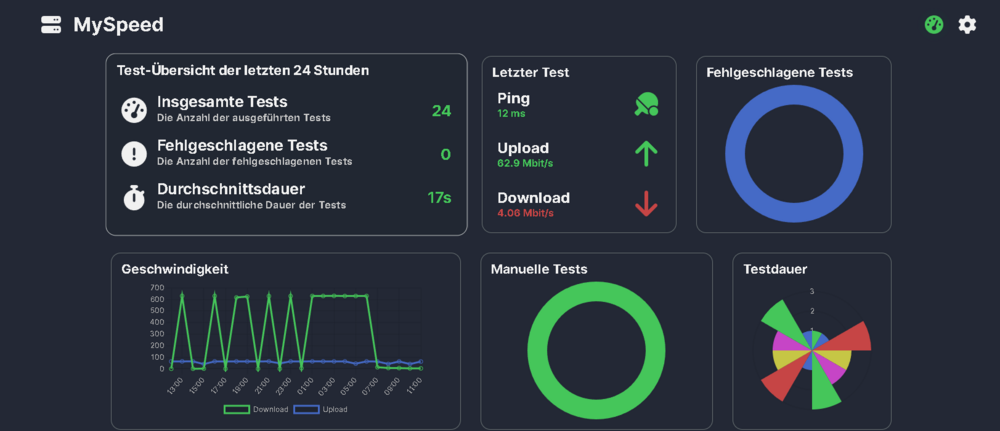
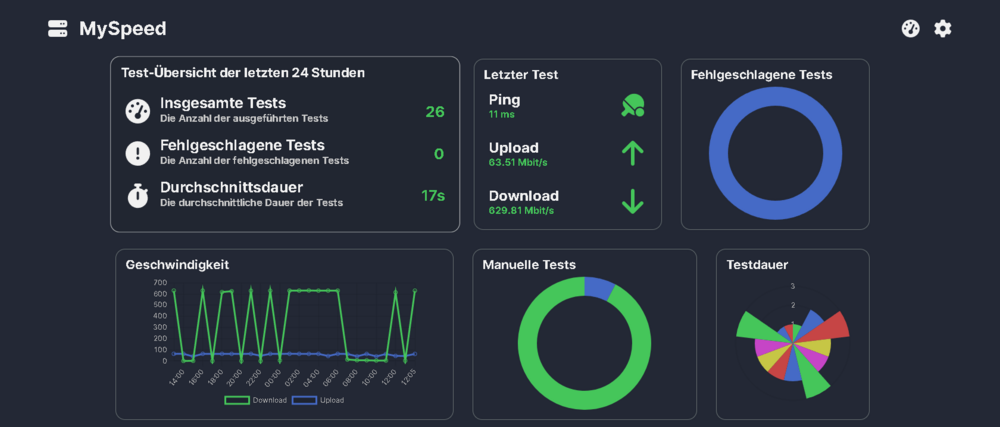
Hi First of all thanks for implementing this docker! Was looking for an nice graphical GUI for monitoring my connection. Somehow the donwload speed seems to be sometimes limited by something to 4 Mbit - I can't figure it out, what is causing this issue. Even when I start manual tests like 1 minute in between it switches between the real speed ~630 Mbit and this 4 Mbit. Maybe someone has an idea what is reason of this. Thanks in advance! Lelo
-
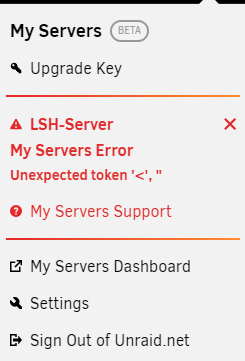
First of all i would like to thank you for this Plugin! Second - I'm still getting this Error-message: But everything seems to work?!? Another thing i would appriciate is an API for Android and Windows, so you could monitor it in the background without having to login into this website in a browser! Thanks!
-
Is there somewhere a changelog from RC8 to final release? Everything seems to work fine!
-
and this is the docker log: Initializing Steam libraries for secure Internet server **************************************************** * * * No Steam account token was specified. * RecordSteamInterfaceCreation (PID 78): SteamUtils009 / Utils RecordSteamInterfaceCreation (PID 78): SteamNetworkingSocketsSerialized003 / RecordSteamInterfaceCreation (PID 78): SteamGameServer012 / GameServer RecordSteamInterfaceCreation (PID 78): STEAMHTTP_INTERFACE_VERSION003 / HTTP RecordSteamInterfaceCreation (PID 78): SteamGameServer012 / GameServer RecordSteamInterfaceCreation (PID 78): SteamUtils008 / Utils RecordSteamInterfaceCreation (PID 78): SteamNetworking005 / Networking RecordSteamInterfaceCreation (PID 78): SteamGameServerStats001 / GameServerStats RecordSteamInterfaceCreation (PID 78): STEAMHTTP_INTERFACE_VERSION002 / HTTP RecordSteamInterfaceCreation (PID 78): STEAMINVENTORY_INTERFACE_V001 / Inventory RecordSteamInterfaceCreation (PID 78): STEAMUGC_INTERFACE_VERSION008 / UGC RecordSteamInterfaceCreation (PID 78): STEAMAPPS_INTERFACE_VERSION008 / Apps RecordSteamInterfaceCreation (PID 78): SteamGameCoordinator001 / RecordSteamInterfaceCreation (PID 78): SteamGameServer012 / GameServer * Logging into anonymous game server account. * * Connections will be restricted to LAN only. * * * * To create a game server account go to * * http://steamcommunity.com/dev/managegameservers * * * ****************************************************
-
here is my server cfg - i have another password but changed it to secret in this file. does it have to be docker - and for the commands in the console i used the right password ... server.cfg
-
I allways get an error in the console after checking "rcon status" after entering "rcon_password Docker" or any other set Password ... can anyone help? which settings or logs are needed? could someone provide a step by step guide? Error: ] rcon status Unable to connect to remote server (192.168.1.3:27015) ] rcon status Unable to connect to remote server (192.168.1.3:27016) Thanks for your work!!
-
Hi! Are we bound to pages on the Unraid system or is it possible to ad a page from another network internal device like the Router or another Server? I would love to have my Routersettings as an additional page!


