





luca2
Members
-
Joined
-
Last visited
-
hi guys, just a quick question. once I add a movie (not present in my media collection) in Movies it shows the pic of the fanart. But if I import a movie of my collection, it does not. Maybe someone could help me. I have set in radarr's Permissions 777 for chmod Folder. /data = /mnt/user/downloads/radarr/ /media = /mnt/user/data/media/movies/ (here is my media collection) radarr is on a custom network created for arr stack permissions of folders: root@tower1:/mnt/user/data/media/movies# cd /mnt/user/appdata/binhex-radarr/ root@tower1:/mnt/user/appdata/binhex-radarr# ls -ld drwxrwxr-x 1 nobody users 249 May 6 19:43 ./ root@tower1:~# cd /mnt/user/data/media/movies/ root@tower1:/mnt/user/data/media/movies# ls -ld drwxrwxrwx 1 nobody users 36864 May 6 19:11 ./ Pls let me know if you need any other info.
-
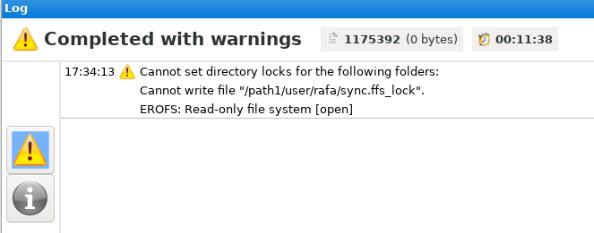
Hi Kilrah, first I want to thank you for this docker! It works great out of the box. Been using it for a long time as desktop. I will be trying it in the next weeks, anyway I got this error, is there a fix for it? I am not running the docker as root. Rgds
-
Hi guys, I need support for setting up Technitium using the here mentioned docker template. I found nowwhere info about how installing it. Can anyone briefly let me know how to proceed? You can PM me to not get out the scope of this thread. Once I have everything setup I will write a guide here on the forum on how to proceed. I just found posts for pihole. Then just a few posts about Technitium where people only mentioned where they got stuck and how they solved that issue. Could not find anything outside unraid forum too. Btw do I need to install it using Network_Type=Host? or Custom:br0?
-
ZFS raid0: 812MiB/s Btrfs raid0: 637MiB/s (pv command and 805MiB/s (dd command). I guess the problem with my previous data was raid0 of 2ssd's was connected to old raid card (running @x4 on old pcie plus only sata ports of 3Gbs). Please con you confirm this are the results I should obtain? Rgds and thx for support!
-
I think looking at it again maybe I have not setup my raid0 as it should. Can anyone confirm if this is ok: btrfs fi usage /mnt/casiopea/ Overall: Device size: 894.26GiB Device allocated: 14.06GiB Device unallocated: 880.20GiB Device missing: 0.00B Device slack: 0.00B Used: 7.25GiB Free (estimated): 884.96GiB (min: 444.86GiB) Free (statfs, df): 884.96GiB Data ratio: 1.00 Metadata ratio: 2.00 Global reserve: 9.20MiB (used: 16.00KiB) Multiple profiles: no Data,RAID0: Size:12.00GiB, Used:7.24GiB (60.30%) /dev/sdg1 6.00GiB /dev/sdf1 6.00GiB Metadata,RAID1: Size:1.00GiB, Used:9.02MiB (0.88%) /dev/sdg1 1.00GiB /dev/sdf1 1.00GiB System,RAID1: Size:32.00MiB, Used:16.00KiB (0.05%) /dev/sdg1 32.00MiB /dev/sdf1 32.00MiB Unallocated: /dev/sdg1 440.10GiB /dev/sdf1 440.10GiB
-
Hi, I did another test and the results are not what I expected for a 2xssd raid 0: What is to be expected if i raid0 on an HBA and then mount it via Unassigned Devices? Or what is the maximum I should expect from the fastest setup?
-
Hi, just a quick question regarding expected cache pool performance in raid0. I did a quick test in my second unraid tower to test for performance of a raid0 2x ssd's setup vs a single ssd setup. Acording to AI it shoud improve a lot. My actual test results were: single cache ssd=> write: 449MB/s read: 541MB/s root@X:~# dd if=/dev/zero of=/mnt/casiopea/testfile bs=1G count=5 oflag=dsync conv=fdatasync 5+0 records in 5+0 records out 5368709120 bytes (5.4 GB, 5.0 GiB) copied, 24.239 s, 221 MB/s root@X:~# dd if=/mnt/casiopea/testfile of=/dev/null bs=1G count=5 iflag=direct 5+0 records in 5+0 records out 5368709120 bytes (5.4 GB, 5.0 GiB) copied, 9.86418 s, 544 MB/sSo I am getting similar or even worse results. I am wondering what results I should really obtain. I mean how any pool created via Pool-Devices (not the cache one for /system and /appdata) but a dedicated one only for /domains should perform. Also, would it improve if I setup the mentioned raid 0 on a dedicated HBA and then access it from Unassigned Devices and not from the array-Pool-Devices? Hope to find some answers soon.
-
I checked the BIOS and it seems to be fine, just unchecked some OC that was there applied to RAM (was stock just find out today). The mentioned Machine check events logged now does not appear, but I get in the vm logs this error: 2024-05-24T16:34:58.679547Z qemu-system-x86_64: vfio: Unable to power on device, stuck in D3 2024-05-24T16:34:58.683538Z qemu-system-x86_64: vfio: Unable to power on device, stuck in D3 2024-05-24T16:34:58.821550Z qemu-system-x86_64: vfio: Unable to power on device, stuck in D3 2024-05-24T16:34:58.825543Z qemu-system-x86_64: vfio: Unable to power on device, stuck in D3 Any idea what this refers to?
-
My system was working fine and some days ago a vw failed working. My system: Model: Custom M/B: Gigabyte Technology Co., Ltd. X570 AORUS PRO Version Default string s/n Default string BIOS: American Megatrends International, LLC. Version F36d Dated 07/20/2022 CPU: AMD Ryzen 9 5900X 12-Core @ 3700 MHz HVM: Enabled IOMMU: Enabled Cache: L1 - Cache: 768 KiB, L2 - Cache: 6 MiB, L3 - Cache: 64 MiB Memory: 64 GiB DDR4 (max. installable capacity 128 GiB) Network: eth0: 1000 Mbps, full duplex, mtu 1500 Kernel: Linux 6.1.74-Unraid x86_64 OpenSSL: 1.1.1v I got this error: May 24 17:08:58 Tower kernel: mce: [Hardware Error]: Machine check events logged May 24 17:08:58 Tower kernel: mce: [Hardware Error]: CPU 1: Machine Check: 0 Bank 5: bea0000000000108 May 24 17:08:58 Tower kernel: mce: [Hardware Error]: TSC 0 ADDR ffffff8184063e MISC d012000100000000 SYND 4d000000 IPID 500b000000000 May 24 17:08:58 Tower kernel: mce: [Hardware Error]: PROCESSOR 2:a20f10 TIME 1716566908 SOCKET 0 APIC 2 microcode a201016 May 24 17:14:03 Tower root: Fix Common Problems: Error: Machine Check Events detected on your server May 24 17:14:03 Tower root: mcelog: ERROR: AMD Processor family 25: mcelog does not support this processor. Please use the edac_mce_amd module instead. Can anyone help me out? I am stuck.
-
Hi, everything seems to be working. I checked the supervisord.log and there is no error message. How can I check for the upload?
-
Hi, I am running this docker with PIA (openvpn) and I can download torrents but I cannot upload. I guess it has to do with my router blocking the uploads. There are ports 58846, 58946, 8112 and 8118 from app to host as shown in the docker tab. Can anyone explain how they actually work? I guess I need to add some rules to my firewall to let a port be forwarded to the wan (which one?). Hope someone can help me out.
-
Hi, I am planning to format an external hdd as ntfs so that it can be used with Windows. I want to encrypt it with bitlocker. Will this setup work with UD?
-
It was a working plus license. I did not receive any message of it being blacklisted till now. Will contact Unraid. Thx.
-
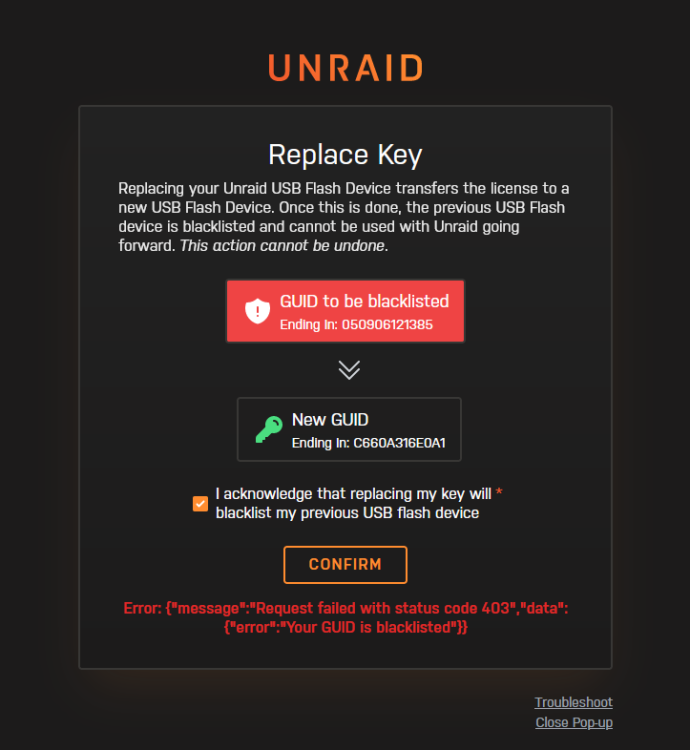
Hi, I tried to replace my key to a new usb stick and got this error. Pls let me know how to solve it. Rgds
-
I replay to myself as I think it is easier this way to explain what I realised. It may make more sense after that. I attached the content of lab-network.xml (corresponds to virbr1 I am trying to set up) which contains this error: the IP network 192.168.122.0 I posted is the same as virbr0 (the one that is already provided by default by Unraid for virbr0). I then changed it to a new not used network: 192.168.133.0 and this is what I get after asking virsh # net-dumpxml lab-network: <network ipv6='yes'> <name>lab-network</name> <uuid>e00fd28e-5bfc-4e83-8163-0c17e34562ae</uuid> <bridge name='virbr1' stp='on' delay='0'/> <mac address='52:54:00:05:a0:07'/> </network> Still virbr1 is not up and running as virbr0. I pinged 192.168.133.1 from host and there is no answer. So I thought maybe someone can tell me how virbr0 is defined and where is the config file stored ... and from there I could solve my problem with virbr1.

