





Chlorgas
Members
-
Joined
-
Last visited
-
Hello, I want to solve this specific (php-) error from passman: { "reqId": "ZU1i5UVHRM902ej4RGVq", "level": 3, "time": "2025-11-17T21:45:02+00:00", "remoteAddr": "", "user": "--", "app": "PHP", "method": "", "url": "--", "message": "OCA\\Passman\\Service\\CredentialRevisionService::getRevision(): Implicitly marking parameter $user_id as nullable is deprecated, the explicit nullable type must be used instead at /config/www/nextcloud/apps/passman/lib/Service/CredentialRevisionService.php#87", "userAgent": "--", "version": "32.0.1.2", "data": { "app": "PHP" }, "id": "691b9811cb89b" }Can anybody lead me to a proper fix for that? Many thanks in advance! edit, 19.11.2025: I've found this bug report: https://github.com/bcit-ci/CodeIgniter/issues/6302 But all the file locations are not available on my undraid-instance nor in the nextcloud docker.
-
I also got this message and went according to this tutorial: https://www.c-rieger.de/nextcloud-und-php-troubleshooting/
-
7.1.2 --> 7.1.3 and encountered no problems.
-
7.1.3 --> 7.1.4 and no problems encountered.
-
So, I just follow spaceinvaderone's instruction in preparation, then put all disks into the new machine mounting it via unassigned devices, copy everything onto the new cache and pool and at last start all the dockers again, right?
-
What would be the process if I have complete new drives? Is there a simple solution for moving the data accordingly?
-
Thanks for that!! Worked for me as well!
-
Same here. Log says: [info] Initialisation started... [info] influxdb fixed. [info] loki fixed. [info] telegraf fixed. [info] promtail fixed. [info] grafana fixed. [info] Initialisation complete [info] Runing apps... [info] Run influxdb as service on port 8086 Executable /usr/bin/influxd does not exist! [info] Run loki as daemon on port 3100 [info] Run telegraf as service [info] Run promtail as daemon on port 9086 [info] Run grafana as service on port 3006 * Starting Grafana Server ...fail! [info] All done [error] influxdb crashed! [error] loki crashed! [info] Skip hddtemp due to USE_HDDTEMP set to no [error] telegraf crashed! [info] promtail PID: 77 [error] grafana crashed!
-
Vielen Dank @base64! Habe alles gesichert und wegkopiert, den Mover laufen lassen und konnte danach die Datenbank ohne Fehler wiederherstellen!
-
Also /mnt/user/ und dann habe ich alles am aktuellsten Stand beieinander. Dann teste ich das mal mit einer neuen mariadb-Installation.
-
Da ist alles vorhanden. Ich bin mir nur nicht sicher was ich mit /mnt/user und /mnt/user0 mache. Was muss ich hier sichern, um einen Fehler oder file corruption zu vermeiden?
-
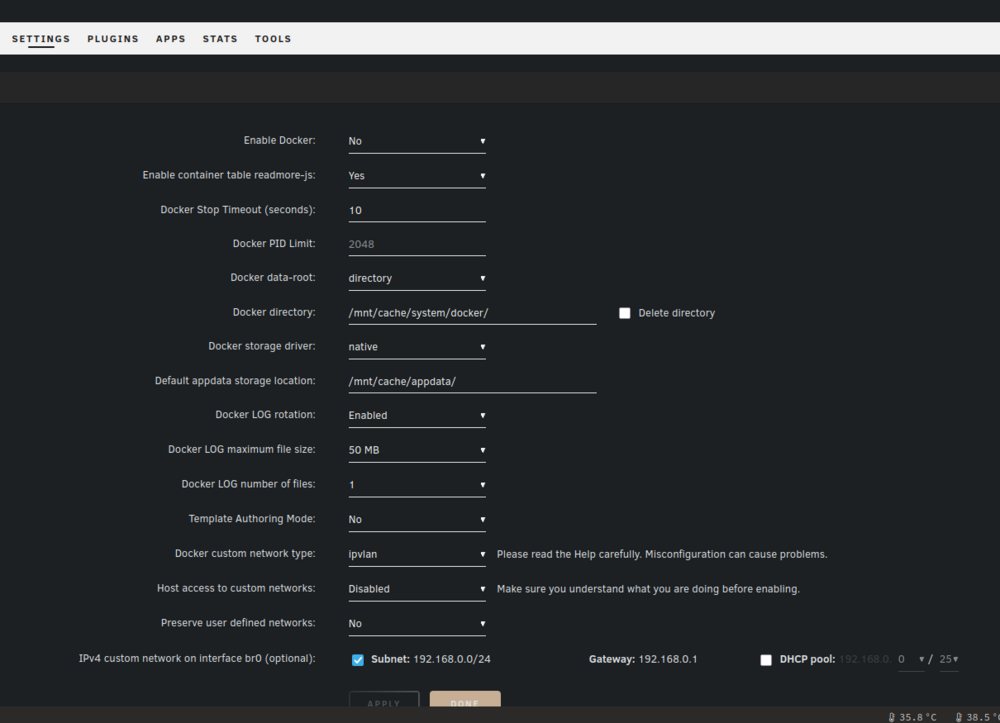
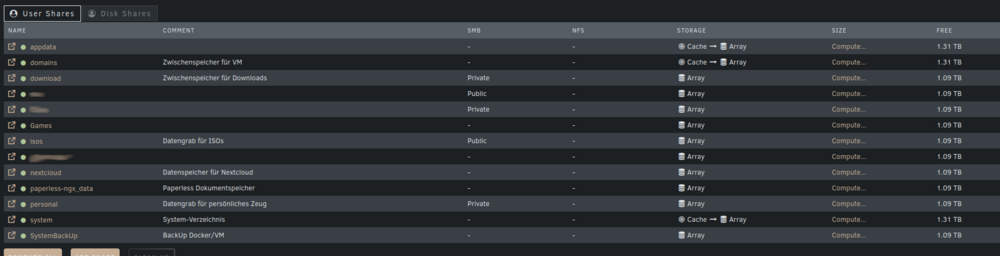
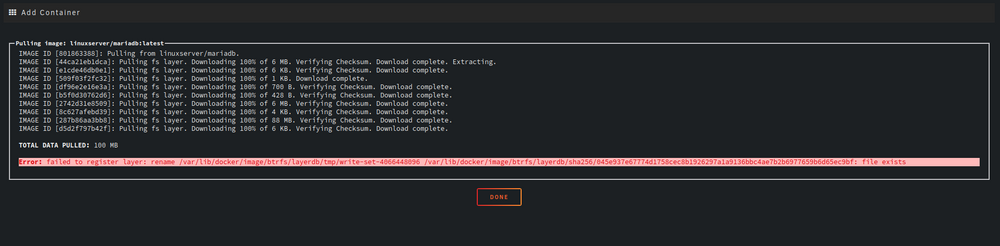
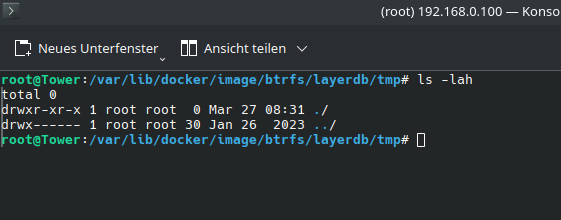
Grüß euch! Ich glaube, meine Shares bzw. deren Pfade ordentlich totkonfiguriert habe und benötige Hilfe von euch Spezialisten hier. Das Problem stellt sich wie folgt dar: Nachdem ich die Pfade in den Docker-Settings verändert habe, starten meine Dienste nicht mehr. Ich habe anschließend die Pfade zurückgesetzt (2025_0327 unraid 01.png), aber meine Datenbank (mariadb) startete nicht mehr bzw. mit fortlaufenden Fehlern im Log. Ein Löschen des Containers und Neuinstallation via User-Template funktionierte auch nicht. Ich habe anschließend ein Restore via Appdata BackUp durchgeführt und konnte die Dienste wieder starten. Danach wollte ich die Fehler aus "Fix Common Problems" bereinigen: Share xxx is set to cache only, but files / folders exist on the array Share xxx is to to not use the cache, but files / folders exist on the cache drive und zwar wie hier beschrieben: Das führte dazu, dass meine Docker nicht mehr in der Übersicht sichtbar sind. Als ich diese via User-Template neu installieren wollte, trat ein Installationsfehler auf (2025_0327 unraid 03.png). Ich habe das betreffende Verzeichnis via SSH geprüft, aber das ist leer (2025_0327 unraid 04.png). Nun tritt Panik ein, da es sich hier um meine nextcloud-Datenbank handelt und die sollte natürlich wieder laufen. Der Endzustand sollte so aussehen, dass meine Docker-Images im Cache (Share: system) gespeichert werden und die User-Daten auf dem Array (Share: appdata) liegen. Die nextcloud-Dateien sollten getrennt davon im Array (Share: nextcloud) gespeichert werden und paperless-Daten sollen auch am Array (Share: paperless-ngx_data) gespeichert sein (Shares sieht man in 2025_0327 unraid 02.png). Screenshots und diagnostic sind angehängt, weitere Details reich ich gerne nach, wenn notwendig. Kann mich bitte jemand in DAU-Sprech anweisen, wie ich das wieder hinbekomme? Vielen Dank im Voraus! Docker-Übersicht: Shares: Fehler maraidb: Verzeichnis des Fehlers: Diagnostic:
-
Thanks for the fast support, @ich777. Everything seems up and running again!
-
Hello! I'm running unraid 6.12.13 and updated PP today. After restart i see a blank page saying: "Version 17 of JVM is not suitable for this product. Version: 21 or greater is required." Does someone has a hint for me solving this issue? Thanks in advance!
-
How did you solve it?


