





nexusjosh
Members
-
Joined
-
Last visited
-
A good idea. But when I shut down my array, I always manually shut down all of my docker containers and VM's, then shut down the array, then shutdown, or restart UnRaid. Right now I have one windows VM, and 2 Dockers, one being Plex, and the other being Lancache.
-
Three posts up from yours, I attached it. @Arbadacarba Yes, that is possible. The question would be: What was causing the extremely long shutdown. If my server starts acting up again, I'll post here. I'll leave this thread up for a few days, before marking it as Solved.
-
I don't understand my server. I changed a bit of the physical config, and now its purring better then ever. The only other issue I'm having is trying to add a Disk 8. When I add the disk, and start the array, it sort of just doesn't do anything. The last time I added a disk about a year or maybe two ago, it prompted me for permission to format the disk, then just added it to the array. Has that changed?
-
swiftserver-diagnostics-20221025-1844.zip
-
OK so any ideas on why UnRaid is so ungodly slow, any indication from the logs?
-
What sort of error would it give, or where would it display any error it comes across?
-
Hey guys! I had a scare earlier this year, when my server kep't crashing. When I was doing through mountans of troubleshooting, I attempted to reset my OS on the Flash Drive. I think it perhaps has lead to issues now? Over the last couple of weeks, I've noticed my server acting... for lack of a better word, strange. Slow, and I recently attempted to upgrade it with another disk... which hasn't worked. Even now, I reset the server, and its doing a Parity Check (Even though it was a clean shutdown), and its stuck paused. Even when I attempt to Stop the Array, it takes Forever to execute the command, and stop the array. Same with Reboot or Shutdown Any ideas? I have asked in the past if there is any way to verify OS files, and no-one has answered that question. It feels like a classic OS error. Here is the prior thread: swiftserver-syslog-20221025-0207.zip
-
Its sad no-one has replied. I just got a used M477fdn, and was tinkering with its settings. I wanted to get Scan to Network functioning, but when I do "Save and Test" it fails. I made the printer its own user in UnRaid. The fields that could be wrong are "Network Path" and I have "\\10.0.0.2\Household Storage\04 Scans\HP StN" 10.0.0.2 being my server address. "Household Storage" being the Share and the the nested folders from there. If anyone has set this up, and can help myself and @henris I, and no doubt he would be thankful.
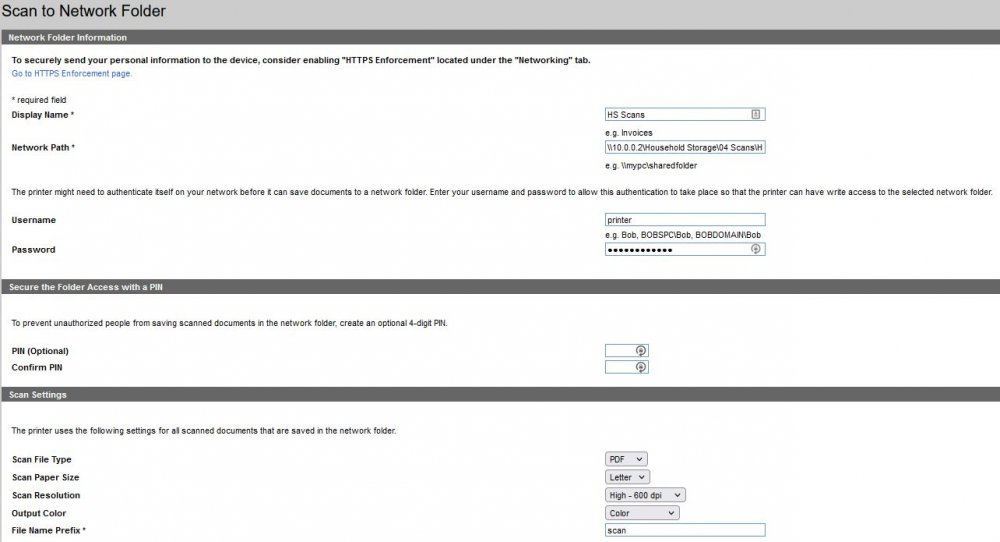
-
At this moment, I'm going to say its a tentative resolution. From what I understand, various BIOS updates, not to mention the most current release back in 2019, had various micro architecture updates. When the MB called the CPU's to do something specific (I am no Engineer) and the CPU's couldn't. It'd crash. It almost always crashed when under load, but not always. I've had it under a full load, at 80-95% CPU load, which was causing the system to crash, and it is now stable. I remember when I originally purchased the MB, I saw on the site "E5-2600 v2 family" I googled that, bringing me to This page. The page listing all CPU's in the generation. I didn't realize at the time, that the CPU had to also be 26xx. So it worked for YEARS, and it wasn't until I was upgrading the system, and decided to do a BIOS Upgrade. The System STILL BOOTS, and it isn't until there is a call from the BIOS to do something that the CPU is too new to? To not. Its quite sad that SuperO didn't just support the newer CPU's? They OBVIOUSLY work. But it is what it is. @m1a8x2 If you want to try the same thing I did. Look at the version of your BIOS, and see if there is an earlier version online. Or contact your motherboard manufacturer directly, and request the earlier BIOS rev. they have for "Troubleshooting Purposes" All in all. I feel like there is probably a custom Bios somewhere on the interwebs. I might look for it at some point, because after I rolled back the BIOS, I've found the actual menu to be strangely buggy. Its also funny, a few months ago, I was going to upgrade the processors. But now, I'm certainly NOT going to push my luck. Though perhaps I could try and get my hands on a pair of E5-2697 v2... Better, and In spec. Hmm...
-
Update: I sent the SuperO Tech the same message I sent here, and he called me quickly. He reviewed some pics I sent, and took it to a couple of different departments. It was pointed out that it could be the two CPU's I have paired with my MB. Since officially the Motherboard only supports Intel® Xeon® processor E5-2600 and E5-2600 v2 family, and I have two E5-4610 v2. So he sent me one of the original BIOS builds, and I've rolled back the BIOS. I have it under full load now. so we'll see what happens! Its insane that a "Non Supported CPU" would just be unstable, and the BIOS wouldn't just reject the CPU upon boot like every other Motherboard I've ever seen does. This has all been a roller coaster. If this BIOS Rollback doesn't fix my issue, I'll try that. Information Edit: The BIOS I was provided was x9dr3p3. I'm attaching it here, in case anyone in the future needs it. Fair warning though, on my system at least the BIOS interface is strangely, buggy. You can't left arrow to the save menu, instead you have to press F Keys to save BIOS changes, restore defaults, etc. If I note any other strange bugs, I'll update this post. x9dr3p3.c04.zip
-
Update: Resetting BIOS settings made no difference. The SuperO support tech called me, and we discussed what was going on for a bit. He said the only thing it could be at this point is thermals. I re-seated both CPU's, thoroughly cleaned the CPU's and heatsinks of new paste and applied new thermal paste. I then put the server under full standard load, and after about 20 minutes under full load it reset. At the time I was monitoring the tempatures, and on both CPU's, the temps didn't go above 40C.
-
Update: No change. Continuing talks with SuperO Support. I just returned all bios settings to Default, so we'll see if that makes any difference?
-
Update: I just swapped the PSU from my Server and gaming rig, so we'll see if that makes any sort of difference. We'll see if the server continues to crash... Or my gaming PC starts crashing. Edit: Aaaaaaand Crashed! Server crashed that is. New PSU made no difference. Sigh.
-
So, from the IPMI logs, maybe it is the PSU? But maybe its just... Sort of failing, because of the Sata Rail? Ugh.
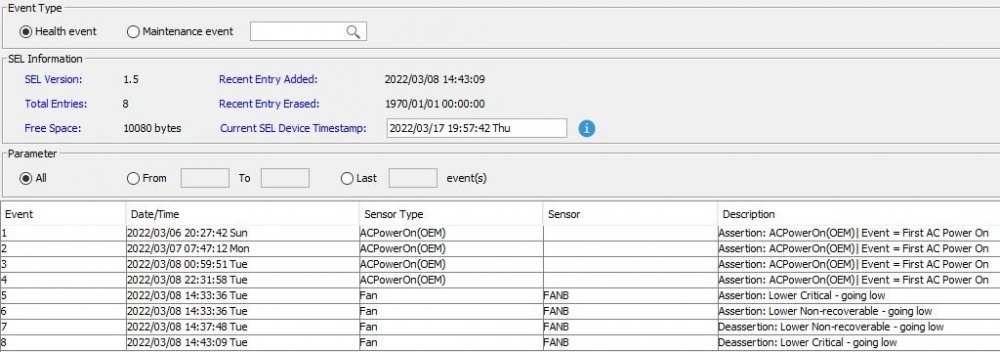
-
Hey its all good. Its something. When the system crashes the IPMI does not. I've been busy the last few days, so I haven't been able to sub the PSU. If it IS the PSU then this will have been a the 2nd PSU in 5 years, which is a bit crazy, but we'll see. And if it is, which PSU should I purchase to be the permanent replacement?

