





CaptainTivo
Members
-
Joined
-
Last visited
Everything posted by CaptainTivo
-
I have been using cron to run a couple of scripts and last week I got this error email: cron for user root /boot/config/my_scripts/list_disks.sh Console and webGui login account <[email protected]> Mar 29, 2020, 4:00 AM (3 days ago) to root, bcc: me /bin/sh: /boot/config/my_scripts/list_disks.sh: Permission denied Here is the relevant cron entry: # run backup script on Home\ Video to copy to Backup1 every Sunday at 4am 0 4 * * 0 /boot/config/my_scripts/backup_home_video.sh # run script to list individual disk contents 0 4 * * 0 /boot/config/my_scripts/list_disks.sh I checked and, indeed, the script file not longer has execute permission. I attempted to add execute permission (sudo chmod +x list_disk.sh) but that failed silently. root@Tower:/boot/config/my_scripts# ls -l total 192 -rw------- 1 root root 640 Jan 6 11:30 backup_home_video.sh -rw------- 1 root root 305 Jan 27 16:06 directory_size.sh -rw------- 1 root root 717 Oct 29 2018 list_disks.sh -rw------- 1 root root 85224 Jul 12 2018 test.sh Any idea what caused this? It has been working fine for over a year now. Currently running 6.8.2
-
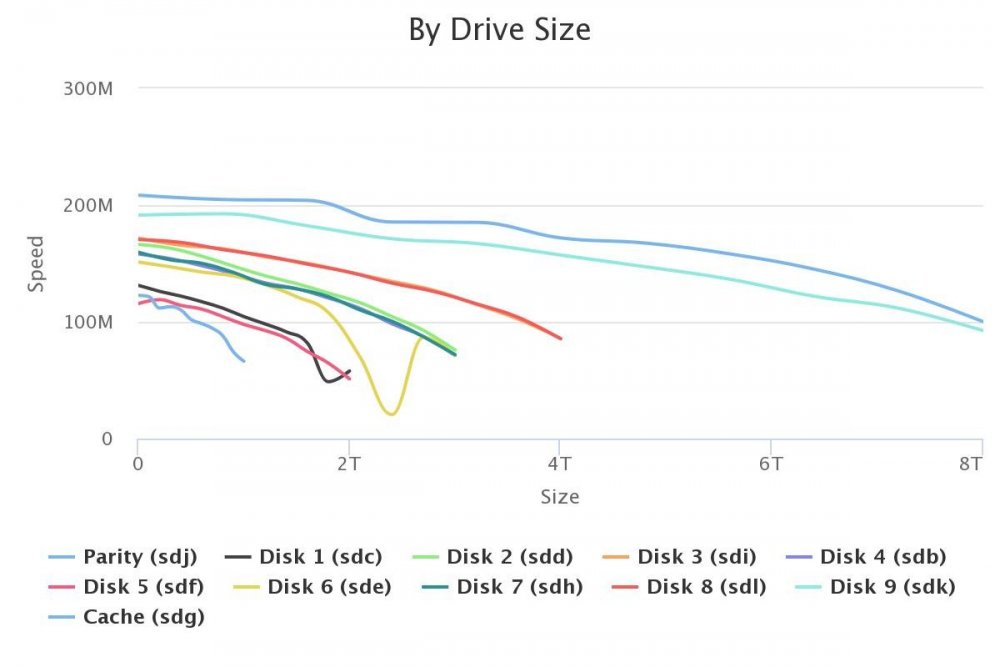
Hmm. Here is what I found about "Current Pending Sector Count" (damn, I just hear that in Siri's voice :-) "Count of "unstable" sectors (waiting to be remapped, because of unrecoverable read errors)." If the reads of these sector have unrecoverable errors, haven't I lost data already? Or is it that the read error trigger a seek to a different track and that would explain the sudden drop in read data rate? Anyway, I decided to remove the drive. I just installed a new 8TB drive shucked from a WD My Book so I have lots of extra space. I just wish there were a less nerve-racking way to move the data from disk to disk. I use rsync but I am never completely convinced that every single bit is copied. I did that an here is what it spit out. BTW, I kept looking for a way to abort the test and finally started clicking around on the scroll bars of this tiny little window: And it finally showed a sliver of the abort button. Maybe you could enlarge it a bit so that the Abort button can be seen? Here is the test output: 06:45:20 Spot: [100] ScanLoc: [2288211] SizeLoc: [3 TB] SkipLines: [1] Avg: [75.86 MB] AvgMin: [72.09 MB] AvgMax: [78.64 MB] 06:45:39 Spinning up sde (3TB)06:45:39 Performing random seek tests06:45:49 Performing sequential seek tests06:46:01 Performing drive latency testsRandom Seek: 568SequentialSeek: 5869DriveLatency: 114511306:46:11 Spot: [0] ScanLoc: [0] SizeLoc: [0 GB] Avg: [151.24 MB] AvgMin: [141.56 MB] AvgMax: [159.91 MB] 06:46:28 Spot: [10] ScanLoc: [228927] SizeLoc: [300 GB] Avg: [147.10 MB] AvgMin: [141.56 MB] AvgMax: [152.04 MB] 06:46:45 Spot: [20] ScanLoc: [457854] SizeLoc: [600 GB] Avg: [142.57 MB] AvgMin: [136.31 MB] AvgMax: [149.42 MB] 06:47:02 Spot: [30] ScanLoc: [686781] SizeLoc: [900 GB] Avg: [139.44 MB] AvgMin: [135.00 MB] AvgMax: [145.49 MB] 06:47:19 Spot: [40] ScanLoc: [915708] SizeLoc: [1.2 TB] Avg: [129.76 MB] AvgMin: [120.59 MB] AvgMax: [138.94 MB] 06:47:36 Spot: [50] ScanLoc: [1144635] SizeLoc: [1.5 TB] Speed Gap of 117.96 MB (max allowed is 45 MB), retrying06:47:53 Spot: [50] ScanLoc: [1144635] SizeLoc: [1.5 TB] Speed Gap of 61.60 MB (max allowed is 50 MB), retrying06:48:10 Spot: [50] ScanLoc: [1144635] SizeLoc: [1.5 TB] Speed Gap of 95.68 MB (max allowed is 55 MB), retrying06:48:27 Spot: [50] ScanLoc: [1144635] SizeLoc: [1.5 TB] Speed Gap of 79.95 MB (max allowed is 60 MB), retrying06:48:44 Spot: [50] ScanLoc: [1144635] SizeLoc: [1.5 TB] Avg: [116.25 MB] AvgMin: [69.47 MB] AvgMax: [131.07 MB] 06:49:01 Spot: [60] ScanLoc: [1373562] SizeLoc: [1.8 TB] Speed Gap of 116.65 MB (max allowed is 45 MB), retrying06:49:18 Spot: [60] ScanLoc: [1373562] SizeLoc: [1.8 TB] Speed Gap of 117.96 MB (max allowed is 50 MB), retrying06:49:35 Spot: [60] ScanLoc: [1373562] SizeLoc: [1.8 TB] Speed Gap of 117.96 MB (max allowed is 55 MB), retrying06:49:52 Spot: [60] ScanLoc: [1373562] SizeLoc: [1.8 TB] Speed Gap of 112.72 MB (max allowed is 60 MB), retrying06:50:09 Spot: [60] ScanLoc: [1373562] SizeLoc: [1.8 TB] Speed Gap of 117.96 MB (max allowed is 65 MB), retrying06:50:26 Spot: [60] ScanLoc: [1373562] SizeLoc: [1.8 TB] Speed Gap of 106.17 MB (max allowed is 70 MB), retrying06:50:43 Spot: [60] ScanLoc: [1373562] SizeLoc: [1.8 TB] Speed Gap of 110.10 MB (max allowed is 75 MB), retrying06:51:00 Spot: [60] ScanLoc: [1373562] SizeLoc: [1.8 TB] Speed Gap of 82.58 MB (max allowed is 80 MB), retrying06:51:17 Spot: [60] ScanLoc: [1373562] SizeLoc: [1.8 TB] Avg: [101.33 MB] AvgMin: [52.43 MB] AvgMax: [123.21 MB] 06:51:34 Spot: [70] ScanLoc: [1602489] SizeLoc: [2.1 TB] Speed Gap of 98.30 MB (max allowed is 45 MB), retrying06:51:51 Spot: [70] ScanLoc: [1602489] SizeLoc: [2.1 TB] Speed Gap of 108.79 MB (max allowed is 50 MB), retrying06:52:08 Spot: [70] ScanLoc: [1602489] SizeLoc: [2.1 TB] Speed Gap of 110.10 MB (max allowed is 55 MB), retrying06:52:25 Spot: [70] ScanLoc: [1602489] SizeLoc: [2.1 TB] Speed Gap of 110.10 MB (max allowed is 60 MB), retrying06:52:42 Spot: [70] ScanLoc: [1602489] SizeLoc: [2.1 TB] Speed Gap of 108.79 MB (max allowed is 65 MB), retrying06:52:59 Spot: [70] ScanLoc: [1602489] SizeLoc: [2.1 TB] Speed Gap of 110.10 MB (max allowed is 70 MB), retrying06:53:16 Spot: [70] ScanLoc: [1602489] SizeLoc: [2.1 TB] Speed Gap of 102.24 MB (max allowed is 75 MB), retrying06:53:33 Spot: [70] ScanLoc: [1602489] SizeLoc: [2.1 TB] Speed Gap of 106.17 MB (max allowed is 80 MB), retrying06:53:50 Spot: [70] ScanLoc: [1602489] SizeLoc: [2.1 TB] Speed Gap of 107.48 MB (max allowed is 85 MB), retrying06:54:07 Kill flag found

-
Unfortunately, it seems very repeatable. Also, I had to disable the Speedgap detection to get it to finish at all. Checked the SMART values and these stand out: 9 Power on hours 0x0032 051 051 000 Old age Always Never 35911 (4y, 1m, 4d, 7h) 197 Current pending sector 0x0032 200 200 000 Old age Always Never 2 Drive was put into service May 2014. Could the speed drop be explained by the current pending sector count?
.thumb.jpeg.7fe191b2d5dacc32dff0fadae706f51b.jpeg)
-
Thanks for you work on this. More and better diagnostics is just what unRAID needs. I just ran diskspeed and got the following result. I have three WD30EZRX drives. Two of them (disk2 and disk4) behave normally and virtually identically. But disk6 is weird. What could cause the massive dip at 2.5 TB? Have you seen this behavior before? Should I replace it?
-
Great. Thanks for that info.
-
I am getting a fail notice that I don't understand. I just finished a copy-and-shrink-array operation, removed two disk, New config and now rebuilding parity. This morning I got the email quoted below and the red box notification on the Main page. But when I got to "Fix Common Problems" plugin page, it says: "No errors found" Can I ignore this? tower-diagnostics-20180817-1016.zip
-
Hi and thanks for the work on this. I am running mariadb to support my Kodi database and I would like to backup the database. I want to get it right, so, a few questions: 1. I want to backup /mnt/appdata/mariadb/databases so I have set Appdata Share (source): to /mnt/appdata/mariadb/databases 2. I am concerned about this warning: I have a dedicated share for all backups from all my computers called Backup1, which is limited to a specific disk. Within that share are a bunch of directories with different backup types: Backup1\ backups\ PC1\ PC2\ Game backups\ Pictures\ etc. Can I simply make a dedicated folder for this backup? i.e.: Destination Share: Backup1\backups\mariadb The warning seems to imply that this could write over files/folders at the Backup1 directory level. Thanks.
.jpeg.1659fe3680ac41949bb3e4674e99eba1.jpeg)
