





xerox445
Members
-
Joined
-
Last visited
-
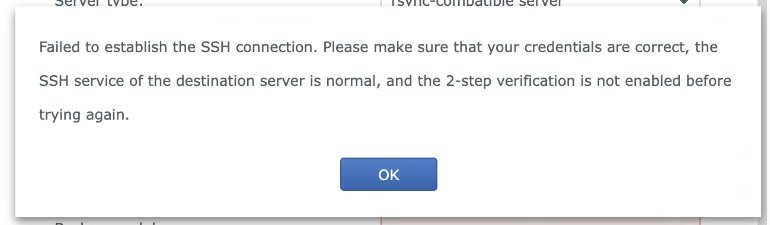
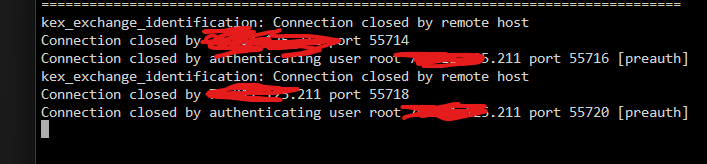
I'm im the same boat, I am trying to remotely backup a synology dsm 6.2.2 using rsync to my unraid server over the internet. I tried to use the ssh-keygen ed25519, and then use the cat ~/.ssh/id_ed25519.pub command, got the key and put it into rsync docker container as shown, but still no joy. On DSM 6.2.2 I am getting this when trying, and here is the log when i am trying to connect. Not sure how to move forward at this point, would appreciate any help you could provide. Seems like I am missing just one step.
-
https://obscurus.org/unraid-gpu-passthrough-needed-a-tweak/ This is the fix for when you have done everything properly and you still cant get your VM to boot when passing a GPU through. Took me awhile to find it, but this fixed it right away. We need more guys like phil. If you are out there, thank you!
-
Adding the XML of the VM: <?xml version='1.0' encoding='UTF-8'?> <domain type='kvm' id='3'> <name>Windows 10</name> <uuid>14c11b2e-d6a1-87f1-c9e7-e2834d9b0cdc</uuid> <metadata> <vmtemplate xmlns="unraid" name="Windows 10" icon="windows.png" os="windows10"/> </metadata> <memory unit='KiB'>12582912</memory> <currentMemory unit='KiB'>12582912</currentMemory> <memoryBacking> <nosharepages/> </memoryBacking> <vcpu placement='static'>6</vcpu> <cputune> <vcpupin vcpu='0' cpuset='0'/> <vcpupin vcpu='1' cpuset='6'/> <vcpupin vcpu='2' cpuset='2'/> <vcpupin vcpu='3' cpuset='8'/> <vcpupin vcpu='4' cpuset='4'/> <vcpupin vcpu='5' cpuset='10'/> </cputune> <resource> <partition>/machine</partition> </resource> <os> <type arch='x86_64' machine='pc-i440fx-7.1'>hvm</type> <loader readonly='yes' type='pflash'>/usr/share/qemu/ovmf-x64/OVMF_CODE-pure-efi.fd</loader> <nvram>/etc/libvirt/qemu/nvram/14c11b2e-d6a1-87f1-c9e7-e2834d9b0cdc_VARS-pure-efi.fd</nvram> </os> <features> <acpi/> <apic/> <hyperv mode='custom'> <relaxed state='on'/> <vapic state='on'/> <spinlocks state='on' retries='8191'/> <vendor_id state='on' value='none'/> </hyperv> </features> <cpu mode='host-passthrough' check='none' migratable='on'> <topology sockets='1' dies='1' cores='3' threads='2'/> <cache mode='passthrough'/> <feature policy='require' name='topoext'/> </cpu> <clock offset='localtime'> <timer name='hypervclock' present='yes'/> <timer name='hpet' present='no'/> </clock> <on_poweroff>destroy</on_poweroff> <on_reboot>restart</on_reboot> <on_crash>restart</on_crash> <devices> <emulator>/usr/local/sbin/qemu</emulator> <disk type='file' device='disk'> <driver name='qemu' type='raw' cache='writeback'/> <source file='/mnt/user/domains/Windows 10/vdisk1.img' index='3'/> <backingStore/> <target dev='hdc' bus='virtio'/> <boot order='1'/> <alias name='virtio-disk2'/> <address type='pci' domain='0x0000' bus='0x00' slot='0x03' function='0x0'/> </disk> <disk type='file' device='cdrom'> <driver name='qemu' type='raw'/> <source file='/mnt/user/isos/Windows.iso' index='2'/> <backingStore/> <target dev='hda' bus='ide'/> <readonly/> <boot order='2'/> <alias name='ide0-0-0'/> <address type='drive' controller='0' bus='0' target='0' unit='0'/> </disk> <disk type='file' device='cdrom'> <driver name='qemu' type='raw'/> <source file='/mnt/user/isos/virtio-win-0.1.229-1.iso' index='1'/> <backingStore/> <target dev='hdb' bus='ide'/> <readonly/> <alias name='ide0-0-1'/> <address type='drive' controller='0' bus='0' target='0' unit='1'/> </disk> <controller type='pci' index='0' model='pci-root'> <alias name='pci.0'/> </controller> <controller type='ide' index='0'> <alias name='ide'/> <address type='pci' domain='0x0000' bus='0x00' slot='0x01' function='0x1'/> </controller> <controller type='virtio-serial' index='0'> <alias name='virtio-serial0'/> <address type='pci' domain='0x0000' bus='0x00' slot='0x04' function='0x0'/> </controller> <controller type='usb' index='0' model='ich9-ehci1'> <alias name='usb'/> <address type='pci' domain='0x0000' bus='0x00' slot='0x07' function='0x7'/> </controller> <controller type='usb' index='0' model='ich9-uhci1'> <alias name='usb'/> <master startport='0'/> <address type='pci' domain='0x0000' bus='0x00' slot='0x07' function='0x0' multifunction='on'/> </controller> <controller type='usb' index='0' model='ich9-uhci2'> <alias name='usb'/> <master startport='2'/> <address type='pci' domain='0x0000' bus='0x00' slot='0x07' function='0x1'/> </controller> <controller type='usb' index='0' model='ich9-uhci3'> <alias name='usb'/> <master startport='4'/> <address type='pci' domain='0x0000' bus='0x00' slot='0x07' function='0x2'/> </controller> <interface type='bridge'> <mac address='52:54:00:3f:7b:c1'/> <source bridge='br0'/> <target dev='vnet2'/> <model type='virtio-net'/> <alias name='net0'/> <address type='pci' domain='0x0000' bus='0x00' slot='0x02' function='0x0'/> </interface> <serial type='pty'> <source path='/dev/pts/2'/> <target type='isa-serial' port='0'> <model name='isa-serial'/> </target> <alias name='serial0'/> </serial> <console type='pty' tty='/dev/pts/2'> <source path='/dev/pts/2'/> <target type='serial' port='0'/> <alias name='serial0'/> </console> <channel type='unix'> <source mode='bind' path='/var/lib/libvirt/qemu/channel/target/domain-3-Windows 10/org.qemu.guest_agent.0'/> <target type='virtio' name='org.qemu.guest_agent.0' state='disconnected'/> <alias name='channel0'/> <address type='virtio-serial' controller='0' bus='0' port='1'/> </channel> <input type='tablet' bus='usb'> <alias name='input0'/> <address type='usb' bus='0' port='1'/> </input> <input type='mouse' bus='ps2'> <alias name='input1'/> </input> <input type='keyboard' bus='ps2'> <alias name='input2'/> </input> <audio id='1' type='none'/> <hostdev mode='subsystem' type='pci' managed='yes'> <driver name='vfio'/> <source> <address domain='0x0000' bus='0x06' slot='0x00' function='0x0'/> </source> <alias name='hostdev0'/> <rom file='/mnt/user/isos/vbios/rtxa2000.rom'/> <address type='pci' domain='0x0000' bus='0x00' slot='0x05' function='0x0'/> </hostdev> <hostdev mode='subsystem' type='pci' managed='yes'> <driver name='vfio'/> <source> <address domain='0x0000' bus='0x06' slot='0x00' function='0x1'/> </source> <alias name='hostdev1'/> <address type='pci' domain='0x0000' bus='0x00' slot='0x06' function='0x0'/> </hostdev> <memballoon model='none'/> </devices> <seclabel type='dynamic' model='dac' relabel='yes'> <label>+0:+100</label> <imagelabel>+0:+100</imagelabel> </seclabel> </domain>
-
Hi, I am also having the same issue with my newly build machine. When I start the VM, it pins one core to 100% and will not launch. I have bound iommu groups 22/23 to vfio at boot already, and went through bios to see if there was any relevant settings that could be causing the issue. I oiginally used seabios for the VM, but have since remade it with OVMF. The VM will launch fine and operate with no issues when VNC only is selected as the graphics card, but I can not get this to boot with the rtx a2000. The log is just full of this, 100s of lines: 2023-03-12T01:28:20.846609Z qemu-system-x86_64: vfio_region_write(0000:06:00.0:region1+0x32188, 0x0,8) failed: Device or resource busy 2023-03-12T01:28:20.846615Z qemu-system-x86_64: vfio_region_write(0000:06:00.0:region1+0x32180, 0x0,8) failed: Device or resource busy 2023-03-12T01:28:20.846621Z qemu-system-x86_64: vfio_region_write(0000:06:00.0:region1+0x32178, 0x0,8) failed: Device or resource busy 2023-03-12T01:28:20.846628Z qemu-system-x86_64: vfio_region_write(0000:06:00.0:region1+0x32170, 0x0,8) failed: Device or resource busy 2023-03-12T01:28:20.846634Z qemu-system-x86_64: vfio_region_write(0000:06:00.0:region1+0x32168, 0x0,8) failed: Device or resource busy 2023-03-12T01:28:20.846640Z qemu-system-x86_64: vfio_region_write(0000:06:00.0:region1+0x32160, 0x0,8) failed: Device or resource busy 2023-03-12T01:28:20.846646Z qemu-system-x86_64: vfio_region_write(0000:06:00.0:region1+0x32158, 0x0,8) failed: Device or resource busy 2023-03-12T01:28:20.846653Z qemu-system-x86_64: vfio_region_write(0000:06:00.0:region1+0x32150, 0x0,8) failed: Device or resource busy 2023-03-12T01:28:20.846659Z qemu-system-x86_64: vfio_region_write(0000:06:00.0:region1+0x32148, 0x0,8) failed: Device or resource busy 2023-03-12T01:28:20.846666Z qemu-system-x86_64: vfio_region_write(0000:06:00.0:region1+0x32140, 0x0,8) failed: Device or resource busy 2023-03-12T01:28:20.846672Z qemu-system-x86_64: vfio_region_write(0000:06:00.0:region1+0x32138, 0x0,8) failed: Device or resource busy 2023-03-12T01:28:20.846679Z qemu-system-x86_64: vfio_region_write(0000:06:00.0:region1+0x32130, 0x0,8) failed: Device or resource busy 2023-03-12T01:28:20.846685Z qemu-system-x86_64: vfio_region_write(0000:06:00.0:region1+0x32128, 0x0,8) failed: Device or resource busy otnas-diagnostics-20230311-2018.zip
-
I am having an issue with unclean shutdowns with S3 Sleep, I made a separate post about it that got no replies, so I searched and found this thread. Here is the link to my original post if anyone could take a look I would appreciate it.
-
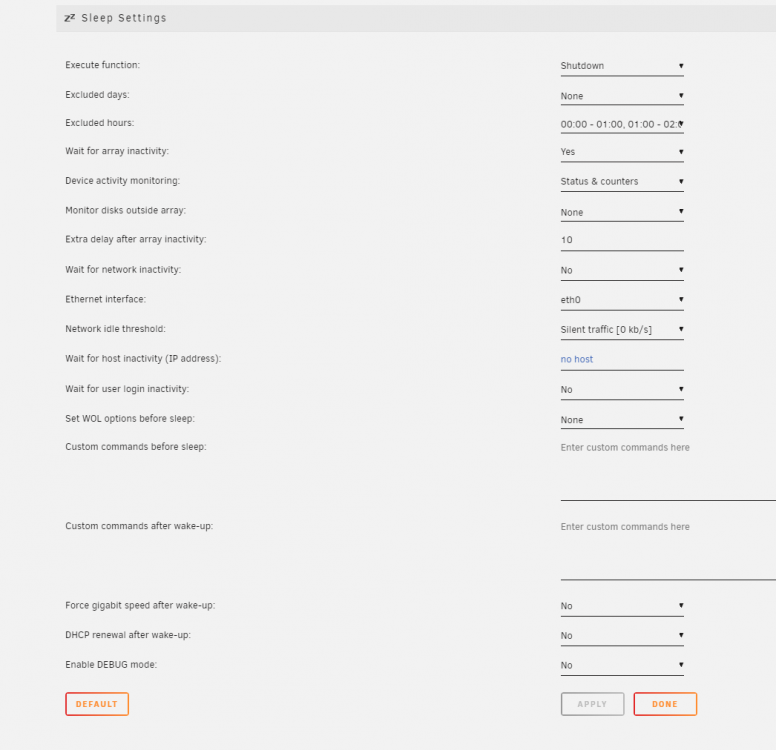
Hello, I recently configured my server to shut off at 7am in the morning, and turn back on at 7pm. I have it functioning with a combo of a shutdown program within my windows 10 VM I am running, the s3 sleep plugin addon to get the server to shut down, and a WIFI plug/timer to kill power a half hour later at 730, and restore it at 700 pm to turn the server back on. Unfortunately, I can not get unraid to shut down cleanly, and it keeps triggering a parity check when it turns on. The VM I have is on a NVME drive, formatted with unassigned devices not in the array. Is there a command I can or need to add to the s3 sleep addon to get this to function correctly? Keep in mind, I want to do a full shutdown, not a s3 sleep. tower-diagnostics-20210622-1136.zip
-
Everytime I try to create this VM, I am booted to the UEFI Interactive Shell V2.2...any ideas? I am just stuck at a command line.

