





shaunmccloud
Members
-
Joined
-
Last visited
-
Nope, it is beyond a new battery. Something is wrong in the control board. Its an ancient APC and the last battery replacement only lasted a year before they went bad from over charging :(
-
I do not, but after checking Redis & MariaDB I found an issue in the database. I backed up all the 3D models (its a personal repository for items I 3D print), then cleared out the database. Set it up again and all is good. I'm guessing a couple of weeks ago when we had a power blip it caused the issue and it didn't manifest until I did the upgrade until 7.3.2, therefore the upgrade was just a red herring.....I really need to get a new UPS.
-
After upgrading to 7.3.2 I get the following in my syslog after starting a random docker container. Always on a different core. This boot is is my manyfold container, but next boot it will probably be a different container. I normally have two parity drives, but I'm in the process of consolidating as much data as possible onto as few drives as possible so I can hopefully spin some drives down, so I have parity disabled right now. Error occurs with parity enabled as well. I am on the newest BIOS for my motherboard (ASUS Pro WS W680-ACE IPMI with an i7-12700k). The only change I made was updating. Could it be something in the 7.3.2 upgrade that doesn't like the E cores on my CPU? bb-8-diagnostics-20260711-1120.zip
-
I'm running 7.3.0-rc.1, and have an unusual question. Is it possible to shrink the size of the internal boot pool? Right now, I have a 256GB and a 512GB SSD in use and am thinking of getting a pair of 16GB Optane SSDs to use for booting. Is there a procedure for this?
-
I actually rolled the update back, so I'll re-update then reboot.
-
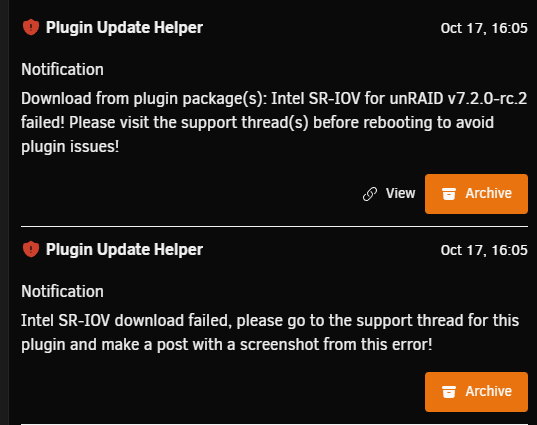
I just tried to upgrade to 7.2.0-rc.2 and this plugin didn't upgrade. Please see the attached screenshot and diagnostics. And let me know what else you need. bb-8-diagnostics-20251017-1611.zip
-
Is there a way to switch to a specific snapshot with this? I.e. 25w32a? My kids want it so we can use copper for more stuff.
-
Upgraded to 7.1.3 and had no issues. After running for about a week, my server went completely non-responsive, all dockers, web UI, everything. I had to power cycle it to bring it back up. I have downgraded back to 7.1.2 because without NginxProxyManager, my wife can't access HomeAssistant and the Wife Approval Factor is a huge issue for me. bb-8-diagnostics-20250615_0349.zip
-
I see plenty of posts about crossflashing a H330 to a HBA330, but nothing for the HBA330 to generic firmware yet.
-
Yep, the Dell firmware from 2024 is 16.00.11.00
-
So I have to cross flash my HBA330 to a HBA330, fun......I'll probably ask for help at STH about getting the 16.00.12.00 firmware on it then.
-
I just replaced my old cross-flashed Dell H310 with a Dell HBA330 so EFI would work right on my motherboard. It shouldn't have been an issue, but it appears there are major issues with the 16.00.11.00 firmware it has that are resolved with the 16.00.12.00. The issue is the card does not always detect SATA drives, I would say that once every 5 boots, all my drives are detected. I don't often reboot my server, but if I need to I don't want to have to hope it works right. However, since I don't have a Dell server serial number, I cannot see if Dell has released an updated official firmware for it, and although I was able to get the proper firmware from IXSystems, I cannot flash it because, of course, it's not Dell-blessed so I can't flash it. Does anyone know if there is a newer firmware/BIOS out there for the HBA330? Or happen to have the serial number of a Dell server that came with one so I can check myself? Or know of the procedure to flash a non-Dell firmware on it?
-
Did not know about that option, just set it now. Thanks.
-
I have SSH enabled on my UNRAID server, but I need to change the port it runs on from 22 to something else so I can easily run Gitea on my server. I thought I had it done by setting it in the config folder on the boot folder, and by adding the following to a startup script using the User Scripts plugin. /etc/rc.d/rc.sshd stop sed -i 's/Port 22/Port 2222/' /etc/ssh/sshd_config /etc/rc.d/rc.sshd start This doesn't work either. Is there any way to get the sshd daemon to run on a different port?
-
And the update disabled CSM mode, which my cross-flashed H310 needs. Finally working again.


