





Slimer
Members
-
Joined
-
Last visited
Everything posted by Slimer
-
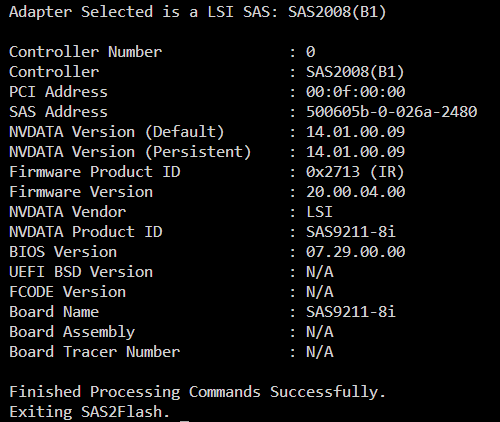
I downloaded a different version of sas2flash from Broadcom, which gave me: How do I know this is in IT mode? I see it says IR, but I know I flashed it to IT mode, and it's been working fine in UnRaid. A little moot since I'm replacing it, but I want to get the replacement firmware right.
-
I have an LSI 9220-8i that I am going to replace with an LSI 9305-16i. The 9220-8i is working fine, but I'm rebuilding the system and want to get rid of the Marvel controller that I also have. I flashed the 9220-8i to IT mode about 6 years ago but the steps elude me. I wanted to test the process before I replace the card, so I'm sure that I have the correct software. I downloaded sas3flash and the support files, but when I run sas3flash -list, I get no Avago adapters found. I tried sas2flash, but that gives me some kind of HTML error. lspci gives me LSI SAS2008 Fusion-MPT SAS-2 [Falcon]. I assume this is why sas3flash does not find the adapter. I'm not sure why sas2flash is not working. I assume it might be the support files?
-
Yeah, I saw that in one of the other posts when I was researching my multiple issues. Thanks
-
Yes, I'll post when I'm back on the PC.
-
Yep, the USB Creator did not copy parts of the Config folder. I copied it manually and it booted OK. Then the Cache drive failed to mount. I was originally having Docker issues, but the Cache drive checked out OK. That led me to find the Flash drive write errors. Although the Flash drive also checked out OK in Windows. JorgeB's posts were very helpful for fixing my Cache drive issue. I ran a scrub after I got it mounted and it found two unrecoverable errors that it didn't find before. I did manage to perform an appdata backup. Then my Docker service didn't load. None of the fixes worked, so I will have to nuke it and reinstall the apps. At least I have an appdata backup. I plan to replace and mirror the Cache drive, but I need to make some hardware upgrades to allow that. I'm also going to replace the Flash drive that says it's OK, as the Cache also said it was OK originally.
-
I currently have 11 drives, including the Parity drive. The array is only about 60 terabytes. The server generates quite a bit of heat with that many drives. Non of the drives have issues despite their age. I've only replaced one or two drives in 10 years. I'm thinking about buying five recertified drives to replace the aging drives and adding a 2nd parity drive. I'll probably go with 18 TB drives from SPD. I've read some of the topics for merging drives and maintaining parity, but I don't have that much patience. I think I'll just combine the data outside of the array and then rebuild my parity. There's nothing critical on the drives anymore, as it's no longer a work server.
-
I was having appdata issues, so I looked in the log and it was throwing Flash write errors. I checked the Flash drive in Windows, expecting to find file corruption, but it said it was fine. I formatted the USB in the event it has bad sectors. I then restored my backup using the USB Creator tool. I booted up with the restored Flash drive, but I was getting connection refused. I attached a monitor and restarted unRaid, but it boots up to Tower login:. My server is not called Tower and that's not what I entered into the USB Creator tool. I logged in with root, but it didn't ask me for a password. It's like it's not seeing my configuration. Any guidance appreciated.
-
I just purchased this one, as my log was showing sda errors, but the Smart status is fine. Sandisk Cruzer Blade 32 GB USB Flash Drive SDCZ50-032G-B35, Black https://a.co/d/cbxsh9V
-
My server has been hanging lately and I suspect it's related to the MacVLan issue that I keep getting warnings about. However, if I follow the instructions and go into Settings>Docker, I don't see an advanced button on the right, just a lone tick box, which does nothing. If I go into the individual dockers, I see an Advanced toggle button, but no MacVLan Settings. I'm obviously missing the boat on something, can someone point me in the right direction. TIA
-
I'm getting Post Processing issues on most, but not all files. This all started with the Python 3 issue way back, which I resolved by updating the syntax in my scripts. This did not last, as I assume the scripts get replaced when the docker is updated? I fixed the scripts again, but I'm still getting Post Processing errors. My quick fix was to turn off the bad scripts in the file Post Processing window, but this does not work anymore. The PP error says that the Password Detector failed, but the script is not even enabled. The first file I changed processed OK, the rest did not. I restarted the docker, but still no joy. If I dig a little deeper, I see this error: ERROR Mon Mar 08 2021 23:44:50Could not post-process again MyFile.S01E08.1080p.BluRay.x264-CLOVER: destination directory /Video/tv/Series/MyFile.S01E08.1080p.BluRay.x264-CLOVER doesn't exist Any bright ideas what's going on and how to permanently fix this issue?
-
OK, I ran the PD code through a syntax checker and it found a couple of tabs it didn't like, so we're happily PPing again. 😁
-
OK, I got Fake Detector working, but Password Detector is still returning an error. I found version 1.8 of FD, but could not get it working, so I ran it though a 2to3 converter. I also ran Password Detector through the 2to3 converter, but no joy on this one.
-
I'm trying to use the {vf} or {vc} options in my format string, but I'm getting a Binding Exception. I gather it's looking for some file it can't find. There is a folder called media, but it appears to be empty.
-
This is under the format options BTW. Tiny little folder icon, after you right mouse to edit the format.
-
I gather I have to load the Input/Output in the UI screen, even though they are specified in my container? The Input did not show up automatically, so I assume the same holds true of the Output. I'll know in a few minutes/hours when it starts copying a Terabyte to the wrong place.
-
Not that I have anyclue about these apps, but did you install filebot UI? (both it and filebot available in CA) FWIW, neither app (filebot or filebot-ui) has a webUI entry in the template defined, the drop down from dynamix will never display a webUI item - probably just an oversight by coppit Yah, it was a PEBKAC issue on the Windows side.
-
OK, I got Filebot installed and the user ids setup, but I can't get in. There is no WebUI in the docker dropdown and I can't access 3389. It says the site can't be reached. It does not appear to be renaming files either? WTH did I miss? Thanks
-
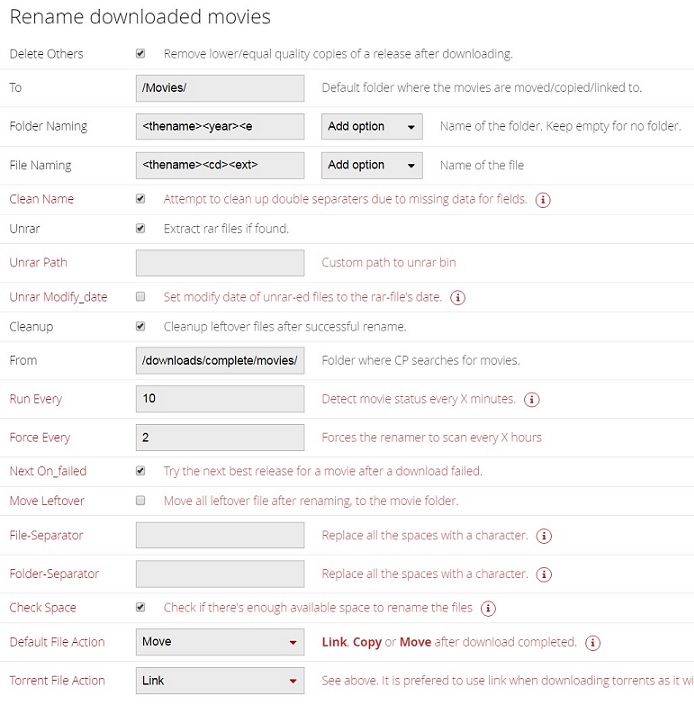
Docker page won't tell you much, I changed it back to 5050 and changed the config file back to 5050. Setting up ports was not my issue, other than the damn renamer bitching about port already in use. Including my Docker page and Renamer settings I was looking for orphan containers and any conflicts. Either you're doing something not quite right or there's a conflict somewhere with your ports. I was going to run a port scan to see if anything else is on 5050, but I don't think so. I think Renamer is just off somehow. I did read somewhere that the From folder should not be your download folder, as it might try to move movies before they are complete. But it won't move them manually either. The first few times I tried it manually I got directory does not exist, but now I don't even get that. I've read a bunch of similar complaints on the CP forum, but no one fix. I think I'm going to try NZBToMedia.py as I've wasted enough time on this.
-
Docker page won't tell you much, I changed it back to 5050 and changed the config file back to 5050. Setting up ports was not my issue, other than the damn renamer bitching about port already in use. Including my Docker page and Renamer settings

-
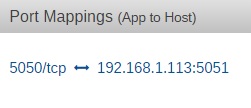
Port mappings attached. Although I can connect through 5051, I'm still getting port in use errors, which I assume is coming from the renamer. The folders in question end up with .ignore files and the movies never get moved. DON'T change the container port, just the host side. So: Gets connection refused on 5050 and 5051 Have you changed the port to 5051 in the couchpotato ui? If so change it back and keep it as 5050. If in doubt delete your container, appdata and recreate from fresh. When I use 5050 I get Port already in use errors and renamer does not work. Although it didn't work for 5051 either
-
Port mappings attached. Although I can connect through 5051, I'm still getting port in use errors, which I assume is coming from the renamer. The folders in question end up with .ignore files and the movies never get moved. DON'T change the container port, just the host side. So: Gets connection refused on 5050 and 5051
-
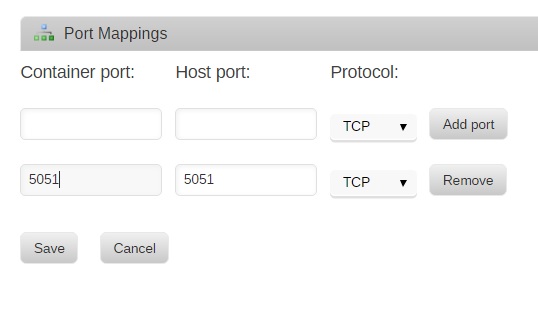
Port mappings attached. Although I can connect through 5051, I'm still getting port in use errors, which I assume is coming from the renamer. The folders in question end up with .ignore files and the movies never get moved.

-
I can`t get renamer to work, it`s snatching like a champ but won`t rename. I was getting directory does not exist at one time when doing a manual scan, but I don`t even get that now. The only errors I was getting recently was port already in use. Changing to port 5051 cures the errors, although start webgui insists on using 5050. Yes I reset the container port. Any idea what the heck is wrong with renamerÉ or why the port defaults to 5050 no matter what. There were no useful messages from the debug that I could see. http://192.168.1.xxx:5051/api/0777xxxxxxxxxxx999/renamer.scan produces {"success": true}
-
Thanks, two tuners now.
-
I'm trying to add two identical TV tuners, If I paste this into the editor, <hostdev mode='subsystem' type='pci' managed='yes'> <driver name='vfio'/> <source> <address domain='0x0000' bus='0x0c' slot='0x00' function='0x0'/> </source> <source> <address domain='0x0000' bus='0x0d' slot='0x00' function='0x0'/> </source> </hostdev> it turns into this when I update. <hostdev mode='subsystem' type='pci' managed='yes'> <driver name='vfio'/> <source> <address domain='0x0000' bus='0x0c' slot='0x00' function='0x0'/> </source> <address type='pci' domain='0x0000' bus='0x00' slot='0x06' function='0x0'/> </hostdev> <memballoon model='virtio'> <address type='pci' domain='0x0000' bus='0x00' slot='0x08' function='0x0'/> </memballoon> Slots 6 and 8 must be the identical tuners. I can see one of the tuners in the Device Manager and it works. What is the syntax for adding the two devices Thanks

