





teh0wner
Members
-
Joined
-
Last visited
Everything posted by teh0wner
-
Hello, I was wondering if there is a way to apply and undervolt (and overclock) in UnRaid similar to what you can do with MSI Afterburner on Windows? Thanks
-
Hello all, I've got 2 drives give me SMART errors within a few days of each other. They are both relatively new (purchased 29/08/2023 and 04/09/2023 respectively). Both are Toshiba Enterprise HDD 20TB, MG10ACA20TE. It all started when the first one gave me "reallocated sector ct is 5". As soon as I saw that, I started copying data off of it, and requested an RMA as that is grounds for a replacement (it has since risen to 62). Today, I saw the 2nd drive give SMART error with "offline uncorrectable is 1". 1) Is it pure coincidence that both are starting to exhibit issues or could there be something wrong here? I'm using an LSI 9300-16i SAS3008 HBA card if that matters at all. 2) With these 2 errors, what should I look out for with regards to missing/corrupt data? I have a 2-disk parity setup if that matters at all. Attaching both SMART logs for reference. Any help/input is greately appreciated. TOSHIBA_MG10ACA20TE_6380A1U1F4MJ-20240513-1929.txt TOSHIBA_MG10ACA20TE_6380A19CF4MJ-20240513-1917.txt
-
Did you ever find a solution to this?
-
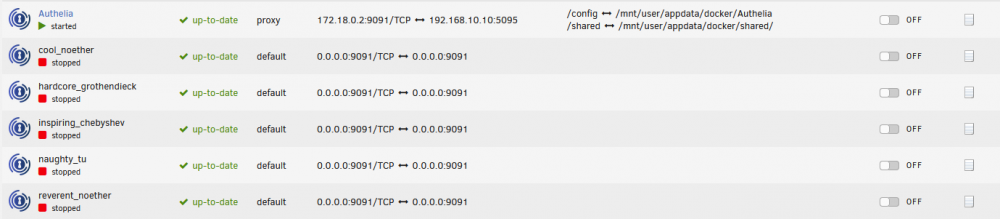
Any ideas why Authelia seems to be creating these docker containers automatically but serve no purpose?
-
I'm using SA for that and uploads are working fine. The problem is with "downloading"
-
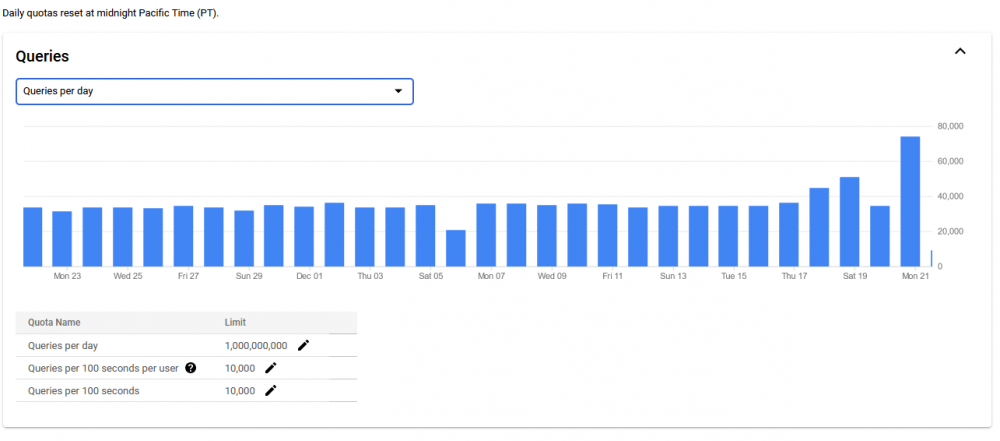
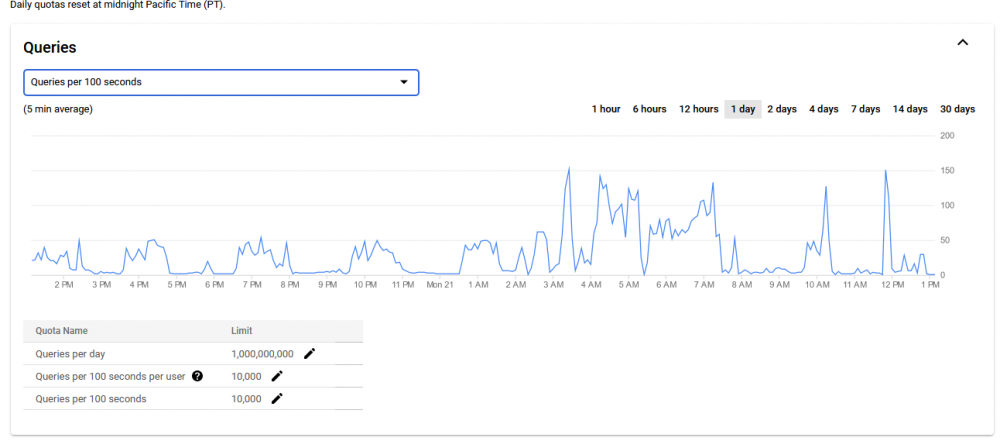
So it seems I've bit hit with a ban - "Error 403: The download quota for this file has been exceeded., downloadQuotaExceeded" when trying to acess my files although I can't figure out why exactly. Looking at the Quota stats on https://console.developers.google.com/apis/api/drive.googleapis.com/quotas I don't see me even getting close to the quota. I've also tried creating a new client id/secret to by-pass this, but I'm still getting the same error back. I also have a completely different Team Drive using different credentials, and that seems to have been hit with a ban as well. Any ideas?
-
Did you figure this out? Having the same issue here too.
-
Partly one of the issues I was having - not sure what the best way of checking there's an upload currently running, or whether the mount script is currently running (and attempting to mount a drive - i.e. rclone_mount).
-
I've written a small user script that reliably stops the array 100%. I'm not quite sure how 'safe' it is though - I haven't noticed any issues since I've been using it though. Here it is : #!/bin/bash ########################## ### fusermount Script #### ########################## RcloneRemoteName="google_drive_encrypted_vfs" RcloneMountShare="/mnt/user/data/remote_storage" MergerfsMountShare="/mnt/user/data/merged_storage" echo "$(date "+%d.%m.%Y %T") INFO: *** Starting rclone_fusermount script ***" while [[ -f "/mnt/user/appdata/other/rclone/remotes/$RcloneRemoteName/mount_running" ]]; do echo "$(date "+%d.%m.%Y %T") INFO: mount is running, sleeping" sleep 5 done while [[ -f "/mnt/user/appdata/other/rclone/remotes/$RcloneUploadRemoteName/upload_running" ]]; do echo "$(date "+%d.%m.%Y %T") INFO: upload is running, sleeping" sleep 15 done fusermount -uz "$MergerfsMountShare/$RcloneRemoteName" fusermount -uz "$RcloneMountShare/$RcloneRemoteName" echo "$(date "+%d.%m.%Y %T") INFO: ***rclone_fusermount script finished ***" exit Essentially what I'm doing, is checking whether mount is currently running and/or upload is currently running. If either of them are, then the script (and stopping the array) is paused for a few seconds and tries again. Once mount and upload has finished, it will proceed to fusermount -uz (both rclone and mergefs), and then the array stops just fine. I've been using this for the past week with no issues and the array stops always. Let me know what you think if you get to use it
-
How safe would manually doing fusermount -uz (on array stop) be if mount_running and upload_running don't exist? (i.e. those 2 scripts aren't running)?
-
I'm having some issues with the permissions as well. Even adding the chmod in go, it doesn't seem to apply on boot. root@XXX-XXXX:/usr/local/emhttp/webGui/event/starting# ls -ltra total 4 drwxr-xr-x 9 root root 180 May 3 10:54 ../ -rw------- 1 root root 164 May 3 10:54 fetch_key drwxrwxrwx 2 root root 60 May 3 10:54 ./ And my go looks like this root@XXX-XXX:/boot/config# cat go #!/bin/bash # auto unlock array mkdir -p /usr/local/emhttp/webGui/event/starting mkdir -p /usr/local/emhttp/webGui/event/started mkdir -p /usr/local/emhttp/webGui/event/stopped cp -f /boot/custom/bin/fetch_key /usr/local/emhttp/webGui/event/starting cp -f /boot/custom/bin/delete_key /usr/local/emhttp/webGui/event/started cp -f /boot/custom/bin/fetch_key /usr/local/emhttp/webGui/event/stopped chmod a+x /usr/local/emhttpd/webGui/event/starting/fetch_key chmod a+x /usr/local/emhttpd/webGui/event/started/delete_key chmod a+x /usr/local/emhttpd/webGui/event/stopped/fetch_key # Start the Management Utility /usr/local/sbin/emhttp & The actual fetch_key and delete_key scripts work fine, as when I chmod them manually and run, they work.
-
I've not even tried uploading. Fresh reboot, manually run rclone_mount, stop. Always fails 100%. I've not got to the bottom of it either, but will revert if I do. I was thinking maybe writing another script that checks if an upload if running, and if not, then run fusermount -uz on the rclone mounts, and then stop the array. Do you think that'll cause issues? Edit: Something along the lines of the below: #!/bin/bash ########################## ### fusermount Script #### ########################## RcloneRemoteName="google_drive_encrypted_vfs" RcloneMountShare="/mnt/user/XYZ/remote_storage" MergerfsMountShare="/mnt/user/XYZ/merged_storage" echo "$(date "+%d.%m.%Y %T") INFO: *** Starting rclone_fusermount script ***" while [[ -f "/mnt/user/appdata/other/rclone/remotes/$RcloneRemoteName/mount_running" ]]; do echo "$(date "+%d.%m.%Y %T") INFO: mount is running, sleeping" sleep 5 done while [[ -f "/mnt/user/appdata/other/rclone/remotes/$RcloneUploadRemoteName/upload_running" ]]; do echo "$(date "+%d.%m.%Y %T") INFO: upload is running, sleeping" sleep 15 done fusermount -uz "$MergerfsMountShare" fusermount -uz "$RcloneMountShare" echo "$(date "+%d.%m.%Y %T") INFO: ***rclone_fusermount script finished ***" exit
-
It's more of question of what if I'm unavailable to enter the passphrase, than not being able to. People reliant on the server would have to wait for me to enter the passphrase, whereas, I would prefer to automate this process with FTP or similar. Only downside, is I don't have a keyfile to follow the tutorials. Unless it's just a matter of echo "passphrase" > keyfile ? Edit: Indeed, that's the way.
-
How would one go on about auto-unlocking from a remote source if encryption was set-up with a passphrase?
-
Has anyone had issues with Stopping/Rebooting/Shutting down the Array when rclone mount is active? I've been testing this for the day, and stopping the array after a fresh reboot (before I run rclone_mount) works fine. As soon as I run rclone_mount and I try and stop the array, it doesn't work. Syslogs May 2 17:34:15 XXX-XXX emhttpd: shcmd (440): rmdir /mnt/user May 2 17:34:15 XXX -XXX root: rmdir: failed to remove '/mnt/user': Device or resource busy May 2 17:34:15 XXX -XXX emhttpd: shcmd (440): exit status: 1 May 2 17:34:15 XXX -XXX emhttpd: shcmd (442): /usr/local/sbin/update_cron May 2 17:34:15 XXX -XXX emhttpd: Retry unmounting user share(s)... May 2 17:34:20 XXX -XXX emhttpd: shcmd (443): umount /mnt/user May 2 17:34:20 XXX -XXX root: umount: /mnt/user: target is busy. May 2 17:34:20 XXX -XXX emhttpd: shcmd (443): exit status: 32 May 2 17:34:20 XXX -XXX emhttpd: shcmd (444): rmdir /mnt/user May 2 17:34:20 XXX -XXX root: rmdir: failed to remove '/mnt/user': Device or resource busy May 2 17:34:20 XXX -XXX emhttpd: shcmd (444): exit status: 1 May 2 17:34:20 XXX -XXX emhttpd: shcmd (446): /usr/local/sbin/update_cron May 2 17:34:20 XXX -XXX emhttpd: Retry unmounting user share(s)... lsof gives nothing back root@XXX -XXX :~# lsof /mnt/* root@XXX -XXX :~# lsof /mnt/user/ The only way I can get the array to stop, is by manually running fusermount -uz /mnt/user/ Can someone shed some light please? Thanks
-
Actually, after the upload script has finished it's own thing, it looks like the hard-links are gone again, and the inode count is 1.
-
I think I've figured it out, although not quite sure why the behaviour is as is.. My rclone_mount set-up looks as follows (relevant parts only) : RcloneRemoteName="google_drive_encrypted_vfs" LocalFilesShare="/mnt/user/data/staged_storage" RcloneMountShare="/mnt/user/data/remote_storage" MergerfsMountShare="/mnt/user/data/merged_storage" LocalFilesShare2="/mnt/user/data/local_storage" The following configuration fails to create a hard-link: Deluge downloads to LocalFileShare2/incomplete Deluge moves once complete to LocalFileShare2/complete Sonarr attemps to create hard-link to MergerfsMountShare/media The following configuration creates the hard-link successfully: Deluge downloads to LocalFileShare2/complete Deluge moves once complete to MergerfsMountShare/complete (and it's painfully slow) Sonarr create hard-link to MergerfsMountShare/media successfully I don't see though why Mergerfs wouldn't work in the first scenario, as LocalFilesShare2 is still 'merged' into a mount on MergerfsMountShare
-
Managed to grab some logs from Sonarr.. The error is quite obvious, but not quite sure what the solution is. 20-3-3 22:02:41.3|Debug|EpisodeFileMovingService|Hardlinking episode file: /data/local_storage/downloads/deluge/complete/ABC.mkv to /data/merged_storage/google_drive_encrypted_vfs/media/ABC.mkv 20-3-3 22:02:41.3|Debug|DiskTransferService|HardLinkOrCopy [/data/local_storage/downloads/deluge/complete/ABC.mkv] > [/data/merged_storage/google_drive_encrypted_vfs/media/ABC.mkv] 20-3-3 22:02:41.3|Debug|DiskProvider|Hardlink '/data/local_storage/downloads/deluge/complete/ABC.mkv' to '/data/merged_storage/google_drive_encrypted_vfs/media/ABC.mkv' failed. [v2.0.0.5338] Mono.Unix.UnixIOException: Invalid cross-device link [EXDEV]. at Mono.Unix.UnixMarshal.ThrowExceptionForLastError () [0x00005] in <4a040cc44eb54354b3d289eb2bbc1e23>:0 at Mono.Unix.UnixMarshal.ThrowExceptionForLastErrorIf (System.Int32 retval) [0x00004] in <4a040cc44eb54354b3d289eb2bbc1e23>:0 at Mono.Unix.UnixFileSystemInfo.CreateLink (System.String path) [0x0000c] in <4a040cc44eb54354b3d289eb2bbc1e23>:0 at NzbDrone.Mono.Disk.DiskProvider.TryCreateHardLink (System.String source, System.String destination) [0x00013] in M:\BuildAgent\work\5d7581516c0ee5b3\src\NzbDrone.Mono\Disk\DiskProvider.cs:182
-
Glad it worked for you! I've been playing around with rclone and mergerfs a lot the past few days, so if you have any other questions fire away. The only thing I can't figure out which maybe @DZMM might be able to help, is getting hard-links to work with Sonarr/Radarr. It seems completely random when they work and when they dont. I have the following setup on my Sonarr/Radarr and Deluge /data -> /mnt/user/data/ so all docker containers are pointing to the same location with the same exact 'root mount' of /data. Deluge downloads to /data/gdrive_encrypt/vfs/downloads and media lives in /data/gdrive_encrypt_vfs/media, so everything pretty much 'local'. Sometimes a hard-link is created (as I can see the inode count is 2 using ls -li, and sometimes it's 1, which means hard link failed and Sonarr/Radarr had to copy). Any ideas why this might be happening?
-
I finally managed to get this working. Try and make a list of all docker images/containers you have, and nuke all the mergerfs ones. That will force pull the latest one, which seems to be working.
-
Indeed - even that though is exactly the same issue. mergerfs doesn't seem to install properly. I'm wondering if it has to do anything with the issues mentioned above with the branches. Looking at the docker images I have.. trapexit/mergerfs-static-build latest 9fd5a8a2dbc2 23 hours ago 5.58MB This looks like it could contain the dodgy version. I tried doing a docker pull though, so I would assume it would pick up the actual latest with the fix.
-
The error comes at mv. root@R2-D2:~# mkdir -p /mnt/user/appdata/other/test/mergerfs root@R2-D2:~# docker run -v /mnt/user/appdata/other/test/mergerfs:/build --rm trapexit/mergerfs-static-build root@R2-D2:~# mv /mnt/user/appdata/other/rclone/mergerfs/mergerfs /bin mv: cannot stat '/mnt/user/appdata/other/rclone/mergerfs/mergerfs': No such file or directory root@R2-D2:~# ls -ltra /mnt/user/appdata/other/rclone/mergerfs/ total 0 drwxrwxrwx 1 root root 61 Feb 27 11:22 ../ drwxrwxrwx 1 root root 6 Mar 1 13:34 ./ root@R2-D2:~#
-
Please find below. This was working just fine yesterday. #!/bin/bash ###################### #### Mount Script #### ###################### ### Version 0.96.4 ### ###################### ####### EDIT ONLY THESE SETTINGS ####### # INSTRUCTIONS # 1. Change the name of the rclone remote and shares to match your setup # 2. NOTE: enter RcloneRemoteName WITHOUT ':' # 3. Optional: include custom command and bind mount settings # 4. Optional: include extra folders in mergerfs mount # REQUIRED SETTINGS RcloneRemoteName="google_drive_encrypted_vfs" # Name of rclone remote mount WITHOUT ':'. NOTE: Choose your encrypted remote for sensitive data LocalFilesShare="/mnt/user/data/staged_storage" # location of the local files you want to upload without trailing slash to rclone e.g. /mnt/user/local RcloneMountShare="/mnt/user/data/remote_storage" # where your rclone remote will be located without trailing slash e.g. /mnt/user/mount_rclone MergerfsMountShare="/mnt/user/data/merged_storage" # location without trailing slash e.g. /mnt/user/mount_mergerfs. Enter 'ignore' to disable DockerStart="XYZ ABC" # not the real dockers MountFolders=\{"media/TV,media/Movies,media/Anime,media/Music"\} # comma separated list of folders to create within the mount CacheDir="/mnt/cache/cache_tmp/" # Note: Again - remember to NOT use ':' in your remote name above # OPTIONAL SETTINGS # Add extra paths to mergerfs mount in addition to LocalFilesShare LocalFilesShare2="/mnt/user/data/local_storage" # without trailing slash e.g. /mnt/user/other__remote_mount/or_other_local_folder. Enter 'ignore' to disable LocalFilesShare3="ignore" LocalFilesShare4="ignore" # Add extra commands or filters Command1="--rc" Command2="" Command3="" Command4="" Command5="" Command6="" Command7="" Command8="" CreateBindMount="N" # Y/N. Choose whether to bind traffic to a particular network adapter RCloneMountIP="192.168.1.120" # My unraid IP is 172.30.12.2 so I create another similar IP address NetworkAdapter="eth0" # choose your network adapter. eth0 recommended VirtualIPNumber="2" # creates eth0:x e.g. eth0:1. I create a unique virtual IP addresses for each mount & upload so I can monitor and traffic shape for each of them ####### END SETTINGS ####### ############################################################################### ######## DO NOT EDIT ANYTHING UNLESS YOU KNOW WHAT YOU ARE DOING ########## ############################################################################### ####### Preparing mount location variables ####### LocalFilesLocation="$LocalFilesShare/$RcloneRemoteName" # Location for local files to be merged with rclone mount RcloneMountLocation="$RcloneMountShare/$RcloneRemoteName" # Location for rclone mount MergerFSMountLocation="$MergerfsMountShare/$RcloneRemoteName" # Rclone data folder location CacheLocation="$CacheDir/$RcloneRemoteName" ####### create directories for rclone mount and mergerfs mounts ####### mkdir -p /mnt/user/appdata/other/rclone/remotes/$RcloneRemoteName #for script files eval mkdir -p $LocalFilesLocation/"$MountFolders" mkdir -p $RcloneMountLocation mkdir -p $MergerFSMountLocation ####### Check if script is already running ####### echo "$(date "+%d.%m.%Y %T") INFO: *** Starting mount of remote ${RcloneRemoteName}" echo "$(date "+%d.%m.%Y %T") INFO: Checking if this script is already running." if [[ -f "/mnt/user/appdata/other/rclone/remotes/$RcloneRemoteName/mount_running" ]]; then echo "$(date "+%d.%m.%Y %T") INFO: Exiting script as already running." exit else echo "$(date "+%d.%m.%Y %T") INFO: Script not running - proceeding." touch /mnt/user/appdata/other/rclone/remotes/$RcloneRemoteName/mount_running fi ####### Create RClone Mount ####### # Check If Rclone Mount Already Created if [[ -f "$RcloneMountLocation/mountcheck" ]]; then echo "$(date "+%d.%m.%Y %T") INFO: Success ${RcloneRemoteName} remote is already mounted." else echo "$(date "+%d.%m.%Y %T") INFO: Mount not running. Will now mount ${RcloneRemoteName} remote." # Creating mountcheck file in case it doesn't already exist echo "$(date "+%d.%m.%Y %T") INFO: Recreating mountcheck file for ${RcloneRemoteName} remote." touch mountcheck rclone copy mountcheck $RcloneRemoteName: -vv --no-traverse # Check bind option if [[ $CreateBindMount == 'Y' ]]; then echo "$(date "+%d.%m.%Y %T") INFO: *** Checking if IP address ${RCloneMountIP} already created for remote ${RcloneRemoteName}" ping -q -c2 $RCloneMountIP > /dev/null # -q quiet, -c number of pings to perform if [ $? -eq 0 ]; then # ping returns exit status 0 if successful echo "$(date "+%d.%m.%Y %T") INFO: *** IP address ${RCloneMountIP} already created for remote ${RcloneRemoteName}" else echo "$(date "+%d.%m.%Y %T") INFO: *** Creating IP address ${RCloneMountIP} for remote ${RcloneRemoteName}" ip addr add $RCloneMountIP/24 dev $NetworkAdapter label $NetworkAdapter:$VirtualIPNumber fi echo "$(date "+%d.%m.%Y %T") INFO: *** Creating bind mount ${RCloneMountIP} for remote ${RcloneRemoteName}" else RCloneMountIP="" echo "$(date "+%d.%m.%Y %T") INFO: *** Creating mount for remote ${RcloneRemoteName}" fi # create rclone mount rclone mount \ --allow-other \ --buffer-size 256M \ --dir-cache-time 720h \ --drive-chunk-size 512M \ --log-level INFO \ --cache-dir $CacheLocation \ --vfs-read-chunk-size 128M \ --vfs-read-chunk-size-limit off \ --vfs-cache-mode writes \ --bind=$RCloneMountIP \ $RcloneRemoteName: $RcloneMountLocation & # Check if Mount Successful echo "$(date "+%d.%m.%Y %T") INFO: sleeping for 5 seconds" # slight pause to give mount time to finalise sleep 5 echo "$(date "+%d.%m.%Y %T") INFO: continuing..." if [[ -f "$RcloneMountLocation/mountcheck" ]]; then echo "$(date "+%d.%m.%Y %T") INFO: Successful mount of ${RcloneRemoteName} mount." else echo "$(date "+%d.%m.%Y %T") CRITICAL: ${RcloneRemoteName} mount failed - please check for problems." rm /mnt/user/appdata/other/rclone/remotes/$RcloneRemoteName/mount_running exit fi fi ####### Start MergerFS Mount ####### if [[ $MergerfsMountShare == 'ignore' ]]; then echo "$(date "+%d.%m.%Y %T") INFO: Not creating mergerfs mount as requested." else if [[ -f "$MergerFSMountLocation/mountcheck" ]]; then echo "$(date "+%d.%m.%Y %T") INFO: Check successful, ${RcloneRemoteName} mergerfs mount in place." else # check if mergerfs already installed if [[ -f "/bin/mergerfs" ]]; then echo "$(date "+%d.%m.%Y %T") INFO: Mergerfs already installed, proceeding to create mergerfs mount" else # Build mergerfs binary echo "$(date "+%d.%m.%Y %T") INFO: Mergerfs not installed - installing now." mkdir -p /mnt/user/appdata/other/rclone/mergerfs docker run -v /mnt/user/appdata/other/rclone/mergerfs:/build --rm trapexit/mergerfs-static-build mv /mnt/user/appdata/other/rclone/mergerfs/mergerfs /bin fi # Create mergerfs mount echo "$(date "+%d.%m.%Y %T") INFO: Creating ${RcloneRemoteName} mergerfs mount." # Extra Mergerfs folders if [[ $LocalFilesShare2 != 'ignore' ]]; then echo "$(date "+%d.%m.%Y %T") INFO: Adding ${LocalFilesShare2} to ${RcloneRemoteName} mergerfs mount." LocalFilesShare2=":$LocalFilesShare2" else LocalFilesShare2="" fi if [[ $LocalFilesShare3 != 'ignore' ]]; then echo "$(date "+%d.%m.%Y %T") INFO: Adding ${LocalFilesShare3} to ${RcloneRemoteName} mergerfs mount." LocalFilesShare3=":$LocalFilesShare3" else LocalFilesShare3="" fi if [[ $LocalFilesShare4 != 'ignore' ]]; then echo "$(date "+%d.%m.%Y %T") INFO: Adding ${LocalFilesShare4} to ${RcloneRemoteName} mergerfs mount." LocalFilesShare4=":$LocalFilesShare4" else LocalFilesShare4="" fi # mergerfs mount command mergerfs $LocalFilesLocation:$RcloneMountLocation$LocalFilesShare2$LocalFilesShare3$LocalFilesShare4 $MergerFSMountLocation -o rw,async_read=false,use_ino,allow_other,func.getattr=newest,category.action=all,category.create=ff,cache.files=partial,dropcacheonclose=true # check if mergerfs mount successful echo "$(date "+%d.%m.%Y %T") INFO: Checking if ${RcloneRemoteName} mergerfs mount created." if [[ -f "$MergerFSMountLocation/mountcheck" ]]; then echo "$(date "+%d.%m.%Y %T") INFO: Check successful, ${RcloneRemoteName} mergerfs mount created." else echo "$(date "+%d.%m.%Y %T") CRITICAL: ${RcloneRemoteName} mergerfs mount failed." rm /mnt/user/appdata/other/rclone/remotes/$RcloneRemoteName/mount_running exit fi fi fi ####### Starting Dockers That Need Mergerfs Mount To Work Properly ####### # only start dockers once if [[ -f "/mnt/user/appdata/other/rclone/remotes/$RcloneRemoteName/dockers_started" ]]; then echo "$(date "+%d.%m.%Y %T") INFO: dockers already started." else touch /mnt/user/appdata/other/rclone/remotes/$RcloneRemoteName/dockers_started echo "$(date "+%d.%m.%Y %T") INFO: Starting dockers." docker start $DockerStart fi rm /mnt/user/appdata/other/rclone/remotes/$RcloneRemoteName/mount_running echo "$(date "+%d.%m.%Y %T") INFO: Script complete" exit CacheDir is being used in the rclone mount command, in order for the cache to go explicitly on my cache, and not /root/.cache - the latter caused some major issues.
-
I was thinking the same and have tried a few things.. Doing a docker pull on it, modifying the docker run to include a tag, etc and nothing seems to have worked. Even reverted back to the original rclone_mount script and now getting the following: 2020/03/01 15:01:32 DEBUG : 7 go routines active 01.03.2020 15:01:32 INFO: *** Creating mount for remote google_drive_encrypted_vfs 01.03.2020 15:01:32 INFO: sleeping for 5 seconds 01.03.2020 15:01:37 INFO: continuing... 01.03.2020 15:01:38 INFO: Successful mount of google_drive_encrypted_vfs mount. 01.03.2020 15:01:38 INFO: Mergerfs not installed - installing now. mv: cannot stat '/mnt/user/appdata/other/rclone/mergerfs/mergerfs': No such file or directory 01.03.2020 15:01:47 INFO: Creating google_drive_encrypted_vfs mergerfs mount. 01.03.2020 15:01:47 INFO: Adding /mnt/user/data/local_storage to google_drive_encrypted_vfs mergerfs mount. /tmp/user.scripts/tmpScripts/rclone_mount/script: line 174: mergerfs: command not found 01.03.2020 15:01:47 INFO: Checking if google_drive_encrypted_vfs mergerfs mount created. 01.03.2020 15:01:47 CRITICAL: google_drive_encrypted_vfs mergerfs mount failed. Script Finished Sun, 01 Mar 2020 15:01:47 +0000
-
Indeed, looks like the culprit is something to do with rclone_mount script I've been trying to use. Fix Common Problems has also flagged it up. Attaching diagnostics. r2-d2-diagnostics-20200301-1115.zip



