





bonzi
Members
-
Joined
-
Last visited
-
I didn't want to backup onto external hard drives or build another server so I got a LTO8 tape drive. I installed this using an external sas card in a Rocky VM. I have each individual disk mounted in my VM. The largest disks in my unraid server are 8 TB. LTO8 drives support formatting LTO7 tapes as Type M which have a formatted size of 9 TB. LTO7 tapes can be purchased for about $30 each. I simply use tar to backup each individual disk to a single tape. Tar supports incremental backups so I can come back several months later and add to each tape as needed. The tape drive is the expensive part of my backup strategy but once you have one, backups of a large amount of data is dirt cheap and very reliable.
-
I have an old P400 card in my server, nvidia drivers stopped working after update. Headed over here and found the answer, downgraded to 580.x and all back up and running. Thanks all!
-
This now seems to be broken unfortunately. I cannot connect to the printer from another computer or even print a test page directly from CUPS. Not sure how to troubleshoot it, on Unraid 7.1.2. Let me know if there are useful details that can be provided to figure out why it is not working.
-
I have been running for 4 days without a crash with just one single stick of memory. I am going to let it go for at least a few more days then I will try putting in the other sticks and seeing which one is giving problems. Its strange that memtest did not pick this up at all but I will be able to figure this out now I think.
-
Ok I will give that a try. Crashes are becoming more frequent now, often after a few hours and less than one day. Memtest does pass but it does seem like a hardware issue.
-
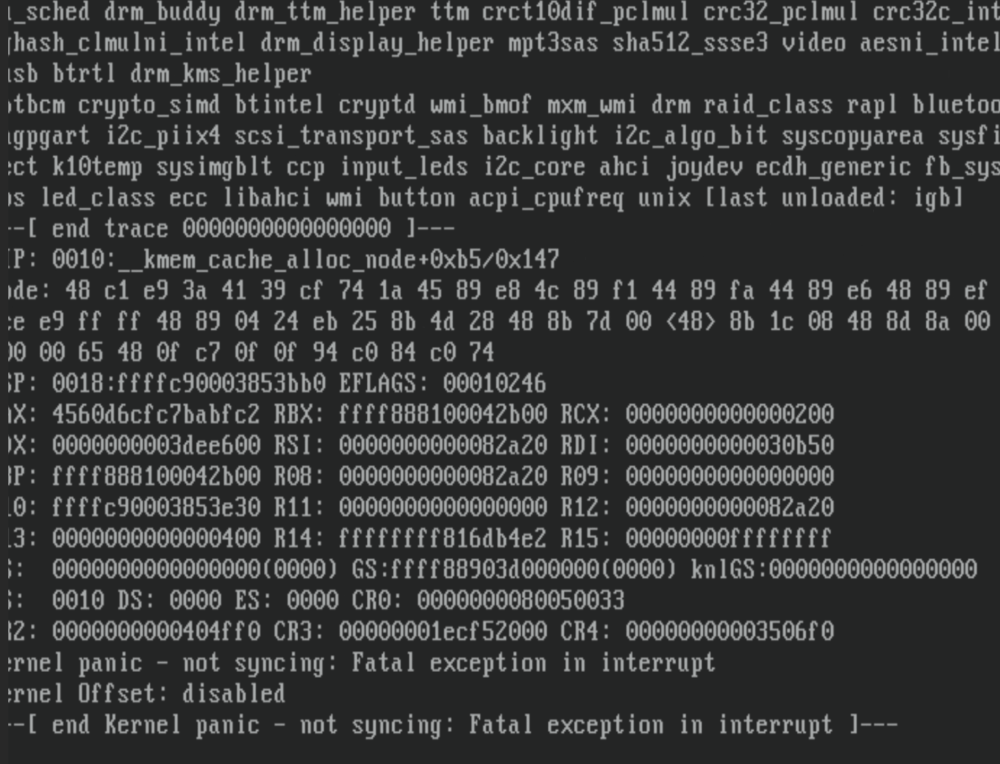
It crashed again, this time I think we might have something more useful. Could it be that the USB ports are causing this and are failing or not drawing power properly for devices that need a lot of power? Especially I am thinking the USB port that the Coral TPU is plugged into? Thoughts? That is what it looks like to me from the log. I attached all of the log from the crash and reboot. @JorgeB if you could have a look at the first few lines and let me know if you think this is what is going on. Thanks! syslog-crash-2.rtf
-
I had another crash last night, c-states are disabled. Frustratingly there seems to be little of interest in the syslog. The only activity I see is this which I believe is my Coral TPU: Oct 28 23:11:22 Tower kernel: usb 2-2: reset SuperSpeed USB device number 2 using xhci_hcd Oct 28 23:11:22 Tower kernel: usb 2-2: LPM exit latency is zeroed, disabling LPM. At this point I really do not know what to do, except hope to get more information before the crash. EDIT: I have also posted a screenshot of what is printed on to the screen at the time of the crash.
-
Ok, I disabled c-states in the bios. I have done a overnight memtest, that passed without any issues at all. Let's see if the c-states fixes the problem.
-
@JorgeB My server crashed again today. Managed to capture the syslog. Not sure what it all means. I am attaching a snip of it. I have done some googling not sure exactly what to make of it. Let me know what you think. Thanks! syslog-crash.rtf
-
I am waiting for it to crash again, I think I will need that data to understand why this is happening. The memtest was fine, ran o/n no errors.
-
Done, saw you recommend that in another thread. Good idea, that should get us more information. It passed an overnight run of memtest so all good there. Thanks!
-
Hi, I am experiencing these every couple of days. Previously the system was rock solid. Nothing stands out in the diagnostics to me (attached), problem is that I need to capture this as it happens. Anyone have any ideas? I will do a memory test. That seems like the most likely culprit and report back. tower-diagnostics-20231018-1840.zip
-
Hi Phillip, I didn't think so but I did have it set to a static IP. I set it to a different address and it is all good now.
-
Hi, Yesterday I replaced the battery in my UPS and when I brought my server back up, I couldn't access the webgui. After trying several times, I realized that I could in fact access it about 20% of the time. I investigated further and it seemed like the flash had been corrupted so I went for a new install. However, my new install has the same exact problem and I have no idea what is going on. I am attaching my diagnostics. Would be grateful for any ideas at this point. I've been pulling my hair out for hours. EDIT: one more thing to add. Access seems to be better if I type tower.local, it will connect most of the time rather than the IP address of the server. tower-diagnostics-20230528-1912.zip
-
Hoping someone might be able to help. I have installed Big Sur using the video instructions and it boots up and works well with VNC. I have been trying to setup passthrough of a 580x for the past few weeks and have had no luck but I feel like I am making progress and am likely close to making it work. Hardware is Asrock x399 Tiachi, Threadripper 1900x. IOMMU and other virtualization features are turned on in the BIOS. I have also enabled the PCIe overide and VFIO unsafe interrupts (both). Seems to be necessary. The GPU (video/audio) is binded to VFIO. I can pass the graphics card through to a Windows 10 VM. I am using the vBIOS for my card here: https://www.techpowerup.com/vgabios/194686/dell-rx580-8192-170301 When I try to pass the 580x through to my Mac VM, it hangs on the Mac loading screen at about 25%. My xml is below, hopefully someone knows how to fix this, I am at a bit of a loss: <?xml version='1.0' encoding='UTF-8'?> <domain type='kvm' xmlns:qemu='http://libvirt.org/schemas/domain/qemu/1.0'> <name>Macinabox BigSur</name> <uuid>d28b8bc3-bb06-4370-abf5-66a3bb821127</uuid> <description>MacOS Big Sur</description> <metadata> <vmtemplate xmlns="unraid" name="Windows 10" icon="default.png" os="osx"/> </metadata> <memory unit='KiB'>16777216</memory> <currentMemory unit='KiB'>16777216</currentMemory> <memoryBacking> <nosharepages/> </memoryBacking> <vcpu placement='static'>8</vcpu> <cputune> <vcpupin vcpu='0' cpuset='1'/> <vcpupin vcpu='1' cpuset='9'/> <vcpupin vcpu='2' cpuset='3'/> <vcpupin vcpu='3' cpuset='11'/> <vcpupin vcpu='4' cpuset='5'/> <vcpupin vcpu='5' cpuset='13'/> <vcpupin vcpu='6' cpuset='7'/> <vcpupin vcpu='7' cpuset='15'/> </cputune> <resource> <partition>/machine</partition> </resource> <os> <type arch='x86_64' machine='pc-q35-4.2'>hvm</type> <loader readonly='yes' type='pflash'>/mnt/user/system/custom_ovmf/Macinabox_CODE-pure-efi.fd</loader> <nvram>/etc/libvirt/qemu/nvram/d28b8bc3-bb06-4370-abf5-66a3bb821127_VARS-pure-efi.fd</nvram> </os> <features> <acpi/> <apic/> </features> <cpu mode='host-passthrough' check='none' migratable='on'> <topology sockets='1' dies='1' cores='4' threads='2'/> <cache mode='passthrough'/> <feature policy='require' name='topoext'/> </cpu> <clock offset='utc'> <timer name='rtc' tickpolicy='catchup'/> <timer name='pit' tickpolicy='delay'/> <timer name='hpet' present='no'/> </clock> <on_poweroff>destroy</on_poweroff> <on_reboot>restart</on_reboot> <on_crash>restart</on_crash> <devices> <emulator>/usr/local/sbin/qemu</emulator> <disk type='file' device='disk'> <driver name='qemu' type='raw' cache='writeback'/> <source file='/mnt/cache/VM/Macinabox BigSur/macos_disk.img'/> <target dev='hdc' bus='sata'/> <boot order='1'/> <address type='drive' controller='0' bus='0' target='0' unit='2'/> </disk> <controller type='pci' index='0' model='pcie-root'/> <controller type='pci' index='1' model='pcie-root-port'> <model name='pcie-root-port'/> <target chassis='1' port='0x8'/> <address type='pci' domain='0x0000' bus='0x00' slot='0x01' function='0x0' multifunction='on'/> </controller> <controller type='pci' index='2' model='pcie-root-port'> <model name='pcie-root-port'/> <target chassis='2' port='0x9'/> <address type='pci' domain='0x0000' bus='0x00' slot='0x01' function='0x1'/> </controller> <controller type='pci' index='3' model='pcie-root-port'> <model name='pcie-root-port'/> <target chassis='3' port='0xb'/> <address type='pci' domain='0x0000' bus='0x00' slot='0x01' function='0x3'/> </controller> <controller type='pci' index='4' model='pcie-root-port'> <model name='pcie-root-port'/> <target chassis='4' port='0x13'/> <address type='pci' domain='0x0000' bus='0x00' slot='0x02' function='0x3'/> </controller> <controller type='pci' index='5' model='pcie-root-port'> <model name='pcie-root-port'/> <target chassis='5' port='0xa'/> <address type='pci' domain='0x0000' bus='0x00' slot='0x01' function='0x2'/> </controller> <controller type='pci' index='6' model='pcie-to-pci-bridge'> <model name='pcie-pci-bridge'/> <address type='pci' domain='0x0000' bus='0x01' slot='0x00' function='0x0'/> </controller> <controller type='virtio-serial' index='0'> <address type='pci' domain='0x0000' bus='0x02' slot='0x00' function='0x0'/> </controller> <controller type='sata' index='0'> <address type='pci' domain='0x0000' bus='0x00' slot='0x1f' function='0x2'/> </controller> <controller type='usb' index='0' model='ich9-ehci1'> <address type='pci' domain='0x0000' bus='0x00' slot='0x07' function='0x7'/> </controller> <controller type='usb' index='0' model='ich9-uhci1'> <master startport='0'/> <address type='pci' domain='0x0000' bus='0x00' slot='0x07' function='0x0' multifunction='on'/> </controller> <controller type='usb' index='0' model='ich9-uhci2'> <master startport='2'/> <address type='pci' domain='0x0000' bus='0x00' slot='0x07' function='0x1'/> </controller> <controller type='usb' index='0' model='ich9-uhci3'> <master startport='4'/> <address type='pci' domain='0x0000' bus='0x00' slot='0x07' function='0x2'/> </controller> <interface type='bridge'> <mac address='52:54:00:57:6d:8b'/> <source bridge='br0'/> <model type='e1000-82545em'/> <address type='pci' domain='0x0000' bus='0x03' slot='0x00' function='0x0'/> </interface> <serial type='pty'> <target type='isa-serial' port='0'> <model name='isa-serial'/> </target> </serial> <console type='pty'> <target type='serial' port='0'/> </console> <channel type='unix'> <target type='virtio' name='org.qemu.guest_agent.0'/> <address type='virtio-serial' controller='0' bus='0' port='1'/> </channel> <input type='tablet' bus='usb'> <address type='usb' bus='0' port='1'/> </input> <input type='mouse' bus='ps2'/> <input type='keyboard' bus='ps2'/> <graphics type='vnc' port='-1' autoport='yes' websocket='-1' listen='0.0.0.0' keymap='en-us'> <listen type='address' address='0.0.0.0'/> </graphics> <audio id='1' type='none'/> <video> <model type='qxl' ram='65536' vram='65536' vgamem='16384' heads='1' primary='yes'/> <address type='pci' domain='0x0000' bus='0x00' slot='0x02' function='0x0' multifunction='on'/> </video> <hostdev mode='subsystem' type='pci' managed='yes'> <driver name='vfio'/> <source> <address domain='0x0000' bus='0x41' slot='0x00' function='0x0'/> </source> <rom file='/mnt/cache/VM/Macinabox BigSur/Dell.RX580.8192.170301.rom'/> <address type='pci' domain='0x0000' bus='0x04' slot='0x00' function='0x0' multifunction='on'/> </hostdev> <hostdev mode='subsystem' type='pci' managed='yes'> <driver name='vfio'/> <source> <address domain='0x0000' bus='0x41' slot='0x00' function='0x1'/> </source> <address type='pci' domain='0x0000' bus='0x04' slot='0x00' function='0x1'/> </hostdev> <memballoon model='none'/> </devices> <seclabel type='dynamic' model='dac' relabel='yes'/> <qemu:commandline> <qemu:arg value='-usb'/> <qemu:arg value='-device'/> <qemu:arg value='usb-kbd,bus=usb-bus.0'/> <qemu:arg value='-device'/> <qemu:arg value='************************'/> <qemu:arg value='-smbios'/> <qemu:arg value='type=2'/> <qemu:arg value='-cpu'/> <qemu:arg value='Penryn,kvm=on,vendor=GenuineIntel,+kvm_pv_unhalt,+kvm_pv_eoi,+hypervisor,+invtsc,+pcid,+ssse3,+sse4.2,+popcnt,+avx,+avx2,+aes,+fma,+fma4,+bmi1,+bmi2,+xsave,+xsaveopt,+rdrand,check'/> </qemu:commandline> </domain>

