DannyG
Members
-
Joined
-
Last visited
Everything posted by DannyG
-
I have configured CUPS, I'm able to print a test page. (however, not a Print self-test page). But, I'm not able to add this printer to my Mac, my iphone doesn't see it either. They CUPS is on a different subnet. I'm able to access this subnet from my MAC. (it's bridged to my unraid server's local IP) When I try to add the printer, I 'm entering my unraid server's IP.
-
I have a 15 drive array. Most at 4TB (a few 2TB) I have 2 parity drives 4TB). Many of my 4TB drives have been failing lately (all the same brand) and I’ve have to replace a few. right now, another one of them has failed and wants to be replaced. I’ve been thinking about the day where I will need to eventually upgrade the parity drives to at least 8TB if I ever need to grow my array past 52TB instead of purchasing a new 4TB drive, I would like to purchase a larger drive and assign it to the parity drive and then reassign the parity drive to the data drive. Questions 1: is this possible? Will it work in my current state? (Where data is being emulated due to faulty data drive) Question2: once I replace both parity drives to larger ones, do I need to do anything additional to grow my array? Or will I now be able to feed my data drives larger disks right away?
-
Hey @chansearrington, There's no benefit with unraid. Keep in mind that a real Netapp, is more then just this shelf. In a production environment it's 2 controllers + a shelf (or more). NetApps do really fancy things that are needed to mission critical applications. My NetApp training days are far behind me now, but I believe the extra ports at the bottom is for something called "High Availability multipath" (don't quote me) - This is something proprietary to their controllers + software. it's not something that will work out of the box, and probably not worth the effort required to get it to work.
-
ya, that makes sense. I have other drives in there that should be dead but aren't.
-
Now that i think of it, Should I ever bother replacing it? or should I wait until it dies? if I replace it now or later, it needs to rebuild from my parity drive.
-
smartctl 7.1 2019-12-30 r5022 [x86_64-linux-5.10.28-Unraid] (local build) Copyright (C) 2002-19, Bruce Allen, Christian Franke, www.smartmontools.org === START OF INFORMATION SECTION === Vendor: NETAPP Product: X320_SMEGX04TA07 Revision: NA00 Compliance: SPC-4 User Capacity: 4,000,787,030,016 bytes [4.00 TB] Logical block size: 512 bytes LU is fully provisioned Rotation Rate: 7200 rpm Form Factor: 3.5 inches Logical Unit id: 0x5000c500864e19b3 Serial number: Z1ZBSBP2 Device type: disk Transport protocol: SAS (SPL-3) Local Time is: Wed Jun 8 08:40:44 2022 EDT SMART support is: Available - device has SMART capability. SMART support is: Enabled Temperature Warning: Enabled Read Cache is: Enabled Writeback Cache is: Disabled === START OF READ SMART DATA SECTION === SMART Health Status: DATA CHANNEL IMPENDING FAILURE DATA ERROR RATE TOO HIGH [asc=5d, ascq=32] Current Drive Temperature: 38 C Drive Trip Temperature: 40 C Manufactured in week 46 of year 2016 Specified cycle count over device lifetime: 10000 Accumulated start-stop cycles: 190 Specified load-unload count over device lifetime: 300000 Accumulated load-unload cycles: 788 Elements in grown defect list: 2 Error counter log: Errors Corrected by Total Correction Gigabytes Total ECC rereads/ errors algorithm processed uncorrected fast | delayed rewrites corrected invocations [10^9 bytes] errors read: 2687287801 320 0 2687288121 324 420177.275 3 write: 0 0 0 0 0 14940.312 0 verify: 1744269895 0 0 1744269895 0 4803.854 1 Non-medium error count: 25 SMART Self-test log Num Test Status segment LifeTime LBA_first_err [SK ASC ASQ] Description number (hours) # 1 Background short Completed - 14770 - [- - -] Long (extended) Self-test duration: 32700 seconds [545.0 minutes] Background scan results log Status: waiting until BMS interval timer expires Accumulated power on time, hours:minutes 14793:04 [887584 minutes] Number of background scans performed: 200, scan progress: 0.00% Number of background medium scans performed: 200 # when lba(hex) [sk,asc,ascq] reassign_status 1 14744:45 000000014710d31a [1,17,1] Recovered via rewrite in-place 2 14744:45 000000014710dc60 [1,17,1] Recovered via rewrite in-place 3 14744:46 000000014710e6a1 [3,11,0] Recovered via rewrite in-place 4 14744:46 000000014710eec4 [1,17,1] Recovered via rewrite in-place 5 14744:46 000000014710f878 [3,11,0] Successfully reassigned 6 14744:46 000000014710f8fb [1,17,1] Recovered via rewrite in-place 7 14744:48 000000014713dec3 [1,17,1] Recovered via rewrite in-place 34560 14740:26 0000000147141f95 [0,0,0] Reserved [0x0] 34561 14740:26 0000000147141fc7 [0,0,0] Reserved [0x0] Protocol Specific port log page for SAS SSP relative target port id = 1 generation code = 1 number of phys = 1 phy identifier = 0 attached device type: SAS or SATA device attached reason: power on reason: unknown negotiated logical link rate: phy enabled; 6 Gbps attached initiator port: ssp=1 stp=1 smp=1 attached target port: ssp=0 stp=0 smp=0 SAS address = 0x5000c500864e19b1 attached SAS address = 0x500148500073a530 attached phy identifier = 0 Invalid DWORD count = 7028158 Running disparity error count = 6654797 Loss of DWORD synchronization = 793 Phy reset problem = 0 Phy event descriptors: Invalid word count: 7028158 Running disparity error count: 6654797 Loss of dword synchronization count: 793 Phy reset problem count: 0 relative target port id = 2 generation code = 1 number of phys = 1 phy identifier = 1 attached device type: no device attached attached reason: unknown reason: unknown negotiated logical link rate: phy enabled; unknown attached initiator port: ssp=0 stp=0 smp=0 attached target port: ssp=0 stp=0 smp=0 SAS address = 0x5000c500864e19b2 attached SAS address = 0x0 attached phy identifier = 0 Invalid DWORD count = 0 Running disparity error count = 0 Loss of DWORD synchronization = 0 Phy reset problem = 0 Phy event descriptors: Invalid word count: 0 Running disparity error count: 0 Loss of dword synchronization count: 0 Phy reset problem count: 0
-
Thank you! That fixed it.
-
is it safe to delete this file? if I delete the files on my flash drive and then save my network conigs in the GUI again, will it just create a new file?
-
This is the error that I keep getting; /boot/config/network-rules.cfg.bkp.cfg corrupted I find the name really bizarre, why is it cfg.bkp.cfg ? But anyways, it asked me to post here for help.unraid-diagnostics-20220310-1202.zip I would like to say that I had problems with my server for a long time (99% sure it's unrelated to this). It just kept jamming for no apparent reason. I had previously posted my diagnostic but nothing helpful showed up, and I was told it's probably hardware problem. My temp fix was to put in a script to reboot the server everyday. that worked for a while but still it crashed sometimes. So I updated the script to reboot every 12 hours. The "crash" wasn't a hard crash, the server wasn't fully locked up. if I was still connected to the web interface I could see that all my CPUs were at 100% if I left it logged on the server's GUI in with an actual monitor, the mouse and KB still worked but I wasn't able to do anything. (terminal > reboot would do nothing) I fixed my issue recently! the problem was 1 stupid checkbox (which I can't find anymore) - but it was something along the lines of "enable Host access to custom networks" once I turned that off, all my problems went away.
-
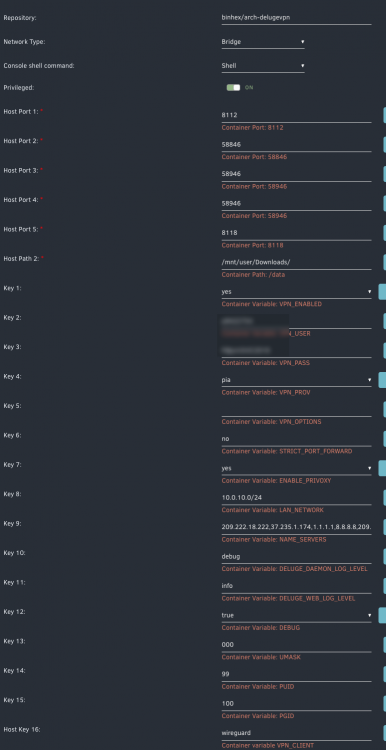
just for fun, I just installed the binhex-qtorrent... configured it the same. and i'm able to connect without issues... the DNS in KEY 9 are the same for both containers.
-
no I don't. I have a Ubiquiti DreamMachine Pro... perhaps it's the intrusion detection settings?
-
Excellent idea. (I search for users and passwords in my log file but found none) Here's my log. supervisord.log
-
Does anyone have any idea why Deluge wont start for me with my VPN? I've tried different VPN destinations, I've tried with OPEN VPN and now with Wireguard, the GUI wont start. it will only work with the VPN turned off. I'm using PIA which seems to be very swell supported... the account is valid, I can log into it manually on my desktop. These are my settings:
-
Alright, wireguard is running. I still have the same issue I don't see any errors in the logs... but the web gui wont load. it only loads if I disable the VPN. Here are my logs: 2021-02-08 10:25:07,439 DEBG 'watchdog-script' stdout output: [debug] iptables chain policies are in place 2021-02-08 10:25:07,450 DEBG 'watchdog-script' stdout output: [debug] VPN incoming port is 6890 [debug] Deluge incoming port is 6890 [debug] VPN IP is 10.14.212.89 [debug] Deluge IP is 10.14.212.89 2021-02-08 10:25:37,453 DEBG 'watchdog-script' stdout output: [debug] Checking we can resolve name 'www.google.com' to address... 2021-02-08 10:25:37,453 DEBG 'watchdog-script' stdout output: [debug] Checking we can resolve name 'www.google.com' to address... 2021-02-08 10:25:38,600 DEBG 'watchdog-script' stdout output: [debug] DNS operational, we can resolve name 'www.google.com' to address '172.217.12.164' 2021-02-08 10:25:38,601 DEBG 'watchdog-script' stdout output: [debug] Waiting for iptables chain policies to be in place... 2021-02-08 10:25:38,609 DEBG 'watchdog-script' stdout output: [debug] iptables chain policies are in place 2021-02-08 10:25:38,620 DEBG 'watchdog-script' stdout output: [debug] VPN incoming port is 6890 [debug] Deluge incoming port is 6890 [debug] VPN IP is 10.14.212.89 [debug] Deluge IP is 10.14.212.89 2021-02-08 10:26:08,623 DEBG 'watchdog-script' stdout output: [debug] Checking we can resolve name 'www.google.com' to address... 2021-02-08 10:26:08,838 DEBG 'watchdog-script' stdout output: [debug] DNS operational, we can resolve name 'www.google.com' to address '172.217.12.164' 2021-02-08 10:26:08,839 DEBG 'watchdog-script' stdout output: [debug] Waiting for iptables chain policies to be in place... 2021-02-08 10:26:08,848 DEBG 'watchdog-script' stdout output: [debug] iptables chain policies are in place 2021-02-08 10:26:08,859 DEBG 'watchdog-script' stdout output: [debug] VPN incoming port is 6890 [debug] Deluge incoming port is 6890 [debug] VPN IP is 10.14.212.89 [debug] Deluge IP is 10.14.212.89 2021-02-08 10:26:38,863 DEBG 'watchdog-script' stdout output: [debug] Checking we can resolve name 'www.google.com' to address... 2021-02-08 10:26:39,063 DEBG 'watchdog-script' stdout output: [debug] DNS operational, we can resolve name 'www.google.com' to address '172.217.165.132' 2021-02-08 10:26:39,064 DEBG 'watchdog-script' stdout output: [debug] Waiting for iptables chain policies to be in place... 2021-02-08 10:26:39,063 DEBG 'watchdog-script' stdout output: [debug] DNS operational, we can resolve name 'www.google.com' to address '172.217.165.132' 2021-02-08 10:26:39,064 DEBG 'watchdog-script' stdout output: [debug] Waiting for iptables chain policies to be in place... 2021-02-08 10:26:39,073 DEBG 'watchdog-script' stdout output: [debug] iptables chain policies are in place 2021-02-08 10:26:39,084 DEBG 'watchdog-script' stdout output: [debug] VPN incoming port is 6890 [debug] Deluge incoming port is 6890 [debug] VPN IP is 10.14.212.89 [debug] Deluge IP is 10.14.212.89
-
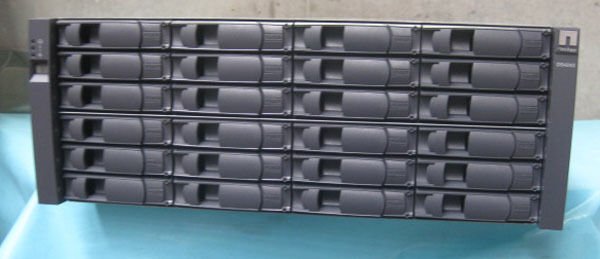
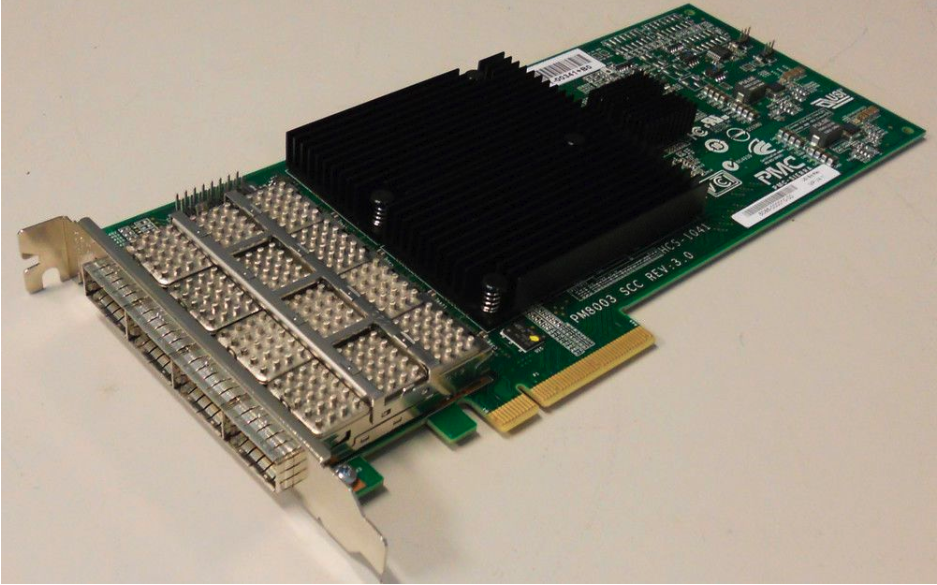
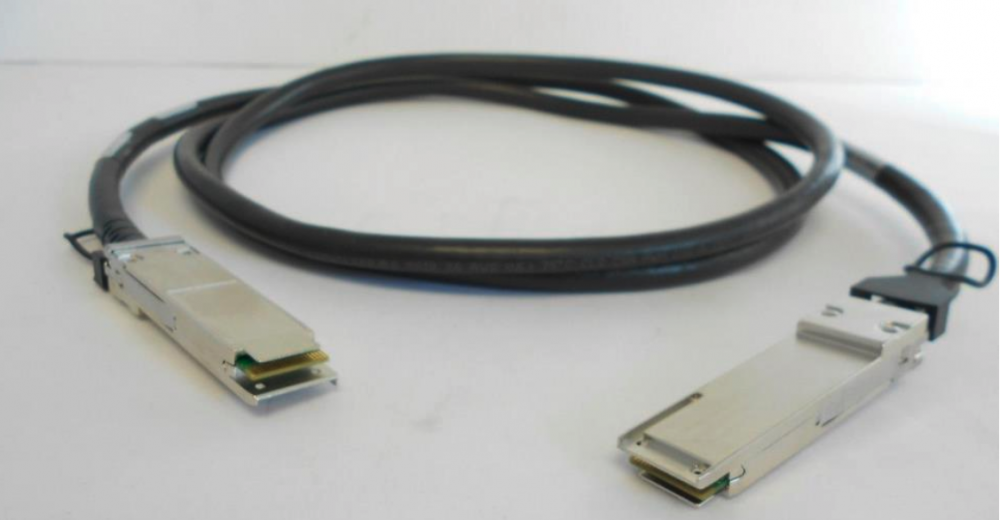
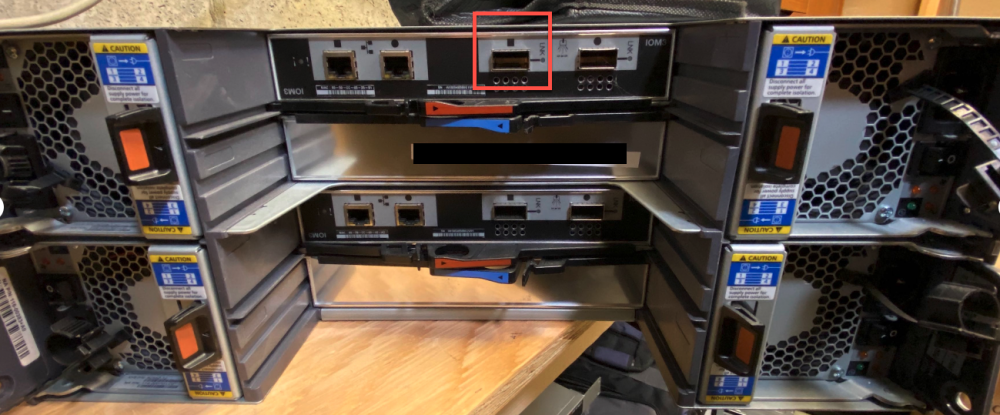
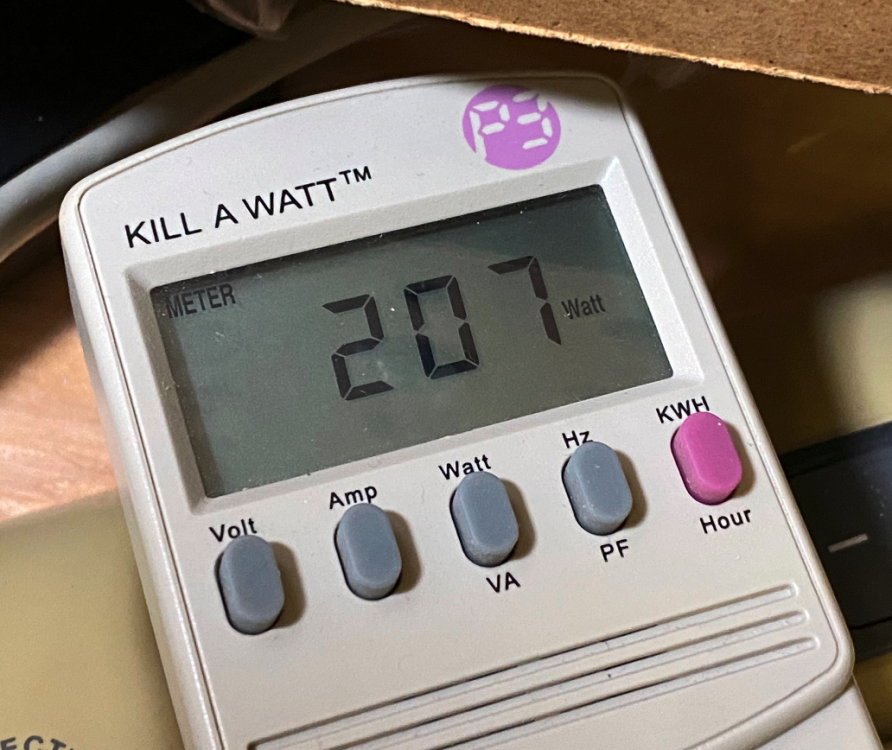
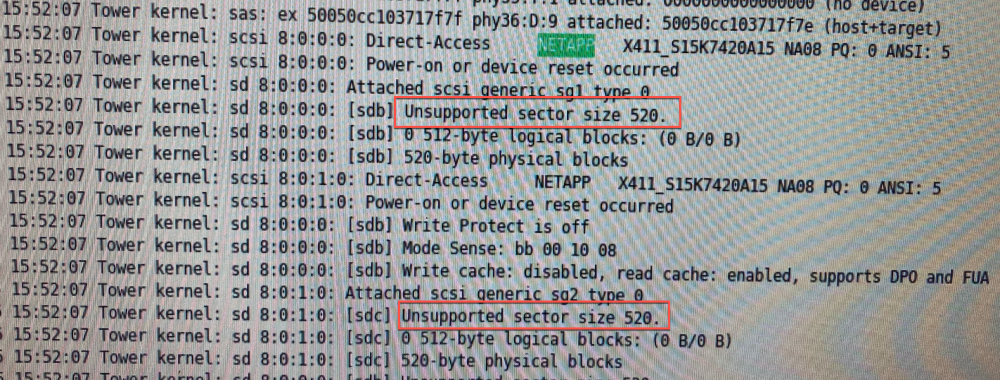
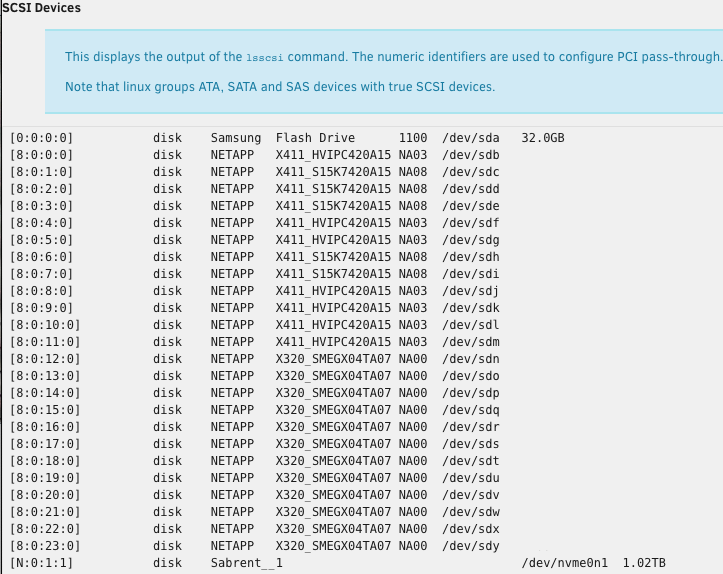
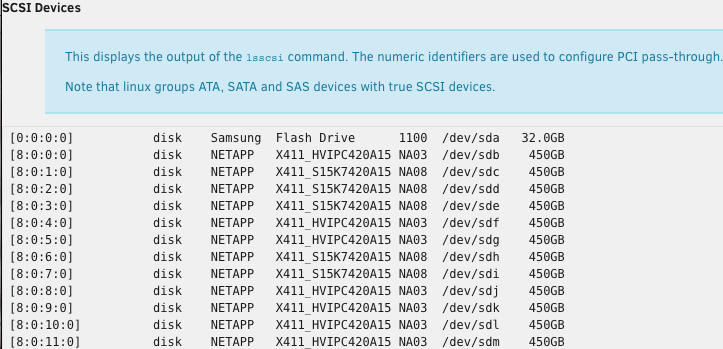
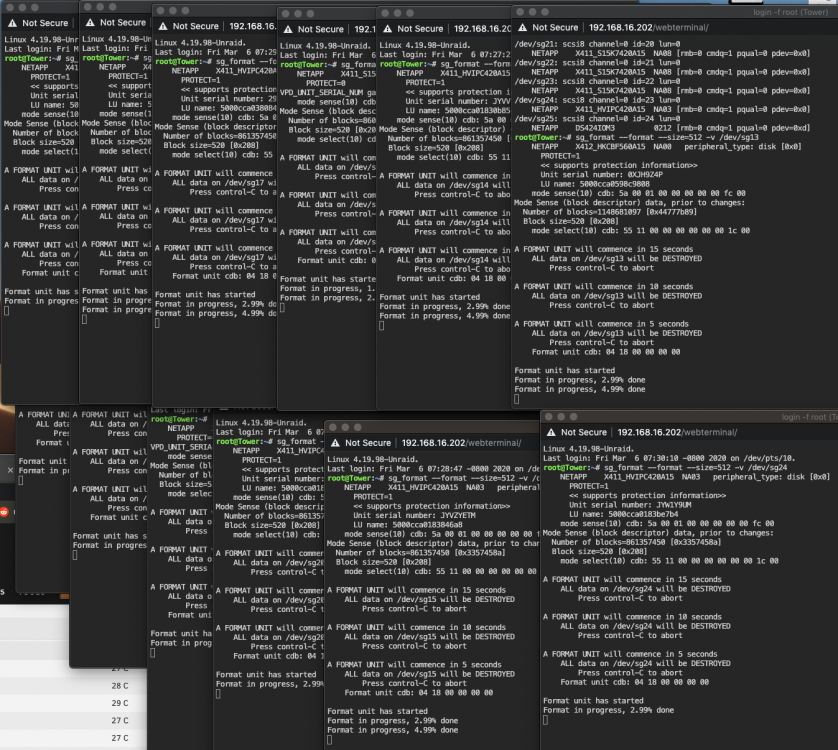
How do use wireguard? the instructions aren't very clear to me. Google failed me aswell. I'm not able to connect using OpenVPN anymore... so I'd like to try something different.I remove 3 or 4 plugins that I've had for a while. I think ALL my issues were resolved after I removed them. no more rebooting my server every 24 hours. no more GUI SLOWNESS where certain pages take forever to load. I'm sorry to say that I don't recall which plugins were at fault. I think it was like "folder cache" it's been too long now, I don't recall.So My unraid server has been running like ass for the past few months. I'm not able to download diagnostic I'm not able to load plugins I need to reboot my server once a day or else it locks up Dockers and VM work fine during that 24hour period the Server still locks up in safe mode, or regular mode with docks and VMs disabled. the only thing I can view is the syslog. and they are spammed with this: Jan 27 10:19:16 Tower nginx: 2021/01/27 10:19:16 [alert] 4277#4277: worker process 14256 exited on signal 6 Jan 27 10:19:16 Tower nginx: 2021/01/27 10:19:16 [alert] 4277#4277: worker process 14256 exited on signal 6 What can I do to fix this? syslogI've been having this problem for months now... I get spammed even in safe mode, dockers and VMs disabled.I got all this stuff for free. I'm a little sad I can't have more then 1 array. if I had multiple arrays, I could have all these 15K RPM disk in one for a nice fast pool for the VMs. and the slower 7200 RPM drives for longer term storage. I also see I'm limited to only 30 Drives.. which makes this 24 Bay Drive an over kill since I already have 10 Drives (+ 1 NVMe) in my main server.Parts used in this Build Netapp DS4243 Shelf (no controller) QUAD SAS Card: PM8003 SAS Cable QSFP to QSFP If you have a different SAS card, I'm sure it will still work. This is the card that I was able to source. There's no Power button on these shelves, they just turn on when you give them power. from my testing, you only need 1 power Supply to be on and all 24 drives will still work. the other power supplies are only to be used for redundancy (ideally from different power sources) and is over kill in a home lab. EDIT: I was getting "random" drives disconnecting form my array, to re-add the drives, you had to rebuild the array which took a long time and put my data at risk. In the logs it was found that my drives would go missing each time my UPS did a self check. the fix was to use 2 power supplies, I put them on their own UPS. Here are some power stats for fun: Empty Shelf with all 4 Power Supplies ON. (207 Watts) The Full Shelf, with 24 Disks on takes: 305 Watts with 1 PowerSupply on. 323 Watts with 2. 348 Watts with 3, an 378 Watts with all 4. STEP 1) Install your SAS card in your unraid server. leave the server off for now. STEP 2) - With the Netapp turned OFF; Physically plug the SAS Cable in the port with the "Square icon" on the top controller & the other end of the cable to your SAS Card in your unraid server. - Turn on a Power Supply. - Give it a good minute to fully initialize. STEP 3) Power on your Unraid Server & login to its interface. - If you're lucky. you're Done. The drives are already showing up in the MAIN menu, and you can start assigning your Disks. if you don't see your Drives... Keep reading. STEP 4) Go to TOOLS > System devices. - Do you see your disks? (yes = good) (No? Go to Step 5) - Your Disks don't have a "Size"? (Let's fix this) STEP 5) Sanity Check - Check the Logs - Go to: TOOLS > SYSTEM LOGS - CTRL-F (find), search for "Netapp" - Finding "Netapp" confirms that your card is working. (Great!) - Some Netapp drives are formatted with 520b sectors instead of the needed 512b. we need to reformat them for Unraid to see them properly. STEP 6) - Click the Terminal icon - Run this command to download the formatting utility: wget http://slackware.cs.utah.edu/pub/slackware/slackware64-14.1/slackware64/l/sg3_utils-1.36-x86_64-1.txz - Run this after the download to install sg3_utils upgradepkg --install-new sg3_utils-1.36-x86_64-1.txz - Use this command to show SAS HDD's sg_scan -i this command to format. PLEASE READ /dev/XXX should be the HDD in the NetApp that needs to be formatted. (AKA double check before you format the wrong drive) sg_format --format --size=512 -v /dev/XXX From my testing, I was able to open 24 terminal windows and format all 24 drives at the same time. This might have slowed things down a bit.. not sure.. but I just went to bed. STEP 7) The following morning, I woke up, went to MAIN, but still didn't see my disks I REBOOTED the System.... and the 24 Disks appeared. Checked the Logs... no more errors... and I confirmed it was formatted in 512 sectors now. yes!
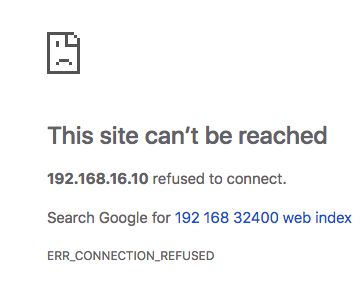
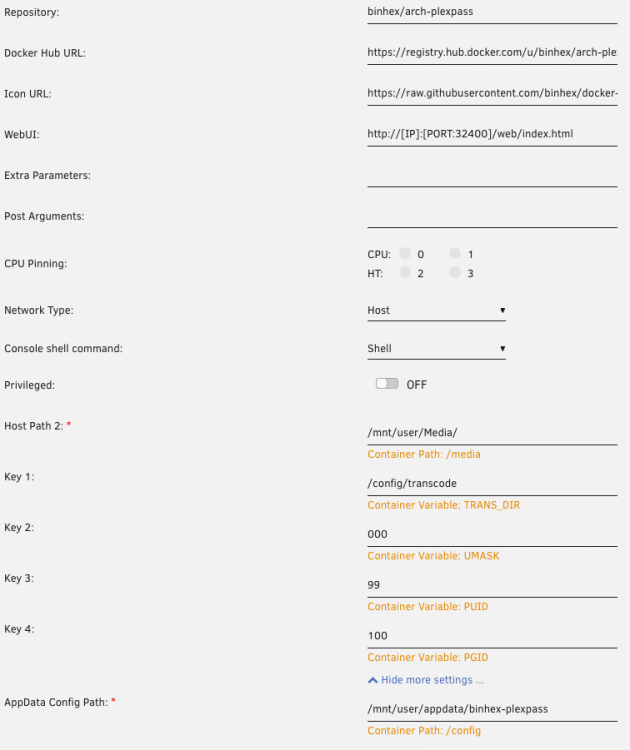
 I have 320GB I wish UNraid could make better use of it... like a real cache driveHi guys, I've been running unraid for the past 3 months, and so far I've been loving it. Yesterday I ran into my first issue. I can't connect to my plex server. My Logs say the following: 2019-02-22 08:14:50.091360 [info] System information Linux UnRaidServer 4.18.20-unRAID #1 SMP Fri Nov 23 11:38:16 PST 2018 x86_64 GNU/Linux 2019-02-22 08:14:50.122694 [info] PUID defined as '99' 2019-02-22 08:14:50.267939 [info] PGID defined as '100' 2019-02-22 08:14:50.408576 [info] UMASK defined as '000' 2019-02-22 08:14:50.441054 [info] Permissions already set for volume mappings 2019-02-22 08:14:50.471165 [info] TRANS_DIR defined as '/config/transcode' 2019-02-22 08:14:50.561746 [info] Starting Supervisor... 2019-02-22 08:14:51,011 INFO Included extra file "/etc/supervisor/conf.d/plexmediaserver.conf" during parsing 2019-02-22 08:14:51,012 INFO Set uid to user 0 succeeded 2019-02-22 08:14:51,014 INFO supervisord started with pid 8 2019-02-22 08:14:52,016 INFO spawned: 'plexmediaserver' with pid 54 2019-02-22 08:14:52,017 INFO reaped unknown pid 9 2019-02-22 08:14:52,119 DEBG fd 8 closed, stopped monitoring <POutputDispatcher at 23029063375328 for <Subprocess at 23029063375256 with name plexmediaserver in state STARTING> (stdout)> 2019-02-22 08:14:52,119 DEBG fd 10 closed, stopped monitoring <POutputDispatcher at 23029063375616 for <Subprocess at 23029063375256 with name plexmediaserver in state STARTING> (stderr)> 2019-02-22 08:14:52,119 INFO exited: plexmediaserver (exit status 255; not expected) 2019-02-22 08:14:52,119 DEBG received SIGCLD indicating a child quit 2019-02-22 08:14:53,122 INFO spawned: 'plexmediaserver' with pid 59 2019-02-22 08:14:53,159 DEBG fd 8 closed, stopped monitoring <POutputDispatcher at 23029063375832 for <Subprocess at 23029063375256 with name plexmediaserver in state STARTING> (stdout)> 2019-02-22 08:14:53,159 DEBG fd 10 closed, stopped monitoring <POutputDispatcher at 23029063375904 for <Subprocess at 23029063375256 with name plexmediaserver in state STARTING> (stderr)> 2019-02-22 08:14:53,159 INFO exited: plexmediaserver (exit status 255; not expected) 2019-02-22 08:14:53,159 DEBG received SIGCLD indicating a child quit 2019-02-22 08:14:55,162 INFO spawned: 'plexmediaserver' with pid 64 2019-02-22 08:14:55,199 DEBG fd 8 closed, stopped monitoring <POutputDispatcher at 23029063376120 for <Subprocess at 23029063375256 with name plexmediaserver in state STARTING> (stdout)> 2019-02-22 08:14:55,199 DEBG fd 10 closed, stopped monitoring <POutputDispatcher at 23029063375616 for <Subprocess at 23029063375256 with name plexmediaserver in state STARTING> (stderr)> 2019-02-22 08:14:55,199 INFO exited: plexmediaserver (exit status 255; not expected) 2019-02-22 08:14:55,199 DEBG received SIGCLD indicating a child quit 2019-02-22 08:14:58,203 INFO spawned: 'plexmediaserver' with pid 69 2019-02-22 08:14:58,240 DEBG fd 8 closed, stopped monitoring <POutputDispatcher at 23029063376192 for <Subprocess at 23029063375256 with name plexmediaserver in state STARTING> (stdout)> 2019-02-22 08:14:58,240 DEBG fd 10 closed, stopped monitoring <POutputDispatcher at 23029063375904 for <Subprocess at 23029063375256 with name plexmediaserver in state STARTING> (stderr)> 2019-02-22 08:14:58,240 INFO exited: plexmediaserver (exit status 255; not expected) 2019-02-22 08:14:58,240 DEBG received SIGCLD indicating a child quit 2019-02-22 08:14:59,241 INFO gave up: plexmediaserver entered FATAL state, too many start retries too quickly Here are my configs: The only change I did that's related was I installed Tautuli, which installed correctly. any help would be greatly appreciated! Dan