





BrunoVic
Members
-
Joined
-
Last visited
Everything posted by BrunoVic
-
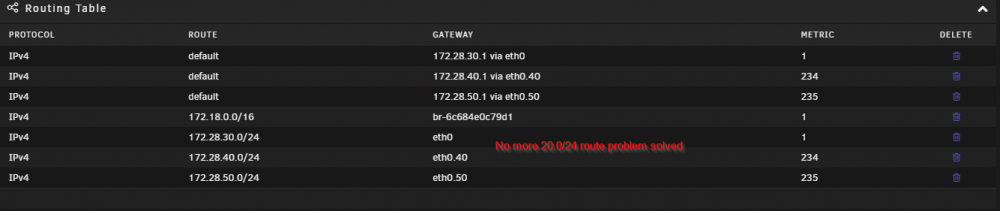
It's a problem with the routing table. I did an experiment and it worked now my problem is why is it doing that. So what I did was I disabled the VLAN 20 interface more or less by not configuring an IP at all. When the network daemon restarted it rebuilt the routing table and excluded the 20.0/24 network. Now when I do a transfer from 30.0/24 to 20.0/24 the transfer is successful without any issues. Problem is I need that VLAN 20. So the moment I bring it back up I will have the same problems again. It looks like for some reason when the transfer is first started it chooses the default path but for some reason it later decides to send it to the 20.0/24 interface but the client is expecting the response to be from a 30.5 host not a 20.5 host so it essentially times out. Even with the default route set to a metric of 1 which SHOULD be preferred over the 20.0/24 route it still wants to send the traffic to a dead end destination and I do not know why.

-
I stumbled and hijacked this thread. Not sure what the proper etiquette is here on that. But seeing what this guy is going through it seems very similar but not exact. He never really posted his routing table. He said he noticed something wrong with it but without any further details I can't figure what exactly his solution did for him that helped. I looked at my routing table and eliminated any unnecessary default routes. In networking when dealing with multiple networks you only need ONE default route. I am not sure why creating a VLAN interface made that much of a mess with the routing table. Even then though after cleaning everything up I am still having the same problem. I can't help but feel I am so close to a solution though. I have a feeling it has something to do with the routing table but I can't quite figure out what is wrong. If I were looking at a Cisco router everything would look fine right about now. But this is a UNIX like system so I am in uncharted territory.
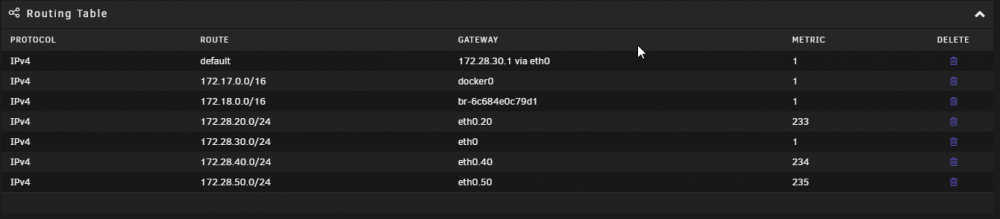 What did your routing table look like before. I am having almost identical issues as you. Same subnet and transfer is fine. Different subnets and transfer works for about a few seconds but then dies. I looked at my routing table and I had a bunch of default routes I had to clean up. Looks like they were auto generated with the VLAN interfaces. Unfortunately even after cleaning everything up I am still having the same problems as you. I'll attach a screenshot of my routing table. Maybe another set of eyes on this may give me a clue.
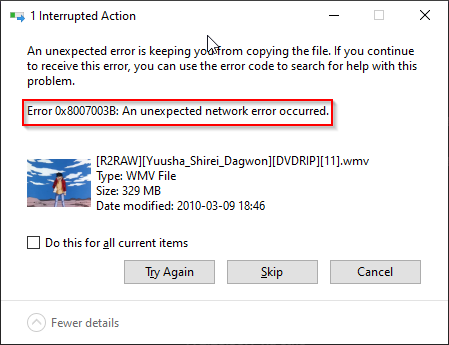
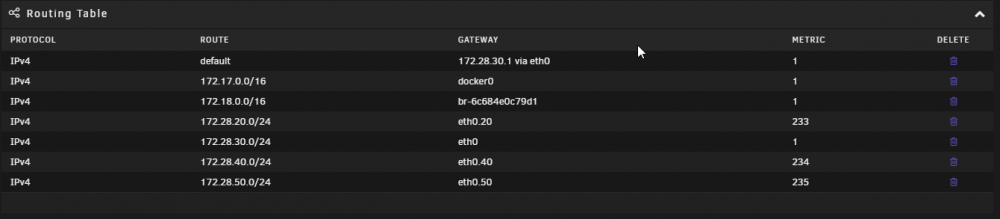 Guys please ask me some probing questions at least. I've provided diagnostics reports and I have posted follow up thread of my TS efforts on the network side. I don't know much on the server side and I am deferring to you for help. But if I am the only one asking my own questions I am simply chasing my tail here. So what information can I provide to you guys that can help us find a resolution here?Ok so I figured out my route metric problem. Seems I had the VLAN interface configured to static IP which kept forcing a route metric of one. Now that is adjusted the only route metric of 1 on the VLAN interfaces is 172.28.30.0/24. I though this would have fixed my issues but it looks like that did not fix it. So why is it that anything I transfer from the 30.0/24 network to the 20.0/24 network I get an error but from the 20.0/24 network and the 20.0/24 network it works fine?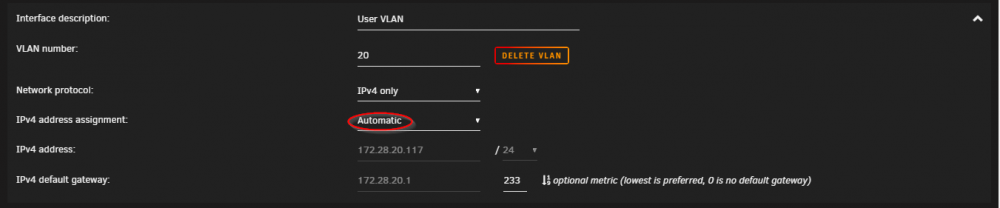
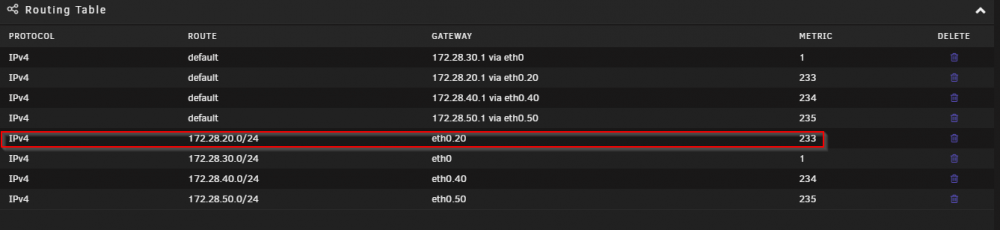
 I have a strong feeling this is the problem. For some reason the metric on 172.28.20.0/24 is set to 1. I've manually set the metric to 233 on the VLAN interface but for some reason there is still a static route set to 1 that will not budge and it's creating all kinds of issues for 172.28.30.0/24. Why can't I delete the static route for 172.28.20.0/24?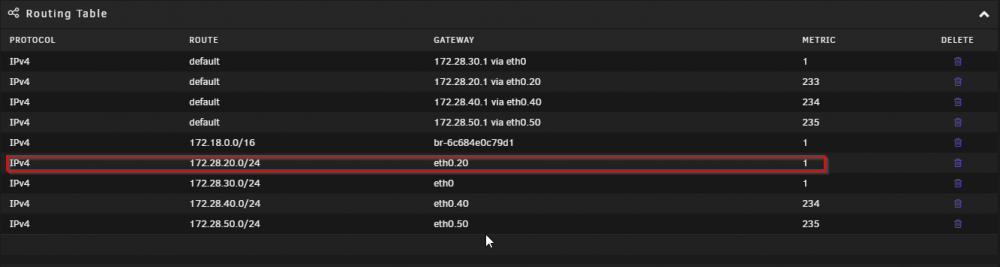
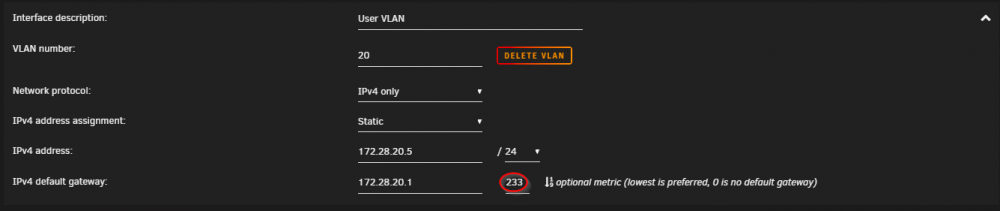 Anyone have any ideas on this? I still haven't been able to fix this.So has anyone else had experience with this? Why is the connection intermittent when transferring from a different subnet and there is no connection problem transferring from the same subnet?Ok I think I may have narrowed down the culprit but now I need to know WHY. Right now UNRAID is sitting on a server network which is a different network than the user network that I am on. I have multiple VLANs on the UNRAID host. When I try to transfer data from UNRAID on the server VLAN to a computer on the user VLAN the network connection is constantly dropping. However if I transfer data from UNRAID on the user VLAN to a computer on the user VLAN (same network) there is no problem with the connection. So I know what you are going to say. Then just use the user VLAN and problem fixed right? Wrong the whole point of putting the UNRAID on a different network from the user network is so that if one network is compromised then the user network is still protected. However if the UNRAID is on the same network as the users then there is a potential that if UNRAID is compromised then the computer on the same network will be compromised as well and vice versa. So I need to figure out WHY the connection keeps dropping out when transferring the files from one different subnet to another?
and44morepages-Person.thumb.png.737c08fdf7c881b27c690bf653c09109.png)
and44morepages-Personal.thumb.png.9713ebc24b8b9ef1bed61c9ca974a933.png)
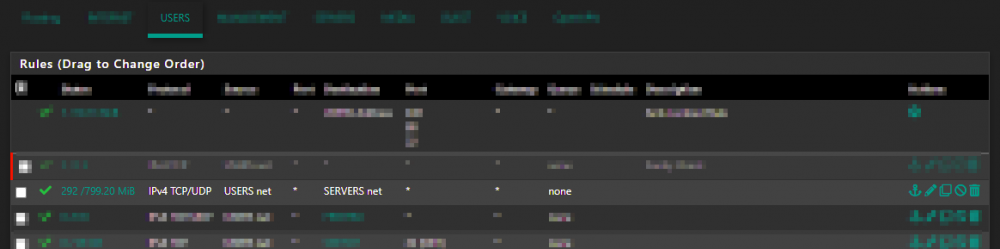 Ok so even with WinSCP I am still getting connection drops to the unraid server.Ok I am also noticing that the transfer crashes when it starts to copy over a different file after finishing the transfer of the last file.I upgraded to 6.10 and the interface is extremely slow too. Is this normal?Please see the latest updates. I have narrowed the problem down with transfers and connections timing out between different networks. I am having issues with transfers from the unraid server to local host. The transfers start just fine but after a few seconds it stops transferring and I get an error that the host could not be reached. I have to constantly restart the transfers just to get anything transferred. It looks like it is working because some things a completed but it's keeps giving me an error message and stops the transfer until I restart it again. unraid-diagnostics-20210826-1316.zipI have a Management VLAN 10. I've set the default gateway on the switch to point to the gateway IP in VLAN 10. I have a jumper server that straddles two VLANs one in the User LAN and one in the Management VLAN. From there I am able to hit the management IPs of all devices that need to be managed through an RDP/VNC session.That's what I am currently doing now. I have the native VLAN set to 30. The problem is that because the switch is STIGed to have an unused VLAN for the native VLAN which causes a native VLAN mismatch alert on my switch.No I kinda get what you're saying. It's somewhat a networking problem but you're right it's an engineering design problem. I'm just hoping someone might have dealt with this and can give me some insight.So if you see the diagram and explanation hopefully you can understand my predicament. My goal was to make 1 and 2 both trunk interfaces so that the AP might see the controllers if the controllers docker interface was configured with a VLAN id on the host (UNRAID). However when I configure VLAN ids on the host (UNRAID) it expects the main interface to still have an IP address otherwise it assigns an APIPA (169 address) and the docker bridge wants to use that 169 address instead of a specific VLAN.Here is a updated Visio diagram. I had the numbers backwards.
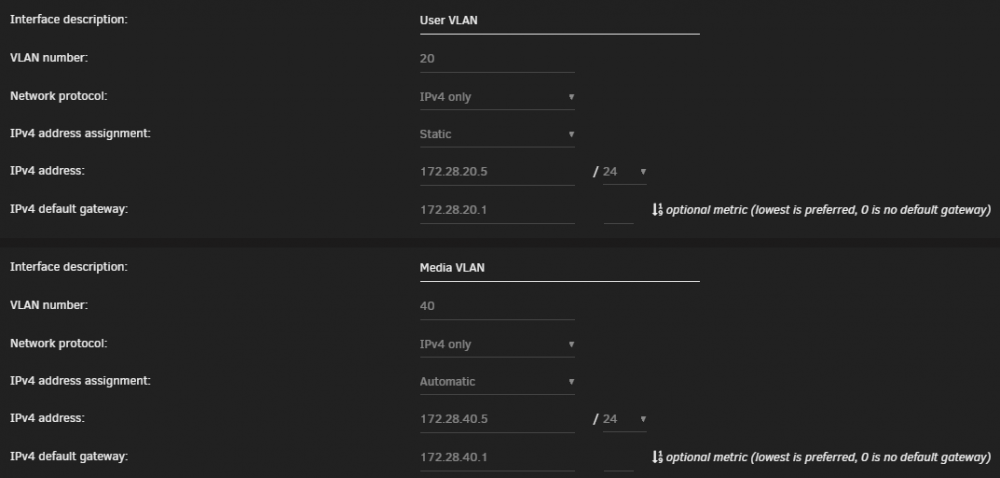
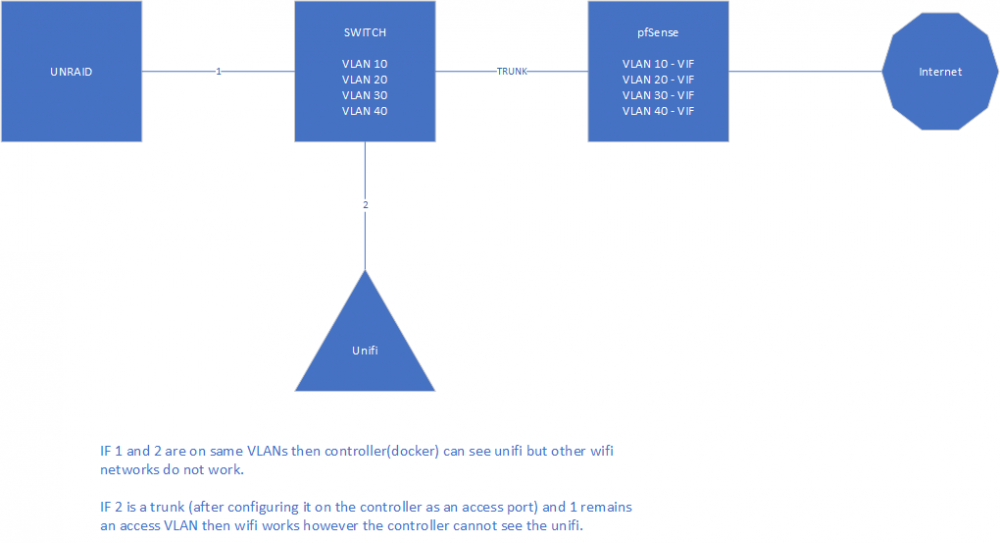 Yes I already have a router/gateway supporting this. I have a pfSense firewall running multiple VLANs and a Cisco 2960 switch set up with the VLAN trunks to pass multi-VLAN traffic. The problem I have is that in order to get the WAP working with the controller AND have a trunk interface going to the WAP the host(UNRAID) that the controller is on needs to be configured for trunk as well. Otherwise the controller can no longer see the WAP. The ONLY way the controller can see the WAP without a trunk is if I give the interface that the WAP is on an access port on the same VLAN the host (UNRAID) is on. ONLY then can the controller see the WAP. Unfortunately doing that makes it impossible for the WAP to pass multi-VLAN traffic and the WAP doesn't work as it should.Is there anyone who knows about networking that can answer this question please?Good morning. I was in the process of going from a single network to multiple networks to allow my Unifi Controller Docker to pass multi VLAN traffic onto the trunk link for multiple WiFi SSIDs. The problem I am running into is that on the UNRAID host the main interface insist on getting an IP address. I don't want the main interface to get an IP address. I just want to set up each individual VLAN and assign IP address to those. So instead IF I don't give the main interface an IP address it assigns itself an APIPA address instead. The problem is that now the Docker containers inherit that IP address and it throws the whole network off. The temp work around I've made so far is that on the trunk link I've assigned a native VLAN of the server VLAN so that the main interface would be happy. But now my switch isn't happy because I have TWO native VLANs and it's causing confusion. What I ultimately want to do is to stop the main interface from trying to get an IP address.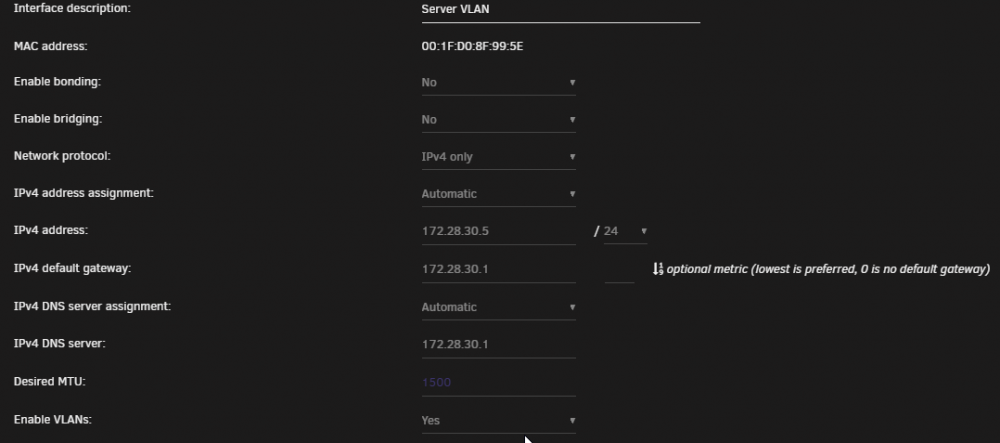
 Ok I used unbalance and migrated everything on the cache drive over to disk1. I did a scrub and balance then restarted the array and it looks like everything is fixed.No I do not have any VMs. Or at least none that I care about. I tried VM and it drained nearly all my resources and made UNRAID unusable. So I just gave up on VMs.


and44morepages-Person.png.d0c0ae08a694f085cb486c9f23c31acb.png)
and44morepages-Personal.png.40b8f1293b54e8ea8c9da9df61e22fd9.png)


