





maxstevens2
Members
-
Joined
-
Last visited
Everything posted by maxstevens2
-
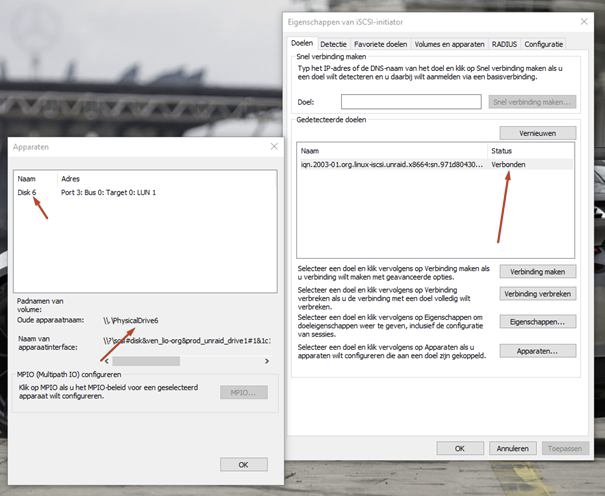
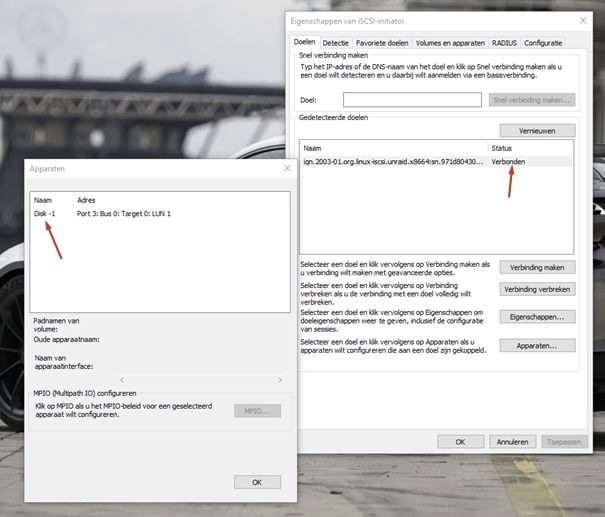
I'm having an issue with this: I have 2 network cards, 1 is the main 1GbE connection (home network and others (VLAN's) are all connected to this), the other is a 10GbE connection (peer 2 peer pc-server). The issue I am having is that when I try to connect via the 10GbE it connects, but doesn't seem to load in the disks, and makes the whole service just lock up (I actually need to restart my PC to get it to work). Does anyone have an advise what to do? (Is there maybe a way to lock ISCSI to an IP or interface?) btw: My firewall is also a vm which has access to both networks. See the differences in the pictures (verbonden means connected)
-
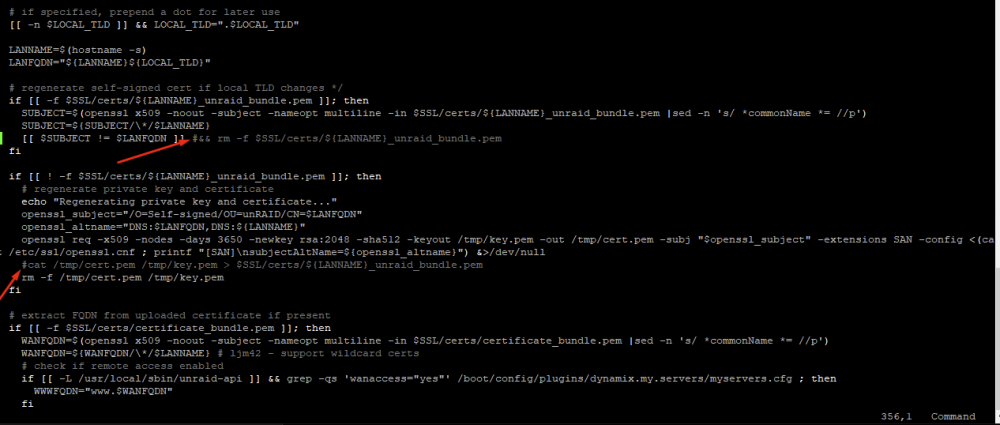
So I decided to also take a shot on this, and I hacked my trough it! What did I used to do?: I just replaced the /boot/config/ssl/certs/(Your_ServerName)_unraid_bundle.pem with my own one. How do I do it now?: Well exact same script, but an edited rc.nginx config. At 356 (or close to it) I removed the removal of the 'old' file by disabling the rm command. at 365 (or close to it) I disabled the whole line, so it won't get overwritten. This way my /boot/config/ssl/certs/Unraid_unraid_bundle.pem does not get overwritten, and I can use my own cert!
-
Any suggestions what cable I need to buy? The cable right now is a cable delivered with the motherboard if i recall right I have 6 Sata drives, would trying to swap some do something? Also, is it safe to still have the SSD working like this? Otherwise I will move all data off of it.
-
If power related, I will try to leave my server in power safe tonight (Corsair CX430M). Are u sure it isn't the SSD? The SSD before this one didn't have these error's (altought that wasn't a Samsung)
-
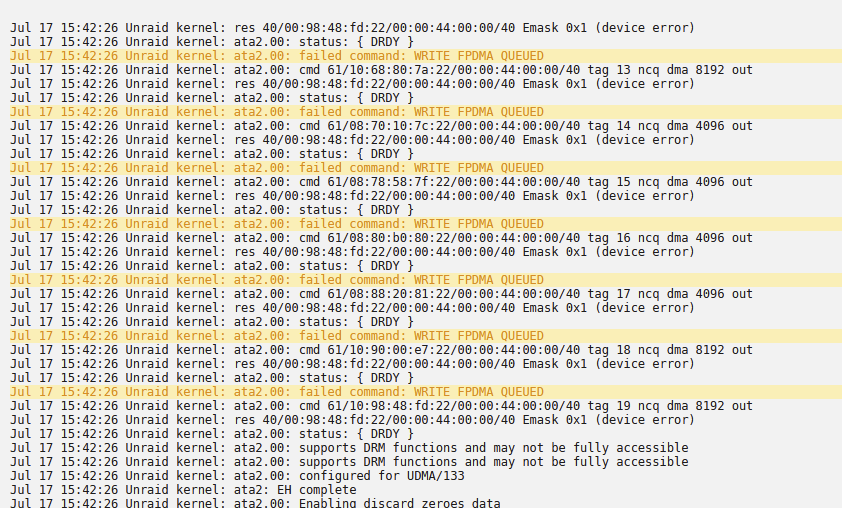
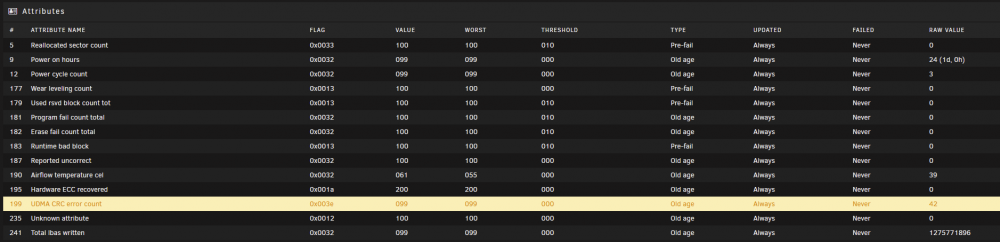
Hi there, I've recently installed my brand new Samsung 970 EVO 1TB (Sata version), but now i get the following errors in log: And on disk level (SMART) I see this: This disk has been replaced for Cache purposes, so the whole Cache is on there. This messages comes by every half our (24 hours uptime, 42 warnings) I tried resitting the cable, but to my knowledge it wouldn't be the cable since it has had another 64GB SSD on it for over 2 years! Does anyone have an idea what to do next? Do I need to replace the complete SSD, or just get a new cable fitted, or try something else? Thanks! Bjorn
-
Got it all fixed now, no crazy writes anymore, and no crazy action. I do try to make the usage of the MariaDB as little as i can, but still have some performance. So I won't cache like 15 minutes and then drop it all at once onto the databases. For anyone wondering I've applied the following workaround for the insane logging: Very happy with the solution right now.
-
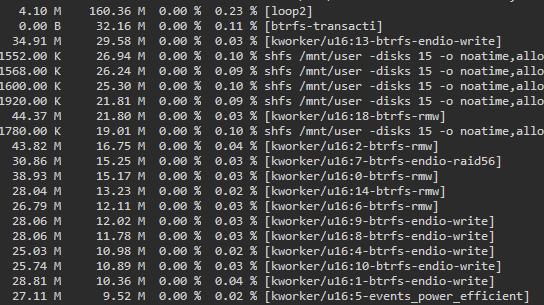
So comming back to this now. I changed a few local things. - I've updated Unraid to the 6.9-rc2. - Home Assistant now only saves every 30 seconds to the database. I came up with these results in a 34 minute timepsand: All calculated, this generates around 47 GB of writes a week, which I find more casual for the disk (due to there being 3 of them). Recalculated this is around 4.7 Megabyte per minute and 0,07 per second (and around 0,149 on the btrfs-transacti). A yearly sum of this woul be around 2466 GB of writes (docker only). I think this is a need fit compared to the 20+ MB/s before nearly being continously. Which would be 1,296 (or just 1,2) TERABYTE per day at 15MB/s 24/7. As of now and the thing I reported earlier, I actually broke the log (/var/syslog is just empty). I guess this doesn't affect loopt but I will retest. Edit: Here you can clearly see the 30 seconds mark when Home Assistant Pushes its data out. Before the saving rate was every 10 seconds

-
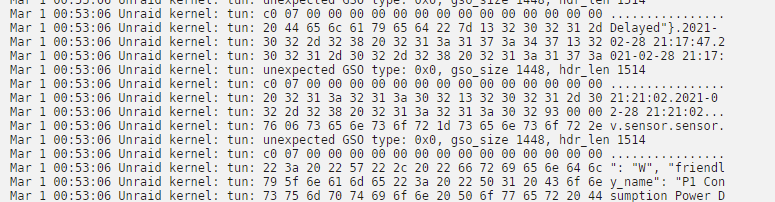
Maybe a bit off topic, but do you use dockers for Home Assistant MQTT @Niklas? My power usage is now litterally showing in kind off encrypted style in the log. lol Only when I am not on the website it won't show anything..
-
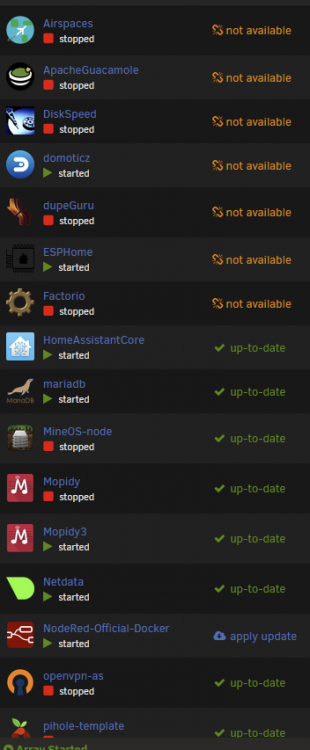
So, Unraid updated quite easily. Only issue now is the following, but won't matter too much as 4/7 are just barebone nothing lol: The rest of the 'fixes' I will try tommorow (a.k.a. today) as the dockers don't impact a lot, but the VM's do. Will work on it later though. Weirdly the writing (according to Unraid's UI) doesn't seem to be in use that crazy much right now. Nearly 3MB/s write peak instead of 25 MB/s. See picture after (red line is the kinda docker-started line): Before the update it litterally spiked continously from 12 to 2 to 25 and sometimes (server at high-performance) to 54. Will very much keep an eye for it for now. Maybe I don't even need to change it. Or you guys have suggestions? Really have to give out probs already to @Niklas with the update suggestion. Otherwise I would have needed to apply the solution in the 'report' page 2. Good Nighty :')

-
Ah, my recorder/database for history is stored in MariaDB on docker... which is kinda how this all started. You might believe it is stupid to run it like that, but it ran on MariaDB inside a VM for months without any crazy writes on an old HDD... But I won't get too database'y. Time to upgrade now though!
-
I might have found out that Home Assistant doesn't actually 'abuse' the docker image file as it's storage location. So I am more hopeful now. Will now shut dockers down and backup the image. Then need to have 1 docker online at 00:00 CET. After that upgrade time. I'll keep you updated lol. Thanks for the help so far though!!
-
Here it's now 23:29. So I am trying to get this fixed before Monday morning. I will update Unraid asap. I will ofcourse backup the image and such. Is there a way to transport/move the dockers from the img to the 'new location'? Or is what you said the way to get the docker back with it's settings?
-
Has 6.9 been stable for you? Been waiting for the new big release, but if it stable and the docker can be fixed, that would be perfect!
-
I do worry a bit about the solution as this guy 'lost' his dockers. Which would in my case mean I lose most of the Home Assistant configuration (not configuration files, but things like built-in integrations, internal user settings etc.)
-
That was the 'report' I was referring to, and was wondering if the 'fix' listed on page 2 was the way to go? Thanks for the reply !
-
I do want to note, that my docker/loop2 doesn't write consistantly, it does it at some random moments. Calculated per day this is around 133 gigabytes of writes..
-
It's been a long time since start of this post. I actually am having the same issue right here. Whilst checking at the report, I am scrolling trough pages and found only 1 solution from @S1dney (listed onto page 2). This big writing started when I started using MariaDB docker, but I've seen before that the cache has always been very busy. My SSD's are running RAID 5 unencrypted with a total of 300 million writes in 41 days (started using mariadb docker since last 5 days). Any suggestion how to fix? Or is the method listed on page 2 still the workaround to go with?

-
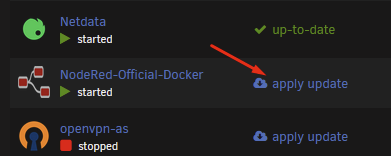
Glad to hear it works now. How do you usually install or update dockers? The casual way is just this button:
-
Try that yes, see what it shows there. expected behavour is this: Do note i am running unraid 6.8.3
-
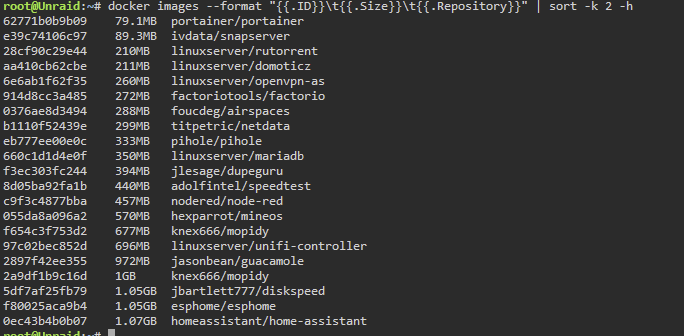
Alright here a few little steps: - First of all, how many dockers you got? (it can be also achieved with the following command): docker images --format "{{.ID}}\t{{.Size}}\t{{.Repository}}" | sort -k 2 -h - See how much volumes there are that have insane sizes: du -sh /var/lib/docker/volumes/ If this doesn't show something suspicious, try to check things in Portainer Let me know results, will try to help
-
Can you do a 'casual' df -h (using terminal or ssh)? look in the list 'Mounted on' for /var/lib/docker
-
Just a comeback back onto this topic. I finnaly increased the size to 30GB. I've also found theses thing out: - portainer is a nice management tool for docker; volumes etc. - found out while using (see below) that I had a volume that used over 2.3 GB! (removed that via Portainer). du -sh /var/lib/docker/volumes/* As of this moment, docker is stable in usage, and I've used 15GB out of 30, so I now hopefully no weird increases (Running Unraid Version: 6.8.3 )
-
Hi, I have the same kind type of issue. I try to configure some macOS VM's which needs keyboard and mouse to work with the eGPU. Whilst setting the VM up i sometimes need to force stop the VM. Sometimes it works, but most of the times it says this in the syslog: Jan 18 13:21:16 Unraid kernel: xhci_hcd 0000:02:00.0: WARNING: Host System Error Jan 18 13:21:16 Unraid kernel: xhci_hcd 0000:02:00.0: Event logged [IO_PAGE_FAULT domain=0x0000 address=0x00000000fff91000 flags=0x0000] Jan 18 13:21:16 Unraid kernel: xhci_hcd 0000:02:00.0: Host halt failed, -110 Jan 18 13:21:27 Unraid kernel: xhci_hcd 0000:02:00.0: xHCI host not responding to stop endpoint command. Jan 18 13:21:27 Unraid kernel: xhci_hcd 0000:02:00.0: Host halt failed, -110 Jan 18 13:21:27 Unraid kernel: xhci_hcd 0000:02:00.0: xHCI host controller not responding, assume dead Jan 18 13:21:27 Unraid kernel: xhci_hcd 0000:02:00.0: HC died; cleaning up After that USB devices are gone from Unraid GUI and tools. It seems that it disables the 02:00.0 device, which in my case is a USB 3.0 controller. Before 'crash': After crash: I am trying to find a command to reset the hardware. It must be the controller, because: if I try to connect the hardware to another port on the server it actually recognizes it, but will still have the same issue and will also not work. This kind off makes my server a gun with ammo: if you blow it all, you need to reload (restart the whole server) which in my case takes the whole network down due to having network VM's. Does anyone have a command or a way to fix this? Greetings, Bjorn (Running unraid 6.8.3)


-
At this moment the usage is already 89%, and I still cannot figure out where it is comming from: the logs seem fine, the total dockers together are like ~9GB. 9GB Where is the other 9GB comming from, and how to clear it?
-
I want to come back onto this toppic, i am now having the same issue again. This time my docker size is 80%, all my dockers together are 8,7GB, the log sizes in total like 200MB and I tried the 'docker image prune -a', but that said 0B. Any other clues where the like ~9GB of space is going towards?




