






Marshalleq
Members
-
Joined
-
Last visited
Everything posted by Marshalleq
-
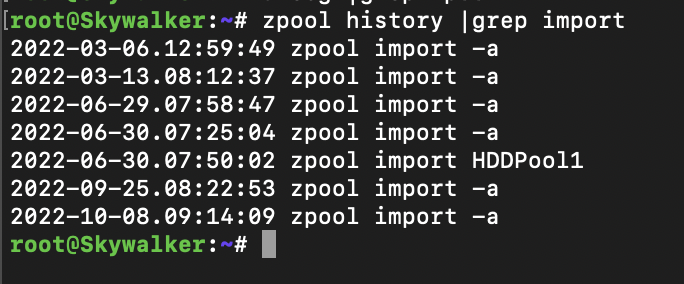
Well I do get 7 results, though I can't say it's alarming given the server has been up for 63 days. I might also add that I do have some kind of hardware problem that requires me to clear the pool every now and then. It's probably a disk or a controller, or heat related. Not too frequent now anyway, but it may well be 6 or 7 times in the three months. That may then lead me to think that you have a similar issue if you have a lot of entries - though I could be completely off here as I'm just guessing. But it's likely worth googling why you might get this in your log and can it happen when ZFS is detecting errors.
-
Hey well just to narrow it down a bit, I run ZFS, ZFS Companion and ZFS Master and have done so for a long time I also run znapzend and a few other things but I have never seen it do this. I assume by your post this is just printing live in the console? Maybe take a look to see if something got into cron somehow? Or User Scripts? Unless you've got unmounted ZFS disks that you do not want to mount it's probably pretty safe. However one thing that occurs to me is to double check this is not a safety feature about disks dropping out - I seriously doubt it because I think that would exhibit more in the Array health i.e zpool status -x has nothing in it.
-
I really dislike that error! I get it too, it shouldn't be so persistent in the GUI and should be more informational as it always comes back after a reboot which is not really desirable. BTW I recall I read that expanders shouldn't be used in JBOD mode, could be wrong but perhaps this is the problem. I've also had this error with an overheating SAS card. Good luck!
-
Yeah, I kinda wondered about that too - it's a possibility that the mover will be zfs enabled when unraid make zfs official. I can't say it would be a waste of time - might be quite nifty, though I expect in a slightly less integrated fashion. If you want to get files to move to other drives for backup - znapzend is a good option (download as a plugin). If you have a lot of data and want the most efficient copy, zfs send receive is the best - though it can be quite tricky to set up. It pays to understand your data to know which is better - rsync can still be a good tool. Another great tool included with Unraid is midnight commander, a copy of the old xtree gold, you do have to spend 5 mins learning the syntax, but it's the fastest and easiest semi graphical tool around.
-
if I understand you correctly you are talking about the unfair cache which requires the unraid array. If you’re on zfs you don’t really need the unraid cache because it’s not as slow as the unraid array. Plus zfs has a myriad of other smart caching features included and some you can add. If you just need to point default dockers and things you can do that in settings.
-
Did you try uninstalling and reinstalling the plugin with the latest unraid kernel?
-
Interesting question, I haven't gone and specifically set anything. However, there are things you can do to help. For example using SSD's with power loss data protection and being careful about what kind of caching you set up (but if you're asking you probably haven't done this yet - and you may never). I guess I'd say it has good sensible defaults that are at least as good as the other options out there, provided you've got some redundancy built in so no, nothing I can think of! UPS will just help even more.
-
Generally the folders must be set 777 whereas the files can be the permissions you require. Also make sure both files and folders are owned by nobody:users.
-
Just share them with unraid - the smb extra file in /config.
-
My advice is to look at the samba config file options. It has a really good example config included usually. There are definitely things you can do to set home drives at the share level. Failing that, you can set them individually via the above config if you don't have too many to do. You can put a dollar sign after the share name to hide them if you like too. Samba is a really really mature product that has been around for decades, if it can be done, it will do it. Just have a browse around e.g. https://docs.centrify.com/Content/zint-samba/SMBConfSample.htm
-
OK, so want an external windows host to connect to the unraid ZFS dataset via SMB? Nice, this is the best way in my opinion, I have recruited many tech people and the best ones are almost always those whom teach themselves and have a natural interest. And a good dose of 'I don't know everything' to go with it. Yes, I tried TrueNAS, I really really wanted it to be good because they do have the basics covered a lot better than unraid does (I mean backups, file sharing, permissions that kind of thing, but unraid just works better. And I really dislike their docker / Kubernetes implementation - hopefully they will sort it out and we will have a second option). You can share them easy enough as per above method, custom config in the smb.extras file. Permissions however, unraid has basically restricted this to the group nobody.users at the file level and leaves reliance on setting permissions at the share level. I expect they did this because it was just too complicated for the target users of this product to do otherwise. I'm not sure - others may be able to correct me about some hacks, but moving away from nobody.users (i.e. chown nobody:users folder name -Rfv) is likely asking for trouble. By the way the file is /boot/config/smb.extra.conf - I was guessing before. Here's what I add to it to share a ZFS share. I hope it helps you. ``` [temp] path = /mnt/HDDPool1/temp comment = ZFS backups Drive browseable = yes valid users = username write list = username vfs objects = create mask = 664 force create mode = 664 directory mask = 2775 force directory mode = 2775 valid users = username root write list = username root force user = nobody force group = users guest ok = no
-
Not first, but probably afterward. ZFS does have SMB sharing contained within it, but on unraid I just set them afterward in the /etc/samba/smb.extras file (or a similar name that I can't quite remember). Luckily samba has a really easy to use configuration file. But I just want to make sure I understand you here, what exactly is the requirement for NFS? If everything is contained within unraid i.e. ZFS is on unraid, you don't need to use NFS or samba to do anything to do with ZFS unless you're connecting a remote host or want to mount something inside of a VM that way. Sorry, I don't know what expertise you have and it almost sounds as though you think you need NFS to mount the folders within the same system.
-
Typically you set this when you create the pool and the datasets fit under the pool's mount via inheritance. That's what I do anyway. However it is possible to set differing mount points afterward if you wish. Example of setting as part of original pool: zpool create Seagate48T -f -o ashift=12 —o autotrim=on -m /mnt/Seagate48T raidz1 /dev/sdb /dev/sdc /dev/sdd /dev/sdf Example of setting mount point afterward: zfs set mountpoint=/yourmountpoint/yoursubmountpointetc Seagate48T/datasetname You can also use zfs get Seagate48T/yourdataset to find out what it's currently set to. Hope that helps! Marshalleq.
-
Hi all, I was just wondering if anyone here had any experience with adjusting the defaults for a linux guest (specifically Ubuntu 20). This is one of the 'basics' that I think Unraid hasn't gotten right yet, or perhaps I don't understand yet, though I don't understand why it would be so hard. Multiple linux guests of various types I've installed seem to have speed issues when it comes to networking. In this case I am doing an email server migration and am uploading email from a windows VM inside unraid connecting to a fresh new linux VM in the same unraid box. Windows reports its speed as 10G, Linux reports as unspecified. I've done iperf test and it reports back at about 200Mb/s (as per below) which is well below 10G as you can imagine. [ ID] Interval Transfer Bandwidth [ 4] 0.0-10.0 sec 270 MBytes 225 Mbits/sec I'm currently using virtio-net on the linux guest and it'd be nice if at least it reported back a speed of some kind. Is there a trick to Linux guests? I've installed the emu-guest-agent and enabled it. systemctl status qemu-guest-agent ● qemu-guest-agent.service - QEMU Guest Agent Loaded: loaded (/lib/systemd/system/qemu-guest-agent.service; static; vendor preset: enabled) Active: active (running) since Tue 2022-11-08 19:04:50 UTC; 24h ago Main PID: 716 (qemu-ga) Tasks: 1 (limit: 19100) Memory: 1.6M CGroup: /system.slice/qemu-guest-agent.service └─716 /usr/sbin/qemu-ga I have also installed the virtualbox-guest-tools in case that makes a difference. I am wondering if better performance would come from vmxnet-3 though from what I understand to get 10G, it needs to be virtio-net. Reading this thread here, I am led to believe I need to use virtio not virtio-net though I do have dockers sharing the same network so I assume that will create another problem. Also, from that thread as I understand it I shouldn't be getting 10G connection on my windows machine. Or perhaps it does get a 10G connection, but just performs like a 1G connection when virtio-net is chosen. Which still leaves the question as to why I'm not getting an accurate speed report on my linux box. So just thinking it all through, to get 10G - I need to create a new bridge for my vm's and assign them all to that, then choose virtio as the driver? Thanks. skywalker-diagnostics-20221109-1440.zip
-
OK, anyone know whether this is the exact installer file downloaded from apple as is, or if the IMG is taken out from inside it? I figure I can just download it on the side and replace this file. Thanks.
-
Hi all, I had this working a while back - just doing it again to do some migration work at the server end because it will be faster. However, the Big Sur download stops at 2GB. I tried Monterey and that stops at 2.4GB. I'm pretty sure these are meant to be more around 7GB right? Anyway seen this happen? Thanks.
-
Did anyone ever get this working without a VM? I'm looking to throw out my Zimbra mail solution, and potentially move to this or perhaps iredmail, but I think mailcow is better. That said, for simplicity it may be better to have it in a VM - I do have zimbra in a vm already anyway. Thanks.
-
OK have sent you the cheat sheet, which is sort of my raw notes to refer to when I want to look something up. All of those things have been part of my journey. I wish someone had sent me that in the beginning. That will give you a starting point upon which you can take and discover from. And while some say ZFS isn't for everyone, as far as I know, on unraid it is the only alternative to the unraid array. I don't think mdadm works though it's probably possible. It's also the only viable self healing file system that I'm aware of and it's worth its weight in gold. I had an overheating SAS card once (though I didn't know it). I was getting errors on 5 of the 6 disks in a Raidz1. I couldn't believe how ZFS managed to keep all my data safe through the months it took me to figure that one out. And now I have Raidz2 ps. there is a lot of information there, you don't need most of it. so please don't be overwhelmed. Probably just focus on zpool create and zfs create to begin with. And learn what the options I've listed for those two commands mean.
-
Ah awesome! You really only need to know two commands. One to create the pool and one to create the dataset. If you plan on expanding it pays to know what the limitations are which these days are not too much. I have a sort of cheat sheet / notes if you want them.
-
Truenas is probably more complicated than using the zfs command line. I wouldnt go there you’d be disappointed. Also getting a basic zfs system running on y raid is pretty simple really and there are a lot of friendly people on here that would help you. However if you’re the kind of guy that isn’t really into technology or willing to spend a bit of time learning then I might agree wait for official zfs support. Or just get a Mac and put plex on it and use iPhoto.
-
It's possible you had one very slow disk caused by bad disk or bad cable or similar if there were those kinds of performance issues on the unraid array - if I recall directly it will only go as fast as the slowest drive. It should be enough for playing video media - you really only notice it when you want to copy large amounts of data to or from it. Personally unless you have a need to use a large amount of differing sized disks I wouldn't bother with the unraid array when you are already experienced with a much better tech - ZFS (which is purportedly going to have a much tighter integration in the next version). ZFS will add some really core benefits like actually tell you when things corrupt and offer to repair them - the unraid array will only rebuild a disk really - it doesn't do much else than that. And if it's speed you want - the capabilities it has for SSD mirrors are also pretty awesome.
-
Yes, the standard unraid array is one big known performance issue, however depending on what you're doing with it it may or may not bother you. Putting ZFS on unraid will indeed get around this if you do it right because basically any array known to man is faster than unraids standard array, but speed isn't what it was made for - it does have a use case. So there is really no need to move from unraid to solve a standard unraid array speed issue - you can simply put zfs on unraid. Your response was a bit confusing because it sounded like you had ZFS on unraid already, but you also said 'standard array' which is certainly not ZFS on unraid (yet). I suspect you'll be back on unraid as the features are pretty much better than everything else. You'll be able to bring your ZFS array over easily if you ever decide to do that. Good luck.
-
I'm not sure if /mnt/disks is a good location i.e. isn't used for other things that Unraid automates and might it interfere? I just put mine under mount/data /mnt/whatever works good. Fix common problems will always complain as far as I know and you just have to ignore it.
-
For those that associate the phrase hacking with something negative, I would just like to point out that putting ZFS on Unraid is not at all a hack. The two devs have worked extremely hard on it including with Limetech to make the plugin work and update seamlessly alongside Unraid updates etc. In fact it's them we have to thank for some of the nice new plugin features we are now all enjoying. The fact that ZFS currently has no official GUI, is just how it is supplied at present, (the master code has no GUI by design, however there are ZFS plugins available to help with this). And yes many people come to Unraid for the Unraid array - including myself. But just because you run ZFS, does not mean Unraid has no value. Actually the way that Unraid has implemented docker support and plugins is in a class all of its own. I tried TrueNAS and even participated in the beta of TrueNAS scale to try give it a bit more polish, its implementation of docker is just awful and frustrating to use and second cousin to its installed Kubernetes. Kubernetes is considered to be the king of containerisation on TrueNAS but that is some weird hack implementation that doesn't quite fit well for home installations nor enterprise installations, arguably Kubernetes is really meant for enterprises. So basically I'm just trying to defend Unraid a bit here by saying it's array isn't it's only good feature. And FYI, looking at the latest announcement for the latest unraid version it looks like baked in ZFS by limetech is coming in the next Unraid version. Happy Weekend!
-
The question should be reframed to ask if it's any kind of server or just unraid servers. I answered for unraid servers, others did not.

