





xrqp
Members
-
Joined
-
Last visited
Everything posted by xrqp
-
The xfs repair appears to have worked, it appears I got my music back. I will separately post a general question about lost+found. Thanks for checking my diagnostics and helping me.
-
I will try what you suggested. Thanks. How did you know which disk it is (disk 5)? Does "md5" mean 'media disk 5'?
-
MY MUSIC FILES DISAPPEARED, from my music share. It happened about 8 months ago and I recovered most/all of it by doing xfs repair. It happened yesterday and I am still seeking advice at My music disappeared. before I do xfs repair. But I am wondering if unraid is not robust. Or it could be my harddrive(s) fault. Or it could be I just did a Roon update. Anyone else using Unraid and Roon having this problem?
-
Tried reboot, but it did not help. I think I even did power cycle (shutdown, then power back up) prior to posting.
-
I have a share called "music" and it had about 2TB of music files. When I go to the "SHARES" tab, and click on view to see the files in that share, I get a message that says "No listing: Too many files." I also can't see the files in Windows Explorer, or by using Krusader. I know the files are there though, because when I view the files by looking at the Disks, either on the "MAIN" tab or in Krusader, I can see them. I cannot see nor play the music with my music players . Please help. Diagnostics attached. Thanks. tower-diagnostics-20210810-1735.zip
-
The update nag came back, every time i restart Roon on any devices. I succeeded in doing update today, to 1.8 build 806. It was scary at first, since my remotes did not work at first. I don't know how much of this was needed, or if I caused the problem by what I did, so I just tried things to fix it: Rebooted unraid, but remotes still not working (remotes are windows PC, and iphone) Uninstalled Roon on the remote PC. Downloaded new Roon to remote PC. All is working now. The iphone remote started working correctly after this, without doing re-install or anything. Only 194 nags and updates to go, to get to even 1000. Give me a break, Roon. Thankfully this docker is handling updates well.
-
If I use this app, CA Appdata Backup, then is there any reason to backup Sonarr (using the backup feature inside Sonarr) ? I run Sonarr with a Unraid container.
-
Good news for this Roon container. I now think I did not have a port conflict problem. After I fixed an emby path problem, all works good for both emby and this Roon container, without any port re-assignments. Also I did another update of this Roon container yesterday, and all is working.
-
Jonatham, you mentioned the affect of frequency. There may be a curve for freq. vs effic. but but I cannot find it. Maybe the T model keeps the freq in a more effcient spot than the K (if we ignore other equipment affected by making it all run longer). Adding how the other equip is affected preferably would be included, if I knew how. I am guessing hi freq is less effic because it get hotter, and hotter conductors have more resistance, compounding the issue and wasting more on heat. I am not confident in that guess. If my guess is correct, do better CPU coolers save energy on the CPU? Some info for reference only (still does not give the effic numbers we need): Intel defines TDP "represents the average power, in watts, the processor dissipates when operating at Base Frequency with all cores active under an Intel-defined, high-complexity workload." So, as you say, it is not an efficiency number directly. For i7-7700 T and K: TDP for T is 35W, for K is 91W. (K is 260% of T, or 160% above T) Passmark for T is 7895 , for K is 9710 (K is 123% of T, or 23% above T) Processor Base Frequency: for T is 2.90 GHz, for K is 4.20 GHz Max Turbo Frequency for T is 3.80 GHz, for K is 4.50 GHz
-
It should be easier to get good data about energy consumption. Idle power, watts per caclulation, etc. I guess not enough people care. Until then, the TDP is a practical data point. I assume the mobile versions of CPUs (low power) would be appropriate. I ended up getting a used Intel i7-7700T for $250. The T at the end means for mobile (low power). Now, the lowest my entire unraid computer goes is 38 watts, I assume when nearly everything is idling. I have 6 hard drives and 1 nvme drive. My power supply is 450 watt, Seasonic G-450, 80 Plus Gold. I was hoping AMD may have a breakthrough on energy efficiency, but it seemed product availability was not good, and info on energy remains hard to find.
-
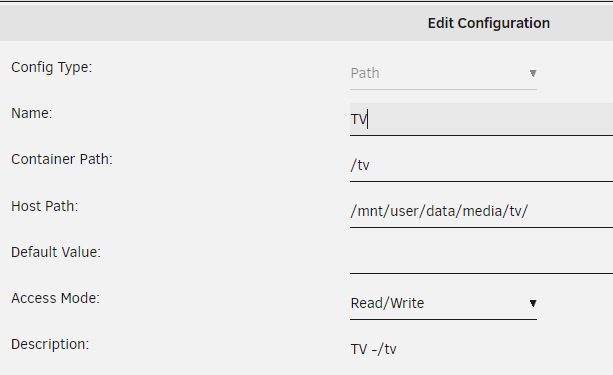
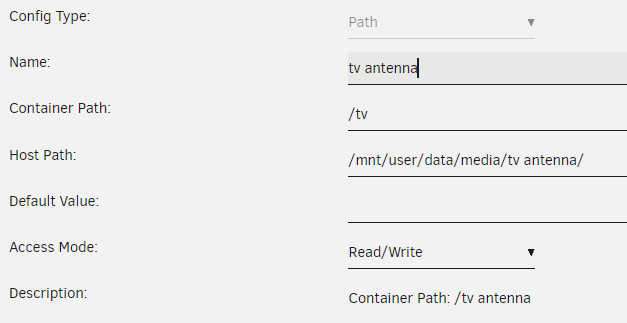
How do I setup paths for this Emby container for two tv folders? Here are the two I want: /data/media/tv/ (used for tv shows from Usenet) /data/media/tv antenna/ (used for tv shows from antenna and Emby DVR) My share is "data". Here is for 1. data/media/tv Do I need to create a another container path for "tv antenna" for recordings? If yes, what do I put for container path and host path? The following did not work:
-
I clicked "fix" and it fixed it. Easy peasy. Now my "fix common problems" is clean, which I like. Thanks.
-
Roon and Emby seem to be working now. Maybe it just needed one or two reboots. xthursdayx, do you mean that the TEMPLATE URL warning is to be expected, but of no concern, and that it is OK, regardless if i click nothing, click fix, or click ignore? If the answer is "yes" that would be good news.
-
10 minutes later. With emby kept 1900 to 1900, I rebooted unraid. Both roon and emby containers autostarted. Emby works correct - I can delete files. But now I get a "fix common problems" message that says Before clicking "apply fix" i look at roon container settings and it says "Docker Hub URL: https://hub.docker.com/r/steefdebruijn/docker-roonserver/ " Is this bad? Is it a result of UPNP not working? Should I click "apply fix"? Next, I turned off all autostarts then rebooted again, started only roon, kept emby off, and I still get the same warning about roonserver template URL.

-
Wikipedia says "UPnP uses UDP port 1900". Now I find, for some reason, both Roon and Emby experts find it easy to overlook that they both use port 1900 for UPNP and DLNA, but when pointed out, they agree it is true. https://community.roonlabs.com/t/roon-server-udp-1900/58299/10 https://emby.media/community/index.php?/topic/61815-what-are-embys-linux-server-ports/. With emby port 1900 kept as 1900, I noticed, if I start emby container first, then roon, then they both start, but I cannot delete files from within emby. And, if roon container is started first, I cannot start emby container. When i remapped my emby container port 1900 to be 1901 on the host, it did allow me to start emby when roon was running, but now I cannot delete media files (on unraid array) from within emby. I turned off Roon and kept it off, set the port back to 1900 for emby, and then emby worked good and could delete media files. So I have not solved my problem yet, but I am sure it is to do with port 1900. If anyone knows how to fix this, please tell. Here is my emby settings. UPDATE 2021-6-20: I fixed a path problem in Emby and then no longer had any port problems with Emby and Roon.

-
Thanks very much for the info.
-
So you figured out that same port was being used for roon container and other container? How? The way I did it: looking at error logs when trying to start emby said somethin like "conflict with port 1900". Roon did not say what it used, so I stopped Roon container. Only then was I able to start emby. Then I remapped emby 1900 to 1901. Then both could run. Maybe someone here can figure out how to see what ports it uses. UPDATE 2021-6-20: I fixed a path problem in Emby and then no longer had any port problems with Emby and Roon.
-
What ports does this container use? Can I somehow see which ports it uses, like with most containers? I had a conflict, where an Emby container wanted to use port 1900. Some trial and error gave me a clue that this Roon container may have used 1900. I reassigned emby port 1900 to 1901, so now emby runs, but not well. I have had problems with emby, and other unraid things, so now I wonder if this was the cause. UPDATE 2021-6-20: I fixed a path problem in Emby and then no longer had any port problems with Emby and Roon.
-
Just now, I updated from v 1.8 build 790 to 1.8 build 795 and it went good on everything: Unraid core, ipad, iphone, and Win10 desktop. 😀Good job! Only 305 builds to go to reach build 1000. 🤪
-
Did anybody do the Roon update that came in about May 20? I am afraid to be the first. Every time I start the program it nags me.
-
I'm interested too. I am doing more with my unraid than I first thought I would, so I want 4 cores or more -maybe 8 cores would about right. I want low power like TDP 35 Watts or less. Intel screwed me with the 1151 socket then they quickly made all new CPUs incompatible. I have to choose betrween buying an old used Intel i7-7700T for about $300, or get a new CPU and Motherboard. It seems AMD give a much longer life to the sockets.
-
Is this info still valid in 2021 ? Cause I need to try this to see if it fixes my problems.
-
Have I got this correct: If I have a new external hard drive using USB3, and: A) if it is intended for unassigned devices (not the array), then I would delete all partitions, then run preclear if I want a bit of a stress test, then format (like NTFS). Then I can shuck it if desired, at my own risk. B) if it is intended to be readied to be put into the array, then I would delete all partitions, then run preclear if I want a bit of a stress test, then DO NOT format. Then I can shuck it so I can use SATA instead of USB3, at my own risk. Then add to array. When adding to array it is automatically "formatted" if needed. Is the above correct? if it is intended for unassigned devices, which preclear option should I use to stress test: "Verify all the disk", or "erase all the disk" or ? Thanks.
-
A few post above this I reported my Roon core update went well. One possible minor glitch is that it may require a restart, or a power cycle, especially if you also update a remote later. Here is why I say that: The Unraid core update was working good for me for a few days, then came an update on my remote ipad. Then it worked for an hour. Then it stopped working. I tried power cycle on my Auralic G2 (a music computer between Unraid and DAC), which usually fixes these issues, and I tried other things for 40 minutes, with no success. Then when I did power cycle on Unraid, I was able to get things to work again. Prior to this I never needed to restart Roon docker or power cycle the Unraid NAS to fix problems. But next time it won't take me 40 minutes before I try that. Has anyone else had this happen?
-
Using this container, I was able to do an update on my Unraid core last night with good results. From 1.8 785 to 1.8 790. I am very pleased and relieved it can do this. Thanks to steef, and dkerlee, and xthursdayx ! My Unraid machine only uses 35 watts overall, and now I don't need to run my other desktop to play music. My other audio equipment are energy hogs, even on standby. I had to setup a web based power switch to easily disconnect them from power when I am not listening.

