





dcoulson
Members
-
Joined
-
Last visited
-
Hi all, Since this plugin is no longer maintained upstream, I've forked it and I'm planning to keep it going: https://github.com/davidcoulson/LLDP-unRAID Big thanks to desertwitch/Rysz for all the original work. The first release (2026.10.17) is mostly maintenance: - lldpd updated to 1.0.22, which fixes a CVE in 1.0.20 - lldpd now runs with privilege separation instead of as root for everything - general hardening of the config handling and the settings page I'm running it on 7.4.0-rc.1 and it's been fine so far. To switch over, go to Plugins > Install Plugin and paste: https://raw.githubusercontent.com/davidcoulson/LLDP-unRAID/main/plugin/ulldpd.plg Your existing settings carry over. New in 2026.10.18: a proper neighbour table, a dashboard tile, and settings for which interfaces and management IPs get advertised. That last one should finally sort out the IPv4/IPv6 management address request from earlier in this thread. Bugs and requests go on GitHub issues: https://github.com/davidcoulson/LLDP-unRAID/issues
-
With 80+ containers the Docker tab gets hard to scan, so I made a small plugin that adds a search box and filter chips above the container list. Type to filter by name, image, folder, network, IP, port or compose stack. Supports key:value (image:linuxserver, net:br0, port:8080, cpu:4, label:...), is: filters (is:unhealthy, is:update, -is:running) and quoted values. Chips with live counts: Running, Stopped, Healthy, Unhealthy, Update available, Autostart on/off, WebUI, CPU pinned, plus a network picker. Works with folder.view2: folders with matches open automatically and show a matches/total badge, then close again when you clear the search. / to focus, Esc to clear. Remembers the last filter, and the URL hash can be shared (/Docker#q=plex&f=running). Follows all four themes. It only hides rows, never edits them, so sorting, drag-to-reorder, context menus, autostart switches and Basic/Advanced view work as usual. No stock files are changed. Unraid 7.0+. Install via Plugins → Install Plugin: https://raw.githubusercontent.com/davidcoulson/unraid-docker-search/main/docker.search.plg Source and issues: https://github.com/davidcoulson/unraid-docker-search (MIT) AI disclosure: I wrote this with an AI coding assistant (Claude), guided and tested by me: I set the requirements and design and tested it on my own server (Unraid 7.4, 80+ containers, folder.view2). Before release a second AI (OpenAI Codex) did an independent code review. It found no critical issues, and I fixed what it did flag: crafted URL filter values like #f=constructor could break filtering full image tags weren’t searchable when the page shortens them extra container data (CPU pinning, networks) didn’t refresh after changes a folder you closed while filtering could reopen on a list refresh autostart switch changes didn’t update the counts straight away the data endpoint could return broken JSON if Docker was down, and didn’t cap label size It also caught that my sample-data fixture still held some private folder names, which I removed before publishing. The filter logic has automated tests in the repo. Bug reports welcome.
-
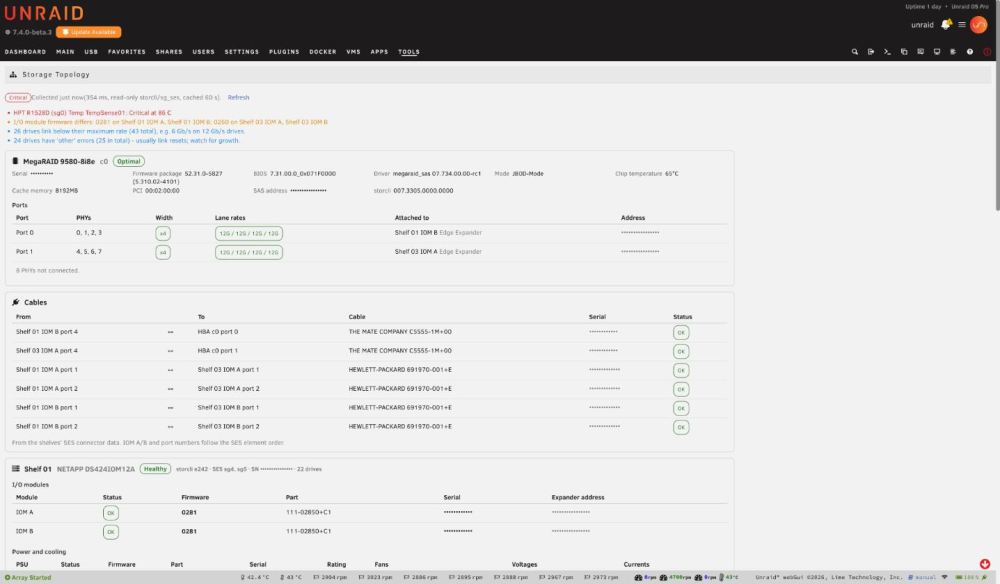
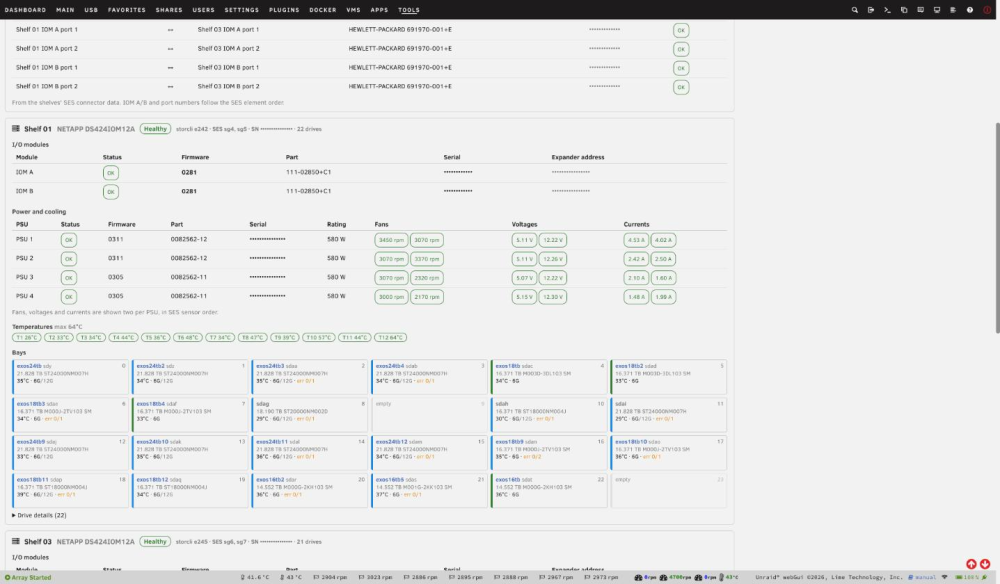
Mods: this is the support thread for my first plugin. Could you move it to Plugin Support? Thanks! Storage Topology adds a read-only page at Tools → System Information → Storage Topology that shows how your SAS storage is wired and how healthy it is, from the controller down to each bay. I wrote it because I couldn't find a single place that answered "which HBA port goes to which shelf, is every lane at 12 Gb/s, are both I/O modules on the same firmware, and is a PSU or fan unhappy?" without running a dozen storcli and sg_ses commands. What it shows Controllers: model, firmware package, BIOS, driver, mode (e.g. JBOD), chip temperature, and every port with its width (x4/x8) and the link rate of each lane, plus what is attached to it. Cable map: which controller port goes to which shelf I/O module port, and shelf-to-shelf cables, with the cable's vendor, part and serial number where the enclosure reports them. Disk shelves: I/O modules (status, firmware, serial), power supplies (status, firmware, wattage), fans (rpm), voltages, currents and all temperature sensors. Bay grid: each bay with the Unraid disk name (linked to the disk page), size, model, temperature and negotiated vs maximum link rate (e.g. 6G/12G), with error counts flagged. Drive details: firmware, both SAS paths with their link rates, and media, other and predictive-failure counts. Firmware overview: every controller, I/O module, PSU and drive model with its versions. Parts of the same kind running different firmware are highlighted. Problems list at the top: failed or degraded elements, firmware mismatches, narrow or slow links, single paths, drive errors, and over-temperature enclosures. That includes NVMe switch cards that expose SES; mine flagged a HighPoint card running at 86 °C. It changes nothing The plugin only reads: storcli … show … J nolog, if storcli is installed sg_ses status pages lsscsi and lsblk the kernel's SAS and enclosure sysfs emhttp's disks.ini There are no settings, no background service and no cron job. Data is collected when you open the page and cached for 60 seconds, and only one collection runs at a time. Each command has a timeout, and a storcli that stops responding isn't sent more commands. Opening the page never wakes a spun-down drive: per-drive storcli detail is skipped while any disk is spun down. Requirements Unraid 7.0 or newer. sg_ses (sg3_utils 1.48+). Unraid 7 already includes it. Optional: Broadcom/LSI storcli (or storcli64) for controller, port and per-drive detail. Without it, the page falls back to the kernel's view: HBA PHY link rates, and bays mapped to disks through /sys/class/enclosure. MegaRAID controllers hide their SAS layer from the kernel, so they need storcli. Tested on Broadcom MegaRAID 9580-8i8e in JBOD mode, with two NetApp DS424 (IOM12) shelves, multipathed, 43 drives HighPoint Rocket 1528D NVMe switch card (SES temperature, fan and slot status) The kernel-view path for LSI HBAs in IT mode (mpt3sas) is implemented but not yet tested on real IT-mode hardware. If you run one, I'd love a report. Other shelves (Supermicro, Dell MD12xx, HP D2600/D3600, EMC/Xyratex) should show status and sensors. Cable and port labels currently come from NetApp's descriptor format, so they may be sparser on other shelves. Install Plugins → Install Plugin, and paste: https://raw.githubusercontent.com/davidcoulson/unraid-storage-topology/main/storage-topology.plgSource and issues: https://github.com/davidcoulson/unraid-storage-topology (MIT) Reporting problems or adding support for your hardware Please post in this thread or open a GitHub issue. Include: your controller and enclosure models what looks wrong if you can, the output of: lsscsi -g sg_ses --json --join /dev/sgN for each enclosure (with storcli) storcli /call show all J nolog and storcli /call/eall show all J nolog Feel free to blank out serial numbers first. Changelog 2026.10.09a: the install message now reports storcli correctly. 2026.10.09: first release.
-
I'm trying to move from a 9580-8i8e to a 9600W-16e but the 9600W keeps booting into safe mode and doesn't detect any drives (although it can see the enclosures and says they're faulted). I put the 9600W in a proxmox box running a 6.8 kernel and it was able to see the drives, so not sure if this is an unraid problem or some other hw incompatability. Anyone else run into similar problems?
-
Is there roadmap to have visibility into pools? I am running 7.0.1 and moving to ZFS pools away from the traditional array and it looks like controlr doesn't show any metrics related to pools yet?
-
dcoulson changed their profile photo
-
I'm in the process of moving my array to a new pool running ZFS - Is there a way to run multiple unbalance operations at the same time - There's plenty of disk IO capacity so I don't expect that is an issue, but I have 12 array data drives and it's going to take forever doing them one at a time. Or should I just manually run the rsync commands the plan generates and have them work behind the scenes?
-
Now we're getting native ZFS in UnRAID, is there a roadmap to have multipath support for ZFS pools? Understand multipath isn't supported in unraid today and probably isn't desirable for use as part of UnRAID array, however it would be super helpful for folks running ZFS pools on SAS shelves with multiple controllers. Is there a mechanism for users to sponsor features like this?
-
I've had this UnRAID system forever, but have done a lot of hardware swapping around over the years. Last hardware changes were over the Holidays, and things have been running stable for 4-6 weeks before it broke in the last 10-14 days. Current HW: Gigabyte TRX40 board w/ 3970X CPU 3070 GPU for OS 4090 GPU for VFIO NVMe boot drive for VM passed via VFIO Currently, if I boot my Windows 11 VM with the 4090 attached to it, it will run fine until I put any load on the GPU then it will crash in 3-5 minutes. Load can be just GPU acceleration for remote access from Parsec, running Kombustor or running Valley benchmark. Windows will reboot and UnRAID will log " vfio-pci 0000:4a:00.0: vfio_bar_restore: reset recovery - restoring BARs". Sometimes the UnRAID system will lock up shortly afterwards, other times it will keep on running. So far I have tried the following changes to UnRAID/HW with no difference: Enabled/Disabled CSM Enabled/Disabled 4G encoding and resizable Bar Removed memory overclock/XMP Deleted VM and re-created it from scratch - Both Q35 and 440fx Fresh windows 11 install w/ current nvidia drivers Reseated CPU/ram/GPUs/etc. Booting the Windows 11 NVMe drive works fine and the GPU can run Kombustor for hours without any issues. I've also pulled the GPU and tried it in a different box and it runs stable. I have a 'new to me' TRX40 board coming in a couple of days, so hoping it's a weird HW issue, but I can't figure out what the heck is going on. Any ideas, or do I just need to continue to replace hardware until the problem goes away?
-
I have a bunch of drives in a ZFS pool that i have flagged as 'passed through' - I added two SSDs to my system to integrate into the ZFS pool, however the 'passed through' option isn't available for them via the edit page. The SSDs have a different icon, so not sure if UD identified them as something that can't be passed through? No idea what debug info is needed/available
-
I'm running 6.11.5 - I am trying to make sure my docker containers do not utilized the isolated cores that I want to dedicate to VMs. I realize everyone says that docker won't use isolated cores, but that doesn't appear to be my experience right now - For example, I am isolating 8-15, but seeing containers use it (tdarr_node for example), and the containers themselves have no pinning configured at all. So could be a bug I suppose?
-
Even though I have 8 of my cores isolated. (8 cores, 16 threads), I am still seeing docker container processes use them - Only way around that seems to be pin the docker containers to other cores to stop that happening. Unless there is another fix for it?
-
Hi- I recently upgraded from a 24C/48T CPU to a 32C/64T CPU and now need to rearrange all my docker and VM pinning - I only have 10 VMs, so that was super easy, but I have over 70 docker containers. 99% of them use the exact same pinning config. Is there a way from CLI or API to modify the pinning config for a container in UnRAID, vs having to wear my mouse out clicking on the CPU pinning settings page. Also is there a way to set a 'default' pinning config for new containers that are created? or do I need to adjust every time i add something?
-
I have a 24C/48T system which has "isolcpus=6-11,30-35" set at boot time to isolate 6C/12T for a VM. I am still seeing docker containers running on these cores when I do "ps -eo pid,psr,comm", and see their CPU utilization in the dashboard with the VM shut down. Do I have to explicitly pin the containers to other cores/threads, or is this functionality broken? I don't see a way to set the cpuset globally for the docker cgroup, and since I have 60+ containers I was hoping to not have to manually set the cpuset on each one - that's a lot of clicking. Is there a better approach for this, or am I misunderstanding how isolcpu works?
-
What's the approach to add more app icons to this plugin? My Unraid box has both Shinobi and t-rex miner dockers utilizing my GPU - GPU stats plugin obviously shows there are two apps using it, however there isn't a little icon like we have for Plex transcoding. Would be great to get a list together of the popular apps that use the GPU and get icons for them into the plugin?
-
What GPU are you using and what algorithm for mining? Can you post your logs?




