





WyoFarr
Members
-
Joined
-
Last visited
Everything posted by WyoFarr
-
Not sure exactly what is happening, google is telling me that the wrong version of pytorch, not sure the google solutions will work as a i don't know that i can console in and correct this as it's happening during the container startup. == Pre-installing/Upgrading torch == Installing torch using uv with backend: cu130 Installing: torch torchvision torchaudio == Installing/Updating from ComfyUI's requirements !! ERROR: ComfyUI requirements install/upgrade failed !! Exiting script (ID: 100) !! ERROR: subscript failed !! Exiting script (ID: 1)
-
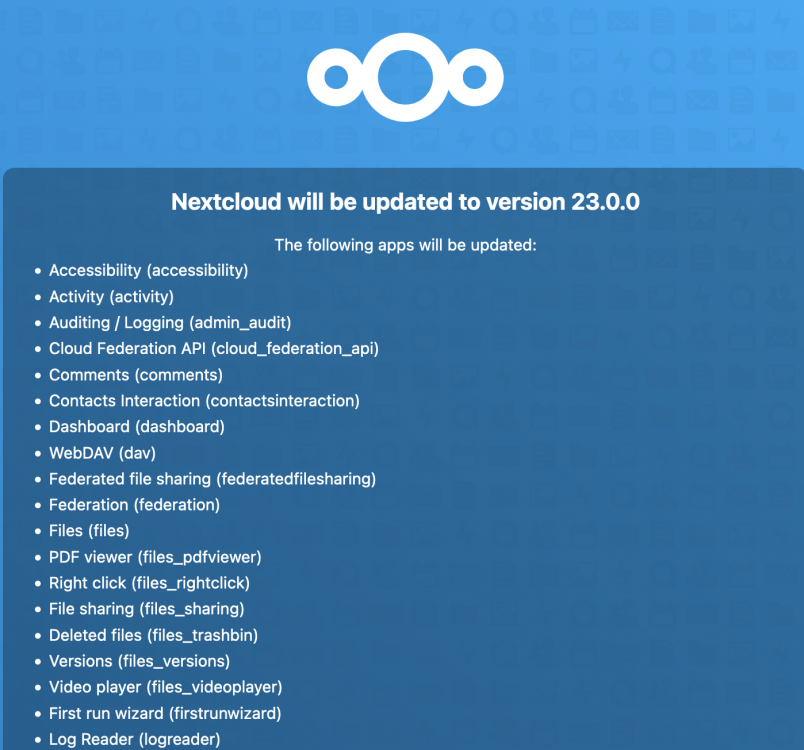
Guys, apologies for this as I'm sure it's been answered and it might be more appropriate in the linux io forum. Was in the process of grading this morning, 21.0.5 to 21.0.7 and the process failed during delete old file. I unfortunately couldn't get back to the updater due to maintenance mode already being active. This might have been a dumb choice but I edited the config.php file changed maintenance mode to false and it now takes me to the installer page, this seemed like it was great except it's trying to install version 23 and is of course throwing the you can't step between major version error if I hit install. I've downloaded 21.0.7 as state in the link below, but for the life up me I have no idea where the install folder is. Is the only way out of this to trash the docker and rebuild it all? Any help or point to a post would be appreciated. https://help.nextcloud.com/t/updates-between-multiple-major-versions-are-unsupported/7094
-
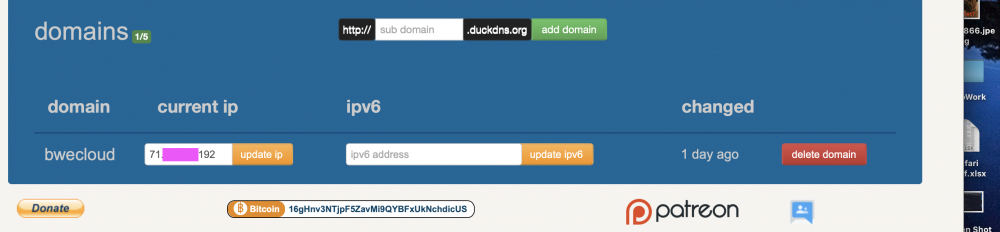
most definitely not what duck DNS is pointing to...if I enter the url that I'm redirecting to duck DNS without port forwarding on and the firewall letting the connection through I get to my routers login page. It's the only reason I'm still working under the assumption that this is a router or docker config issue. If we think duck DNS is the issue, I can just redirect to my ip from my domain. and worry about updating it when/if it changes. I
-
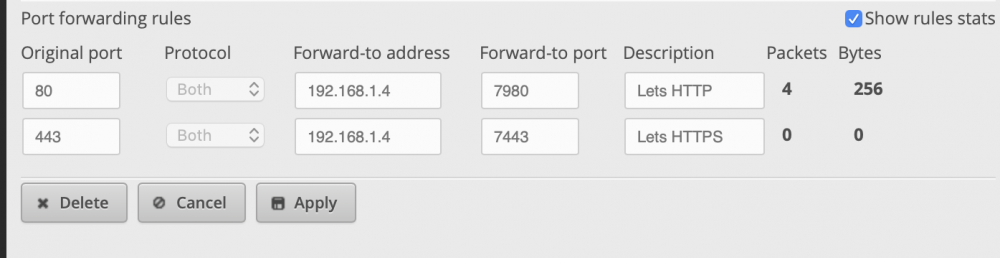
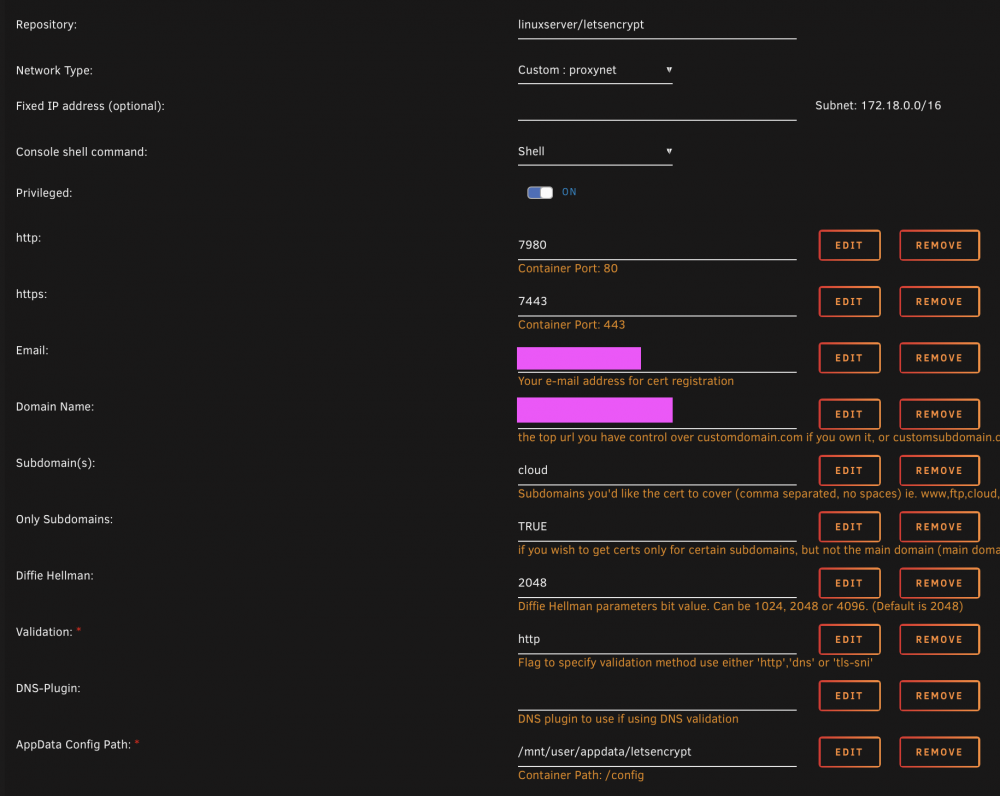
Sorry where are you seeing this in the log? In the original post I had 180 and 1443 like the space invader one video. after bashing my head against this I decided to start over, this time the ports in use at 7980 and 7443. I've rebooted everything multiple times it seems like the port forwarding id working but I let's encrypt is failing to get back to itself. I did just notice this in the log. it's using a self assigned IP address for the server? 169.xxx. etc is most definitely not what unsaid is configured to, is this my problem/ if it is how do I fix this?

-
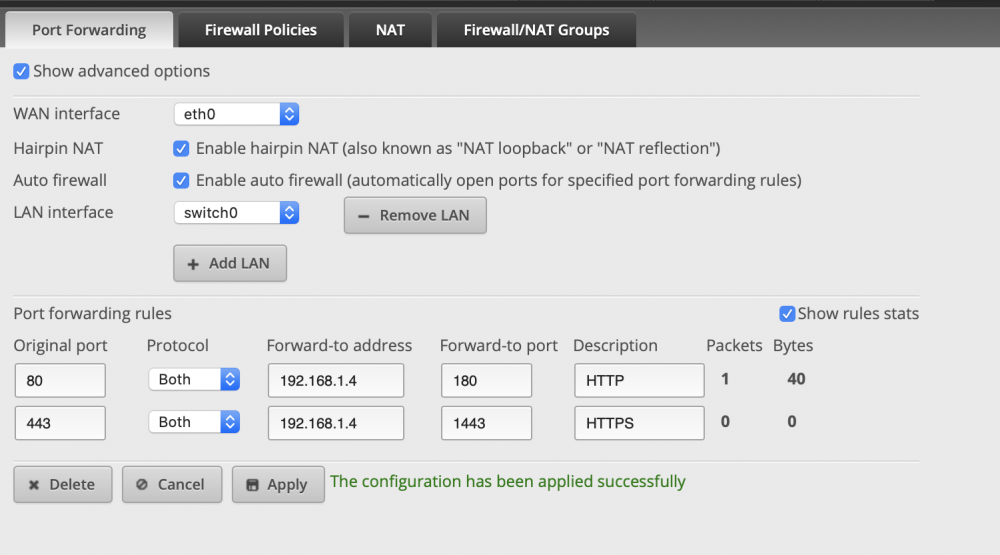
Thanks for the help, I've restarted the router and I'm still getting the same error messages. I changed the ports and updated the let'sencrpyrt so it's using the same ports. it looks like I'm receiving packets just perhaps not the let's encrypt? Screen shot of my docker set up attached too. Is there something wrong in the flow? trying to cert my cloud.*****.com. which redirects to ****.duckdns.com which when I load that webpage it appears to come back to my router as I see the packet increment by 1 and bytes by 128.
-
Hi All, After two days of googling, a bit of an exaggeration, I can't figure out why I'm failing certification. I think my port forwarding is set up correctly, running an edgerouter x sfp. ***** the domain name but it's filled out properly I think. here's the log output, and attached is a screen shot of my port forwarding. 2048 bit DH parameters present SUBDOMAINS entered, processing SUBDOMAINS entered, processing Only subdomains, no URL in cert Sub-domains processed are: -d ***** E-mail address entered: ***** http validation is selected Generating new certificate /usr/lib/python3.8/site-packages/jmespath/visitor.py:32: SyntaxWarning: "is" with a literal. Did you mean "=="? if x is 0 or x is 1: /usr/lib/python3.8/site-packages/jmespath/visitor.py:32: SyntaxWarning: "is" with a literal. Did you mean "=="? if x is 0 or x is 1: /usr/lib/python3.8/site-packages/jmespath/visitor.py:34: SyntaxWarning: "is" with a literal. Did you mean "=="? elif y is 0 or y is 1: /usr/lib/python3.8/site-packages/jmespath/visitor.py:34: SyntaxWarning: "is" with a literal. Did you mean "=="? elif y is 0 or y is 1: /usr/lib/python3.8/site-packages/jmespath/visitor.py:260: SyntaxWarning: "is" with a literal. Did you mean "=="? if original_result is 0: /usr/lib/python3.8/site-packages/digitalocean/LoadBalancer.py:19: SyntaxWarning: "is" with a literal. Did you mean "=="? if type is 'cookies': /usr/lib/python3.8/site-packages/CloudFlare/cloudflare.py:65: SyntaxWarning: "is" with a literal. Did you mean "=="? if self.email is '' or self.token is '': /usr/lib/python3.8/site-packages/CloudFlare/cloudflare.py:65: SyntaxWarning: "is" with a literal. Did you mean "=="? if self.email is '' or self.token is '': /usr/lib/python3.8/site-packages/CloudFlare/cloudflare.py:89: SyntaxWarning: "is" with a literal. Did you mean "=="? if self.email is '' or self.token is '': /usr/lib/python3.8/site-packages/CloudFlare/cloudflare.py:89: SyntaxWarning: "is" with a literal. Did you mean "=="? if self.email is '' or self.token is '': /usr/lib/python3.8/site-packages/CloudFlare/cloudflare.py:113: SyntaxWarning: "is" with a literal. Did you mean "=="? if self.certtoken is '' or self.certtoken is None: Saving debug log to /var/log/letsencrypt/letsencrypt.log Plugins selected: Authenticator standalone, Installer None Obtaining a new certificate Performing the following challenges: http-01 challenge for ***** Waiting for verification... Challenge failed for domain ***** http-01 challenge for ***** Cleaning up challenges Some challenges have failed. IMPORTANT NOTES: - The following errors were reported by the server: Domain: ***** Type: unauthorized Detail: Invalid response from http://*****/.well-known/acme-challenge/P_1kowh6nWwToCI-ORAGFWGYL3TfRmq28Znn3o6Q5IA [162.241.225.183]: "<!DOCTYPE HTML PUBLIC \"-//IETF//DTD HTML 2.0//EN\">\n<html><head>\n<title>404 Not Found</title>\n</head><body>\n<h1>Not Found</h1>\n<p" To fix these errors, please make sure that your domain name was entered correctly and the DNS A/AAAA record(s) for that domain contain(s) the right IP address. ERROR: Cert does not exist! Please see the validation error above. The issue may be due to incorrect dns or port forwarding settings. Please fix your settings and recreate the container
-
I'm seeing the same problem. When I reload the page the scan starts again, does that mean no problems were found? I've included log and diagnostics files just in case. athena-diagnostics-20190718-1054.zip athena-syslog-20190718-1056.zip


