





renk1
Members
-
Joined
-
Last visited
Everything posted by renk1
-
I'm also gettting this error
-
Yeah I think they're toast, can't get them back on unraid. Thanks mate
-
I don't think that the are spinning but can't really tell because of the vibrations. I tried 2 others that i had lying around and they do get detected and appear as new drives on unraid, I then took 2 of the non working disks and plugged them on a windows pc and i hear the usb drive sound but they don't seem to be spinning, disk management is asking me to choose MBR or GPT. Are the drives probably dead or can I save them somehow?
-
Also the drives are not detected in the hba bios on the backplane... The psu is a 650w kinda old but working fine before the change but it doesn't use the original cables, I guess I'll try and buy another one tomorrow
-
I've also tried with 2 sas sff8643 reverse breakout from the backpland to 4 sata each on the motherboard and are also not detected. The backplane lights up on the disks that are occupied but the system don't seem to be detected. I'm a bit perplexed because now I'm trying and bypass 1 drive connecting sata power and a sata cable directly to the motherboard/drive it's not detected
-
Hi! So I had server running fine but needed to add capacity and changed the case to an unykach hsw4u6508 that has a backplane, added an hba Broadcom LSI 9305-16i supposedly already in It mode connected with 2 sff8643 to sff8643 and 2 molex for power but now the drives aren't recognized. I also added a 2nd gpu but the hba seems to be recognized on unraid. Here's my syslog so that any gentil soul can help me syslog.txt
-
@sebastianklingk hi! Did you managed to get this sorted? I'm having the same problem
-
I didn't touch any file, I just updated and got those errors, but I re-ran the update and it seems to have fixed it. Thanks!
-
Hi! I'm getting this alerts, how do i update or get rid of them? Version Compatibility Warning: Frontend version 1.25.11 is outdated. Backend requires 1.36.14 or higher. Visit https://docs.comfy.org/installation/update_comfyui#common-update-issues for update instructions. Legacy ComfyUI-Manager data migrated. See terminal for details. thank you!
-
detectors: onnx: type: onnx gpu: true input_tensor: nchw input_dtype: float num_threads: 2 model_path: /config/model_cache/yolox_m.onnx Sorry I forgot to post my config, I did have it defined but still gives me the same error. Tried with float and float_denorm
-
Hi! I'm trying a fresh install with an rtx a4000 and the yolox_m.onnx but I'm getting this error: onnxruntime.capi.onnxruntime_pybind11_state.InvalidArgument: [ONNXRuntimeError] : 2 : INVALID_ARGUMENT : Unexpected input data type. Actual: (tensor(uint8)) , expected: (tensor(float)) any ideas why? thanks
-
I just updated and it's working, I'll report back if anything changes. Cheers!
-
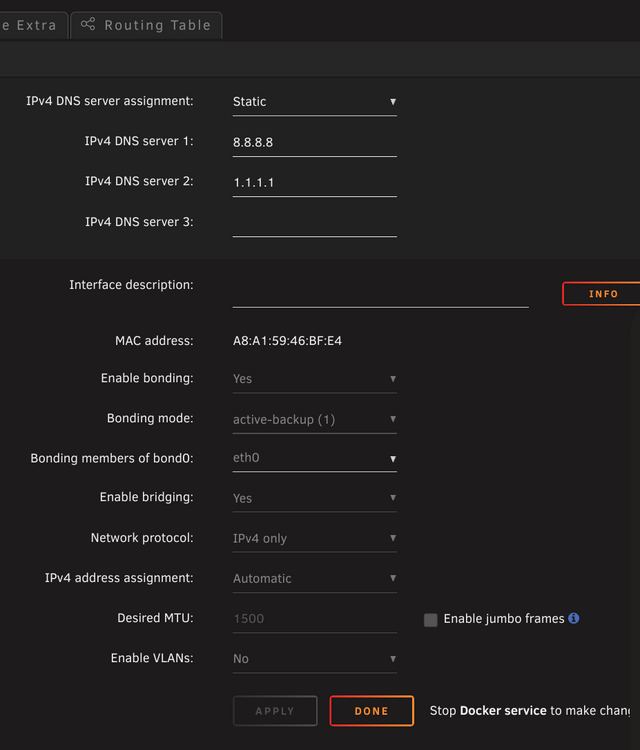
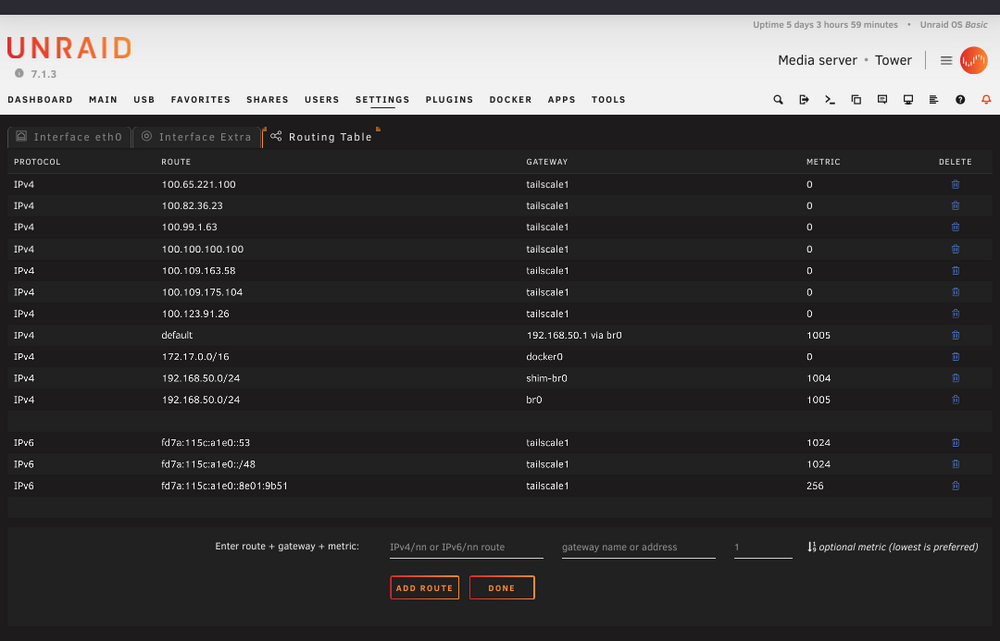
I've recently started having trouble updating the plugins/dockers, in the fix common problems pluging it says the system can't reach github and that I should add my router gateway adress and/or reboot the router (which usually works for a few minutes). Here's my routing table, I have my router gateway adress there, is there anything wrong? Thank you
-
While browsing closed issues on github I saw some reports of users pointing that they could only run models up to 320 so I changed to yolov7-320 and it seems to be stable. thanks @yayitazale
-
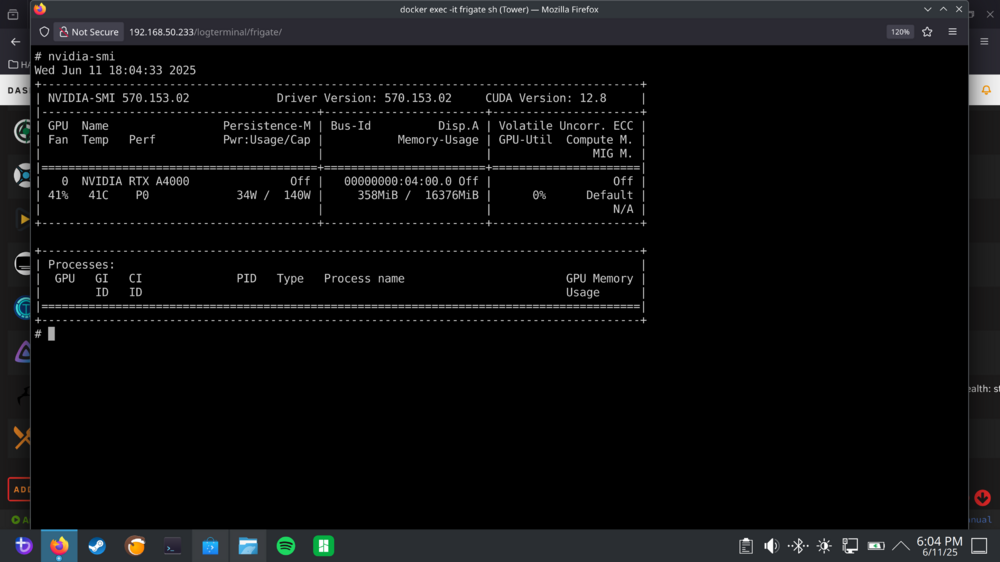
Correct if I'm wrong but in the logs it mentions some gpu stats for a few seconds before the python segmentation fault, doesn't it mean that is being used? Also, on the frigate gui I could see rtx a4000 utilization on the bottom. I'm using the Nvidia Driver Version: 570.153.02 from the production branch, I'm using the tensorrt branch and already added the --runtime=nvidia , corrected the tensorrt part like you recommended and I'm still getting the same error... I also ran nvidia-smi and it seems fine I think EDIT: don't really know if there is anything else I have to do regarding gpu passthrough
-
So I was previously running a frigate instance with a quadro p1000 and a reolink doorbell with no problems but lost the config when I changed to an rtx a4000. I tried to generate a new config and it seems to be in a restart loop. anyone can help? config: mqtt: host: 192.168.50.5 user: frigatemqtt password: xxxxxxxxxxx detectors: tensorrt: type: tensorrt device: 0 model: path: /config/model_cache/tensorrt/8.5.3/yolov7-tiny-416.trt input_tensor: nchw input_shape: [1, 3, 416, 416] go2rtc: streams: doorbell: - "ffmpeg:http://192.168.50.19/flv?port=1935&app=bcs&stream=channel0_main.bcs&user=xxxxxxxxxxxxxx&password=xxxxxxxxxxx#video=copy#audio=copy#audio=opus" - rtsp://192.168.50.19/Preview_01_sub doorbell_sub: - "ffmpeg:http://192.168.50.19/flv?port=1935&app=bcs&stream=channel0_ext.bcs&user=xxxxxxxxxxxxx&password=xxxxxxxxxxxxx" cameras: doorbell: ffmpeg: inputs: - path: rtsp://127.0.0.1:8554/doorbell input_args: preset-rtsp-restream roles: - record - path: rtsp://127.0.0.1:8554/doorbell_sub input_args: preset-rtsp-restream roles: - detect detect: width: 416 height: 416 fps: 5 snapshots: enabled: true timestamp: true bounding_box: true retain: default: 2 record: enabled: true retain: days: 7 mode: motion logs s6-rc: info: service s6rc-fdholder: starting s6-rc: info: service s6rc-oneshot-runner: starting s6-rc: info: service s6rc-oneshot-runner successfully started s6-rc: info: service fix-attrs: starting s6-rc: info: service s6rc-fdholder successfully started s6-rc: info: service fix-attrs successfully started s6-rc: info: service legacy-cont-init: starting s6-rc: info: service legacy-cont-init successfully started s6-rc: info: service trt-model-prepare: starting s6-rc: info: service log-prepare: starting s6-rc: info: service log-prepare successfully started s6-rc: info: service nginx-log: starting s6-rc: info: service go2rtc-log: starting s6-rc: info: service frigate-log: starting s6-rc: info: service certsync-log: starting s6-rc: info: service trt-model-prepare successfully started s6-rc: info: service nginx-log successfully started s6-rc: info: service frigate-log successfully started s6-rc: info: service go2rtc-log successfully started s6-rc: info: service go2rtc: starting s6-rc: info: service certsync-log successfully started s6-rc: info: service go2rtc successfully started s6-rc: info: service go2rtc-healthcheck: starting s6-rc: info: service frigate: starting s6-rc: info: service go2rtc-healthcheck successfully started s6-rc: info: service frigate successfully started s6-rc: info: service nginx: starting s6-rc: info: service nginx successfully started s6-rc: info: service certsync: starting s6-rc: info: service certsync successfully started s6-rc: info: service legacy-services: starting s6-rc: info: service legacy-services successfully started 2025-06-11 00:56:16.297994515 [2025-06-11 00:56:16] peewee.sqliteq INFO : writer received shutdown request, exiting. 2025-06-11 00:56:16.386250666 [INFO] Service Frigate exited with code 0 (by signal 0) 2025-06-11 00:56:16.388627480 exit with signal: terminated 2025-06-11 00:56:16.394064340 [INFO] The go2rtc service exited with code 0 (by signal 0) No models to convert. 2025-06-11 00:56:21.020697518 [INFO] Preparing new go2rtc config... 2025-06-11 00:56:21.021912341 [INFO] Preparing Frigate... 2025-06-11 00:56:21.023507578 [INFO] Starting NGINX... 2025-06-11 00:56:21.097524499 [INFO] Starting Frigate... 2025-06-11 00:56:21.099819157 [INFO] Starting certsync... 2025-06-11 00:56:21.174543616 127.0.0.1 - - [11/Jun/2025:00:56:21 +0100] "" 400 0 "-" "-" "-" 2025-06-11 00:56:21.339580567 [INFO] Starting go2rtc... 2025-06-11 00:56:21.416299222 00:56:21.416 INF go2rtc platform=linux/amd64 revision=b2399f3 version=1.9.2 2025-06-11 00:56:21.416302448 00:56:21.416 INF config path=/dev/shm/go2rtc.yaml 2025-06-11 00:56:21.416662613 00:56:21.416 INF [api] listen addr=:1984 2025-06-11 00:56:21.416867524 00:56:21.416 INF [rtsp] listen addr=:8554 2025-06-11 00:56:21.416989075 00:56:21.416 INF [webrtc] listen addr=:8555/tcp 2025-06-11 00:56:22.834686221 [2025-06-11 00:56:22] frigate.util.config INFO : Checking if frigate config needs migration... 2025-06-11 00:56:22.843014055 [2025-06-11 00:56:22] frigate.util.config INFO : frigate config does not need migration... 2025-06-11 00:56:23.878169248 [2025-06-11 00:56:23] frigate.util.services INFO : Automatically detected nvidia hwaccel for video decoding 2025-06-11 00:56:23.926827426 [2025-06-11 00:56:23] frigate.app INFO : Starting Frigate (0.15.0-6cb5cfb) 2025-06-11 00:56:23.932025140 [2025-06-11 00:56:23] peewee_migrate.logs INFO : Starting migrations 2025-06-11 00:56:23.932179464 [2025-06-11 00:56:23] peewee_migrate.logs INFO : There is nothing to migrate 2025-06-11 00:56:23.954137113 [2025-06-11 00:56:23] frigate.app INFO : Recording process started: 473 2025-06-11 00:56:23.955190679 [2025-06-11 00:56:23] frigate.app INFO : Review process started: 482 2025-06-11 00:56:23.957056882 [2025-06-11 00:56:23] frigate.app INFO : go2rtc process pid: 105 2025-06-11 00:56:23.972708176 [2025-06-11 00:56:23] detector.tensorrt INFO : Starting detection process: 489 2025-06-11 00:56:23.988742370 [2025-06-11 00:56:23] frigate.app INFO : Output process started: 506 2025-06-11 00:56:24.007124332 [2025-06-11 00:56:24] frigate.app INFO : Camera processor started for doorbell: 523 2025-06-11 00:56:24.026536536 [2025-06-11 00:56:24] frigate.app INFO : Capture process started for doorbell: 537 2025-06-11 00:56:24.122939122 [2025-06-11 00:56:24] frigate.detectors.plugins.tensorrt INFO : Loaded engine size: 29 MiB 2025-06-11 00:56:24.214014396 [2025-06-11 00:56:24] frigate.api.fastapi_app INFO : Starting FastAPI app 2025-06-11 00:56:24.276486110 [2025-06-11 00:56:24] frigate.detectors.plugins.tensorrt INFO : [MemUsageChange] Init cuBLAS/cuBLASLt: CPU +6, GPU +8, now: CPU 187, GPU 208 (MiB) 2025-06-11 00:56:24.288052217 [2025-06-11 00:56:24] frigate.detectors.plugins.tensorrt INFO : [MemUsageChange] Init cuDNN: CPU +2, GPU +10, now: CPU 189, GPU 218 (MiB) 2025-06-11 00:56:24.293538561 [2025-06-11 00:56:24] frigate.detectors.plugins.tensorrt INFO : [MemUsageChange] TensorRT-managed allocation in engine deserialization: CPU +0, GPU +28, now: CPU 0, GPU 28 (MiB) 2025-06-11 00:56:24.294846411 [2025-06-11 00:56:24] frigate.api.fastapi_app INFO : FastAPI started 2025-06-11 00:56:24.306690979 [2025-06-11 00:56:24] frigate.detectors.plugins.tensorrt INFO : [MemUsageChange] Init cuBLAS/cuBLASLt: CPU +1, GPU +8, now: CPU 160, GPU 210 (MiB) 2025-06-11 00:56:24.306717700 [2025-06-11 00:56:24] frigate.detectors.plugins.tensorrt INFO : [MemUsageChange] Init cuDNN: CPU +0, GPU +8, now: CPU 160, GPU 218 (MiB) 2025-06-11 00:56:24.309930656 [2025-06-11 00:56:24] frigate.detectors.plugins.tensorrt INFO : [MemUsageChange] TensorRT-managed allocation in IExecutionContext creation: CPU +0, GPU +136, now: CPU 0, GPU 164 (MiB) 2025-06-11 00:56:31.022570692 [INFO] Starting go2rtc healthcheck service... 2025-06-11 00:56:33.941571117 Fatal Python error: Segmentation fault 2025-06-11 00:56:33.941574202 2025-06-11 00:56:33.941575204 Thread 0x00001500d26ad6c0 (most recent call first): 2025-06-11 00:56:33.941604240 File "/usr/lib/python3.9/threading.py", line 312 in wait 2025-06-11 00:56:33.941643334 File "/usr/lib/python3.9/multiprocessing/queues.py", line 233 in _feed 2025-06-11 00:56:33.941677299 File "/usr/lib/python3.9/threading.py", line 892 in run 2025-06-11 00:56:33.941718357 File "/usr/lib/python3.9/threading.py", line 954 in bootstrapinner 2025-06-11 00:56:33.941755127 File "/usr/lib/python3.9/threading.py", line 912 in _bootstrap 2025-06-11 00:56:33.941755668 2025-06-11 00:56:33.941762150 Current thread 0x00001501a00eb740 (most recent call first): 2025-06-11 00:56:33.941806755 File "/opt/frigate/frigate/detectors/plugins/tensorrt.py", line 193 in <listcomp> 2025-06-11 00:56:33.941854797 File "/opt/frigate/frigate/detectors/plugins/tensorrt.py", line 192 in doinference 2025-06-11 00:56:33.941903900 File "/opt/frigate/frigate/detectors/plugins/tensorrt.py", line 309 in detect_raw 2025-06-11 00:56:33.941945529 File "/opt/frigate/frigate/object_detection.py", line 95 in detect_raw 2025-06-11 00:56:33.941986537 File "/opt/frigate/frigate/object_detection.py", line 145 in run_detector 2025-06-11 00:56:33.942027215 File "/usr/lib/python3.9/multiprocessing/process.py", line 108 in run 2025-06-11 00:56:33.942068453 File "/opt/frigate/frigate/util/process.py", line 41 in run_wrapper 2025-06-11 00:56:33.942113900 File "/usr/lib/python3.9/multiprocessing/process.py", line 315 in _bootstrap 2025-06-11 00:56:33.942161470 File "/usr/lib/python3.9/multiprocessing/popen_fork.py", line 71 in _launch 2025-06-11 00:56:33.942357403 File "/usr/lib/python3.9/multiprocessing/popen_fork.py", line 19 in init 2025-06-11 00:56:33.942404282 File "/usr/lib/python3.9/multiprocessing/context.py", line 277 in _Popen 2025-06-11 00:56:33.942449879 File "/usr/lib/python3.9/multiprocessing/context.py", line 224 in _Popen 2025-06-11 00:56:33.942494564 File "/usr/lib/python3.9/multiprocessing/process.py", line 121 in start 2025-06-11 00:56:33.942532366 File "/opt/frigate/frigate/util/process.py", line 30 in start 2025-06-11 00:56:33.942582121 File "/opt/frigate/frigate/object_detection.py", line 204 in start_or_restart 2025-06-11 00:56:33.942666281 File "/opt/frigate/frigate/object_detection.py", line 172 in init 2025-06-11 00:56:33.942727197 File "/opt/frigate/frigate/app.py", line 350 in start_detectors 2025-06-11 00:56:33.942750802 File "/opt/frigate/frigate/app.py", line 598 in start 2025-06-11 00:56:33.942805877 File "/opt/frigate/frigate/__main__.py", line 60 in main 2025-06-11 00:56:33.942843749 File "/opt/frigate/frigate/__main__.py", line 64 in <module> 2025-06-11 00:56:33.942883044 File "/usr/lib/python3.9/runpy.py", line 87 in runcode 2025-06-11 00:56:33.942926957 File "/usr/lib/python3.9/runpy.py", line 197 in runmodule_as_main 2025-06-11 00:56:44.213061641 [2025-06-11 00:56:44] frigate.watchdog INFO : Detection appears to be stuck. Restarting detection process... 2025-06-11 00:56:44.229847465 [2025-06-11 00:56:44] detector.tensorrt INFO : Starting detection process: 668 2025-06-11 00:56:44.390762970 [2025-06-11 00:56:44] frigate.detectors.plugins.tensorrt INFO : Loaded engine size: 29 MiB 2025-06-11 00:56:44.572463613 [2025-06-11 00:56:44] frigate.detectors.plugins.tensorrt INFO : [MemUsageChange] Init cuBLAS/cuBLASLt: CPU +6, GPU +8, now: CPU 191, GPU 413 (MiB) 2025-06-11 00:56:44.583668953 [2025-06-11 00:56:44] frigate.detectors.plugins.tensorrt INFO : [MemUsageChange] Init cuDNN: CPU +2, GPU +10, now: CPU 193, GPU 423 (MiB) 2025-06-11 00:56:44.595719303 [2025-06-11 00:56:44] frigate.detectors.plugins.tensorrt INFO : [MemUsageChange] TensorRT-managed allocation in engine deserialization: CPU +0, GPU +28, now: CPU 0, GPU 28 (MiB) 2025-06-11 00:56:44.601362596 [2025-06-11 00:56:44] frigate.detectors.plugins.tensorrt INFO : [MemUsageChange] Init cuBLAS/cuBLASLt: CPU +0, GPU +8, now: CPU 164, GPU 415 (MiB) 2025-06-11 00:56:44.601382824 [2025-06-11 00:56:44] frigate.detectors.plugins.tensorrt INFO : [MemUsageChange] Init cuDNN: CPU +0, GPU +8, now: CPU 164, GPU 423 (MiB) 2025-06-11 00:56:44.614089143 [2025-06-11 00:56:44] frigate.detectors.plugins.tensorrt INFO : [MemUsageChange] TensorRT-managed allocation in IExecutionContext creation: CPU +0, GPU +136, now: CPU 0, GPU 164 (MiB) 2025-06-11 00:56:44.616548524 Fatal Python error: Segmentation fault 2025-06-11 00:56:44.616549937 2025-06-11 00:56:44.616550769 Thread 0x0000150088dbf6c0 (most recent call first): 2025-06-11 00:56:44.616588741 File "/usr/lib/python3.9/threading.py", line 312 in wait 2025-06-11 00:56:44.616651049 File "/usr/lib/python3.9/multiprocessing/queues.py", line 233 in _feed 2025-06-11 00:56:44.616677951 File "/usr/lib/python3.9/threading.py", line 892 in run 2025-06-11 00:56:44.616720512 File "/usr/lib/python3.9/threading.py", line 954 in bootstrapinner 2025-06-11 00:56:44.616783201 File "/usr/lib/python3.9/threading.py", line 912 in _bootstrap 2025-06-11 00:56:44.616786978 2025-06-11 00:56:44.616788140 Current thread 0x000015008a3f16c0 (most recent call first): 2025-06-11 00:56:44.616801426 File "/opt/frigate/frigate/detectors/plugins/tensorrt.py", line 193 in <listcomp> 2025-06-11 00:56:44.616867912 File "/opt/frigate/frigate/detectors/plugins/tensorrt.py", line 192 in doinference 2025-06-11 00:56:44.616897959 File "/opt/frigate/frigate/detectors/plugins/tensorrt.py", line 309 in detect_raw 2025-06-11 00:56:44.616934249 File "/opt/frigate/frigate/object_detection.py", line 95 in detect_raw 2025-06-11 00:56:44.616971830 File "/opt/frigate/frigate/object_detection.py", line 145 in run_detector 2025-06-11 00:56:44.617010714 File "/usr/lib/python3.9/multiprocessing/process.py", line 108 in run 2025-06-11 00:56:44.617050931 File "/opt/frigate/frigate/util/process.py", line 41 in run_wrapper 2025-06-11 00:56:44.617100164 File "/usr/lib/python3.9/multiprocessing/process.py", line 315 in _bootstrap 2025-06-11 00:56:44.617155340 File "/usr/lib/python3.9/multiprocessing/popen_fork.py", line 71 in _launch 2025-06-11 00:56:44.617209432 File "/usr/lib/python3.9/multiprocessing/popen_fork.py", line 19 in init 2025-06-11 00:56:44.617253697 File "/usr/lib/python3.9/multiprocessing/context.py", line 277 in _Popen 2025-06-11 00:56:44.617298442 File "/usr/lib/python3.9/multiprocessing/context.py", line 224 in _Popen 2025-06-11 00:56:44.617341614 File "/usr/lib/python3.9/multiprocessing/process.py", line 121 in start 2025-06-11 00:56:44.617384786 File "/opt/frigate/frigate/util/process.py", line 30 in start 2025-06-11 00:56:44.617439430 File "/opt/frigate/frigate/object_detection.py", line 204 in start_or_restart 2025-06-11 00:56:44.617487191 File "/opt/frigate/frigate/watchdog.py", line 33 in run 2025-06-11 00:56:44.617537748 File "/usr/lib/python3.9/threading.py", line 954 in bootstrapinner 2025-06-11 00:56:44.617578325 File "/usr/lib/python3.9/threading.py", line 912 in _bootstrap 2025-06-11 00:56:54.226051226 [2025-06-11 00:56:54] frigate.watchdog INFO : Detection appears to have stopped. Exiting Frigate... s6-rc: info: service legacy-services: stopping s6-rc: info: service legacy-services successfully stopped s6-rc: info: service go2rtc-healthcheck: stopping s6-rc: info: service certsync: stopping 2025-06-11 00:56:54.236261944 [INFO] The go2rtc-healthcheck service exited with code 256 (by signal 15) s6-rc: info: service go2rtc-healthcheck successfully stopped 2025-06-11 00:56:54.237915592 [INFO] Service CERTSYNC exited with code 256 (by signal 15) s6-rc: info: service certsync successfully stopped s6-rc: info: service nginx: stopping s6-rc: info: service certsync-log: stopping s6-rc: info: service certsync-log successfully stopped 2025-06-11 00:56:54.293940894 [INFO] Service NGINX exited with code 0 (by signal 0) s6-rc: info: service nginx successfully stopped s6-rc: info: service nginx-log: stopping s6-rc: info: service frigate: stopping s6-rc: info: service nginx-log successfully stopped 2025-06-11 00:56:54.458183161 [2025-06-11 00:56:54] frigate.app INFO : Stopping... 2025-06-11 00:56:54.459200988 [2025-06-11 00:56:54] frigate.stats.emitter INFO : Exiting stats emitter... 2025-06-11 00:56:54.459228481 [2025-06-11 00:56:54] frigate.ptz.autotrack INFO : Exiting autotracker... 2025-06-11 00:56:54.459428081 [2025-06-11 00:56:54] frigate.storage INFO : Exiting storage maintainer... 2025-06-11 00:56:54.459971064 [2025-06-11 00:56:54] frigate.watchdog INFO : Exiting watchdog... 2025-06-11 00:56:54.459991784 [2025-06-11 00:56:54] frigate.events.cleanup INFO : Exiting event cleanup... 2025-06-11 00:56:54.460017042 [2025-06-11 00:56:54] frigate.record.cleanup INFO : Exiting recording cleanup... 2025-06-11 00:56:54.460231440 [2025-06-11 00:56:54] frigate.app INFO : Waiting for capture process for doorbell to stop 2025-06-11 00:56:54.460845509 [2025-06-11 00:56:54] watchdog.doorbell INFO : Terminating the existing ffmpeg process... 2025-06-11 00:56:54.460889012 [2025-06-11 00:56:54] watchdog.doorbell INFO : Waiting for ffmpeg to exit gracefully... 2025-06-11 00:56:54.955154575 [2025-06-11 00:56:54] frigate.object_processing INFO : Exiting object processor... 2025-06-11 00:56:55.167161959 [2025-06-11 00:56:55] watchdog.doorbell INFO : Terminating the existing ffmpeg process... 2025-06-11 00:56:55.167180404 [2025-06-11 00:56:55] watchdog.doorbell INFO : Waiting for ffmpeg to exit gracefully... 2025-06-11 00:56:55.236468884 [2025-06-11 00:56:55] frigate.events.maintainer INFO : Exiting event processor... 2025-06-11 00:56:55.294615435 [2025-06-11 00:56:55] frigate.app INFO : Waiting for process for doorbell to stop 2025-06-11 00:56:58.945911348 [2025-06-11 00:56:58] frigate.video INFO : doorbell: emptying frame queue
-
Hi! I had frigate running with a reolink doorbell with no problems and today out of nowhere the setup broke and now I can't get it to work on frigate but in the app it's fine. Here's the config that I had: go2rtc: streams: doorbell: - "ffmpeg:http://192.168.50.19/flv?port=1935&app=bcs&stream=channel0_main.bcs&user=admin&xxxxxxxxxxxx=password#video=copy#audio=copy#audio=opus" - rtsp://192.168.50.19/Preview_01_sub doorbell_sub: - "ffmpeg:http://192.168.50.19/flv?port=1935&app=bcs&stream=channel0_ext.bcs&user=admin&xxxxxxxxxxxx=password" cameras: doorbell: ffmpeg: inputs: - path: rtsp://frigate:[email protected]:554/h264Preview_01_sub input_args: preset-rtsp-restream roles: - detect - path: rtsp://frigate:[email protected]:554/h265Preview_01_main input_args: preset-rtsp-restream roles: - record logs: 2024-04-27 15:03:11.017068884 [2024-04-27 15:03:11] frigate.video ERROR : doorbell: Unable to read frames from ffmpeg process. 2024-04-27 15:03:11.017109822 [2024-04-27 15:03:11] frigate.video ERROR : doorbell: ffmpeg process is not running. exiting capture thread... 2024-04-27 15:03:20.843099157 [2024-04-27 15:03:20] watchdog.doorbell ERROR : Ffmpeg process crashed unexpectedly for doorbell. 2024-04-27 15:03:20.843155865 [2024-04-27 15:03:20] watchdog.doorbell ERROR : The following ffmpeg logs include the last 100 lines prior to exit. 2024-04-27 15:03:20.843184840 [2024-04-27 15:03:20] ffmpeg.doorbell.detect ERROR : [tcp @ 0x5581eaf5fe40] Connection to tcp://192.168.50.19:554?timeout=5000000 failed: Connection refused 2024-04-27 15:03:20.843212273 [2024-04-27 15:03:20] ffmpeg.doorbell.detect ERROR : rtsp://*:*@192.168.50.19:554/h264Preview_01_sub: Connection refused 2024-04-27 15:03:20.855825405 [2024-04-27 15:03:20] ffmpeg.doorbell.record ERROR : [tcp @ 0x5625c0c0ef40] Connection to tcp://192.168.50.19:554?timeout=5000000 failed: Connection refused 2024-04-27 15:03:20.855858357 [2024-04-27 15:03:20] ffmpeg.doorbell.record ERROR : rtsp://*:*@192.168.50.19:554/h265Preview_01_main: Connection refused 2024-04-27 15:03:20.855894266 [2024-04-27 15:03:20] watchdog.doorbell INFO : Terminating the existing ffmpeg process... 2024-04-27 15:03:20.855928000 [2024-04-27 15:03:20] watchdog.doorbell INFO : Waiting for ffmpeg to exit and now the changes that still don't work: go2rtc: streams: doorbell: - "ffmpeg:http://192.168.50.19/flv?port=1935&app=bcs&stream=channel0_main.bcs&user=admin&password=xxxxxxxxxx#video=copy#audio=copy#audio=opus" - rtsp://192.168.50.19/Preview_01_sub doorbell_sub: - "ffmpeg:http://192.168.50.19/flv?port=1935&app=bcs&stream=channel0_ext.bcs&user=admin&password=xxxxxxxxxxx" cameras: doorbell: ffmpeg: inputs: - path: rtsp://192.168.50.233:8554/doorbell_sub input_args: preset-rtsp-restream roles: - detect - path: rtsp://192.168.50.233:8554/doorbell input_args: preset-rtsp-restream roles: - record logs: 2024-04-27 14:57:04.420341977 [2024-04-27 14:57:04] frigate.video ERROR : doorbell: Unable to read frames from ffmpeg process. 2024-04-27 14:57:04.420386843 [2024-04-27 14:57:04] frigate.video ERROR : doorbell: ffmpeg process is not running. exiting capture thread... 2024-04-27 14:57:23.356757523 [2024-04-27 14:57:23] watchdog.doorbell ERROR : Ffmpeg process crashed unexpectedly for doorbell. 2024-04-27 14:57:23.356818930 [2024-04-27 14:57:23] watchdog.doorbell ERROR : The following ffmpeg logs include the last 100 lines prior to exit. 2024-04-27 14:57:23.356867863 [2024-04-27 14:57:23] ffmpeg.doorbell.detect ERROR : [rtsp @ 0x558cb0f31c40] method DESCRIBE failed: 404 Not Found 2024-04-27 14:57:23.356909863 [2024-04-27 14:57:23] ffmpeg.doorbell.detect ERROR : rtsp://192.168.50.233:8554/doorbell_sub: Server returned 404 Not Found 2024-04-27 14:57:23.376084347 [2024-04-27 14:57:23] ffmpeg.doorbell.record ERROR : [rtsp @ 0x563b3bcbfd80] method DESCRIBE failed: 404 Not Found 2024-04-27 14:57:23.376185961 [2024-04-27 14:57:23] ffmpeg.doorbell.record ERROR : rtsp://192.168.50.233:8554/doorbell: Server returned 404 Not Found 2024-04-27 14:57:23.376231718 [2024-04-27 14:57:23] watchdog.doorbell INFO : Terminating the existing ffmpeg process... 2024-04-27 14:57:23.376264420 [2024-04-27 14:57:23] watchdog.doorbell INFO : Waiting for ffmpeg to exit gracefully... don't really know If the first config was fine and something else happened, can anyone help?
-
Is it possible to run a newer version of go2rtc? The bundled version is 1.2.0 and only versions above 1.5.0 are needed to setup 2 way audio in home assistant
-
Hi, did you managed to get this sorted? My system recognizes the asus bt-500 adapter, it passes through to the HA vm but HA does seem to scan any devices...
-
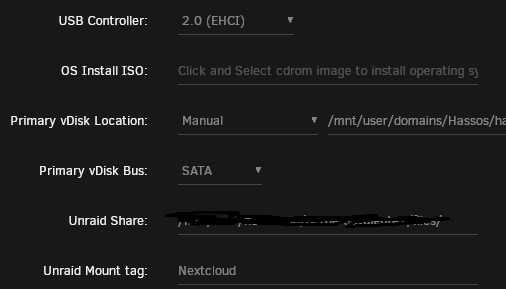
I've been through some threads and also the one you posted but it seems to be out of my league. I did point to the share in "Unraid Share" camp and added a name on "Unraid Mount Tag" but the home assistatant vm doesn't seem to be able to see the share.
-
-
HI! I’m trying to passthough an unraid media share to a HA vm running in unraid but with no sucess. It doesn’t seem to be able to see the share that I’ve filled when setting up the vm… I was trying to avoid to clunky ways to manual mount a remote share until an official streamlined way to do ot gets relased. Has anyone managed to do it?
-
Hey guys I'm a little bit confused: this is my syslinux Global Configuration default menu.c32 menu title Lime Technology, Inc. prompt 0 timeout 50 Unraid OS kernel /bzimage append vfio_iommu_type1.allow_unsafe_interrupts=1 pcie_acs_override=downstream,multifunction initrd=/bzroot IOMMU group where the internal soundcard is, I can't separate it using ACS: IOMMU group 12: [8086:a143] 00:1f.0 ISA bridge: Intel Corporation H110 Chipset LPC/eSPI Controller (rev 31) [8086:a121] 00:1f.2 Memory controller: Intel Corporation 100 Series/C230 Series Chipset Family Power Management Controller (rev 31) [8086:a170] 00:1f.3 Audio device: Intel Corporation 100 Series/C230 Series Chipset Family HD Audio Controller (rev 31) [8086:a123] 00:1f.4 SMBus: Intel Corporation 100 Series/C230 Series Chipset Family SMBus (rev 31) Whats the proper way to pass it through the working windows VM? I already have the gpu soundcard added but adding the internal through the gui gives me errors... thanks



