





Pl4ytimes
Members
-
Joined
-
Last visited
-
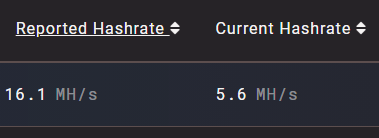
Okay thank you for that information. It helps alot ^^ Can you say me why my reported hasrate is so much higher than my Current? In the docker it shows my reported.
-
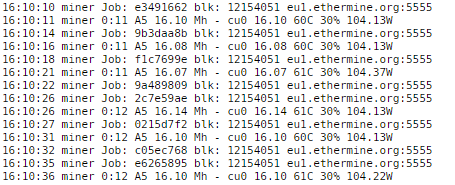
I've set it up properly. When can i see the generated value on my Wallet ? So i can check if its working right.
-
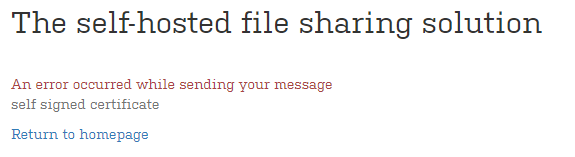
Hello, what should i do that i can send Emails. I've set my Email Host, but i always get an error.
-
No i can't find my Host in the ingame server list. I've typed the server name in the filter field, but my server doesn't show up
-
Perfect, i can find my server with the steam server browser. The server list ingame i atm so slow It works perfect
-
Hey, i've just tried your Valheim Docker, i've forwarded the ports lists in the template, but i can't find the server Ingame. What i am doing wrong ? This is my log. Update state (0x5) verifying install, progress: 7.01 (4194304 / 59862244) Success! App '896660' fully installed. ---Prepare Server--- ---Server ready--- ---Start Server--- CAppInfoCacheReadFromDiskThread took 0 milliseconds to initialize CApplicationManagerPopulateThread took 0 milliseconds to initialize (will have waited on CAppInfoCacheReadFromDiskThread) RecordSteamInterfaceCreation (PID 59): SteamGameServer012 / GameServer RecordSteamInterfaceCreation (PID 59): SteamUtils009 / Utils Setting breakpad minidump AppID = 892970 RecordSteamInterfaceCreation (PID 59): SteamGameServer012 / GameServer RecordSteamInterfaceCreation (PID 59): SteamUtils009 / Utils RecordSteamInterfaceCreation (PID 59): SteamNetworking005 / Networking RecordSteamInterfaceCreation (PID 59): SteamGameServerStats001 / GameServerStats RecordSteamInterfaceCreation (PID 59): STEAMHTTP_INTERFACE_VERSION002 / HTTP RecordSteamInterfaceCreation (PID 59): STEAMINVENTORY_INTERFACE_V002 / Inventory RecordSteamInterfaceCreation (PID 59): STEAMUGC_INTERFACE_VERSION010 / UGC RecordSteamInterfaceCreation (PID 59): STEAMAPPS_INTERFACE_VERSION008 / Apps
